AI Studio, the AI content generator for social media
Write captions, threads and polls, make images, TikTok slideshows, LinkedIn carousels and short videos, then edit and animate them. One click sends it all to the composer, ready to go out as Reels, TikToks, X Articles, LinkedIn PDFs, pins or blog posts.
$0 due today, cancel anytime


Used by 2,831 happy customers
AI caption generator
An AI caption generator for every platform, in your brand voice
Describe the post once. Post mode writes the caption for the platform you pick, inside its character limit, with your brand's voice and hashtags already applied. Then it is one click into the composer.
- Tuned to the platform.
- Pick the platform in For and Post mode writes inside its character limit, in the length and tone that platform rewards.
- In your brand voice.
- Choose a saved brand and its voice, banned words and required hashtags apply to every caption it writes.
- Threads and polls too.
- Switch to Thread for 3 to 10 posts that lead into each other, or Poll for a question with 2 to 4 options and the post around it.
- Improve, Regenerate, Use in Post.
- Tighten a draft, try another take, copy it, save it, or send it straight to the composer. Each caption uses 1 credit.
$0 due today, cancel anytime
What do you want to create today?
Announce our new spring menu. Warm and friendly, end with a question.
Brand sets the voice, banned words and required hashtags · LinkedIn character limit applied
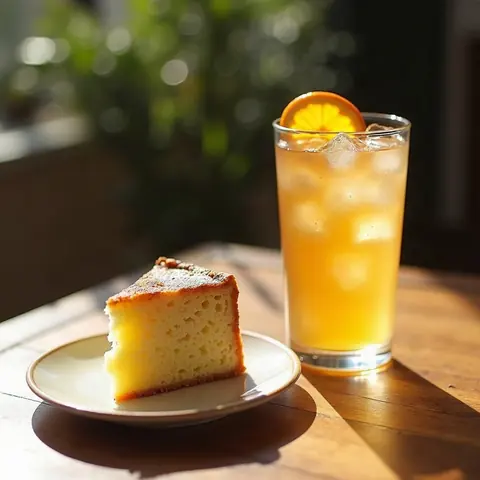
Spring is on the menu at Northwind. Honey lavender lattes, a citrus olive oil cake and a cold brew tonic our baristas cannot stop making for each other.
Which one would you order first?
#NorthwindCoffee #SpringMenu
One brief, a caption for each platform
The same “announce our spring menu” prompt, written for six platforms. The counter shows each caption against that platform's limit.
- Instagram191 / 2,200
Spring just walked in. Honey lavender lattes, a citrus olive oil cake and a cold brew tonic, all week at Northwind. Tag the friend you are bringing.
#NorthwindCoffee #SpringMenu #CoffeeLovers
- X (Twitter)127 / 280
Spring menu is live at Northwind: honey lavender latte, citrus olive oil cake, cold brew tonic. Which one are you trying first?
- LinkedIn200 / 3,000
Our spring menu started as a question from our baristas: what would you make for each other? Three drinks and a cake later, here it is. Thank you to the team who tested every version.
#NorthwindCoffee
- TikTok129 / 4,000
POV: you finally try the honey lavender latte everyone keeps talking about. Spring menu, now at Northwind.
#SpringMenu #CoffeeTok
- Threads120 / 500
Unpopular opinion: olive oil belongs in cake. Our new citrus one is on the spring menu, come and argue with us about it.
- Bluesky99 / 300
New at Northwind this spring: a cold brew tonic with fresh orange. Bright, fizzy and not too sweet.
AI on every post in the composer
Writing in the composer instead? “Write with AI” drafts a caption from scratch, and “Improve caption with AI” reworks the one you have with Rewrite, Shorten, Hashtags, Professional, Casual or a custom instruction of your own.
Use Customise per platform to keep a full set of hashtags on Instagram and none on X (Twitter), from the same post. Need ideas first? Try the free hashtag generator, or draft one quick post with the free social media post generator.
Platform-specific ideas: Instagram, LinkedIn, TikTok and Threads caption generators.
Spring is on the menu at Northwind. Honey lavender lattes, a citrus olive oil cake and a cold brew tonic. Which one would you order first?
Quick actions
Custom instruction...
Image mode
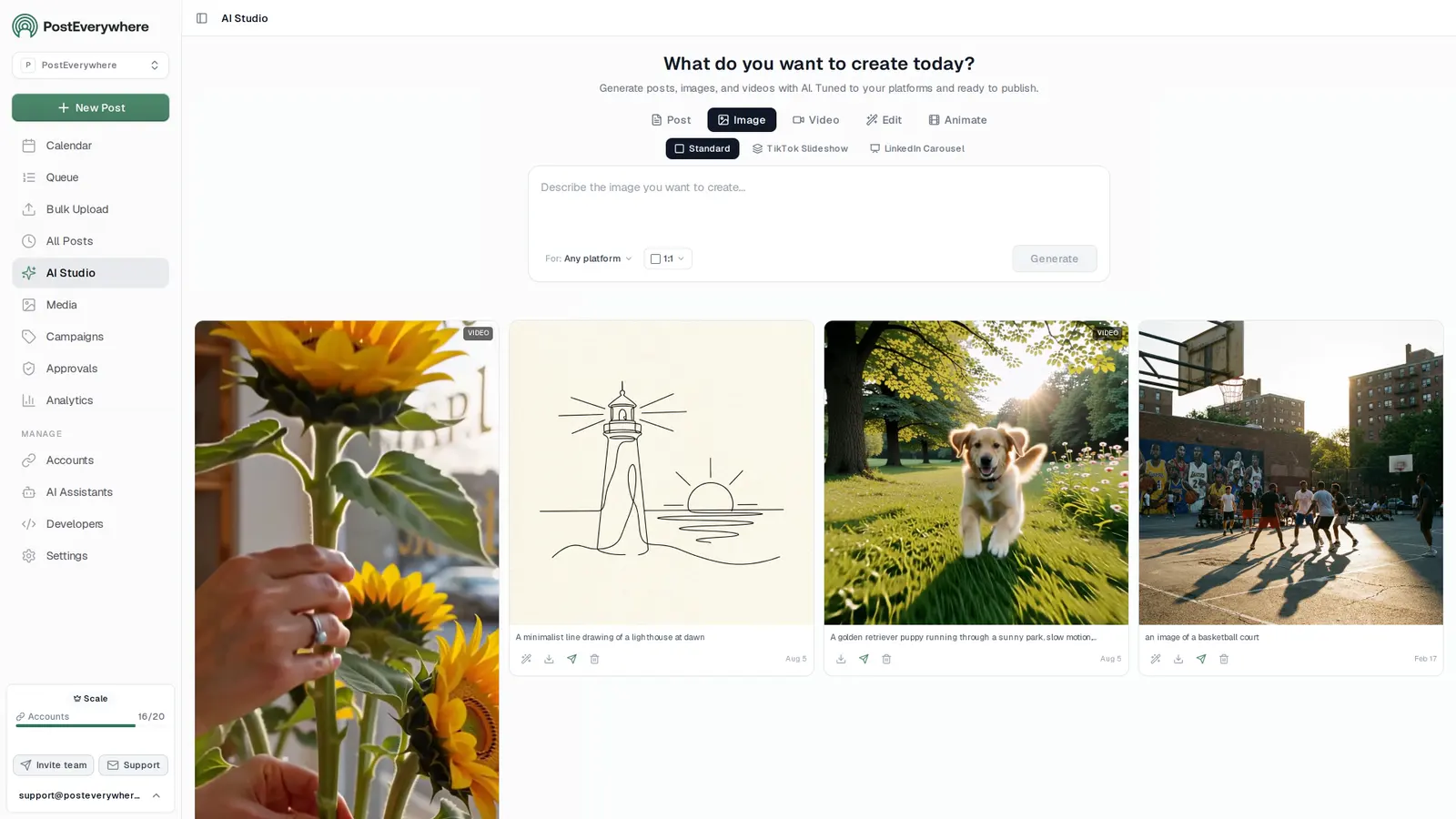
AI image generator for social media posts
Product photos, quote cards, lifestyle scenes, covers and announcement graphics from a sentence, with no photoshoot or designer. Pick the platform and the size is set for you. Need a different size afterwards? Use the free image resizer.
- A model for each job.
- An everyday default, a highest-quality option, a photoreal model, one built for text in images and a fast one for drafts.
- Product shots without a shoot.
- Describe the product, the surface, the light and the mood, then regenerate until it looks right.
- Words that render.
- A text-in-images model handles headlines and quotes inside the image, so quote cards and promos read cleanly.
- Alt text in the composer.
- Add alt text to image posts in the composer on the platforms that support it, Instagram included, so your visuals stay accessible.
What do you want to create today?
A clean product shot of our cold brew bottle on a sunlit concrete step, long shadows, room for a headline.
- EverydayBest value
- Highest qualitySlower, most detail
- PhotorealLifelike photos
- Text in imagesHeadlines and quotes
- Fast draftsQuickest
- Square1:1
- Portrait4:5
- Wide16:9
- Story9:16
Video mode
AI video generator for Reels, TikToks and Shorts
Text to video in one step: hooks, product showcases, b-roll and cinematic openers, ready for TikTok, Instagram Reels and YouTube Shorts.
- The latest video models.
- A highest-quality default, a fast option that adds sound, and premium picks for the most detail. Clips run 5 or 10 seconds, vertical, square or wide.
- 5 or 10 seconds.
- Short clips built to stop the scroll, as an opener for a longer Reel or a post on their own.
- Clip plus script.
- The Story/Reel format writes a 15, 30 or 60 second script with the clip, so the words and the visuals arrive together.
What do you want to create today?
A slow pan across a sunlit cafe counter, steam rising from a fresh espresso, warm morning light.
- Highest qualityNewBest overall
- Fast with audioAdds sound
- High qualityText to video
- PremiumMost detail
 0:05
0:05 0:10
0:10Edit mode
Edit an image by describing the change
Upload a photo, or press Edit on anything AI Studio made, and say what should change. The lighting, the background, an extra prop: the rest of the image stays as it was.
- Two edit models.
- A standard edit model, or a photoreal one when the result has to look like a real photo.
- Fix it instead of starting over.
- Keep the product shot you like and adjust the scene around it for a new season, offer or platform.
What do you want to create today?
Make it golden hour, add a small potted lemon tree on the left, keep the bottle exactly as it is.
 Before
Uploaded, or Edit on any result
 After
AfterAnimate mode
Turn a still photo into a short video
Bring a product photo, a portrait or a generated image to life. Describe the motion, pick the length and AI Studio returns a clip ready for Reels, TikTok or Shorts.
- A choice of motion models.
- Pick the quality, speed or sound you need, for 5 or 10 seconds.
- Stories and Reels.
- Switch to Story/Reel and the clip comes with a script for the full Story or Reel.
What do you want to create today?
Steam curls up from the cup, the camera drifts slowly to the right.
 Your image
 0:10
0:10Formats
Carousels, slideshows, threads and polls from one prompt
Every mode starts on Standard. Switch to a format and AI Studio builds the whole set in one run, and writes the text that goes with it for one extra credit. If a prompt is thin, you get a “Tip for a better result:” and a “Generate anyway” button, never a refusal.

Standard
Every mode
One post, one image or one clip, sized and written for the platform you pick in For.

 …
…TikTok Slideshow
Image · 3 to 10 slides
A set of vertical slides that read in order, made in one go, with the caption written to match.
- … PDF
LinkedIn Carousel
Image · 4 to 12 slides
Square slides in one consistent style, ready for a LinkedIn carousel, with a Download PDF button for the whole set.
- 1/5
- 2/5
- 3/5
Thread
Post · 3 to 10 posts
A numbered thread where each post stands on its own and leads into the next.
- Option 1
- Option 2
- Option 3
Poll
Post · 2 to 4 options
A question with short, distinct options and the post text that introduces it.
- 0:1015s script30s script60s script
Story/Reel
Video and Animate · 15s, 30s or 60s script
A 5 or 10 second vertical clip plus a script for a 15, 30 or 60 second Story or Reel, so the clip has words to go with it.
Aspect ratios
Pick the platform and the size follows
Choose where the post is going in For and AI Studio sets the ratio for you, and in Post mode the character limit too. Posting to several places at once? Choose “Any platform” and pick the ratio yourself. WordPress is in the list as well.
Videos come out vertical, square or wide.
Square 1:1
Instagram feed, LinkedIn, Facebook
Portrait 4:5
Instagram and Facebook feeds
Wide 16:9
YouTube, X (Twitter), LinkedIn
Story 9:16
TikTok, Reels, Shorts, Stories
Create, then publish
Everything you can create and publish
AI Studio makes the content. Create post carries it into the composer, and the composer publishes it as the format each platform expects: a Reel, a TikTok photo post, an X Article, a LinkedIn PDF, a Pinterest pin or a WordPress blog post.
Scheduling happens in the composer, the queue and the calendar, not inside AI Studio, so every post gets a final look before it goes out.
1AI Studio creates
- Posts and captionsWritten for each platform, inside its character limit
- Threads3 to 10 posts that lead into each other
- PollsA question, 2 to 4 options and the post around it
- ImagesSquare, portrait, wide or Story size
- TikTok slideshows3 to 10 vertical slides
- LinkedIn carousels4 to 12 slides, exported as a PDF
- Videos5 or 10 seconds, vertical, square or wide
- EditChange an image by describing it
- AnimateTurn a still image into a 5 or 10 second clip
2The composer publishes, platform by platform
A green tag such as Slideshownames the AI Studio mode or format that makes it.
- InstagramBusiness and Creator accounts
- Feed postsImage
- Carousels2 to 10 images
- ReelsStory/Reel
- StoriesImage or video
- Trial Reels
- TikTokNo business account needed
- VideosVideo
- Photo posts1 to 35 imagesSlideshow
- X (Twitter)Articles need X Premium
- PostsText, images or a videoPost
- ThreadsThread
- Polls2 to 4 optionsPoll
- X ArticlesLong-form, with X Premium
- LinkedInProfiles and company Pages
- Text postsPost
- Images
- Video
- PDF documentsSwipeable carouselsCarousel PDF
- YouTubeTitle, description and tags per video
- Videos
- ShortsDetected automaticallyStory/Reel
- FacebookFacebook Pages
- PostsText or up to 10 images
- Links
- ReelsStory/Reel
- ThreadsUp to 500 characters a post
- Text postsPost
- Images and video
- CarouselsUp to 10
- PinterestPinned to the board you choose
- Image pinsImage
- Carousel pins2 to 5 images
- Video pins
- BlueskyConnect with an App Password
- PostsText, images or videoPost
- Threads
- TelegramThrough your own bot
- Channel postsText, photos, albums, video
- DiscordThrough a channel webhook
- Channel postsText and images
- WordPressWordPress.com and self-hosted
- Blog postsPublish, draft or pending review
One prompt, several platforms: use cross-posting to tailor the text and media per platform, then publish now, add it to the queue or pick a time on the calendar.
The details that save you time
Built for brands that post every day
The small things that decide whether an AI content generator gets used every week or once: your voice, no dead ends, no wasted credits and nothing lost.
Northwind Coffee
- Voice
- Warm, plain-spoken, a little playful
- Banned
- artisanalelevate
- Hashtags
- #NorthwindCoffee
Your brand voice on every post
The Brand picker holds your voice, the words you never use and the hashtags every post must carry. Pick it once and AI Studio writes inside those rules.Tip for a better result: say what each slide should cover.
Generate anywayNever refused
Carousels, slideshows, threads and polls always run. If a prompt is thin you get a “Tip for a better result:” and a “Generate anyway” button, not a dead end.- Generation failedNo credit used
Failed generations are free
If a generation fails or is refused, no credit is used. You only pay for results you can actually use. - Media libraryAI GeneratedAll0:10
 PDF
PDF

Everything saves to your Media library
Every image, video and carousel PDF is saved as it is made, under an AI Generated filter in the Media library. History keeps your past runs, so nothing has to be downloaded to be kept. Buy AI Credits
- 100 credits$5
- 500 creditsBest value$20
- 2,000 credits$60
Top up when you need more
AI credits come with every plan. Buy AI Credits on the web when a busy month needs more, and credits you buy never expire.
AI content planner
Plan a month of content in one sitting
Plan the month, make everything it needs in AI Studio, then load it into the calendar in one go. Ask your AI agent to draft the plan, or sketch it yourself with the free content calendar generator.
- 1. Plan with your agent.
- The plan-content-calendar skill plans a week or a month of posts, shows you the plan and schedules it only when you say yes. The repurpose-content skill turns one article into posts for each platform.
- 2. Make it all in AI Studio.
- Work down the plan: captions and threads in Post mode, images, slideshows and carousels in Image, clips in Video. Every result saves to your Media library as you go.
- 3. Load the month at once.
- Send posts one by one with Create post, or upload a CSV with bulk scheduling that points at your Media library files by name. Posts with no fixed time can join the posting queue and take the next opening.
- 4. See the month on the calendar.
- Everything lands on the content calendar, so gaps and clashes show before anything goes out.
Mon
5
9:00 AM
Launch week is here
1:30 PM
Behind the scenes
Tue
6
10:00 AM
5 tips for faster scheduling
5:00 PM
Product teaser
Wed
7
9:00 AM
Customer story
3:00 PM
New templates
Done. 6 posts scheduled for the rest of the week, each one tailored for its platform.
Create, then schedule
From a prompt to a scheduled post
- Pick a mode and describe it. Choose Post, Image, Video, Edit or Animate and describe what you want in a sentence or two: the subject, the mood and anything that has to appear.
- Choose the model, platform and format. Keep the default model or pick one for its strength, choose the platform in For so the size and length fit, and switch to a format such as a carousel, thread or Story/Reel if you need one.
- Generate and refine. Generate, then Improve or Regenerate text, Edit an image, or Animate it. Every image, video and carousel PDF is saved to your Media library as it is made.
- Create the post and schedule it. Create post opens the composer with everything filled in. Pick your accounts, tailor each platform if you like, and publish now, add it to the queue or set a time on the calendar.
$0 due today, cancel anytime
0:05Create post opens the composer with this image and its text filled in. Pick your accounts and a time there.
Models
Several image and video models, one place to use them
Each model has a strength: photorealism, text in images, speed or the most detail. Keep the default or choose per prompt, and AI Studio keeps the list current as better models arrive.
Image models
- EverydayDefaultBest value
- Highest qualitySlower, most detail
- PhotorealLifelike photos
- Text in imagesHeadlines and quotes
- Fast draftsQuickest
Edit has a standard model and a photoreal one.
Video models · 5 or 10 seconds
- Highest qualityDefaultBest overall · Video and Animate
- Fast with audioAdds sound · Video and Animate
- High qualityText to video · Video
- PremiumMost detail · Video and Animate
The default usually renders a clip in about 20 seconds.
Connect your AI agent
Ask your AI agent to write and design your posts
- Connect any AI agent.
- Add PostEverywhere to ChatGPT, Claude, Grok, Perplexity, Cursor or any other AI app that supports MCP with one address. It takes about a minute.
- Ask in plain English.
- “Make an image for our spring menu, write the Instagram caption and schedule it for Friday at noon.” Your agent writes every post for you.
- It schedules and publishes.
- Your agent can post now, schedule for later or save a draft for you to review. Every post lands in your calendar, and scheduled posts go out on time through each network's official API.
$0 due today, cancel anytime
Connector address
https://mcp.posteverywhere.aiAI assistants
Plus any other MCP client. See every setup guide
Ask your agent
See all 15 skills and prompts“Make an image for this announcement with PostEverywhere, then schedule it to Instagram tomorrow at noon: [your announcement].”
View skill“Turn this article into five posts for LinkedIn, X and Threads, and spread them across next week in PostEverywhere: [paste link or text].”
View skill“Use PostEverywhere to plan next week of posts for all my connected accounts. Suggest one post a day, show me the plan, then schedule it when I say yes.”
View skill
generate_caption
One to five captions from a topic, written for a platform. Your agent sets the tone (professional, casual, witty, enthusiastic, urgent or inspirational), the length, and whether to add hashtags or emojis. Works in Claude, ChatGPT and every other AI app you connect.
generate_image
An image from a choice of models, in 1:1, 4:5, 16:9, 9:16 and other ratios, saved straight to your Media library. It runs on the full MCP server and the npm package, not in the Claude and ChatGPT connectors; there, make images in AI Studio and ask your assistant to attach them to a post. MCP setup
Why one studio
AI Studio vs separate tools and traditional production
| Approach | Captions | Images and video | Revisions | Getting it published |
|---|---|---|---|---|
| AI Studio in PostEverywhere | Written per platform, in your brand | The latest, highest-quality models, sized for the platform | Improve, Regenerate, Edit or Animate | Create post, then schedule |
| Separate AI tools | Copied from a chatbot | A different app for each | Back and forth between apps | Download, re-upload, then schedule |
| Traditional production | Written by hand for each network | Photographer, designer, editor | Another round with the team | Export, upload, then schedule |
Test more ideasWhen a new hook or visual takes seconds, you can try several, keep what works and drop the rest instead of betting the week on one shoot.
See what landsCompare results in cross-platform analytics, and score captions before posting with the free caption analyzer.
AI content is allowedThe major platforms allow AI-generated content, and some ask you to label realistic AI media. Quality and engagement decide reach.
“This tool has truly made my content posting so much easier, I can't work without it. I can schedule my posts days in advance while working on other projects. Set it and forget it.”
Pricing
Simple pricing, unlimited posts on every plan
Every plan posts to all top platforms and includes the API and hosted MCP server for your AI agent.
7-day free trial on every plan. Card required, $0 due today, cancel anytime. Compare every plan
AI credits are included on every plan. Each generation uses credits depending on the mode and model, and a generation that fails costs nothing. Need more? Buy AI Credits on the web: 100 for $5, 500 for $20 or 2,000 for $60. Credits you buy never expire.
See what each post earns afterwards in cross-platform analytics.
FAQ
AI content generator FAQ
Straight answers about AI Studio's modes, models, credits and how it hands off to scheduling.
What is an AI content generator?
An AI content generator turns a short description into finished content: a caption, an image, a short video or a full carousel. In PostEverywhere it is called AI Studio, and it sits next to your calendar, so what you make can be scheduled to every account without downloading and re-uploading.
What can AI Studio create?
AI Studio has five modes. Post writes a post, a thread of 3 to 10 posts or a poll with 2 to 4 options. Image makes a single image, a TikTok Slideshow of 3 to 10 slides or a LinkedIn Carousel of 4 to 12 slides. Video makes a 5 or 10 second clip. Edit changes an image from a plain-English instruction, and Animate turns a still image into a 5 or 10 second video.
Which AI content generator is best for social media?
For social media, look for three things: captions written for each platform rather than one generic block of text, images and short videos in the right sizes, and a way to publish without downloading and re-uploading. AI Studio does all three inside PostEverywhere, so a caption, a carousel or a clip goes from the prompt to the composer and the calendar in one place.
How do I use AI to create social media content?
Start with a plan for the week or month, then make each post from a short brief: the subject, the audience and anything that must appear. In AI Studio, pick Post, Image or Video, choose the platform in For so the length and size fit, and apply your saved brand. Review the result, Improve or Regenerate it, then press Create post and schedule it from the composer.
What formats can I publish with AI Studio?
AI Studio makes posts, threads, polls, images, TikTok slideshows, LinkedIn carousels (as a PDF) and 5 or 10 second videos. Through Create post, the composer then publishes Instagram feed posts, carousels, Reels, Stories and Trial Reels; TikTok videos and photo posts; X (Twitter) posts, threads, polls and X Articles with X Premium; LinkedIn text, image, video and PDF document posts; YouTube videos and Shorts; Facebook posts, links and Reels; Threads posts and carousels; Pinterest image, carousel and video pins; Bluesky posts and threads; Telegram and Discord channel posts; and WordPress blog posts.
Can AI Studio write in my brand voice?
Yes. Save a brand with its voice, the words you never use and the hashtags every post must include, then pick it in the Brand picker. Post mode applies those rules to every caption, thread and poll it writes for that brand.
Can I plan a month of social media content with AI?
Yes. Ask your AI agent to plan the month with the plan-content-calendar skill, make the posts in AI Studio, then load them with bulk scheduling or Create post. Everything shows on the content calendar, and posts without a fixed time can go into the posting queue.
Is there a free AI content generator?
PostEverywhere has free browser tools for single pieces, such as the AI post generator and caption generators for Instagram, LinkedIn, TikTok and Threads. AI Studio, with images, video and publishing, comes with every PostEverywhere plan, and you can try it with a 7-day free trial: $0 due today, cancel anytime.
Which AI models does AI Studio use?
AI Studio runs on the latest, highest-quality image and video models, each picked for a clear strength: an everyday default, the most detail, photorealism, accurate text inside images, fast drafts, and video with sound. Keep the default or pick one per prompt; the line-up is upgraded as better models arrive, so you never manage any of it.
How do I generate AI images for Instagram and TikTok?
Open AI Studio on Image, describe the picture (for example "product photo of sneakers on an urban street, morning light"), pick a model and choose Instagram or TikTok in For. AI Studio sets the ratio for you: Portrait 4:5 for the Instagram feed, Story 9:16 for TikTok, Reels and Stories. Press Generate, then Create post to send it to the composer.
Can I create AI videos for TikTok, Reels and YouTube Shorts?
Yes. Describe the clip in Video mode, pick a model and a length of 5 or 10 seconds, and choose where it is going. Videos come out vertical, square or wide. The Story/Reel format also writes a 15, 30 or 60 second script to go with the clip, so you have the words for a longer Reel or Story.
How does the AI caption generator work?
Post mode writes one post per run for the platform you pick, within its character limit. Pick a saved brand to apply your voice, banned words and required hashtags. Then use Improve, Regenerate, Copy, Save or Use in Post. Inside the composer, "Write with AI" and "Improve caption with AI" offer Rewrite, Shorten, Hashtags, Professional, Casual and a custom instruction.
Can I edit an image or turn a photo into a video?
Yes. Edit takes an uploaded image, or any image you made in AI Studio, and changes it from a written instruction such as "make it golden hour and add a lemon tree on the left". Animate takes an uploaded image and turns it into a 5 or 10 second video. Edit works from the description alone, so there is no brush or mask to paint.
Can I schedule straight from AI Studio?
AI Studio hands off to the composer. Every image, video and carousel PDF saves itself to your Media library, and Create post (or Use in Post for text) opens the composer with the media and text filled in. Pick your accounts there and choose Publish now, the next queue opening or a time on the calendar.
How much does AI content generation cost?
AI credits are included on every plan, and a generation that fails costs nothing. If you need more, you can buy AI Credits on the web: 100 credits for $5, 500 for $20 or 2,000 for $60, and credits you buy never expire. Plans start at $9 a month after a 7-day free trial.
Can my AI agent generate captions and images?
Yes. Connect Claude, ChatGPT or another AI app and it can call generate_caption for one to five captions in a chosen tone and length. The generate_image tool is on the full MCP server and the npm package; in the Claude and ChatGPT apps, make images in AI Studio and ask your assistant to attach them to a post.
Is AI-generated content allowed on social media?
The major platforms allow AI-generated content, and some ask you to label realistic AI media (the X composer has a "Label as made with AI" option). Reach still comes down to whether people stop, read and engage, so treat AI output as a strong first draft and add your own detail.
Still have questions?
Contact us or browse the full FAQ.
$0 due today, cancel anytime
More AI tools and guides
Free tools for the pieces around a post, and guides to using AI well on social media.
Social Media Scheduler
Schedule what you make to all top platforms.
Cross-Posting
One post, tailored for every platform.
Connect Your AI Agent
Claude, ChatGPT and 40+ AI apps.
Free AI Post Generator
Draft a social post in your browser.
Instagram Caption Generator
Free Instagram caption ideas.
LinkedIn Caption Generator
Free LinkedIn caption ideas.
Content Repurposer
Turn one piece into many.
Best AI Caption Generators
The caption tools compared.
Best AI Image Generators
The image tools compared.
Best AI Video Generators
The video tools compared.
How to Use AI for Social Media
The full workflow, tool by tool.
AI Prompts for Social Media
Prompts that produce usable posts.
Social Media Management
Everything from one dashboard.
Make this week's posts in one sitting
Write, design and animate in AI Studio, then schedule everything from the same place.
$0 due today, cancel anytime