


Automate your social media from content to publishing
Stop posting manually. PostEverywhere's social media automation tool handles AI content generation, posting schedules, cross-platform formatting, and auto-publishing to all top platforms, from Instagram and TikTok to Bluesky, Discord and WordPress.
Get started from as little as $9 per month. $0 due today, cancel anytime.


 Works with any AI agent


Used by 2,831 happy customers
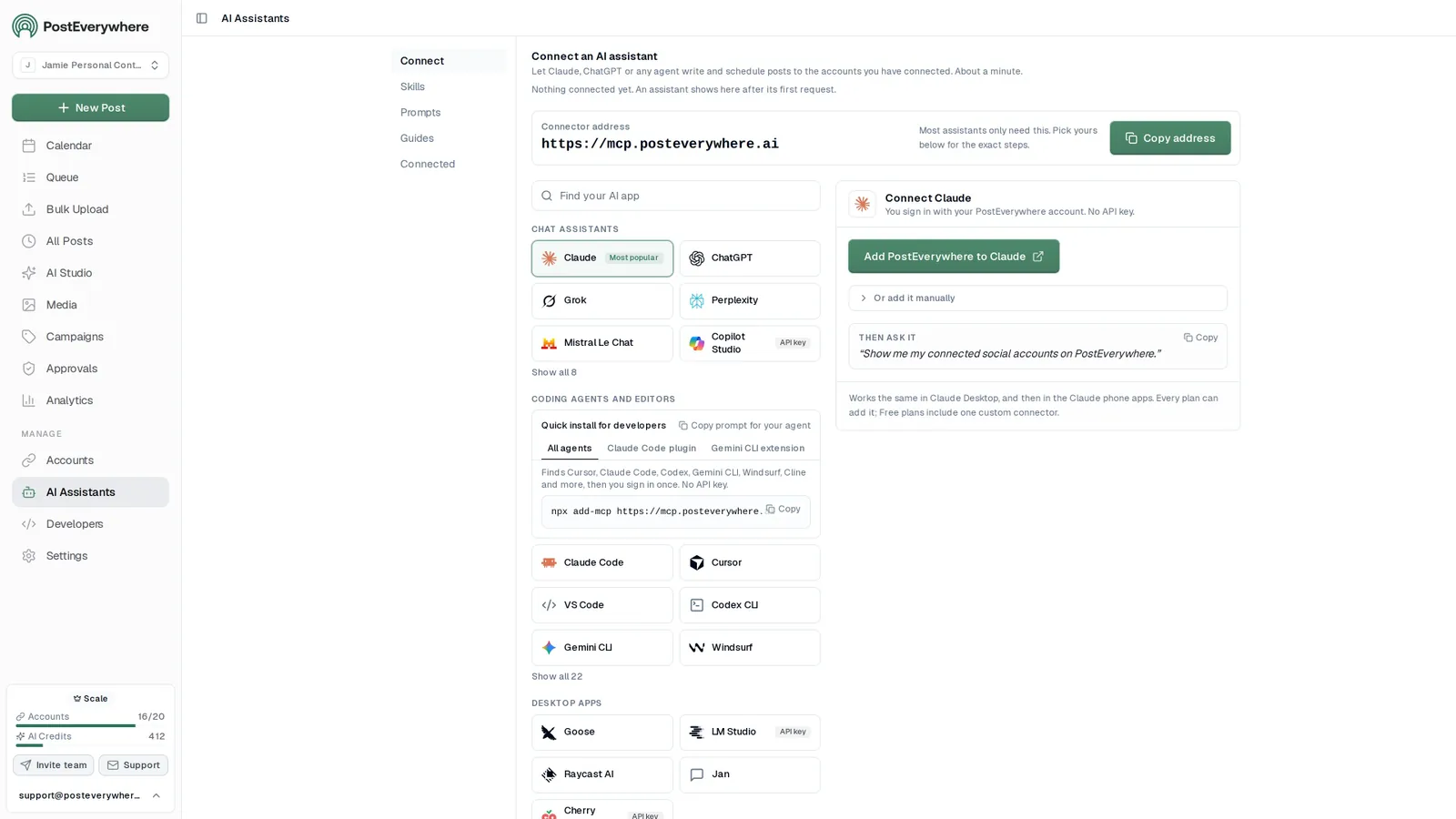
Connect your AI agent
Automate your social media with any AI agent
- Connect any AI agent.
- Add PostEverywhere to ChatGPT, Claude, Grok, Perplexity, Cursor or any other AI app that supports MCP with one address. It takes seconds.
- Ask in plain English.
- “Turn our new blog post into posts for every platform and schedule them.” Your agent writes every post for you.
- It schedules and publishes.
- Your agent can post now, schedule for later or save a draft for you to review. Every post lands in your calendar, and scheduled posts go out on time through each network's official API.
$0 due today, cancel anytime
Connect your AI agent
Choose your AI agent and connect in seconds.
Works on every Claude plan, including free. Full Claude guide
- 1
Add to Claude
One click from Claude’s connector directory.
- 2
Sign up or sign in
Takes seconds, then you’re sent straight back.
- 3
Ask Claude
“Plan and schedule my posts for next week.”
Ask your agent
See all 15 skills and prompts“Turn this article into five posts for LinkedIn, X and Threads, and spread them across next week in PostEverywhere: [paste link or text].”
View skill“Use PostEverywhere to plan next week of posts for all my connected accounts. Suggest one post a day, show me the plan, then schedule it when I say yes.”
View skill“Find my best posts from the last 3 months in PostEverywhere and schedule new versions.”
View skill
Full automation, not just scheduling
Social media automation that goes beyond scheduling
A social media scheduler lets you pick a time and publish later. Social media automation goes further. PostEverywhere generates content with AI, publishes on a posting schedule you set once, checks every post against each platform's rules, and handles bulk publishing across all top platforms from one dashboard.
The result: you spend 15 minutes setting up a week of content instead of an hour per day posting manually. Connect up to 20 accounts, generate captions and AI images, fill your posting queue, and let PostEverywhere handle the rest. Check your engagement rate to see the difference.
A new post goes up on your blog
RSS feedYour agent drafts a caption for each platform
generate_captionIt generates an image to go with it
generate_imageSchedules it to LinkedIn, X and Threads
bulk_create_postsHears back the moment each one publishes
post.published
AI content generation
Generate a full week of posts in minutes
Stop staring at a blank screen. PostEverywhere's AI content generator creates platform-native captions, hashtags, and visuals from a topic or prompt. Set your brand voice once and every post stays on-brand automatically. Generate content for all top platforms in a single session.
- AI caption and hashtag writer.
- Generate scroll-stopping captions with hooks, CTAs, and platform-optimized hashtags. Edit inline or publish as-is.
- AI image generation.
- Create custom visuals from text prompts with a choice of image models, from photorealism to text in images, in AI Studio. No design tools needed.
- Brand voice consistency.
- Set your tone, style, and vocabulary once. The AI maintains your brand voice across every generated post and platform.
What do you want to create today?
A bright flat-lay of our new coffee blend on a marble counter, soft morning light, room for a headline.

Image models
Video models · 5s or 10s
Smart auto-scheduling
Auto-post at the times you set, on every platform
Forget picking a time for every post. Set your recurring posting times once and every new post, from you or your AI agent, takes the next free opening. Use our best time to post research to choose your openings.
- Recurring posting times.
- Set the openings you want each week, for example weekdays at 9:00. Every queued post takes the next free one, with no manual time-picking.
- Suggested schedules.
- Start from your suggested best times, based on when your posts have done best, or from Steady weekdays, Commute and lunch or Always on (general starting points), then adjust.
- Retries, and a clear Failed state.
- A post that hits a temporary problem shows as Retrying. One that still cannot publish is marked Failed with the reason, ready to retry once the cause is fixed.
Recurring posting times. Add posts to the queue and each takes the next free opening.
- Monday 09:00
- Tuesday 09:00
- Wednesday 09:00
- Thursday 09:00
- Friday 09:00
- SaturdayNo openings
- SundayNo openings
Next openings
Where the next posts added to the queue will land (UTC).
- 1 Mon, 12 Oct, 9:00 am
- 2 Tue, 13 Oct, 9:00 am
- 3 Wed, 14 Oct, 9:00 am
- 4 Thu, 15 Oct, 9:00 am
- 5 Fri, 16 Oct, 9:00 am
Suggested schedules
General starting points, not measured from your audience.
Steady weekdays
5 openings / week
Commute and lunch
7 openings / week
Always on
14 openings / week
Changing your openings does not move posts already in the queue. They keep the time they were given.
Bulk automation
Automate an entire month of content in one session
Upload a CSV, use the batch composer, or generate posts with AI, then auto-schedule 20+ posts at once. PostEverywhere's bulk scheduling lets you plan weeks of content in a single sitting. Combine it with our content calendar to visualize your entire posting schedule at a glance.
- Batch content creation.
- Create, customize, and schedule an entire week or month of posts in one session. Upload media in bulk or generate it with AI.
- Cross-platform auto-formatting.
- Create one post and auto-publish to all platforms. PostEverywhere checks caption length, hashtag limits and media specs against the rules of each network, and you can tailor the caption per platform.
Schedule up to 200 posts in one go.
Drop your CSV here or click to upload
Max 200 posts per upload, 5MB max
october-posts.csv30 rows| date | platforms | content | media |
|---|---|---|---|
| Oct 5, 09:00 | Launch week is here | launch.mp4 | |
| Oct 6, 12:30 | 60-second product tour | tour.mp4 | |
| Oct 7, 09:00 | Three lessons from launch week | ||
| Oct 8, 17:00 | Customer spotlight | spot-1.jpg|spot-2.jpg |
+ 26 more rows
Automation in 2026
How Social Media Automation Works in 2026
Social media automation means removing manual work from your posting workflow. Instead of writing each caption by hand, logging into 8 apps, and publishing at specific times every day, an automation tool handles content creation, formatting, timing, and publishing for you. The goal is simple: maintain a consistent, high-quality presence across every platform while spending a fraction of the time. PostEverywhere automates five core workflows.
- AI content generation. AI content generation creates captions, hashtags, and images from a topic or prompt.
- Auto-scheduling. Auto-scheduling publishes every post at the next opening in your posting queue.
- Cross-platform formatting. Cross-platform formatting adapts a single post for all top platforms, with a version per network where it matters.
- Bulk scheduling. Queue 20+ posts in one session from a CSV or the batch composer.
- An AI agent. An AI agent connected to our hosted MCP server can plan, write and schedule posts for you, publish them now, or save them as drafts for you to review.
No platform penalizes automated posts. Instagram, TikTok, LinkedIn, and every other major network treat API-published content identically to manual posts. What determines reach is content quality, engagement signals, and timing, and automation helps you nail all three consistently. For developers building autonomous workflows, see our social media agents page, or read AI social media agents compared to see which tools actually act on their own. Compare your options with our best social media tools guide, or see how automation compares to basic social media scheduling.
Mon
5
9:00 AM
Launch week is here
1:30 PM
Behind the scenes
Tue
6
10:00 AM
5 tips for faster scheduling
5:00 PM
Product teaser
Wed
7
9:00 AM
Customer story
3:00 PM
New templates
Done. 6 posts scheduled for the rest of the week, each one tailored for its platform.
Every repetitive task, handled
5 Workflows You Can Automate Today
Every repetitive social media task, handled automatically, plus the analytics that tell you whether it worked.
Plan a two-week campaign for our launch and schedule every post.
PostEverywhere
create_campaignProduct Launchlist_accounts5 accountsbulk_create_posts12 posts
Done. I created the Product Launch campaign and scheduled 12 posts in it across Instagram, LinkedIn and X over the next two weeks. They are on your calendar, and the campaign shows their progress on the Campaigns page.
Content creation. Generate captions, hashtags, and images with AI. Set your brand voice and let the tool create platform-native content.
Posting queue. Set recurring posting times once. Every new post takes the next free opening, no manual time selection needed.
Cross-platform formatting. Create once and publish everywhere. Each post is checked against every network's character limits, hashtag limits and media rules.
Bulk publishing. Queue 20+ posts in a single session. Upload via CSV or use the batch composer.
AI agents. Connect ChatGPT, Claude or any AI agent and let it plan, write and schedule posts through the hosted MCP server, let an always-on OpenAI Dot keep the queue full in the background, or build the workflow yourself with an n8n AI Agent node.
Performance tracking. Track views and engagement wherever each platform reports them, in one unified dashboard.
$0 due today, cancel anytime
Pricing
Simple pricing, unlimited posts on every plan
Every plan posts to all top platforms and includes the API and hosted MCP server for your AI agent.
7-day free trial on every plan. Card required, $0 due today, cancel anytime. Compare every plan
FAQ
Social Media Automation FAQ
Straight answers about auto-posting, safety, agents and pricing.
Does auto-posting hurt my reach or engagement?
No. Instagram, TikTok, YouTube, LinkedIn, Facebook, X, Threads, Pinterest, Bluesky, Telegram, and Discord all treat auto-posted content identically to manually published posts. The algorithm evaluates content quality and engagement signals, not how the post was published. Automating your posting actually helps reach because you post consistently, at the times you choose.
Is social media automation safe for my accounts?
Yes, when using an official API-based tool like PostEverywhere. We connect through each platform's official API (Meta Business Suite, LinkedIn API, YouTube Data API, etc.), which means your account credentials are never shared and there's zero risk of being flagged for suspicious activity. Avoid tools that use browser automation or unofficial workarounds.
What's the difference between a scheduler and an automation tool?
A scheduler lets you pick a time and publish later. An automation tool goes further, it generates content with AI, publishes on a posting schedule you set once, checks each post against every platform's rules, and handles bulk publishing. PostEverywhere combines both: you can manually schedule or let automation handle everything.
Can I automate content creation, not just posting?
Yes. PostEverywhere's AI content generator creates captions, hashtags, and images from a simple prompt or topic. You can generate a full week of posts in minutes, review and edit them, then auto-schedule the entire batch. The AI adapts tone and format for each platform automatically.
How does auto-scheduling at optimal times work?
You set recurring posting times once in the posting queue, for example weekdays at 9:00, and every new post takes the next free opening, so there is no manual time-picking. PostEverywhere also suggests best times based on when your posts have done best (new accounts start with what works across PostEverywhere on each platform), and the Steady weekdays, Commute and lunch and Always on schedules are general starting points.
Can automation publish one post to every platform?
Yes. Once a post is scheduled, PostEverywhere auto-publishes it to every connected platform at the time you set, and checks each version against every network's caption, hashtag and media rules, and you tailor each one in the same composer instead of creating separate posts. The cross-posting tool covers that one-post, every-platform workflow in more detail.
What happens if a scheduled post fails to publish?
If a publish hits a temporary problem, the post shows as Retrying while PostEverywhere tries again. If it still cannot go out, it is marked Failed with the platform's reason, so you can fix the cause and retry it from the dashboard, or your AI agent can retry it with retry_failed_post (or retry_failed_posts for a batch).
What should you not auto post?
Automation is a distribution tool, not a judgement tool, so a few things are worth keeping manual. Pause the queue during live events and breaking news so a promotional post does not land at the wrong moment. Keep replies and comments human, because automated conversation makes an account feel abandoned while appearing active. Avoid identical copy with no adaptation, since what works on LinkedIn rarely works on TikTok. And review anything scheduled far in advance before it publishes, because a post can age badly. For teams, an approval step catches all of this before it goes live.
Do I need an API to auto post to social media?
Only if publishing must happen from inside your own product, script or AI agent. For everything else, a scheduling tool covers it without code. If you do need programmatic access, a unified API such as the PostEverywhere API is far less work than building against each platform separately, since each network requires its own developer app, OAuth flow and approval.
How much does social media automation cost?
PostEverywhere starts at $9/month (Lite: 2 accounts), $19/month (Starter: 5 accounts), $29/month (Growth: 10 accounts), or $39/month (Scale: 20 accounts). All plans include unlimited scheduled posts, auto-scheduling, cross-platform formatting, and a 7-day free trial. Save up to 20% with annual billing.
Still have questions?
Contact us or browse the full FAQ.
$0 due today, cancel anytime

What customers say


“This product just WORKS, I didn’t have any issues with it and everything went smoothly so far. For us, is a no brainer, I used to manually schedule posts in hours , now I do it in a minute. Love the Claude Connector /MCP , for us it’s worth every dollar.”
Laurentiu Cotet, RomaniaView original “The calendar view is really nice and neatly organized. Originally there wasn’t a way to thread an X post but now there is - that was my biggest complaint but is now fixed. I was able to very easily integrate my agent into it which allows me to quickly draft and schedule dozens of posts in minutes. Super easy, great UI.”
M W, United StatesView original “Thanks for providing this easy to use software that saves me lots of time and therefore makes me more consistent with posting. Good value.”
Lisa, AustraliaView original - ★★★★★Customer
“This tool has truly made my content posting so much easier, I can't work without it. I can schedule my posts days in advance while working on other projects. Set it and forget it.”
Kim V., Content Creator
Explore Automation Features
Dive deeper into the tools that power PostEverywhere's social media automation.
Best Social Media APIs
9 APIs compared for automating social media.
Social Media for Coaches
Keep publishing through the weeks you spend delivering the programme.
AI Social Media Manager
AI that plans, writes and schedules your posts.
Social Media Scheduler
Schedule posts to all top platforms from one dashboard with drag-and-drop calendar management.
AI Content Generator
Generate captions, hashtags, and images with AI. Set your brand voice and create weeks of content in minutes.
Content Calendar
Visualize your entire posting schedule across every platform in monthly, weekly, and daily views.
Cross-Platform Publishing
Create one post and auto-publish everywhere. Automatic formatting for each platform.
Best Time to Post
Find good posting times for each platform from our research and data-driven analytics.