


Post to All Social Media at Once
Connect your accounts, write your post once, tick every platform and press Publish now or Schedule. PostEverywhere sends it to all top platforms from one composer, with its own version for any platform that needs one.
Get started from as little as $9 per month. $0 due today, cancel anytime.


 Works with any AI agent


Used by 2,831 happy customers
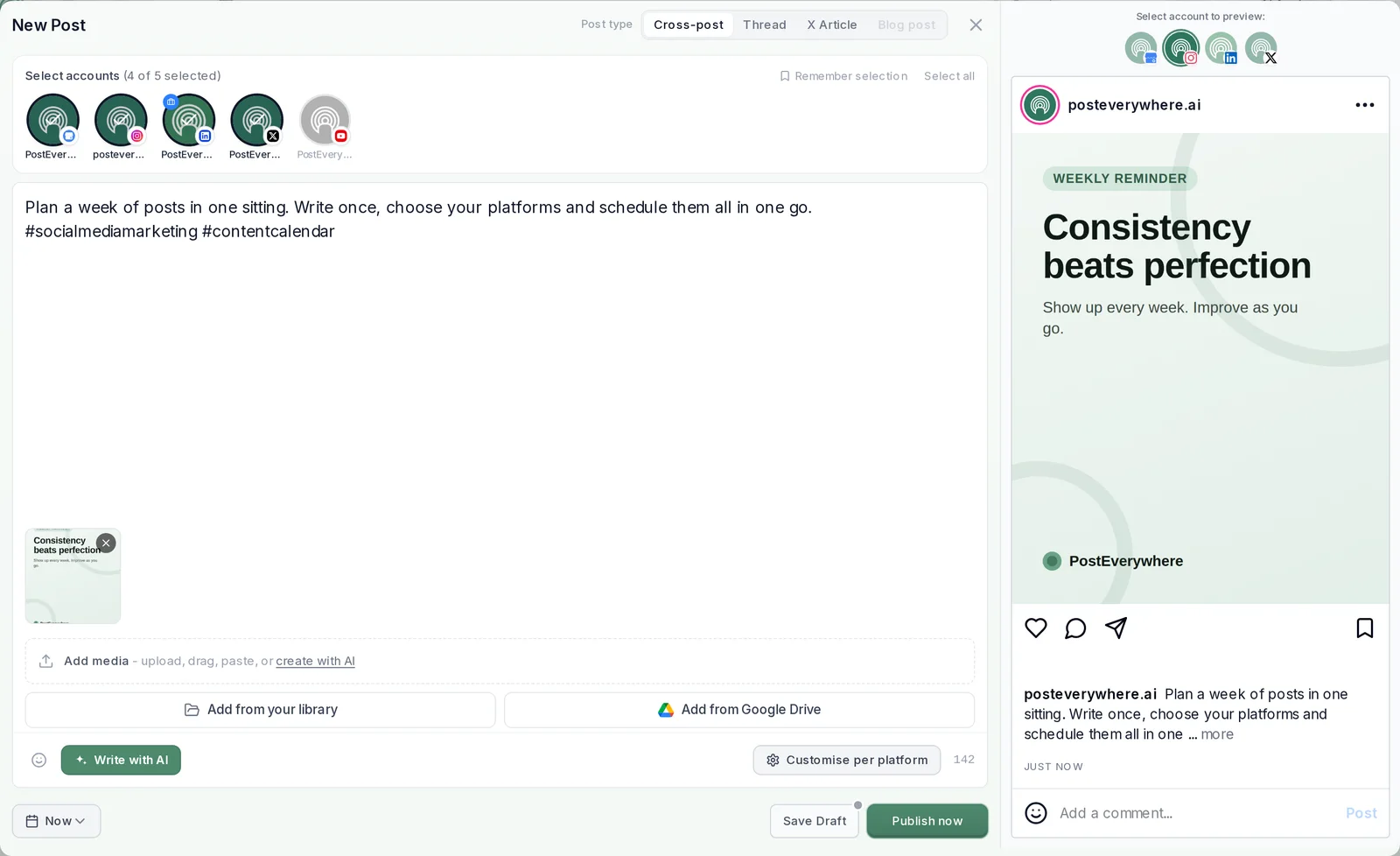
Step by step
How to post to all social media at once
To post to all social media at once, connect your accounts to one app, write the post once, select every account and publish or schedule it. In PostEverywhere that is one composer, so posting to multiple social media at once takes a minute: one caption and one set of media go to all top platforms, with your own version for any platform that needs it.
- Connect your accounts. Link Instagram, TikTok, YouTube, LinkedIn, Facebook, X (Twitter), Threads and the rest once, through each platform’s own sign-in.
- Write your post once. Open New Post, keep the post type on Cross-post, and add your caption, images or video. Write with AI can draft the caption for you.
- Pick your platforms. Tick every account the post should go to, or press Select all. Remember selection keeps the same set ticked next time.
- Customise per platform. Optional: give LinkedIn a longer caption or X a shorter one. Each change applies to that platform only, with its own preview.
- Publish now or schedule. Press Publish now, pick a time, or choose Next queue opening in your posting queue. Every post lands in your calendar, and each platform gets it as a native post.
$0 due today, cancel anytime
Post to (5 of 8 selected)
Select allLaunch week is here
Plan once, publish everywhere. Schedule your posts to Instagram, LinkedIn, X, Facebook and Threads from one calendar.
What will you ship this week? #contentmarketing #socialmedia
 spring-blend.jpg
How our team plans a whole launch week in one sitting, and the checklist we use for every network.
Launch week, planned in one sitting. The checklist we use for every network 👇
The basics
What is cross-posting?
Cross-posting means sharing the same post to several of your social media accounts at once, such as Instagram, LinkedIn and X (Twitter), instead of rebuilding it in each app. Done well, every platform gets a native post with a caption and format that fit it.
Cross-posting is not the same as social media scheduling: scheduling decides when a post goes out, cross-posting decides where. PostEverywhere does both in the same composer.

northwind.coffee Spring is on the menu: honey lavender lattes are back. #springmenu

@northwind.coffee
The pour that started spring. Which one are you ordering?
original sound
Northwind Coffee
Specialty coffee roaster
Launch week: our spring blend is now on the menu at both shops, and wholesale partners can order samples today.

Cross-posting vs reposting
Reposting shares a post that already exists, often someone else’s, on the same network. Crossposting on one network, such as sharing to several groups, is that network’s own feature. Cross-posting publishes your own post to your other accounts as new, native posts.
How to cross-post on social media
Write the post once, select the accounts it should go to, adjust the caption for any platform that needs it, then publish or schedule. The five steps above show each screen in PostEverywhere.
Cross-platform social media posting vs copy and paste
Copying a post into five apps means five uploads, five captions to trim and five places to check. Cross-platform posting from one composer means one upload, a character count for each platform and one calendar that shows what went where.
Why PostEverywhere
The app to post on all social media
PostEverywhere is an app that lets you post to all social media from one composer: Instagram, TikTok, YouTube, LinkedIn, Facebook, X (Twitter), Threads, Pinterest and the rest of the top platforms. Write once, give each platform its own version where it helps, then publish now, schedule it, or hand the job to your AI agent.
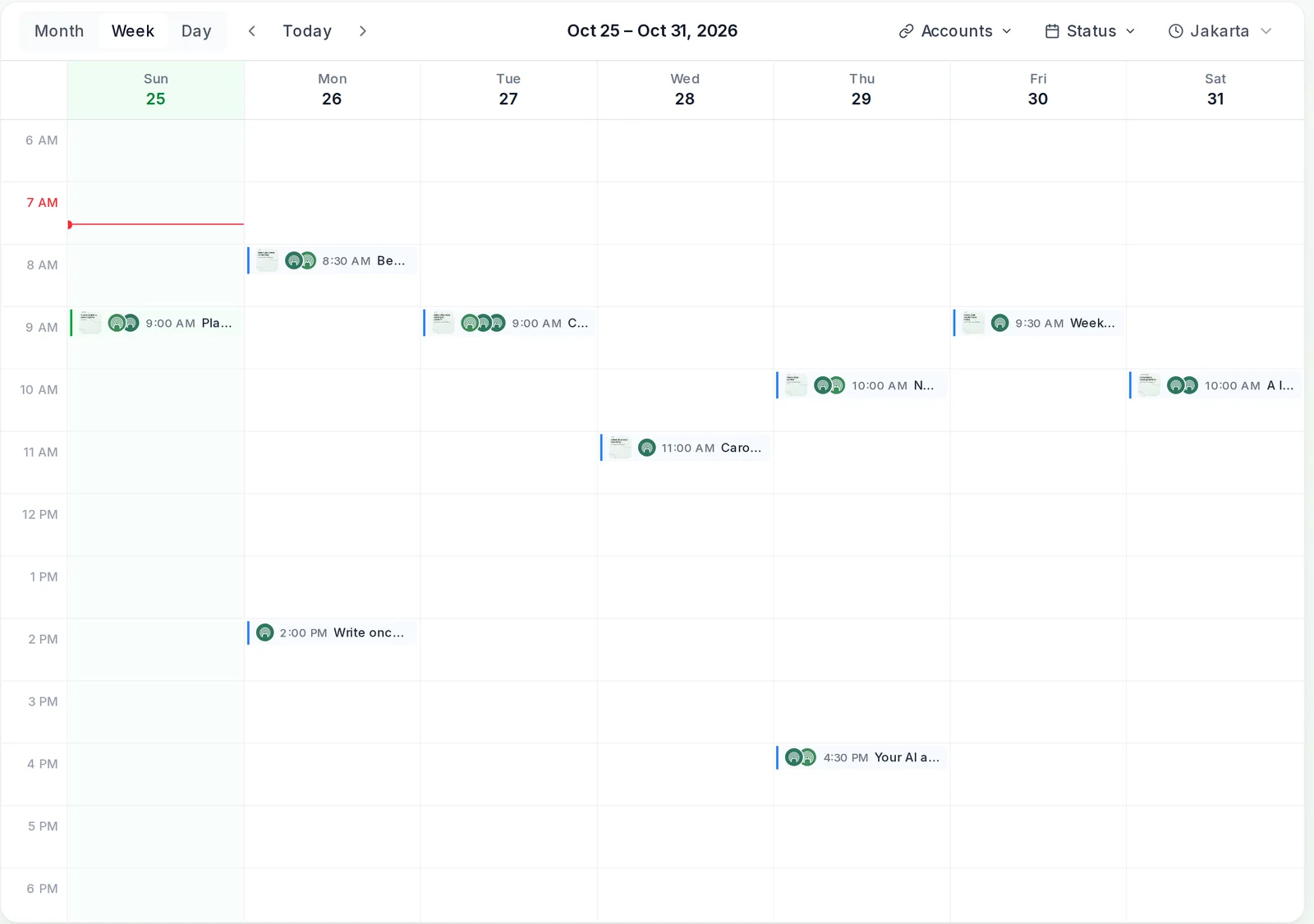
An all-in-one social media app
The composer, a drag-and-drop content calendar, a posting queue, AI Studio for captions and images, and analytics for each post, in one place on the web and on iPhone.
Published natively, through official APIs
Every post goes to each platform through that platform’s official API, so it lands as a native post, not a link or a reminder to post it yourself. Scheduled posts go out on time from our servers, whether or not you are online.
Checked before it goes out
Images and videos are checked against each platform’s size, format and count limits as you build the post, so a problem shows up in the composer, not as a failed post. If a platform still refuses one, it is marked Failed so you can fix it and retry.
A platform to post on all social media, for you or your AI agent
Post from the composer yourself, ask the built-in AI Assistant, or connect Claude, ChatGPT or another AI agent. Everything lands in the same calendar, where you can check it before it goes out.
$0 due today, cancel anytime
One post, many versions
Copy or adapt: one post, a version for each platform
Both. By default every platform gets your main post. Open Customise per platform to give any one of them its own caption and settings, such as a longer LinkedIn version or a shorter one for X (Twitter). Changes there apply to that platform only, and Use main post puts it back at any time.
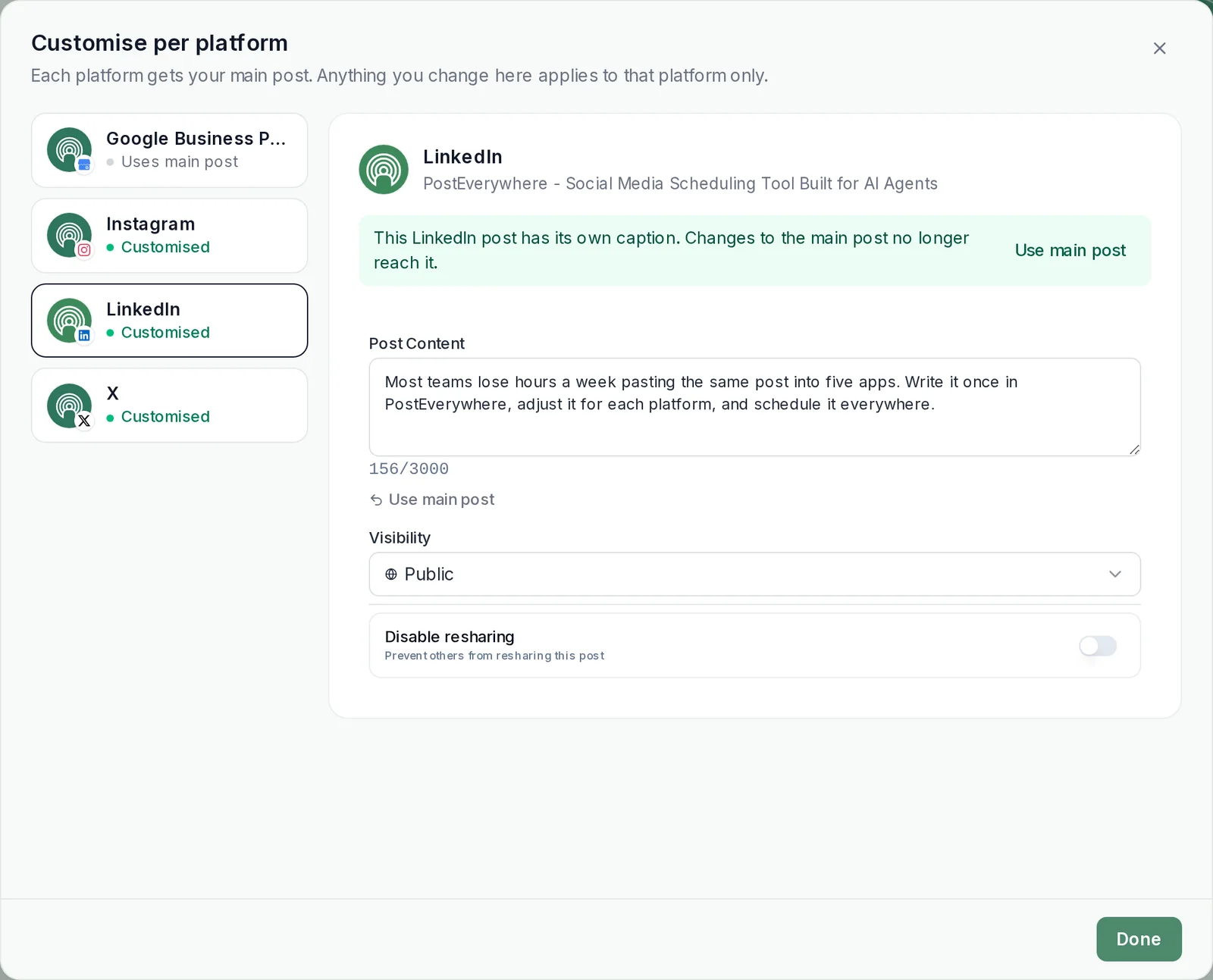
Its own caption. Rewrite the caption, hashtags and mentions for one platform while the rest keep the main post.
Platform settings. Each platform keeps its own options, such as LinkedIn visibility or turning off resharing.
A preview for each account. Switch the preview between accounts to see each version before it goes out.
AI rewrites on request. Improve caption with AI tightens a version for you, and AI Studio writes captions, carousels and threads from a prompt.
Every format. Images, carousels, video, Reels, Shorts, threads, X Articles and blog posts on WordPress, each where the platform supports it.
The right time for each network. Send one post everywhere at once, or schedule a separate post per platform at its own best time to post.
Connect your AI agent
Let your AI agent post everywhere
Connect Claude, ChatGPT or another AI agent to PostEverywhere’s MCP server and ask it to post everywhere for you: one request, a caption for each platform, published now or scheduled. Every post it makes lands in your calendar.
- Connect any AI agent.
- Add PostEverywhere to ChatGPT, Claude, Grok, Perplexity, Cursor or any other AI app that supports MCP with one address. It takes seconds.
- Ask in plain English.
- “Post this to Instagram, LinkedIn and X, with a version for each one.” Your agent writes every post for you.
- It schedules and publishes.
- Your agent can post now, schedule for later or save a draft for you to review. Every post lands in your calendar, and scheduled posts go out on time through each network's official API.
$0 due today, cancel anytime
Connect your AI agent
Choose your AI agent and connect in seconds.
Works on every Claude plan, including free. Full Claude guide
- 1
Add to Claude
One click from Claude’s connector directory.
- 2
Sign up or sign in
Takes seconds, then you’re sent straight back.
- 3
Ask Claude
“Plan and schedule my posts for next week.”
Ask your agent
See all 15 skills and prompts“Post this video to TikTok, Instagram Reels and YouTube Shorts with PostEverywhere. Write the right title and caption for each: [video link].”
View skill“Turn this article into five posts for LinkedIn, X and Threads, and spread them across next week in PostEverywhere: [paste link or text].”
View skill“Post this to all my accounts tomorrow at 9am with PostEverywhere.”
View skill
Platforms
Supported platforms
Post to all top platforms from one composer, each through its official API. Every platform page covers what you can post there, from Reels and carousels to Shorts, threads and blog posts.
Cross-posting is not copy-pasting. Each platform has its own image sizes, caption limits and habits. Give each a version that fits, and every post looks native.
Know how each network crops. Our social media image sizes guide shows how each platform will crop your visuals before you post.
Repurpose across formats. Turn one long piece into a set of posts with our guide to repurposing content for social media.
Measure what worked. See views, likes, comments and shares for each post, wherever each platform reports them, in social media analytics.
Plan a whole batch. Got a month of posts in a CSV file? Upload up to 200 at a time with bulk scheduling.
Compare the alternatives. See how other apps handle the same job in our roundup of the best cross-posting tools.

What customers say


“This product just WORKS, I didn’t have any issues with it and everything went smoothly so far. For us, is a no brainer, I used to manually schedule posts in hours , now I do it in a minute. Love the Claude Connector /MCP , for us it’s worth every dollar.”
Laurentiu Cotet, RomaniaView original “The calendar view is really nice and neatly organized. Originally there wasn’t a way to thread an X post but now there is - that was my biggest complaint but is now fixed. I was able to very easily integrate my agent into it which allows me to quickly draft and schedule dozens of posts in minutes. Super easy, great UI.”
M W, United StatesView original “Thanks for providing this easy to use software that saves me lots of time and therefore makes me more consistent with posting. Good value.”
Lisa, AustraliaView original - ★★★★★Customer
“This tool has truly made my content posting so much easier, I can't work without it. I can schedule my posts days in advance while working on other projects. Set it and forget it.”
Kim V., Content Creator
Pricing
Simple pricing, unlimited posts on every plan
Every plan posts to all top platforms and includes the API and hosted MCP server for your AI agent.
7-day free trial on every plan. Card required, $0 due today, cancel anytime. Compare every plan
FAQ
Posting to all social media at once: FAQs
Straight answers about posting everywhere at once: free options, apps, accounts, timing and limits.
How do you post on multiple social media platforms at once?
Use a scheduling app that connects to each platform. In PostEverywhere you connect your accounts once, write the post in one composer, select every account it should go to and press Publish now or Schedule. That is how to post on all platforms at once: each one gets a native post, and you can give any platform its own caption first.
How can I post on multiple platforms at once for free?
Only inside Meta. Instagram can share your posts to Facebook and Threads, and Meta Business Suite publishes to a Facebook Page and Instagram together, both free. There is no free built-in way to reach TikTok, YouTube, LinkedIn and X (Twitter) in one go. PostEverywhere covers every top platform, and you can try it with a 7-day free trial.
Which free app can post to all social media?
Free options come with a catch: Meta’s own tools only reach Facebook, Instagram and Threads, and free scheduler plans usually limit how many accounts or posts you get. PostEverywhere posts to all top platforms with unlimited posts on every plan, from $9 a month, and starts with a 7-day free trial.
What is the best app to post on all social media?
PostEverywhere is the best app to post on all social media for most people: one composer for all top platforms, a version for each platform when you need one, a shared calendar and posting queue, and an MCP server so Claude, ChatGPT or another AI agent can post for you. Plans start at $9 a month. For a side-by-side look, see our comparison of cross-posting tools.
Is there an all-in-one social media app?
Yes. PostEverywhere puts writing, scheduling and publishing for every top platform in one app: the composer, a calendar, a posting queue, AI Studio for captions and images, and analytics for each post, plus approvals for teams from the Starter plan. It works on the web and on iPhone, and your AI agent can use it too.
Can I post to multiple social media sites at once?
Yes. Select every account you want in one post and they publish together, whether that is Instagram, Facebook and LinkedIn or every site you use. Choose Now to publish straight away, or pick a time and every site gets the post at that time.
Can I post to all my social media accounts at the same time?
Yes. Press Select all in the composer and every connected account gets the post, including several accounts on the same platform, such as two Instagram accounts. If you post to the same set often, Remember selection keeps it ticked.
Does cross-posting hurt reach?
Not by itself; a post that looks out of place on a platform does, so give each platform a version that fits. Our guide on whether cross-posting hurts your reach covers the evidence.
Can each platform go out at a different time?
One cross-post goes to every selected account at the same time. To stagger it, create a separate post for each platform and give each its own time, or add them to your posting queue so each one takes the next opening.
Is cross-posting the same as resharing or reposting?
No. Reposting shares a post that already exists, often someone else’s. Cross-posting through PostEverywhere publishes your own post to each platform through its official API, so every platform treats it as a native upload, not a link or an embed.
Which platforms can I post to at once?
All top platforms: Instagram, Facebook, X (Twitter), LinkedIn, TikTok, Threads, Bluesky, Telegram, Discord, YouTube, Pinterest, WordPress and Google Business Profile. Pick any mix of them in one post.
Is there a limit on how many posts I can send?
Not from us: every plan includes unlimited posts. Each platform may enforce its own limits or rate limiting, for example X (Twitter) Articles are limited to two per account per day, and a post a platform refuses is marked Failed so you can fix it and retry.
Still have questions?
Contact us or browse the full FAQ.
$0 due today, cancel anytime
Write once, post everywhere
Post to all top platforms from one composer, or let your AI agent do it. 7-day free trial, plans from $9 a month.