


AI Social Media Manager
PostEverywhere plans your week, writes posts in your brand voice and schedules them across all top platforms. Run it from your own AI agent like Claude or ChatGPT, with our AI Assistant, or yourself. Plans from $9/mo.
Get started from as little as $9 per month. $0 due today, cancel anytime.


 Works with any AI agent


Used by 2,831 happy customers
The basics
What is an AI social media manager?
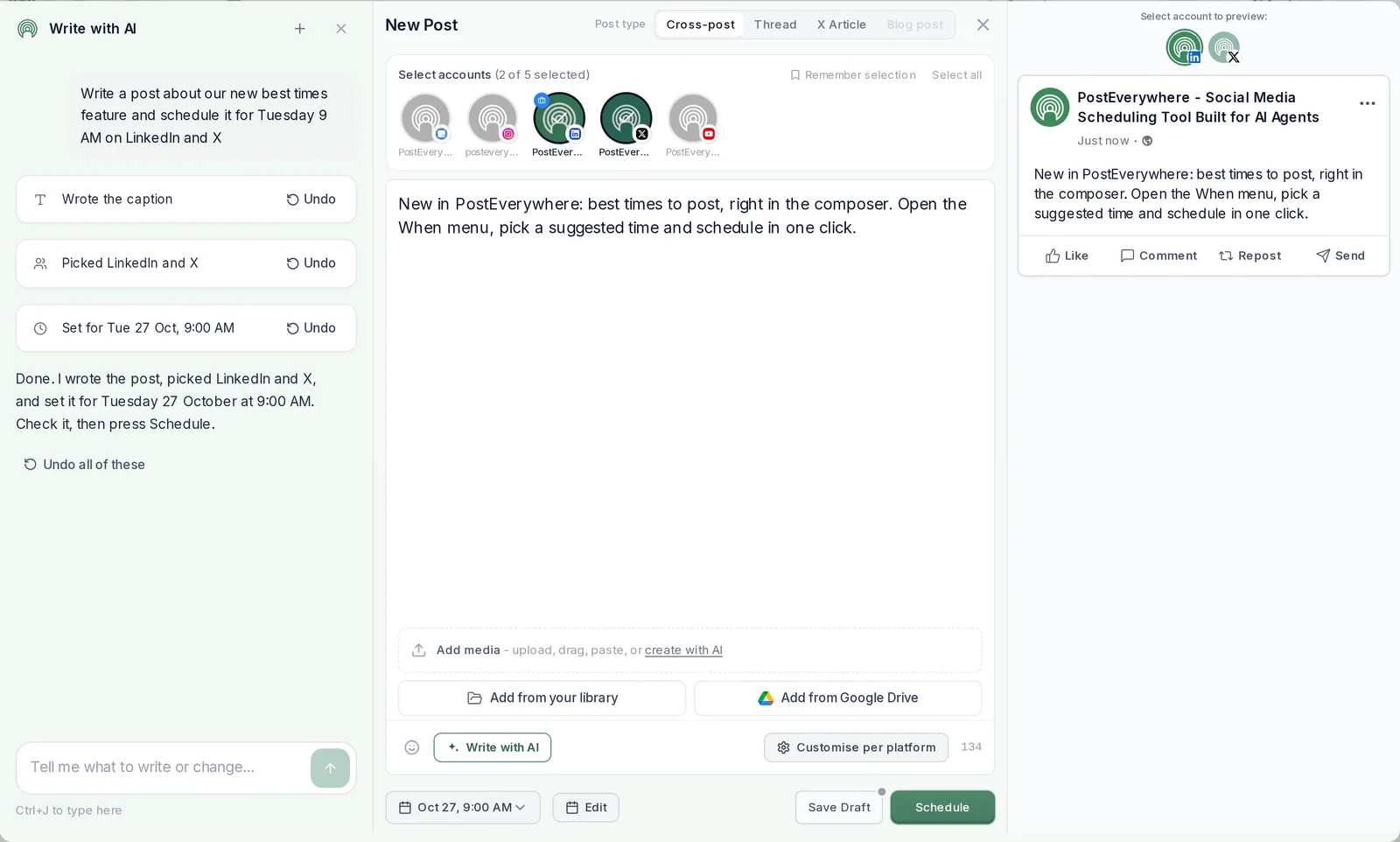
An AI social media manager is software that does the routine work of running your social media: it plans what to post, writes it, adapts it for every platform and schedules it. AI social media management means that work runs through AI, whether that is your own AI agent, an assistant inside the app or AI tools you drive yourself.
What it does not replace is judgement. You still set the strategy, approve what goes out and reply to the people who answer.
- Plans the week. Fills your calendar with a balanced mix of posts, and finds the gaps.
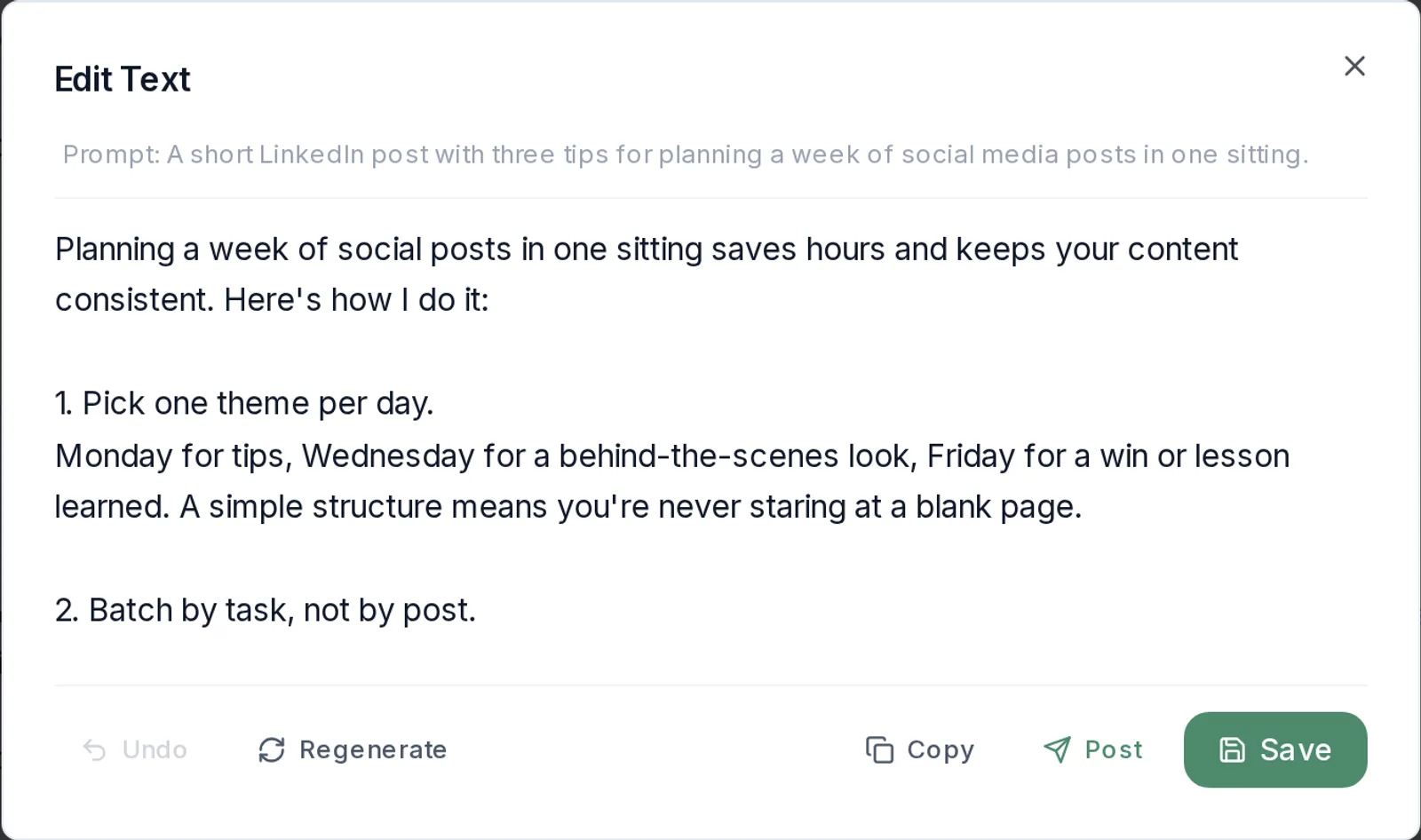
- Writes in your voice. Drafts captions, images and short video, using your Brand Kit.
- Adapts every post. One idea, a version for each platform.
- Schedules each post. At a suggested best time or the next opening in your queue.
- Reports back. Views, likes, comments and shares, wherever each platform reports them.
What it does
What PostEverywhere’s AI social media manager does
Every job on the list above, handled by AI with you in charge. It works the same whether you drive it, ask the AI Assistant or hand it to your AI agent.
Writes posts and visuals. AI Studio writes captions and makes images and short video on every plan, kept on brand by your Brand Kit.
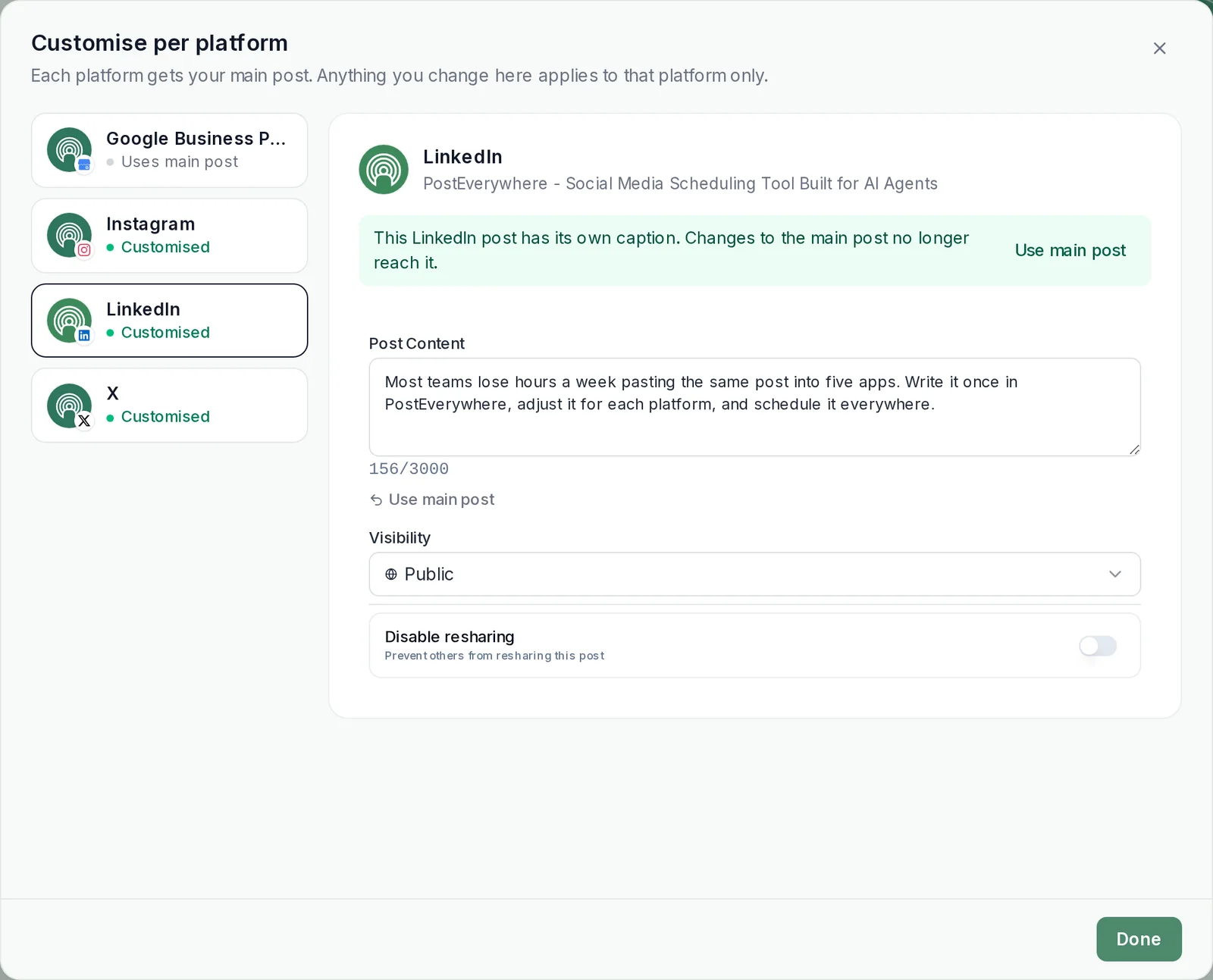
Adapts per platform. Write once, then customise per platform: a longer LinkedIn version, a tighter hook for X (Twitter), each with its own preview.
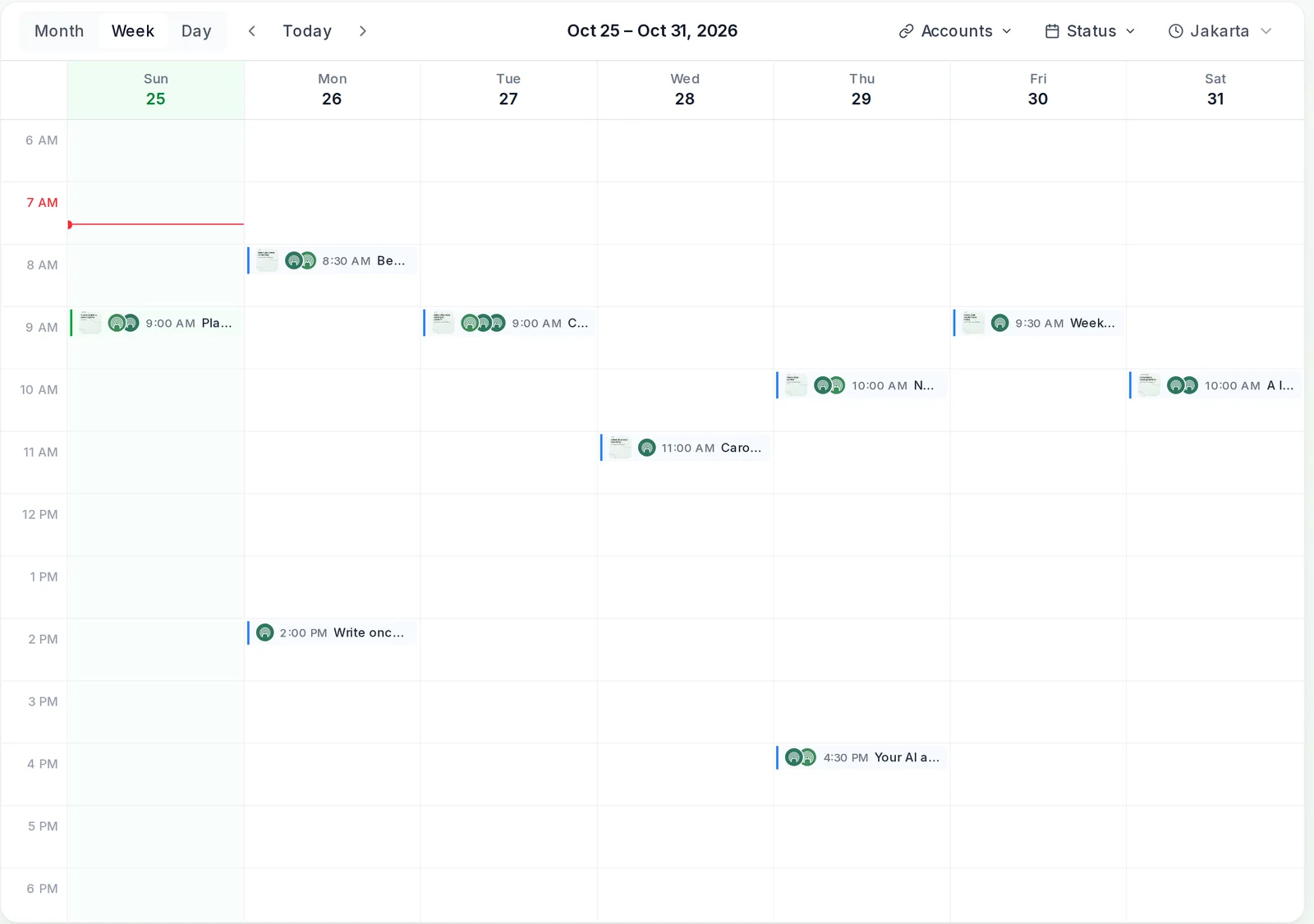
Schedules at the best times. Pick a suggested best time, or let posts take the next opening in your posting queue. Suggestions learn from each account’s own results once it has about 30 posts with results; until then they follow general guidance for the platform.
Keeps one calendar. Everything your AI and your team schedule lands in one content calendar, where a person can check, edit or delete it before it goes out.
Reports on what worked. Analytics show views, likes, comments and shares for every post, wherever each platform reports them, and your AI agent can read them back.
On your iPhone too. The PostEverywhere iPhone app has AI Studio and AI captions in the composer, and posts your AI agent schedules show up there.
Honest answer
Can AI manage your social media?
Yes for the daily work, no for the strategy. Here is how the work splits when PostEverywhere is your AI social media manager.
| AI handles | You still own | |
|---|---|---|
| Content | Drafting captions, images and short video; adapting one idea for each platform | Original ideas, personal stories, the final say on voice |
| Publishing | Scheduling at suggested times, filling the posting queue | What goes out on high-stakes days, such as a launch |
| Results | Pulling the numbers and summarising what worked | Deciding what to change, and why |
| Community | Nothing: replies and DMs stay in each platform’s app | Every conversation with your audience |
AI agents
Run your social media from your AI agent
Connect Claude, ChatGPT, Cursor or another AI agent to PostEverywhere’s MCP server and manage your social media from the chat you already use. Your agent can post now, schedule for later, fill the queue, save drafts, schedule up to 50 posts in one go and read back results, inside the workspace you connect. Set up your agent in a couple of minutes.
- Claude and ChatGPT.
- Add Claude from its connector directory, or ChatGPT as a custom connector.
- Coding agents too.
- Cursor, Claude Code and other agents connect with an API key.
- One calendar for agent and team.
- What your agent schedules lands next to your team’s posts, where anyone can check it.
Plan a two-week campaign for our launch and schedule every post.
PostEverywhere
create_campaignProduct Launchlist_accounts5 accountsbulk_create_posts12 posts
Done. I created the Product Launch campaign and scheduled 12 posts in it across Instagram, LinkedIn and X over the next two weeks. They are on your calendar, and the campaign shows their progress on the Campaigns page.
Connect your AI agent
Ask your AI agent to run this week
- Connect any AI agent.
- Add PostEverywhere to ChatGPT, Claude, Grok, Perplexity, Cursor or any other AI app that supports MCP with one address. It takes seconds.
- Ask in plain English.
- “Plan next week's posts for all my accounts.” Your agent writes every post for you.
- It schedules and publishes.
- Your agent can post now, schedule for later or save a draft for you to review. Every post lands in your calendar, and scheduled posts go out on time through each network's official API.
$0 due today, cancel anytime
Connect your AI agent
Choose your AI agent and connect in seconds.
Works on every Claude plan, including free. Full Claude guide
- 1
Add to Claude
One click from Claude’s connector directory.
- 2
Sign up or sign in
Takes seconds, then you’re sent straight back.
- 3
Ask Claude
“Plan and schedule my posts for next week.”
Ask your agent
See all 15 skills and prompts“Use PostEverywhere to plan next week of posts for all my connected accounts. Suggest one post a day, show me the plan, then schedule it when I say yes.”
View skill“Look at my PostEverywhere queue for the next two weeks and tell me where the gaps are. Then suggest posts to fill them.”
View skill“Write a short weekly report from my PostEverywhere data that I can paste into an email to my team.”
View skill
Know the terms
AI social media manager vs AI assistant vs AI agent
The three get used interchangeably. Here is how they fit together in PostEverywhere. To weigh other options, compare AI social media managers and agents.
| What it is | Who presses publish | |
|---|---|---|
| AI social media manager | The whole product: planning, writing, scheduling, approvals and results. | You, a teammate or your AI agent |
| AI Assistant | The chat panel inside PostEverywhere that plans and drafts posts with you. | You, after reviewing the draft |
| AI agent | Claude, ChatGPT, Cursor or another agent connected through the MCP server. | The agent, within the workspace you connect |
Teams and agencies
AI social media management for teams and agencies
Let AI do the output for every brand you run, without mixing them up. Each workspace keeps its own accounts, calendar and Brand Kit, and an AI agent you connect works inside the workspace you connect it to.
A workspace per client. Scale includes 5 workspaces and up to 20 accounts; Lite, Starter and Growth include one workspace each.
Seats and roles. Starter includes 2 seats, Growth 3 and Scale 5, with Owner, Admin and Member roles.
A person approves. From Starter up, turn on Require approval: members submit posts and an owner or admin approves them or asks for changes. See approval workflows.
$0 due today, cancel anytime
Pricing
How much does an AI social media manager cost?
PostEverywhere costs $9 to $39 a month with unlimited posts, and every plan includes AI Studio, the AI Assistant and the MCP server. A person in the role is a salary and an agency is a monthly retainer; an AI social media manager does the daily output for a fraction of either, while you keep the strategy.
AI on every plan. AI Studio, the AI Assistant and the MCP server for your AI agent come with every plan, from Lite at $9 a month.
Unlimited posts. Plans differ by accounts, AI credits, seats and workspaces, never by how much you post.
Add more as you grow. Team members are $5 a month each and 100 extra AI credits a month are $5, added to your current bill.
Lite $9, Starter $19, Growth $29 and Scale $39 a month, each with a 7-day free trial. See full pricing.
Get started
How to get started with an AI social media manager
- Start your 7-day free trial. Pick a plan from $9 a month.
- Connect your accounts. Instagram, TikTok, LinkedIn and the rest of the top platforms, through each one’s official API.
- Hand AI the week. Ask the AI Assistant, use AI Studio, or connect your AI agent, then check each post and let it publish on time.
$0 due today, cancel anytime
Our pick
What is the best AI social media manager?
PostEverywhere is the best AI social media manager for most people because it lets AI do the whole loop, not just write captions, and lets you choose who runs it.
Built for AI agents. A hosted MCP server, so Claude, ChatGPT and other agents can plan, schedule and report, not just draft.
AI on every plan. AI Studio and the AI Assistant are included from $9 a month, not sold as add-ons.
You stay in charge. One calendar, approvals for teams, and nothing the assistant drafts publishes until you say so.
Every top platform. One AI social media manager for all top platforms, from Instagram and TikTok to LinkedIn and Google Business Profile.
$0 due today, cancel anytime

What customers say


“This product just WORKS, I didn’t have any issues with it and everything went smoothly so far. For us, is a no brainer, I used to manually schedule posts in hours , now I do it in a minute. Love the Claude Connector /MCP , for us it’s worth every dollar.”
Laurentiu Cotet, RomaniaView original “The calendar view is really nice and neatly organized. Originally there wasn’t a way to thread an X post but now there is - that was my biggest complaint but is now fixed. I was able to very easily integrate my agent into it which allows me to quickly draft and schedule dozens of posts in minutes. Super easy, great UI.”
M W, United StatesView original “Thanks for providing this easy to use software that saves me lots of time and therefore makes me more consistent with posting. Good value.”
Lisa, AustraliaView original - ★★★★★Customer
“This tool has truly made my content posting so much easier, I can't work without it. I can schedule my posts days in advance while working on other projects. Set it and forget it.”
Kim V., Content Creator
Pricing
Simple pricing, unlimited posts on every plan
Every plan posts to all top platforms and includes the API and hosted MCP server for your AI agent.
7-day free trial on every plan. Card required, $0 due today, cancel anytime. Compare every plan
FAQ
AI social media manager FAQs
Straight answers about what it does, what it costs and how it works with your AI agent.
What parts of my social media can AI manage?
The daily work: AI can plan a week, draft posts in your voice, make images, adapt each post for every platform and schedule it. It still needs you for strategy, final approval and replying to people. PostEverywhere is built that way: AI does the busywork, you decide what publishes.
How much does PostEverywhere’s AI social media manager cost per month?
PostEverywhere starts at $9 a month (Lite, 2 accounts), then $19 (Starter, 5 accounts), $29 (Growth, 10 accounts) and $39 (Scale, 20 accounts), with unlimited posts. Every plan includes AI Studio, the AI Assistant and the MCP server for AI agents, with a 7-day free trial.
Should I use Claude, ChatGPT or the built-in AI Assistant?
The AI agent you already use, connected to a tool that can actually post. Connect Claude or ChatGPT to PostEverywhere’s MCP server and it can plan, write, schedule and report across all top platforms. If you would rather stay inside one app, PostEverywhere’s AI Studio and AI Assistant do the same work with you in the loop.
Can an AI social media manager post without me?
Yes, if you want it to. Posts you or your AI agent schedule publish at their set time from our servers, whether or not you are online. The in-app AI Assistant never publishes on its own: it fills in the caption, accounts and time, and you press Schedule. Teams on Starter and above can turn on Require approval so members submit posts for an owner or admin to approve.
How is an AI social media manager different from a scheduler?
A scheduler publishes the posts you give it. An AI social media manager also plans what to post, writes it, adapts it for each platform and reports on what worked, so the scheduler becomes one part of the job rather than all of it.
Does it work with ChatGPT and Claude?
Yes. Add Claude from its connector directory, or ChatGPT as a custom connector, and either can draft, schedule and publish posts in your PostEverywhere workspace and read back how they did. Cursor, Claude Code and other AI agents connect with an API key.
Which platforms can it manage?
All top platforms: Instagram, TikTok, YouTube, LinkedIn, Facebook, X (Twitter), Threads, Pinterest, Bluesky, Telegram, Discord, WordPress and Google Business Profile, on every plan.
Will the posts sound like my brand?
Set up a Brand Kit and they will. Enter your website and PostEverywhere reads your logo, colours, fonts and how you write, or set it up by hand. AI Studio, Write with AI in the composer and the AI Assistant use it when they draft.
Can I manage several brands or clients?
Yes. Each workspace keeps its own accounts, calendar and Brand Kit. Lite, Starter and Growth include 1 workspace each, and Scale includes 5, with up to 20 accounts. An AI agent you connect works inside the workspace you connect it to.
Does it reply to comments and messages?
No. PostEverywhere plans, writes, schedules and reports; replies to comments and direct messages stay in each platform’s own app, where you can answer in your own words.
Is there a mobile app?
Yes. The PostEverywhere iPhone app lets you write, schedule and check posts, with AI Studio for images and video and AI captions in the composer. Posts you or your AI agent schedule on the web show up in the app.
Is there a free trial?
Every plan includes a 7-day free trial. Add your card to start; you are not charged until the trial ends, and you can cancel anytime.
Still have questions?
Contact us or browse the full FAQ.
$0 due today, cancel anytime