


Campaign management
Plan, tag, and track social media campaigns across every platform. Coordinate multi-platform launches, follow every campaign's progress, and keep your team aligned from brief to publish.
Get started from as little as $9 per month. $0 due today, cancel anytime.


 Works with any AI agent


Used by 2,831 happy customers
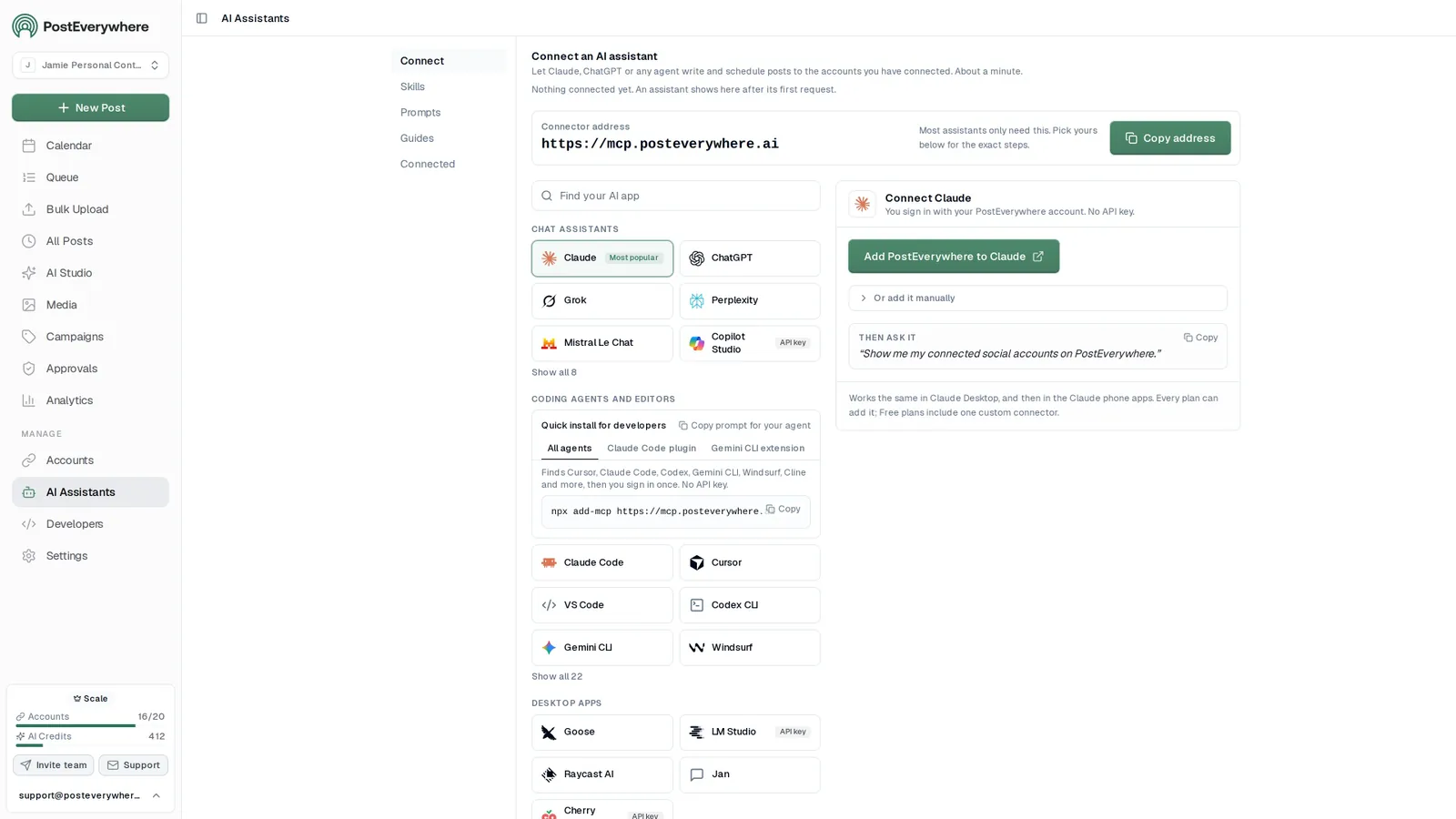
Connect your AI agent
Let your AI agent plan and schedule whole campaigns
- Connect any AI agent.
- Add PostEverywhere to ChatGPT, Claude, Grok, Perplexity, Cursor or any other AI app that supports MCP with one address. It takes seconds.
- Ask in plain English.
- “Plan a two-week campaign for our launch and schedule every post.” Your agent writes every post for you.
- It schedules and publishes.
- Your agent can post now, schedule for later or save a draft for you to review. Every post lands in your calendar, and scheduled posts go out on time through each network's official API.
$0 due today, cancel anytime
Connect your AI agent
Choose your AI agent and connect in seconds.
Works on every Claude plan, including free. Full Claude guide
- 1
Add to Claude
One click from Claude’s connector directory.
- 2
Sign up or sign in
Takes seconds, then you’re sent straight back.
- 3
Ask Claude
“Plan and schedule my posts for next week.”
What your agent can do
Skills teach your agent the job. The 44 tools do the work.
- Plan a content calendarPlan a week or month of posts and fill your queue.
- Repurpose contentTurn a blog post, transcript or newsletter into a set of posts.
- Cross-post a videoOne video to TikTok, Reels, Shorts and more, with the right caption for each.
- Fix failed postsFind posts that didn't go out, explain why, and fix them.
- Weekly reportA short weekly or monthly report, ready to paste into an email.
- Brand voiceLearn how you write from your own posts and keep new posts in your voice.
Organize everything
Plan campaigns that actually ship
Stop tracking campaigns in spreadsheets. PostEverywhere gives you campaign tags, visual timelines, and a shared content calendar so your entire team knows what is publishing, where, and when.
- Campaign tagging.
- Create a campaign, then add posts to it through the API, MCP or CLI, or let your AI agent do it. The Campaigns page groups everything that belongs to each initiative.
- Timeline planning.
- Map out your campaign on a visual calendar. Drag and drop posts across dates, set launch windows, and adjust the schedule as priorities shift.
- Multi-platform coordination.
- Schedule campaign content across Instagram, TikTok, LinkedIn, Facebook, YouTube, and X from one view. No more switching between platform dashboards.
Plan a two-week campaign for our launch and schedule every post.
PostEverywhere
create_campaignProduct Launchlist_accounts5 accountsbulk_create_posts12 posts
Done. I created the Product Launch campaign and scheduled 12 posts in it across Instagram, LinkedIn and X over the next two weeks. They are on your calendar, and the campaign shows their progress on the Campaigns page.
Measure what matters
Follow every campaign's progress
Each campaign shows how many of its posts are scheduled, posted or failed, live on the Campaigns page. Engagement for every post lives in your analytics dashboard, so you can adjust while the campaign is still running, not after.
- Live campaign status.
- Every campaign counts its posts: total, scheduled, posted and failed. A failed post shows up the moment it happens.
- UTM link tracking.
- Add UTM parameters to the links in your campaign posts, then measure website traffic and conversions in Google Analytics.
- Per-post results.
- Open Analytics to see views, likes and comments for each post wherever the platform reports them, and compare what worked across platforms.
Organize your posts by campaigns and track their performance
Product Launch
Two-week launch across every channel
Total: 12Scheduled: 7Posted: 5
Created 9/28/2026
Weekly Tips
One quick tip every weekday
Total: 20Scheduled: 10Posted: 9Failed: 1
Created 9/1/2026
Holiday Sale
Offers and countdown posts
Total: 8Scheduled: 8Posted: 0
Created 9/30/2026
Scale across accounts
Coordinate campaigns across brands and clients
Running campaigns for multiple accounts? Each workspace gets its own campaign tags, content, and analytics. Manage client campaigns without overlap, and switch between brands in seconds.
- Workspace separation.
- Each client or brand gets its own workspace with dedicated campaign tags, approval workflows, and analytics. Nothing bleeds between accounts.
- Team approval workflows.
- Turn on Require approval for a workspace and members' posts wait for an owner or admin, who approves them or sends them back with a note.
- NNorthwind Coffee
- BBluebird Dental
- HHarbor Fitness
- AAtlas Legal
Create Workspace
Everything you need
Campaign management features
Plan, execute, and measure campaigns across all platforms with tools built for teams that move fast.
- Campaign Tagging
- Group posts into campaigns through the API, MCP or CLI, and see every campaign with its live counts on the Campaigns page.
- Timeline Planning
- Map out campaign timelines visually on your content calendar. See every scheduled post across platforms with drag-and-drop adjustments.
- UTM Tracking
- Add UTM parameters to the links in your campaign posts and measure traffic and conversions in Google Analytics.
- Campaign progress
- Follow each campaign's scheduled, posted and failed counts, and see every post's engagement in Analytics.
- Team Approval Workflows
- Turn on Require approval and members' posts wait for an owner or admin, who approves them or sends them back with a note.
- Multi-Platform Launches
- Coordinate simultaneous launches across Instagram, TikTok, LinkedIn, Facebook, YouTube, and X from one campaign dashboard.
Why campaign management matters
From scattered posts to coordinated launches
Most social media teams run campaigns by memory. Posts go out late, platforms get missed, and nobody can tell you how the campaign actually performed. PostEverywhere fixes this by giving every campaign a name, a timeline, and a shared view that the whole team can see.
- Plan the timeline. Start by planning your campaign on the content calendar: launch day, the teasers before it and the reminders after.
- Draft a version for each platform. Use the AI content generator to draft platform-specific variations instead of one caption pasted everywhere.
- Schedule the launch. Schedule posts across Instagram, TikTok, LinkedIn, Facebook, YouTube, and X (Twitter) for a coordinated launch, and add them to the campaign through the API, MCP server or CLI, or let your AI agent do it. Running a sale or an event? Add an Offer or Event post for your Google Business Profile so it shows on your Google Search and Maps listing too.
- Track it while it runs. Once the campaign is live, follow its scheduled, posted and failed counts and track performance in your analytics dashboard. Add UTM parameters to every link so you can measure traffic and conversions in Google Analytics, then compare each campaign's results to see which ones paid off.
- Wrap up and plan the next one. After the campaign wraps, run a social media audit to capture learnings. Generate a performance report for stakeholders, then use insights to plan your next campaign in the content calendar. Read our guide on how to create a social media strategy for a step-by-step framework.
$0 due today, cancel anytime
Mon
5
9:00 AM
Launch week is here
1:30 PM
Behind the scenes
Tue
6
10:00 AM
5 tips for faster scheduling
5:00 PM
Product teaser
Wed
7
9:00 AM
Customer story
3:00 PM
New templates
Done. 6 posts scheduled for the rest of the week, each one tailored for its platform.
Or ask your agent to run the campaign
See all skills and prompts“Plan a launch campaign for our new feature next Tuesday in PostEverywhere.”
View skill“Write a launch post for LinkedIn and a shorter one for X about [your news]. Schedule both in PostEverywhere for Tuesday at 9am.”
View skill“Look at my PostEverywhere queue for the next two weeks and tell me where the gaps are. Then suggest posts to fill them.”
View skill
Pricing
Simple pricing, unlimited posts on every plan
Every plan posts to all top platforms and includes the API and hosted MCP server for your AI agent.
7-day free trial on every plan. Card required, $0 due today, cancel anytime. Compare every plan
FAQ
Campaign Management FAQ
Straight answers about plans, platforms and how scheduling works.
What is social media campaign management?
Social media campaign management is the process of planning, organizing, executing, and tracking coordinated marketing efforts across multiple social media platforms. It involves grouping related content under campaign tags, setting timelines, coordinating team approvals, and measuring results to ensure each campaign meets its objectives.
How do campaign tags work in PostEverywhere?
Create a campaign on the Campaigns page, then add posts to it through the API, MCP server or CLI by passing its campaign ID, or ask your AI agent to do it. Each campaign shows how many of its posts are scheduled, posted and failed, so you can follow a launch at a glance.
Can I run campaigns across multiple platforms simultaneously?
Yes. PostEverywhere lets you coordinate campaigns across Instagram, TikTok, LinkedIn, Facebook, YouTube, and X from a single dashboard. Add posts for every platform to the same campaign, schedule them for coordinated launch times, and follow the campaign's scheduled, posted and failed counts on the Campaigns page.
How does team approval work for campaign content?
Turn on Require approval for the workspace and members submit posts for approval instead of publishing them. Owners and admins approve each post or send it back with a note saying what to change, and the author is emailed either way. Owners and admins publish directly.
Can I track campaign ROI?
Not as a single number. Each campaign shows how many of its posts are scheduled, posted and failed, and Analytics shows each post's engagement wherever the platform reports it. For traffic and conversions, add UTM parameters to your links and measure them in Google Analytics, or estimate the value with the free ROI calculator.
How do I plan a campaign timeline?
Use the visual content calendar to map out your campaign timeline. Drag and drop posts across dates, set launch windows, and see all scheduled content for a campaign in one view. The Campaigns page then shows the campaign's progress as its posts go out.
Can I manage campaigns for multiple clients or brands?
Yes. With workspaces and multi-account management, you can run separate campaigns for different clients or brands from one PostEverywhere account. Each workspace keeps its own campaign tags, content, and analytics, so nothing overlaps between clients.
What metrics should I track during a campaign?
Key campaign metrics include reach, impressions, engagement rate, clicks, shares, and saves. For campaigns driving website traffic, track UTM-tagged link clicks and conversions. PostEverywhere shows engagement for each post in Analytics wherever the platform reports it, and each campaign's scheduled, posted and failed counts on the Campaigns page.
Still have questions?
Contact us or browse the full FAQ.
$0 due today, cancel anytime
Related Campaign Tools & Resources
Plan, execute, and measure campaigns with these scheduling, analytics, and strategy tools.
Content Calendar
Visualize campaign timelines with drag-and-drop scheduling.
Social Media Scheduler
Schedule campaign posts across all platforms from one calendar.
Analytics Dashboard
Track how each post performs across platforms.
Cross-Platform Publishing
Launch campaigns on Instagram, LinkedIn, TikTok, Facebook, X, and YouTube.
Multi-Account Management
Run separate campaigns for multiple brands or clients.
Workspaces
Organize campaigns by client with dedicated workspaces.
UTM Link Builder
Generate trackable campaign URLs with UTM parameters.
Social Media Report Generator
Generate campaign performance reports for stakeholders.
Content Calendar Generator
Create a campaign content calendar in minutes.

What customers say


“This product just WORKS, I didn’t have any issues with it and everything went smoothly so far. For us, is a no brainer, I used to manually schedule posts in hours , now I do it in a minute. Love the Claude Connector /MCP , for us it’s worth every dollar.”
Laurentiu Cotet, RomaniaView original “The calendar view is really nice and neatly organized. Originally there wasn’t a way to thread an X post but now there is - that was my biggest complaint but is now fixed. I was able to very easily integrate my agent into it which allows me to quickly draft and schedule dozens of posts in minutes. Super easy, great UI.”
M W, United StatesView original “Thanks for providing this easy to use software that saves me lots of time and therefore makes me more consistent with posting. Good value.”
Lisa, AustraliaView original - ★★★★★Customer
“This tool has truly made my content posting so much easier, I can't work without it. I can schedule my posts days in advance while working on other projects. Set it and forget it.”
Kim V., Content Creator