


Social media marketing for small business
Start on the one or two platforms your customers already use, post on a rhythm you can keep in your busiest week, and plan the week in one sitting. Here is where to start, what to post and how to keep it going when you also run the business.
Get started from as little as $9 per month. $0 due today, cancel anytime.


 Works with any AI agent


Used by 2,831 happy customers
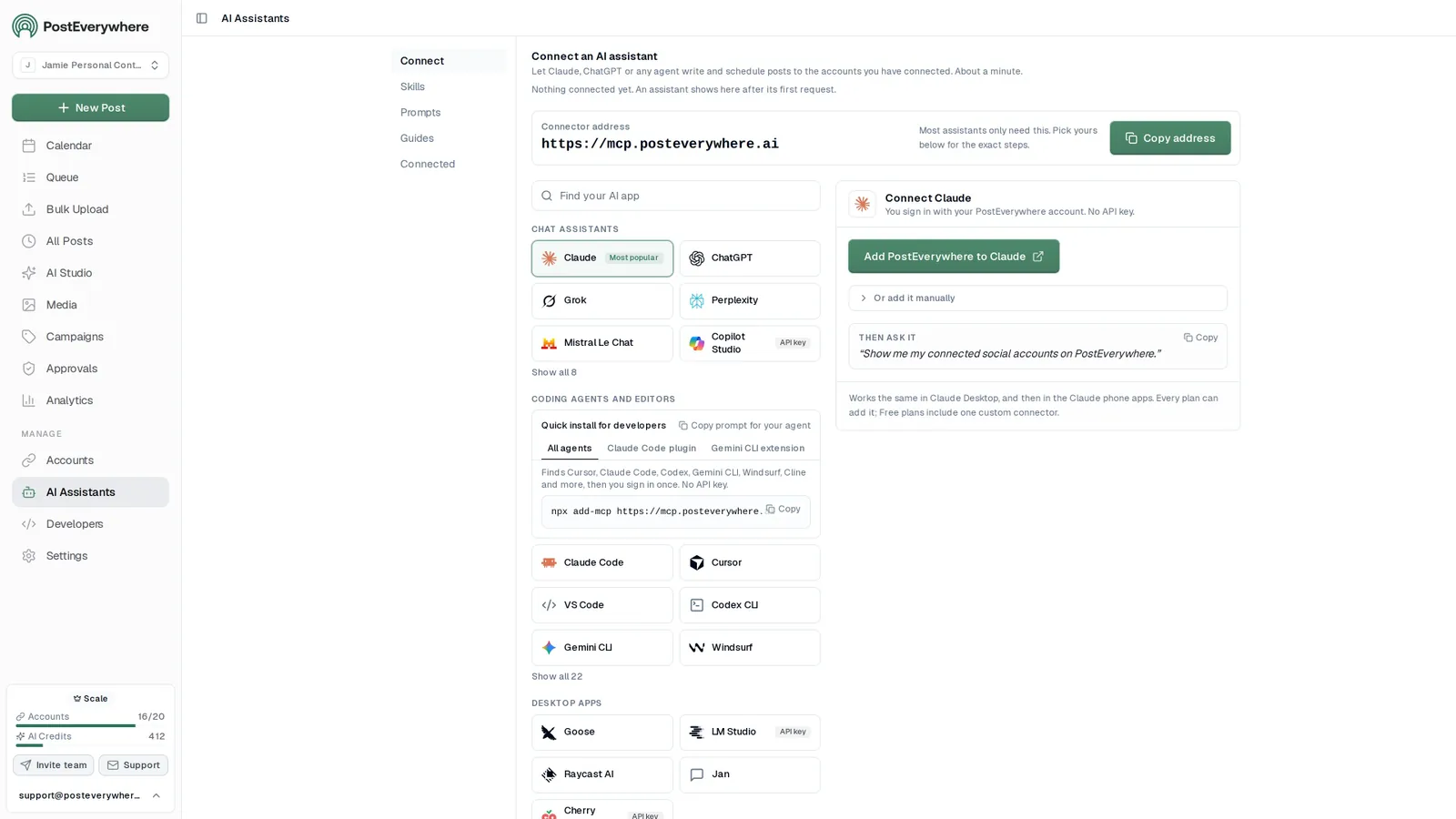
Connect your AI agent
Let your AI agent handle your social media
- Connect any AI agent.
- Add PostEverywhere to ChatGPT, Claude, Grok, Perplexity, Cursor or any other AI app that supports MCP with one address. It takes seconds.
- Ask in plain English.
- “Plan next week’s posts about our opening hours and offers.” Your agent writes every post for you.
- It schedules and publishes.
- Your agent can post now, schedule for later or save a draft for you to review. Every post lands in your calendar, and scheduled posts go out on time through each network's official API.
$0 due today, cancel anytime
Connect your AI agent
Choose your AI agent and connect in seconds.
Works on every Claude plan, including free. Full Claude guide
- 1
Add to Claude
One click from Claude’s connector directory.
- 2
Sign up or sign in
Takes seconds, then you’re sent straight back.
- 3
Ask Claude
“Plan and schedule my posts for next week.”
What your agent can do
Skills teach your agent the job. The 44 tools do the work.
- Plan a content calendarPlan a week or month of posts and fill your queue.
- Repurpose contentTurn a blog post, transcript or newsletter into a set of posts.
- Cross-post a videoOne video to TikTok, Reels, Shorts and more, with the right caption for each.
- Fix failed postsFind posts that didn't go out, explain why, and fix them.
- Weekly reportA short weekly or monthly report, ready to paste into an email.
- Brand voiceLearn how you write from your own posts and keep new posts in your voice.
What is the best social media for small business?
The best platform is the one your customers already check. For most local businesses that is Facebook and Instagram, for products it is Instagram and TikTok, and for B2B services it is LinkedIn. Start with two, post consistently for three months, then add a third.
Local services: salons, trades, clinics, cafes
Facebook and Instagram
Neighbours check a Facebook Page for hours, reviews and offers, and Instagram shows the work itself. PostEverywhere schedules your Google Business Profile posts too, so updates, events and offers show on Google Search and Maps.
Facebook scheduler · Instagram scheduler · Google Business Profile scheduler
Products and online shops
Instagram, TikTok and Pinterest
Short videos of the product in use reach new buyers on TikTok and Reels, and Pinterest keeps sending traffic to a pin for months.
B2B and professional services
LinkedIn first
Decision makers and referrers are there, and posts from the founder usually travel further than posts from the company page.
Businesses that teach or explain
YouTube, then short clips everywhere
A how-to video answers the same customer question for years. Cut short clips from it for Shorts, Reels and TikTok.
Why social media marketing works for small business
Small businesses have an advantage on social media: customers trust the real people behind them more than a corporate brand.
Customers without ad spend
Organic posts cost time rather than money, which makes social media one of the cheapest ways for a local or small business to be found.
Build trust before the sale
Customers look a business up before they buy. A consistent, active profile signals that you are open, real and worth the visit.
Compete with bigger brands
Feeds reward posts people engage with, not budgets. A small business with useful, personal posts can stand out in its local market.
Direct customer relationships
Comments, DMs and Stories create one-to-one conversations that big brands struggle to have, and those bring repeat business and referrals.
Local discovery
Location tags, hashtags and platform search put your business in front of nearby customers who are looking for what you offer.
Returns that build
Every post adds to your audience. Businesses that keep posting for six months or more give each new post a bigger audience to reach.
How to use social media for small business
You don't need a marketing degree or a big budget. Here's the system that works for most small businesses.
Step 1
Pick 2-3 platforms
Start where your customers are, using the platform picks above. Check your business name is free on each platform before you commit.
Check username availabilityStep 2
Batch your content
Set aside one session per week to create and schedule all your posts. Use a content calendar to stay organized.
Content calendarStep 3
Schedule in advance
Use a scheduler so your posts go out at the times you pick, even when you're busy running your business.
Social media schedulerStep 4
Review and adjust
Check what's working monthly. Run a social media audit to find gaps, compare your numbers against industry benchmarks, then double down on content types that get engagement and drop what doesn't.
Free social media auditRun it in one weekly session
The plan above works when posting stops depending on a free moment. PostEverywhere is AI social media management for small business: write a week of posts in one sitting, adapt each caption per platform, and let the scheduler publish them at the times you set. Plans start at $9/mo with a 7-day trial (card required).
Industry guides
Social media guides by industry
What to post, the rules that apply and a posting plan for your kind of business, written for owners who run their own social.
Social media for photographers
Instagram and beyond: what to post, client consent, and turning one session into weeks of posts.
Read the guideSocial media for schools and universities
Department accounts, student workers, the academic calendar and a social media policy.
Read the guideSocial media for models
Instagram modeling, getting scouted by agencies, and staying safe from fake ones.
Read the guideSocial media for financial advisors
Compliant content for advisers and accountants, built around the financial year.
Read the guideSocial media for coaches
Content that books discovery calls, launch sequences and client stories done right.
Read the guideSocial media for ecommerce
Launches, social commerce, UGC and running it all on a schedule.
Read the guideSocial media for real estate
Listing content, Fair Housing ad rules and a weekly posting workflow.
Read the guideSocial media for restaurants
Menu launches, specials, reviews and posting around service hours.
Read the guideSocial media for healthcare
Patient education, HIPAA basics and a review step before anything posts.
Read the guideSocial media for gyms and fitness
Content ideas, a 30-day plan and filming members the right way.
Read the guideSocial media for nonprofits
Fundraising campaigns, impact stories and running it with a tiny team.
Read the guideSocial media for law firms
Bar advertising rules, LinkedIn thought leadership and partner sign-off.
Read the guideSocial media for salons
Booking more appointments and showing your work on Instagram and TikTok.
Read the guideSocial media for hotels
Strategies that fill rooms, from direct bookings to guest content.
Read the guideSocial media for churches
Growing your congregation online and keeping your community close.
Read the guidePricing
Simple pricing, unlimited posts on every plan
Every plan posts to all top platforms and includes the API and hosted MCP server for your AI agent.
7-day free trial on every plan. Card required, $0 due today, cancel anytime. Compare every plan
FAQ
Social Media Marketing for Small Business FAQ
Straight answers about plans, platforms and how scheduling works.
Is social media marketing worth it for a small business?
Yes, if you can keep it consistent. Organic posts cost time rather than money, and an active profile is often where customers check that a business is real before they call, book or buy. The risk is starting on five platforms and stopping after a month, so begin with one or two and a rhythm you can hold in your busiest week.
How often should a small business post on social media?
Consistency matters more than frequency. For most small businesses, 3-5 posts per week across your primary platforms is a strong starting point. Use a social media scheduler to batch your content in advance so you never miss a day, even when business gets busy.
How much should a small business spend on social media marketing?
Many small businesses see results with $0 in ad spend by posting organic content consistently. If you want to run ads, start with $5-10/day on your best-performing posts. The biggest investment is your time, which is why scheduling tools that let you plan a month of content in one session are so valuable.
What type of content works best for small businesses?
Behind-the-scenes content, customer stories, before-and-after transformations, and educational tips consistently outperform polished corporate content. Authenticity is your competitive advantage over big brands. Short-form video (Reels, TikTok) is currently the highest-reach format across most platforms.
Can I manage social media for my business myself?
Yes. Most small business owners manage their own social media successfully by batching content creation into one session per week and using a scheduling tool to automate posting. This typically takes 2-4 hours per week once you have a system in place. Creating a simple social media policy helps you stay consistent even as you bring on team members.
How long does it take to see results from social media?
Most small businesses start seeing increased engagement within 4-6 weeks of consistent posting. Measurable business results like leads, bookings, or sales typically take 3-6 months. The key is consistency: businesses that post regularly for 6+ months see compounding returns as their audience grows.
Still have questions?
Contact us or browse the full FAQ.
$0 due today, cancel anytime

What customers say


“This product just WORKS, I didn’t have any issues with it and everything went smoothly so far. For us, is a no brainer, I used to manually schedule posts in hours , now I do it in a minute. Love the Claude Connector /MCP , for us it’s worth every dollar.”
Laurentiu Cotet, RomaniaView original “The calendar view is really nice and neatly organized. Originally there wasn’t a way to thread an X post but now there is - that was my biggest complaint but is now fixed. I was able to very easily integrate my agent into it which allows me to quickly draft and schedule dozens of posts in minutes. Super easy, great UI.”
M W, United StatesView original “Thanks for providing this easy to use software that saves me lots of time and therefore makes me more consistent with posting. Good value.”
Lisa, AustraliaView original - ★★★★★Customer
“This tool has truly made my content posting so much easier, I can't work without it. I can schedule my posts days in advance while working on other projects. Set it and forget it.”
Kim V., Content Creator