


Social Media MCP Server
The PostEverywhere MCP server lets Claude, ChatGPT, Cursor and any other AI agent publish, schedule and report on posts across all top platforms. 44 tools, hosted at mcp.posteverywhere.ai, included on every plan from $9 a month.
Get started from as little as $9 per month. $0 due today, cancel anytime.


 Works with any AI agent


Used by 2,831 happy customers
The basics
What is an MCP server for social media?
A social media MCP server is a connector that lets an AI agent work with your social accounts. It speaks the Model Context Protocol (MCP), the open standard AI apps use to call outside tools, so once it is connected your agent can publish, schedule and check posts itself. PostEverywhere is MCP for social media: one server that connects your agent to every account you have connected.
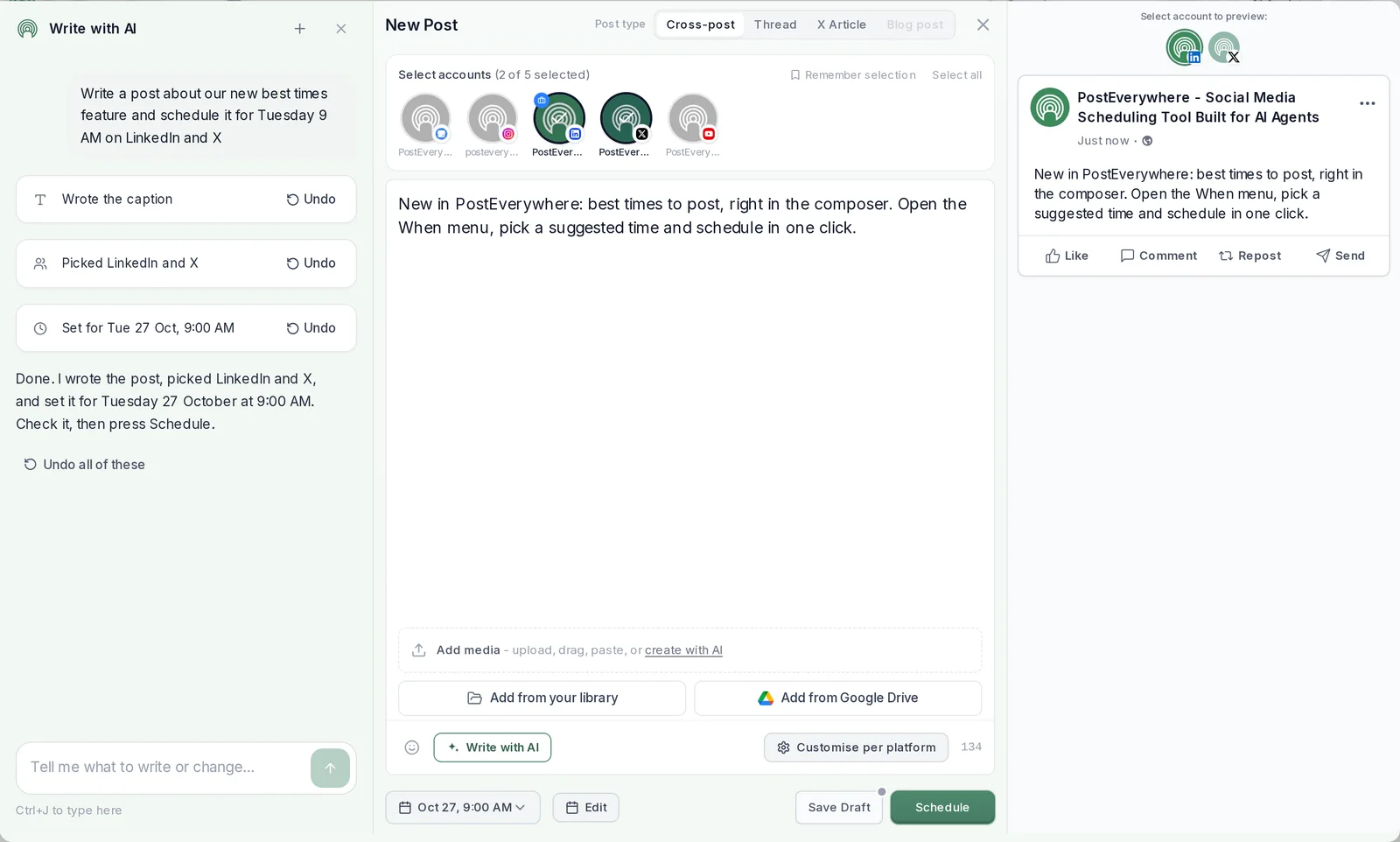
Without one, an AI agent can only write. You copy its post into each app, pick a time in each scheduler and check each feed afterwards. With PostEverywhere's MCP server, you ask in plain words (“schedule this to LinkedIn and X for Tuesday at 9am”) and the agent does those steps through one connection to every account you have connected.
Is MCP just an API?
Not quite. An API is built for code you write. MCP describes the same actions as tools that an AI agent can discover and choose between on its own. PostEverywhere offers both, on every plan: the MCP server for agents, and the social media API for your own code.
Who it is for
Anyone who wants a social media MCP integration for AI agents: founders and marketers who already plan posts with an AI agent, agencies running several brands, and developers building their own agents. If you ask Claude or ChatGPT to write your posts today, the server lets it finish the job. Or skip the setup and let PostEverywhere be your AI social media manager.
Get started
How to get started with the MCP server
- Start your 7-day free trial. Pick any plan from $9 a month. The MCP server is included on every plan.
- Connect your social accounts. Link the accounts you post to, once, in your PostEverywhere dashboard.
- Connect your AI agent to the MCP server. Add
https://mcp.posteverywhere.aiin Claude, ChatGPT, Cursor or any MCP client and approve access. Setup guides for every AI agent. - Ask it to post or schedule. Describe what you want in plain words. Every post lands in your calendar.
$0 due today, cancel anytime
Mon
5
9:00 AM
Launch week is here
1:30 PM
Behind the scenes
Tue
6
10:00 AM
5 tips for faster scheduling
5:00 PM
Product teaser
Wed
7
9:00 AM
Customer story
3:00 PM
New templates
Done. 6 posts scheduled for the rest of the week, each one tailored for its platform.
How it works
How an AI agent publishes through PostEverywhere's MCP server
You ask, the agent picks the tools, and PostEverywhere does the publishing: checking each platform's rules and each account's health first, then posting and reporting back.
Step 1
You ask your agent
In Claude, ChatGPT, Cursor or any MCP client, in plain words.
Schedule this for LinkedIn and X on Tuesday at 9am.Step 2
The agent calls PostEverywhere's MCP tools
list_accountsto find your accounts,get_best_timesorget_queueto pick a time,create_postto schedule it.list_accountsLinkedIn, Xget_best_timesTue 9:00 AMcreate_postScheduled
Step 3
PostEverywhere checks and schedules
Each platform's rules and each account's health are checked, and the post lands in your calendar.
TueScheduled9:00 AMStep 4
It publishes and reports back
get_post_resultsreturns live links or errors for each platform. Webhooks can report each one too.- LinkedInPublished
- XPublished
Everything your agent schedules shows up in your PostEverywhere calendar, where you can edit it before it goes out.
Capabilities
What your AI agent can do with it
The server covers the whole publishing job, not just one “create post” call. It is the same surface you use in the dashboard, including your posting queue, best times to post and bulk scheduling.
- Publish and schedule.
- Post now, at an exact time, or as a draft for review, to any mix of connected accounts in one call. Each platform can get its own caption.
- Use your queue and best times.
- Read your weekly posting slots and take the next free one, or read your suggested best times and schedule into one of them.
- Work in bulk.
- Schedule up to 50 posts in one request, and retry every failed post that matches a filter in one call.
- Handle media.
- Import images and videos from a link, upload local files (including PDFs for LinkedIn document posts), and create images from a prompt.
- Write on brand.
- Read your Brand Kit before writing, and generate captions that always fit each platform’s limit.
- Check before posting.
- Read each platform’s rules and each account’s health, so a post that would fail is caught before it is sent.
- Report on results.
- Read per-platform results with live links or errors, and posting and engagement totals for any time window.
- Run reviews and campaigns.
- Send drafts for approval, approve or request changes, and group posts into campaigns.
Plan next week's posts for all my accounts and schedule one a day at 9am.
Used PostEverywhere
list_accounts8 accountsget_platform_rulesLimits checkedgenerate_caption×55 captionsbulk_create_posts5 posts scheduled
Done. Five posts are scheduled for Monday to Friday at 9:00 AM, each one tailored for its platform. They are in your calendar if you want to change anything.
Mon
9:00 AM
Tue
9:00 AM
Wed
9:00 AM
Tool reference
All 44 tools, named
Every tool on the full server, grouped by job, with what it does. Connecting through Claude's connector directory gives you every tool except generate_image. The PostEverywhere app for ChatGPT has 34. Full parameters are in the API reference.
Posts and scheduling
13create_post- Publish now, schedule for a set time, take the next queue slot or save a draft, for any mix of accounts.
schedule_post- Publish or schedule a draft, optionally changing which accounts it goes to.
bulk_create_posts- Create up to 50 posts in one call, each checked like a single post.
get_post- Read one post: content, media, schedule and its status on each platform.
list_posts- List scheduled, published or draft posts, filtered by status and platform.
list_posts_advanced- The same list with every filter: several statuses, platforms and date ranges.
update_post- Change a scheduled or draft post: text, time, accounts, media or per-platform content.
delete_post- Remove a post from PostEverywhere (a published X post can be deleted on X too).
get_post_results- Per-platform results: live links, errors, attempts and retry times.
retry_failed_post- Retry every failed platform on one post.
retry_failed_posts- Retry failed posts in bulk by account, platform, date range or post IDs.
approve_post- Approve a post waiting for review (needs a reviewer role; approving does not publish).
request_post_changes- Send a post back to its author with a note on what to change.
Accounts and identity
8list_accounts- List connected accounts with their IDs, usernames and whether each can post.
get_account- Details for one account, including Pinterest boards and the WordPress site.
get_account_health- Check an account before posting: can it post, token expiry, recent failures.
get_me- Who is signed in: workspace, plan, permissions and what is left on each quota.
get_analytics_summary- Posting and engagement totals over a time window, per platform.
create_connect_link- A short-lived sign-in link to connect a new social account.
create_reconnect_link- A short-lived link to repair an account whose sign-in has expired.
connect_credential_account- Connect Telegram, Discord, Bluesky or WordPress inside the conversation, no browser needed.
Media
6upload_media_from_url- Import an image or video from a public link into your media library.
create_media_upload- Start an upload for a local file, including a PDF for a LinkedIn document post.
complete_media_upload- Confirm a local upload arrived so it can be attached to posts.
get_media- Check a file: type, size, dimensions and whether it has finished processing.
list_media- Browse the media library by type.
delete_media- Delete a file, refusing if a post that has not gone out still uses it.
AI captions and images
2generate_caption- Write one to five caption options that always fit the platform limit.
generate_image- Create an image from a prompt and save it to your media library.
Queue and best times
2get_queue- Read your weekly posting slots and the next openings.
get_best_times- Suggested best times to post for an account or platform.
Brand Kit
1get_brand- Read your brand voice, rules, words to avoid, hashtags, colours and fonts.
Platform rules
1get_platform_rules- Each platform’s limits: characters, image and video rules, supported features.
Campaigns
5create_campaign- Create a campaign to group related posts.
get_campaign- Read one campaign and how many posts it holds.
list_campaigns- List the campaigns in your workspace.
update_campaign- Rename, recolour or archive a campaign.
delete_campaign- Delete a campaign (its posts are kept).
Webhooks
6create_webhook- Get a signed request whenever an event happens, such as a post publishing or failing.
get_webhook- Read one webhook subscription.
list_webhooks- List your webhook subscriptions and their recent deliveries.
update_webhook- Change a webhook’s address, events or on/off state.
delete_webhook- Delete a webhook and its delivery history.
test_webhook- Send a test event to check your endpoint and signature.
Set up in a minute
Connect your MCP client
The address is the same everywhere: https://mcp.posteverywhere.ai. How you add it depends on the app. Pick yours for its full setup guide, or see every AI agent we support.
Claude
Add PostEverywhere from Claude's connector directory in one click, sign in and press Approve. Or add https://mcp.posteverywhere.ai under Customize, Connectors, Add custom connector.
ChatGPT
Add https://mcp.posteverywhere.ai as a custom connector, then approve access with a one-time sign-in. No API key to paste.
Claude Code, Cursor and others
Code clients use the same address with an API key from the Developers page. In Claude Code it is one command:
claude mcp add --transport http posteverywhere \
  https://mcp.posteverywhere.ai \
  --header "Authorization: Bearer pe_live_YOUR_KEY"
Connect Claude Code
Official PostEverywhere MCP server
One server, published by PostEverywhere. Check you are connecting to the right one:
- Hosted server
https://mcp.posteverywhere.ai- Source code
- posteverywhere/mcp on GitHub
- npm package
- @posteverywhere/mcp
- MCP Registry
- Listed in the official MCP Registry as
ai.posteverywhere/mcp
Want every step with screenshots, time zones and per-platform captions? Follow our step-by-step guide to scheduling social media posts with MCP, or read the MCP setup docs.
Connect your AI agent
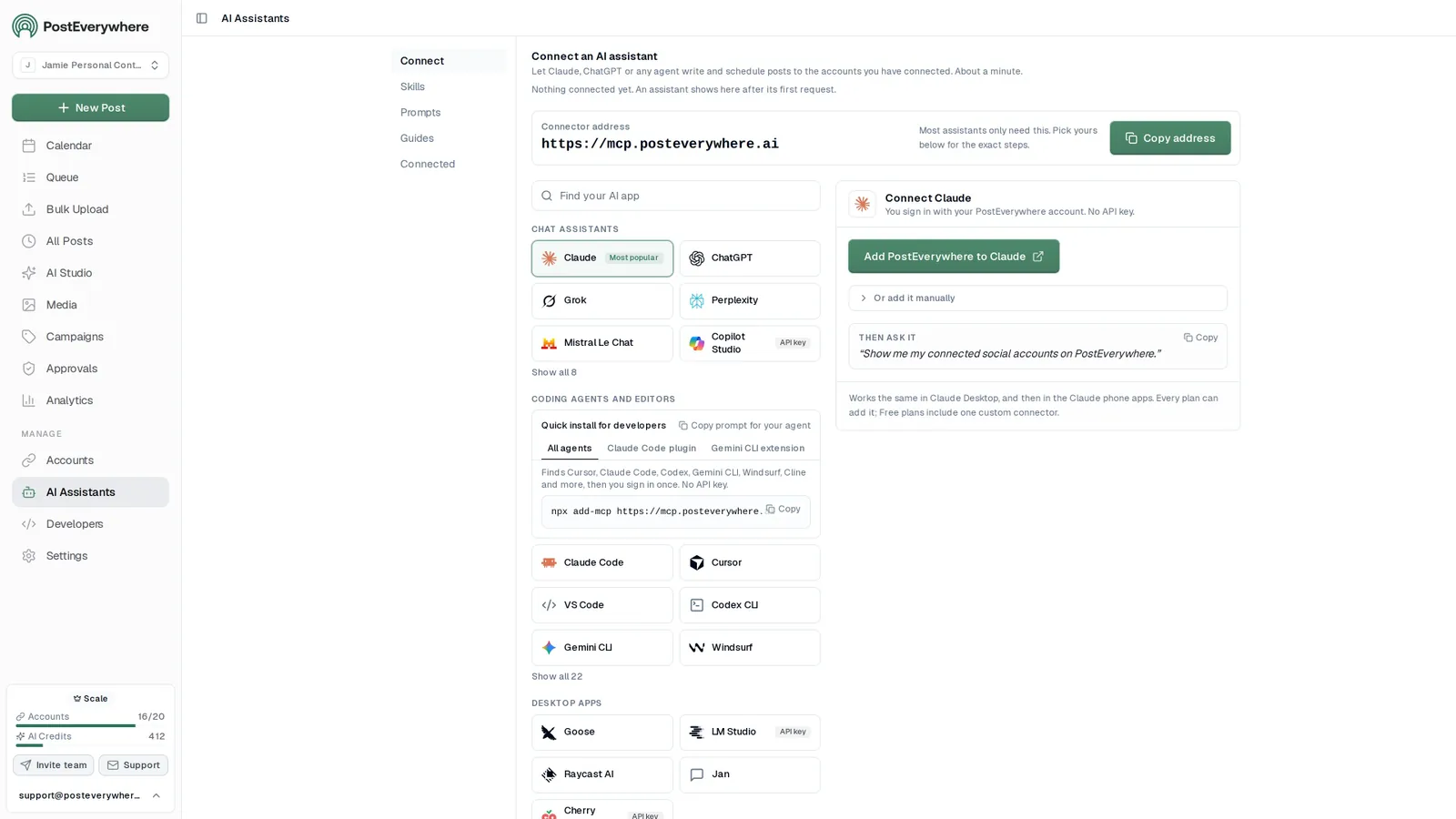
Pick your AI agent and connect it
- Connect any AI agent.
- Add PostEverywhere to ChatGPT, Claude, Grok, Perplexity, Cursor or any other AI app that supports MCP with one address. It takes seconds.
- Ask in plain English.
- “Write next week's posts for every platform and schedule one a day at 9am.” Your agent writes every post for you.
- It schedules and publishes.
- Your agent can post now, schedule for later or save a draft for you to review. Every post lands in your calendar, and scheduled posts go out on time through each network's official API.
$0 due today, cancel anytime
Connect your AI agent
Choose your AI agent and connect in seconds.
Works on every Claude plan, including free. Full Claude guide
- 1
Add to Claude
One click from Claude’s connector directory.
- 2
Sign up or sign in
Takes seconds, then you’re sent straight back.
- 3
Ask Claude
“Plan and schedule my posts for next week.”
What your agent can do
Skills teach your agent the job. The 44 tools do the work.
- Plan a content calendarPlan a week or month of posts and fill your queue.
- Repurpose contentTurn a blog post, transcript or newsletter into a set of posts.
- Cross-post a videoOne video to TikTok, Reels, Shorts and more, with the right caption for each.
- Fix failed postsFind posts that didn't go out, explain why, and fix them.
- Weekly reportA short weekly or monthly report, ready to paste into an email.
- Brand voiceLearn how you write from your own posts and keep new posts in your voice.
Two ways to run it
Hosted or local MCP server
Most people use the hosted server. The same server is open source, so you can also run it on your own machine.
Hosted (recommended)
- Runs on our servers at https://mcp.posteverywhere.ai, always up to date.
- Nothing to install. In Claude and ChatGPT you sign in; elsewhere you add an API key.
- The full 44 tools when you add the address yourself.
Local (npm)
- Runs on your machine with
npx -y @posteverywhere/mcpand Node.js 18 or later. - Uses an API key in your client's config file.
- MIT-licensed on GitHub.
Local config for every MCP client
claude mcp add --transport http posteverywhere \
  https://mcp.posteverywhere.ai \
--header "Authorization: Bearer pe_live_YOUR_KEY"~/Library/Application Support/Claude/claude_desktop_config.json (macOS)%APPDATA%\Claude\claude_desktop_config.json (Windows)
{
  "mcpServers": {
    "posteverywhere": {
      "command": "npx",
      "args": ["-y", "@posteverywhere/mcp"],
      "env": { "POSTEVERYWHERE_API_KEY": "pe_live_YOUR_KEY" }
    }
  }
}~/.cursor/mcp.json
{
  "mcpServers": {
    "posteverywhere": {
      "command": "npx",
      "args": ["-y", "@posteverywhere/mcp"],
      "env": { "POSTEVERYWHERE_API_KEY": "pe_live_YOUR_KEY" }
    }
  }
}~/.codex/config.toml
[mcp_servers.posteverywhere]
command = "npx"
args = ["-y", "@posteverywhere/mcp"]
env = { POSTEVERYWHERE_API_KEY = "pe_live_YOUR_KEY" }
The header must be [mcp_servers.posteverywhere] with an underscore: a mistyped header starts cleanly and loads nothing, with no error. The env line is a TOML inline table, so it needs braces and =, not JSON-style colons.
Cline
Same JSON block, added via the MCP Servers panel in VS Code. The panel accepts what you paste without validating it, so a server that will not start is almost always a malformed block.
Windsurf
Same JSON block, file
~/.codeium/windsurf/mcp_config.json. Windsurf reads it at startup rather than watching it, so fully restart after saving. A trailing comma makes the whole file invalid and it fails quietly.Zed
Same shape, nested under
context_serversinstead ofmcpServers, in~/.config/zed/settings.json. A block left undermcpServersis ignored without any error, and Zed validates the whole settings file, so an error elsewhere in it blocks the save.
Platforms
Supported social media platforms
One server publishes to all top platforms. Your agent reads each platform's rules with get_platform_rules, so captions, images and videos fit before anything is sent. Each platform page covers what you can post there. One request can post to all your social accounts at once, with a caption for each.
Choosing
MCP server or API: which should you use?
Both reach the same features. The difference is who drives.
Use the MCP server when an AI agent drives
You work in Claude, ChatGPT, Cursor or another AI app and want to say what you need in plain words. The agent finds the right tools, fills in the details and reports back. No code.
Use the API when your own code drives
You are building a product, a script or a fixed workflow and want exact control over every request. The PostEverywhere social media API and Node.js SDK cover the same surface, with webhooks for events.
Security
Security and permissions
Your agent gets exactly the access you approve, and you can see and revoke it at any time.
- Sign in, or use a key.
- Claude and ChatGPT connect with a one-time sign-in and an Approve screen. Code clients use an API key that starts with pe_live_.
- Nothing stored on the way.
- The hosted server passes your request straight to the PostEverywhere API, with the same sign-in checks, workspace limits and rate limits as a direct API call.
- Revocable at any time.
- Approving a connection creates an access key you can see and delete on the Developers page of your dashboard.
- Every call on the record.
- The Logs page lists each call your agent makes: the tool, when, how long it took and any error. Kept 30 days on every plan, with secrets redacted.
- Review when you want it.
- Agent posts go straight to your calendar. For a person to sign off first, the agent saves a draft and sends it for approval instead.
- 08:55MCP tool
get_account_healthcan_post: true - 08:55MCP tool
bulk_create_posts30 scheduled - 09:00Webhook
post.published - 09:00Webhook
post.failed - 09:01MCP tool
retry_failed_posts1 retried - 09:02Webhook
post.published
In the app
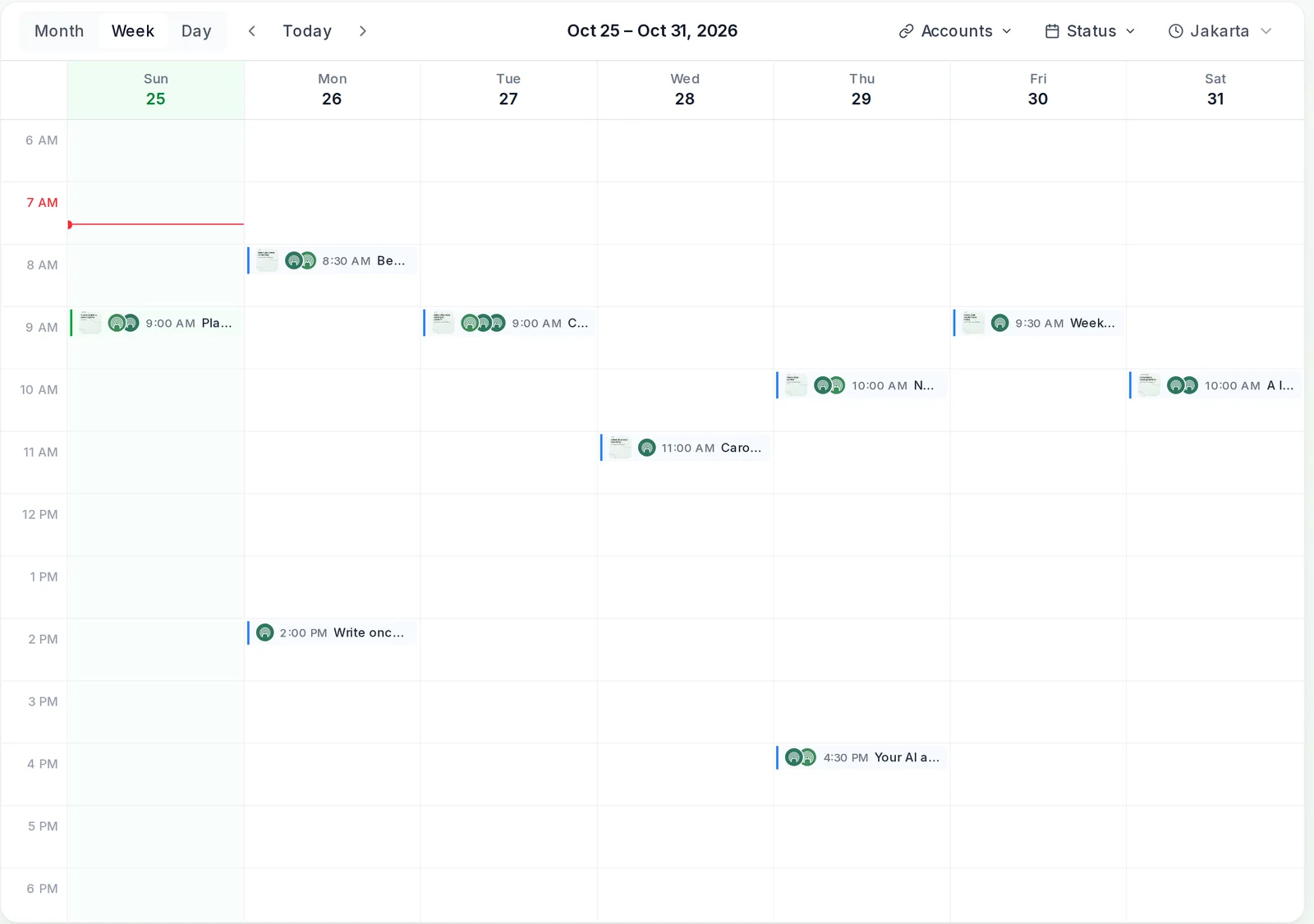
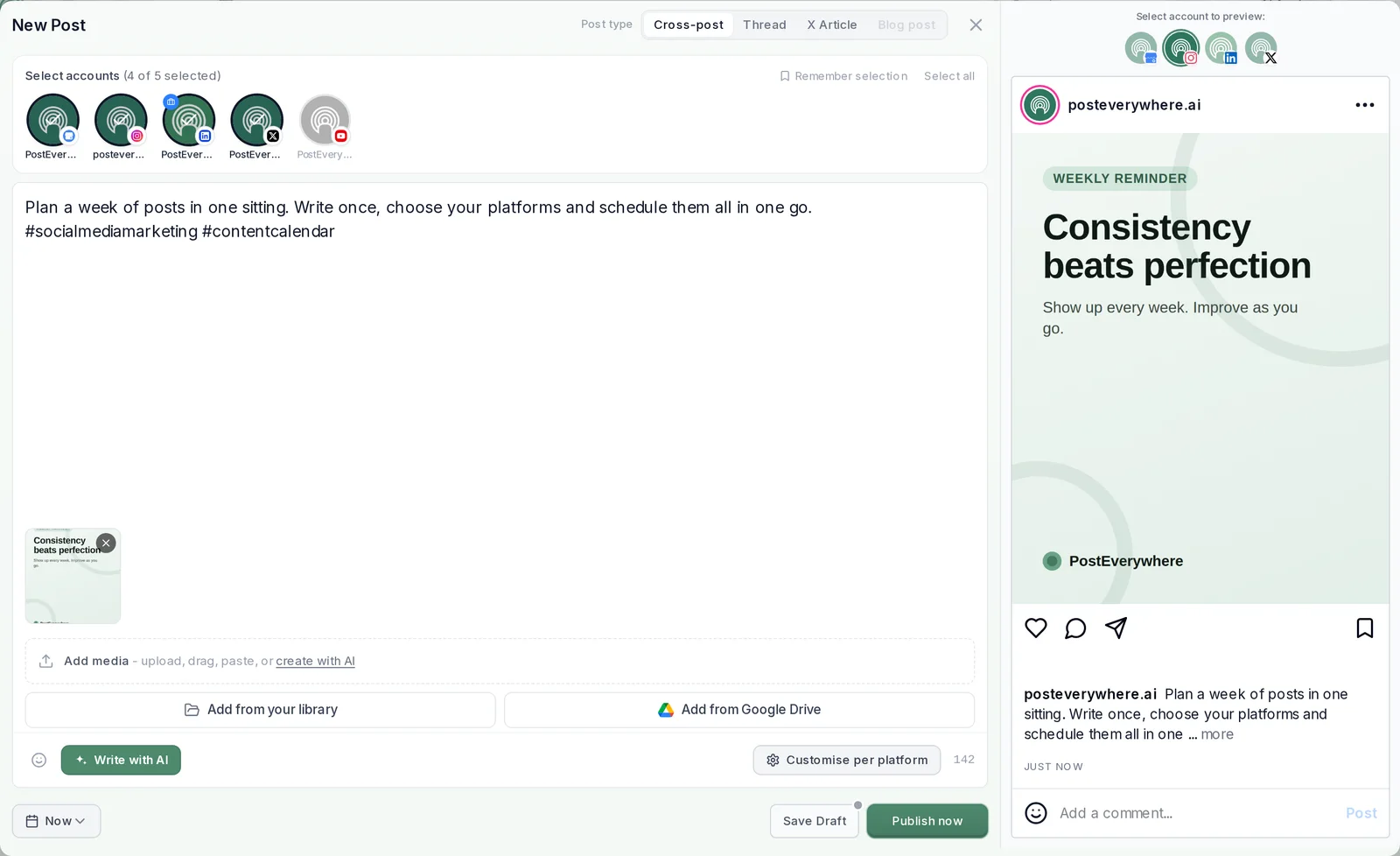
Every post your agent schedules lands in your calendar
Posts your agent creates through the server show up in your PostEverywhere calendar and composer next to everything else, where you or your team can check, edit or delete them before they go out.
Try it
Example prompts for your AI agent
Once the server is connected, paste any of these. For more, browse the agent skills and prompt library.
Plan a week.
“Write five LinkedIn posts from this blog post and schedule one each weekday at 9am New York time.”
Post at the right time.
“Schedule this to Instagram and Facebook at my next best time and tell me which time you picked.”
Fill the queue.
“Add these three tips to my posting queue for X and Threads.”
Fix what failed.
“Retry every post that failed on TikTok this week, and tell me why each one failed.”
Report back.
“How did last month’s posts do on each platform? Which day worked best?”
Repurpose.
“Turn this video script into a YouTube description, an X thread and a LinkedIn post, then save them as drafts for me to check.”
Pricing
The MCP server is included on every plan
Every plan includes the hosted MCP server, the API and the SDK, from $9 a month. Each starts with a 7-day free trial.
Lite
Everything you need for 2 accounts
- 2 social accounts
- Unlimited posts, all top platforms
- 10 AI credits/mo
- 1 team member · 1 workspace
- Full API + hosted MCP server for AI agents
- AI Studio: image, video, captions
Card required, cancel anytime
Starter
For solo creators running one brand
- 5 social accounts
- Unlimited posts, all top platforms
- 25 AI credits/mo
- 2 team members · 1 workspace
- Full API + hosted MCP server for AI agents
- AI Studio: image, video, captions
Card required, cancel anytime
Growth
For content creators
- 10 social accounts
- Unlimited posts, all top platforms
- 100 AI credits/mo
- 3 team members · 1 workspace
- Full API + hosted MCP server for AI agents
- AI Studio: image, video, captions
Card required, cancel anytime
Scale
For teams & small agencies
- 20 social accounts
- Unlimited posts, all top platforms
- 500 AI credits/mo
- 5 team members · 5 workspaces
- Full API + hosted MCP server for AI agents
- AI Studio: image, video, captions
Card required, cancel anytime
Compare every feature on the pricing page.

What customers say


“This product just WORKS, I didn’t have any issues with it and everything went smoothly so far. For us, is a no brainer, I used to manually schedule posts in hours , now I do it in a minute. Love the Claude Connector /MCP , for us it’s worth every dollar.”
Laurentiu Cotet, RomaniaView original “The calendar view is really nice and neatly organized. Originally there wasn’t a way to thread an X post but now there is - that was my biggest complaint but is now fixed. I was able to very easily integrate my agent into it which allows me to quickly draft and schedule dozens of posts in minutes. Super easy, great UI.”
M W, United StatesView original “Thanks for providing this easy to use software that saves me lots of time and therefore makes me more consistent with posting. Good value.”
Lisa, AustraliaView original - ★★★★★Customer
“This tool has truly made my content posting so much easier, I can't work without it. I can schedule my posts days in advance while working on other projects. Set it and forget it.”
Kim V., Content Creator
FAQ
Social media MCP server FAQ
Straight answers about the MCP server: platforms, AI agents, tools, approvals and pricing.
What is a social media MCP server?
A social media MCP server is a connector that lets an AI agent, such as Claude, ChatGPT or Cursor, work with your social media accounts through the Model Context Protocol (MCP). Once it is connected, the agent can publish, schedule, queue and report on posts by calling the server's tools, instead of you copying its writing into each app. In short, it is an MCP server for scheduling social media posts, publishing them and reporting on them. PostEverywhere runs one hosted server at https://mcp.posteverywhere.ai with 44 tools across all top platforms.
Does PostEverywhere have an MCP server?
Yes. The PostEverywhere MCP server is the official hosted server at https://mcp.posteverywhere.ai, and the same server is open source as the @posteverywhere/mcp npm package if you would rather run it on your own machine. It is included on every plan.
Which social media platforms does the MCP server support?
All the platforms PostEverywhere publishes to: Instagram, Facebook, X, LinkedIn, TikTok, Threads, Bluesky, Telegram, Discord, YouTube, Pinterest, WordPress, Google Business Profile. One server covers every account you have connected, so your agent never needs a separate connector per network.
Does it work with ChatGPT?
Yes. In ChatGPT you add https://mcp.posteverywhere.ai as a custom connector and approve access with a one-time sign-in, with no key to paste. Our ChatGPT setup guide walks through each screen.
Does it work with Claude?
Yes. PostEverywhere is listed in Claude’s connector directory, so you can add it in one click on claude.ai and approve access. Claude Code connects with one terminal command.
Which MCP clients are supported?
Any client that supports remote MCP servers: Claude, ChatGPT, Claude Code, Cursor, Windsurf, Cline, Codex, Gemini CLI, Zed and others. Clients that only run local servers can use the npm package with an API key.
How many tools does the MCP server have?
44 on the full server. Connecting through Claude’s connector directory gives you every tool except image generation (43). The PostEverywhere app for ChatGPT has 34. A custom connector you add yourself with the bare address gets the full server in any app.
Is the MCP server free?
MCP for social media costs nothing extra on PostEverywhere: the server is included on every plan, from $9 a month, and you can try it with a 7-day free trial.
Can my AI agent publish without my approval?
Yes, by default posts your agent creates go straight to your calendar and publish at the time it set. If you want a person to sign off first, have the agent save the post as a draft and send it for approval; it then waits for a reviewer.
What is the difference between an MCP server and an API?
The API is for code you write: your program calls endpoints and handles the responses. The MCP server wraps the same features as tools an AI agent can find and call by itself, so you describe what you want in plain words and the agent does the steps. PostEverywhere gives you both on every plan.
Do I need to code to use the MCP server?
No. In Claude and ChatGPT you paste one address, sign in and start asking. Code clients such as Cursor and Claude Code take one command or a short config block.
Should I use the hosted server or run it locally?
Use the hosted server unless you have a reason not to: there is nothing to install or update. Run the npm package locally if your client only supports local servers or you want the server on your own machine.
Still have questions?
Contact us or browse the full FAQ.
$0 due today, cancel anytime
Give your AI agent every social account
Connect Claude, ChatGPT or Cursor to PostEverywhere's MCP server and let it publish for you. 7-day free trial, plans from $9 a month.