


Best time to post on social media
Stop guessing when to post. Research-based posting times for every top platform, plus best times in PostEverywhere based on when your own posts have done best.
Get started from as little as $9 per month. $0 due today, cancel anytime.


 Works with any AI agent


Used by 2,831 happy customers
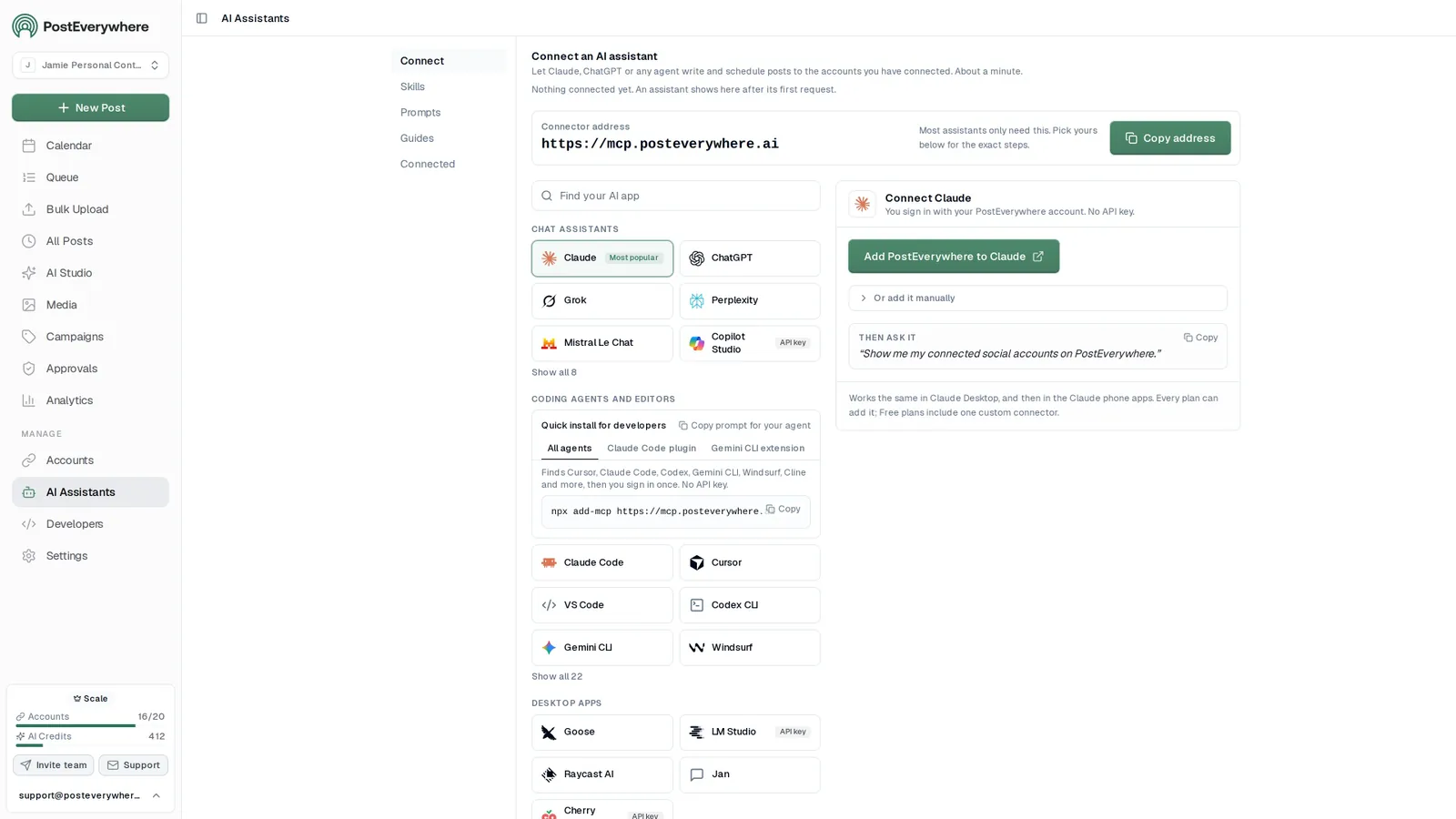
Best times in PostEverywhere
Find the best time to post on every platform
PostEverywhere suggests the times your posts have done best, mixed with what works on each platform while your own history builds. New accounts start with what works across PostEverywhere, and every suggestion is labelled, so you always know which kind it is.
Times are shown in your profile time zone and refresh as new results come in. They are a guide to when your posts have done well, not a promise of more reach.
Where your best times show up
Composer
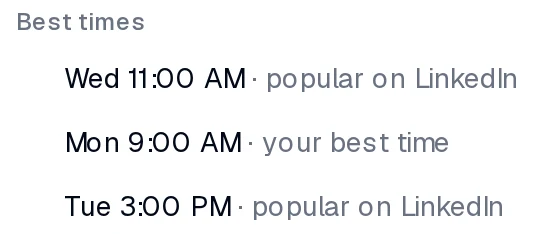
Best times chips when you schedule
Open the When menu on any post and the Best times group lists your next good slots, for example Tue 9:00 AM · your best time. One click sets the time.
Settings › Posting Queue
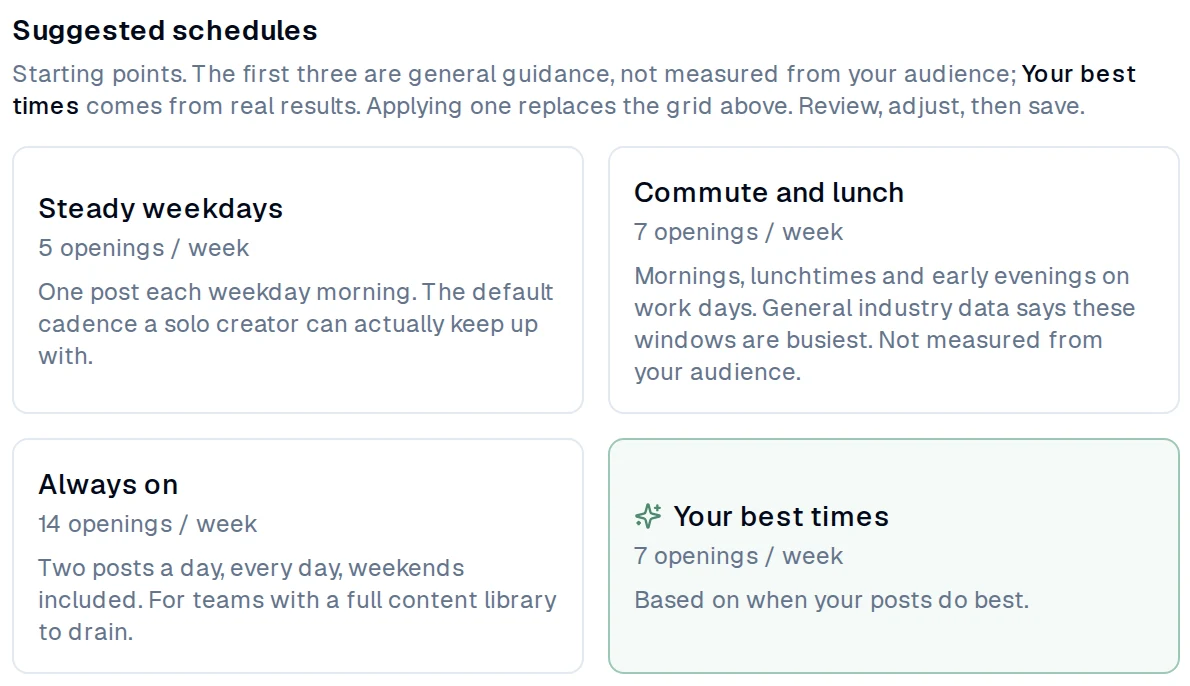
Your best times as a schedule
Your posting queue offers Your best times as a suggested schedule, built from your own results and what works on your platforms, so every post you add takes the next one. Prefer your own times? Keep them, or start from a general preset like Steady weekdays.
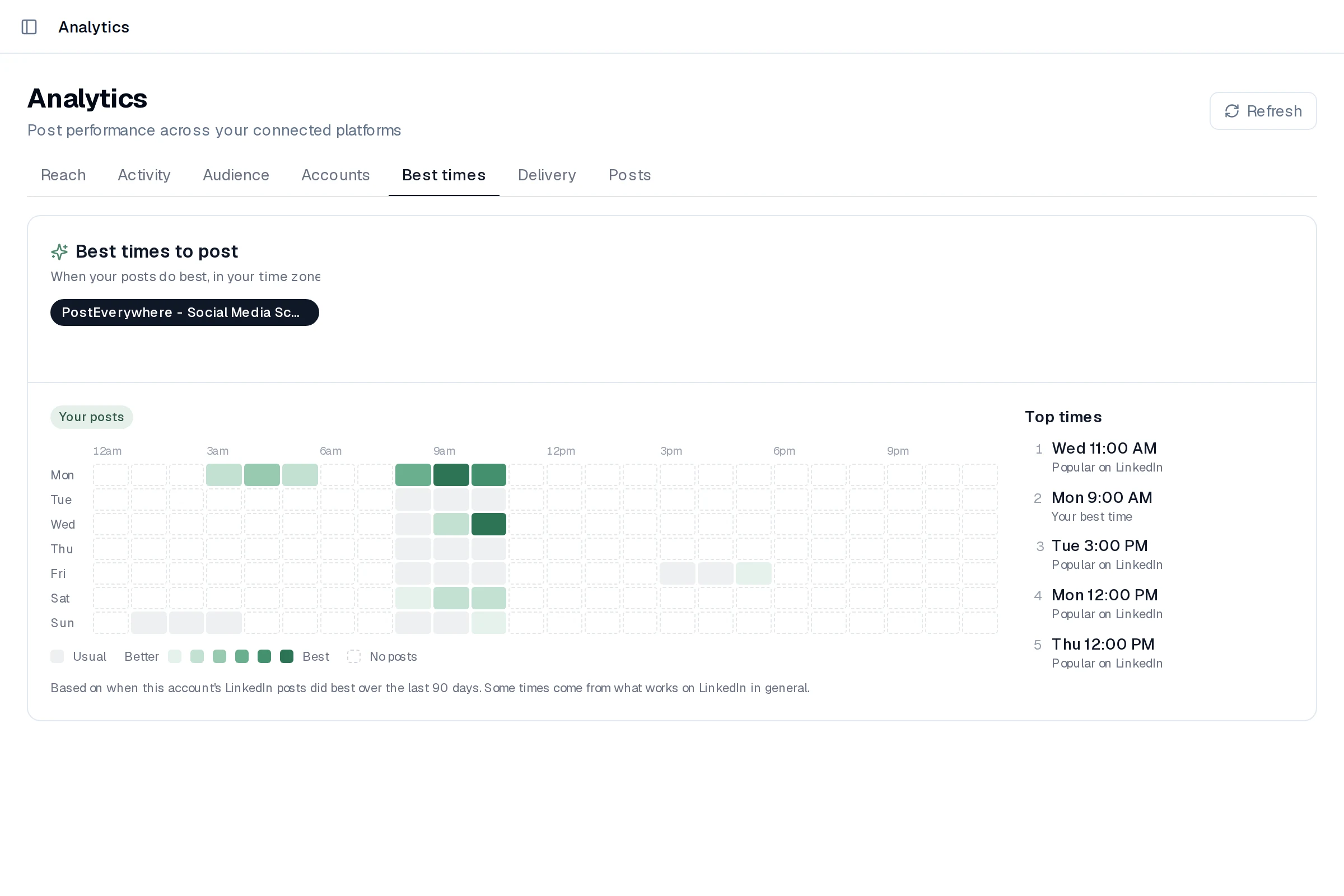
Analytics › Best times
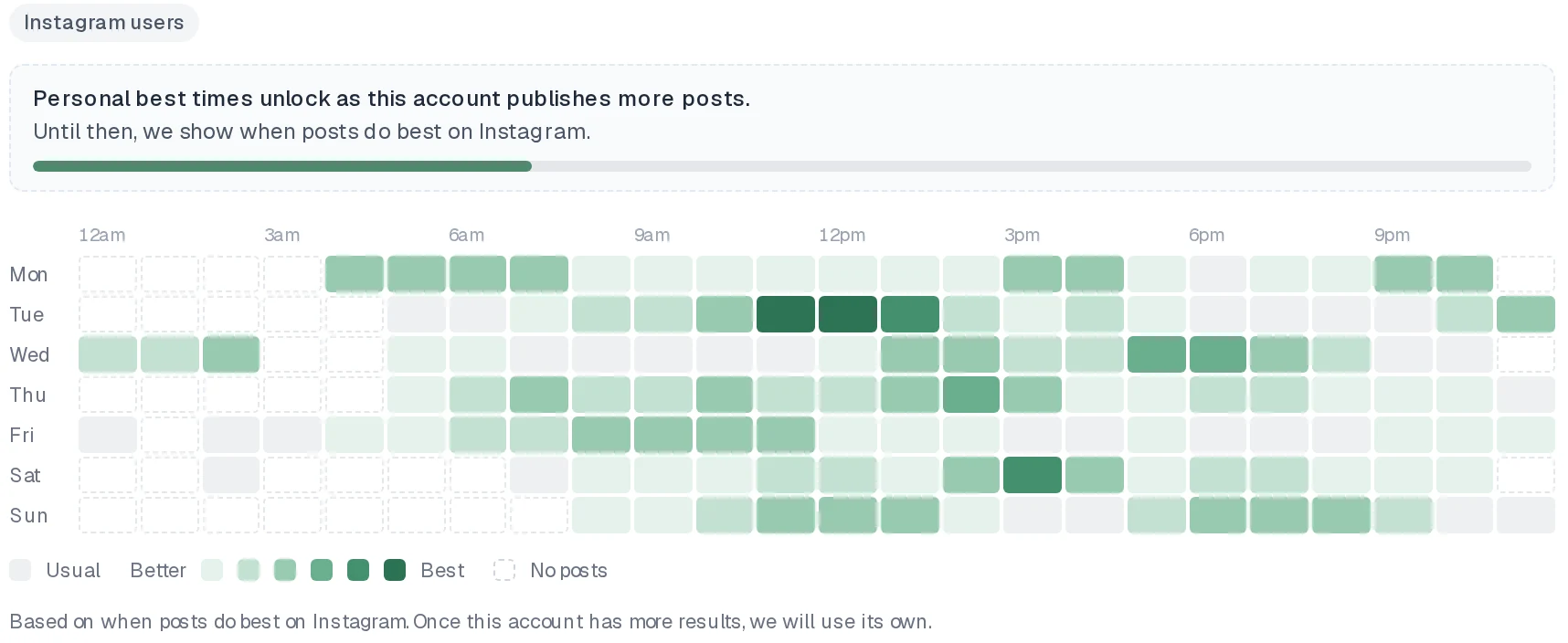
A weekday by hour heatmap
See when each account's posts do best, in your time zone, shaded from Usual to Better to Best, with a Top times list beside it.
Where each suggestion comes from
- Tue 9:00 AM · your best time
Personal, from your own posts
Once an account has 30 or more posts with results from the last 90 days, PostEverywhere compares each post with that account's usual results and ranks the weekday and hour slots. This works best on Instagram, LinkedIn, TikTok, YouTube and Pinterest. Facebook, Threads and Bluesky report too few stats to personalise most accounts.
- Tue 9:00 AM · popular on Instagram
What works across PostEverywhere
New accounts on Instagram, LinkedIn, TikTok and YouTube start with the times that work across PostEverywhere on that platform, each in the poster's own local time. Your personal times take over as your posts build up.
- Tue 9:00 AM · general guidance
General guidance, clearly labelled
X, Telegram, Discord and WordPress, plus other accounts without enough data, get general guidance like the tables below. It is always labelled as guidance, never as your best time.
Best times are included on every plan. Pair them with the posting queue and your posts go out at your best times without you picking a slot each time.
$0 due today, cancel anytime
Quick reference
Best Time to Post on Every Platform at a Glance
There is no single best time to post on social media: every platform keeps its own clock. The times below come from PostEverywhere's Best Time to Post Study 2026, our original data from posts scheduled with PostEverywhere, with each post compared against the same account's usual results so big accounts can't skew the answer. LinkedIn peaks on Wednesday morning, TikTok on weekday mornings, Pinterest in the afternoon, and Instagram and YouTube on Sunday. Each platform guide has the full day-by-day table and the number of posts behind it. Use them as a starting point and schedule your posts in PostEverywhere at the times that suit your audience. Use our free best time to post calculator to find your audience's peak activity times.
| Platform | Best times | Best days | Avoid |
|---|---|---|---|
| Sun 7-10 PM, Thu noon-3 PM | Sunday, Thursday, Friday | Wednesday (days are close) | |
| TikTok | Weekdays 9 AM-noon or around 3 PM | Tuesday, Saturday | Friday; evenings 6-9 PM |
| Wed 9 AM-noon (10 AM best) | Wednesday, Saturday | Thursday | |
| Afternoons 3-6 PM (early data) | Sunday, Saturday | Midweek is flat | |
| YouTube | Sun 8-11 AM, Fri 3-6 PM | Sunday, Friday (days are close) | Evenings 6-9 PM |
| X (Twitter) | Weekdays 9 AM-3 PM (early data) | Thursday, Sunday | Evenings and overnight |
| Threads | 9 AM-noon weekdays, Thu 9 AM | Tuesday, Wednesday, Thursday | Evenings |
| Noon-6 PM (3-6 PM best) | Monday | Evenings 6-9 PM | |
| Bluesky | 9 AM-noon weekdays | Tuesday, Wednesday, Thursday | Overnight, weekends |
Local time. All times are the poster's local time. Based on posts scheduled with PostEverywhere between December 2025 and October 2026. Threads and Bluesky times come from the studies credited in their guides.
By platform
Best Time to Post: Platform-by-Platform Breakdown
Each network rewards a different rhythm. Open any platform's guide for the detailed posting time research, then check the times against your own results on the Posts tab, which shows when each post went out and how it did.
Behind the scenes: how we roast a new single-origin batch
northwindcoffee 2d ago
18.2K 1.4K 96 211
Five things we learned opening our second roastery
Northwind Coffee 4d ago
9.6K 312 41 27
The new autumn blend is here. Tap for the tasting notes
northwind.coffee Sep 28
7.9K 864 52
Example data
Best time to post on Instagram
- Times
- Sun 7-10 PM, Thu noon-3 PM
- Days
- Sunday, Thursday, Friday
Best time to post on TikTok
- Times
- Weekdays 9 AM-noon or around 3 PM
- Days
- Tuesday, Saturday
Best time to post on LinkedIn
- Times
- Wed 9 AM-noon (10 AM best)
- Days
- Wednesday, Saturday
Best time to post on Facebook
- Times
- Afternoons 3-6 PM (early data)
- Days
- Sunday, Saturday
Best time to post on YouTube
- Times
- Sun 8-11 AM, Fri 3-6 PM
- Days
- Sunday, Friday (days are close)
Best time to post on X (Twitter)
- Times
- Weekdays 9 AM-3 PM (early data)
- Days
- Thursday, Sunday
Best time to post on Threads
- Times
- 9 AM-noon weekdays, Thu 9 AM
- Days
- Tuesday, Wednesday, Thursday
Best time to post on Pinterest
- Times
- Noon-6 PM (3-6 PM best)
- Days
- Monday
Best time to post on Bluesky
- Times
- 9 AM-noon weekdays
- Days
- Tuesday, Wednesday, Thursday
Auto-scheduling
Schedule posts at the best time automatically
Set your posting times once as recurring queue openings, for example weekdays at 9:00. Every post you add to the queue takes the next free opening, so it goes out at a time you chose without you picking a slot each time.
- Set your openings once. Add the times you want on each day in the posting queue. Different days can have different times, and editing the openings never moves posts already queued. Run a free social media audit to benchmark your current performance first.
- Start from your best times. Not sure where to start? The posting queue suggests Your best times, based on when your posts have done best (or what works across PostEverywhere on each platform while your accounts are new). The Steady weekdays, Commute and lunch and Always on presets are general starting points if you prefer. Auto-scheduling then handles the timing for every post you add.
- Fill it with posts worth the slot. Timing matters, but it's not everything. A great post at a bad time will still outperform a mediocre post at the perfect time, so pair your schedule with AI content generation and publish quality content at the times you choose.
- Plan, publish and review. Schedule to all top platforms from one visual calendar, let the queue handle the timing, and track your results with cross-platform analytics.
$0 due today, cancel anytime
Changing your openings does not move posts already in the queue. They keep the time they were given.
- Monday 09:00 17:00
- Tuesday 09:00
- Wednesday 09:00
- Thursday 09:00
- Friday 09:00
- SaturdayNo openings
Timing through your AI agent
Ask Claude or ChatGPT to post at your best time
Your agent sees the same best times and posting queue you do. Ask it when to post and it reads your best times, or tell it to post at your best time and it schedules for the next one, then tells you which time it picked and what it is based on.
For builders: the MCP server has a get_best_times tool, create_post and schedule_post accept schedule_at: "best_time", and the REST API has GET /v1/best-times. See the MCP docs.
- Connect any AI agent.
- Add PostEverywhere to ChatGPT, Claude, Grok, Perplexity, Cursor or any other AI app that supports MCP with one address. It takes seconds.
- Ask in plain English.
- “Write a post about our new menu and schedule it on Instagram at my best time.” Your agent writes every post for you.
- It schedules and publishes.
- Your agent can post now, schedule for later or save a draft for you to review. Every post lands in your calendar, and scheduled posts go out on time through each network's official API.
$0 due today, cancel anytime
Connect your AI agent
Choose your AI agent and connect in seconds.
Works on every Claude plan, including free. Full Claude guide
- 1
Add to Claude
One click from Claude’s connector directory.
- 2
Sign up or sign in
Takes seconds, then you’re sent straight back.
- 3
Ask Claude
“Plan and schedule my posts for next week.”
Ask your agent
See all 15 skills and prompts“Look at my PostEverywhere queue for the next two weeks and tell me where the gaps are. Then suggest posts to fill them.”
View skill“How did my posts do last month? Use PostEverywhere analytics and tell me which platform and which kind of post worked best.”
View skill“Use PostEverywhere to plan next week of posts for all my connected accounts. Suggest one post a day, show me the plan, then schedule it when I say yes.”
View skill
FAQ
Frequently Asked Questions
Straight answers about posting times, consistency and finding your own best time.
What is the best time to post on social media?
It depends on the platform. In PostEverywhere's Best Time to Post Study 2026, our original data from posts scheduled with PostEverywhere, LinkedIn does best on Wednesday from 9 AM to noon, TikTok on weekday mornings and around 3 PM, Pinterest from 3 to 6 PM, Instagram on Sunday from 7 to 10 PM and YouTube on Sunday from 8 to 11 AM. The early evening, 6 to 9 PM, was one of the weakest times on TikTok, YouTube, X and Pinterest.
What is the best time to post on social media today?
On a weekday, post to LinkedIn and TikTok between 9 AM and noon, X between 9 AM and 3 PM, Pinterest between 3 and 6 PM, and Instagram at lunchtime or after 9 PM. At the weekend, post to YouTube on Sunday morning, Instagram on Sunday evening and LinkedIn on Saturday morning. All times are your local time.
What is the best day to post on social media?
It differs by platform: Wednesday on LinkedIn, Tuesday on TikTok, Monday on Pinterest, Sunday on Instagram and Facebook, and Thursday on X. YouTube's days are almost level. On most platforms the gap between the best and worst day is small, so posting consistently matters more than the day you pick.
Do posting times really matter?
Yes, but less than content quality. Posting when your audience is online helps, but a great post at a bad time will still outperform a mediocre post at the perfect time. Use best times as a starting point, then analyze your own audience data.
Should I post at the same time every day?
Consistency matters more than perfection. Pick 2-3 time slots that work for your schedule and stick to them. Your audience will learn when to expect your content, improving engagement over time.
How do I find MY best time to post?
Use your platform's native analytics (Instagram Insights, TikTok Analytics, etc.) to see when your followers are most active, or open Analytics › Best times in PostEverywhere to see when your own posts have done best. Then use those times as your posting queue. Try our free best time to post calculator, run a social media audit, or build a comprehensive content strategy with our content calendar generator and content pillar planner.
Do best times differ by industry?
Yes. B2B audiences are most active during work hours (9 AM - 5 PM). B2C audiences engage more in evenings and weekends. Analyze your specific audience behavior rather than relying solely on general benchmarks.
What about time zones?
Always post in your audience's time zone, not yours. If you have a global audience, consider posting at times that catch multiple time zones (e.g., 12 PM EST catches US East Coast lunch and EU evening).
Should I schedule posts or post manually?
Scheduling is better for consistency. It lets you batch content creation, post at optimal times even when you're busy, and maintain a regular posting cadence. Use a social media scheduler to automate this.
How does PostEverywhere work out my best time to post?
PostEverywhere looks at when your posts have done best and suggests those times. It takes each account's published posts from the last 90 days, compares every post with that account's usual results, and ranks the weekday and hour slots. It uses engagement on most platforms, views on TikTok and YouTube, and impressions on Pinterest. Times are shown in your profile time zone.
How many posts do I need?
An account needs 30 or more posts with results from the last 90 days for personal best times. The newest few days of posts are left out so their results have time to settle. Until then, PostEverywhere shows what works across PostEverywhere on that platform, or general guidance.
Which platforms get personal best times?
Best times are personal once an account has about 30 posts with results from the last 90 days. Most accounts that reach that are on Instagram, LinkedIn, TikTok, YouTube and Pinterest. Facebook, Threads and Bluesky can too, though their stats are often thinner. X, Telegram, Discord, WordPress and Google Business Profile get general guidance.
What do new accounts see?
New Instagram, LinkedIn, TikTok, YouTube and Pinterest accounts start with what works across PostEverywhere on that platform, labelled for example "popular on Instagram". Other platforms show general guidance, labelled as such. Analytics › Best times shows that personal best times unlock as the account publishes more posts.
Can my AI agent schedule at my best time?
Yes. Connect Claude, ChatGPT or another agent to the PostEverywhere MCP server and ask it to post at your best time. The get_best_times tool returns your best slots and what each is based on, and create_post or schedule_post with schedule_at: "best_time" schedules for the next one at least 30 minutes ahead. Developers can call GET /v1/best-times on the REST API.
Does it guarantee more reach?
No. Best times are based on when your posts have done best, so they are a good guide, not a guarantee. Reach still depends mostly on the post itself and on each platform's algorithm.
Still have questions?
Contact us or browse the full FAQ.
$0 due today, cancel anytime
💡Related Features & Tools

What customers say


“This product just WORKS, I didn’t have any issues with it and everything went smoothly so far. For us, is a no brainer, I used to manually schedule posts in hours , now I do it in a minute. Love the Claude Connector /MCP , for us it’s worth every dollar.”
Laurentiu Cotet, RomaniaView original “The calendar view is really nice and neatly organized. Originally there wasn’t a way to thread an X post but now there is - that was my biggest complaint but is now fixed. I was able to very easily integrate my agent into it which allows me to quickly draft and schedule dozens of posts in minutes. Super easy, great UI.”
M W, United StatesView original “Thanks for providing this easy to use software that saves me lots of time and therefore makes me more consistent with posting. Good value.”
Lisa, AustraliaView original - ★★★★★Customer
“This tool has truly made my content posting so much easier, I can't work without it. I can schedule my posts days in advance while working on other projects. Set it and forget it.”
Kim V., Content Creator