


One social media analytics dashboard for every platform
Track views, likes, shares, and engagement wherever each platform reports them, from one analytics dashboard. Stop switching between apps to understand what's working.
Get started from as little as $9 per month. $0 due today, cancel anytime.


 Works with any AI agent


Used by 2,831 happy customers
One dashboard, every platform
Your social media dashboard for every platform, in one place
PostEverywhere pulls engagement data from the platforms that report it into a single analytics view. See which posts drive the most engagement, compare performance across Instagram, TikTok, LinkedIn, and more, without logging into each app separately.
- Cross-platform metrics.
- Views, impressions, likes, comments and shares for every post, wherever each platform reports them. One dashboard instead of a tab per app.
- Platform filtering.
- Filter your posts by Instagram, TikTok, LinkedIn, Facebook, YouTube, X, or Threads. Isolate platform-specific data or compare channels side by side.
- Engagement rate tracking.
- See engagement rate alongside reach on the platforms that report both. Identify top-performing content and understand what drives interaction on each platform.
Publishing activity
Posts published per week, by platform
- 3
- Published today
- 2
- Scheduled today
- 14
- Published this week
- 9
- Scheduled this week
Data-driven publishing
Know exactly when to post
Your analytics show which posts landed and when each one went out. Use that to schedule posts on the days that work for your audience and plan your content calendar around your own results, not guesswork. See our best time to post guide for platform-specific recommendations.
- Your own timing data.
- Sort every published post by views, likes, comments or shares and see when each one went out. Spot the days your audience responds to, then set your posting queue to match.
- Performance history.
- Review how past posts performed across platforms. Use historical data to refine your content strategy over time.
- Content pattern analysis.
- Compare how carousels, Reels, videos and text posts perform on each platform. Double down on what works.
Behind the scenes: how we roast a new single-origin batch
northwindcoffee 2d ago
18.2K 1.4K 96 211
Five things we learned opening our second roastery
Northwind Coffee 4d ago
9.6K 312 41 27
The new autumn blend is here. Tap for the tasting notes
northwind.coffee Sep 28
7.9K 864 52
Example data
Scale your analytics
Track performance across every account
Managing multiple accounts? Analytics work across all connected profiles, so you can compare performance between brands and clients, and check that every scheduled post actually went out.
- Multi-account analytics.
- Track performance across all connected accounts, up to 20 profiles. Compare metrics between brands and clients from a single view.
- Delivery tracking.
- The Delivery tab shows what published and what failed on each platform, with the reasons grouped by cause, so a failed post never goes unnoticed.
- Cross-platform comparison.
- See how the same content performs on different platforms. Find where your audience engages most and allocate effort accordingly.
By platform
- Instagram64 sent
- LinkedIn48 sent
- X40 sent
- Facebook31 sent
- TikTok1 of 22 failed
- YouTube12 sent
Why posts failed
Grouped by cause, most common first
This video is outside the length TikTok allows for this account.
Example data
Analytics through your AI agent
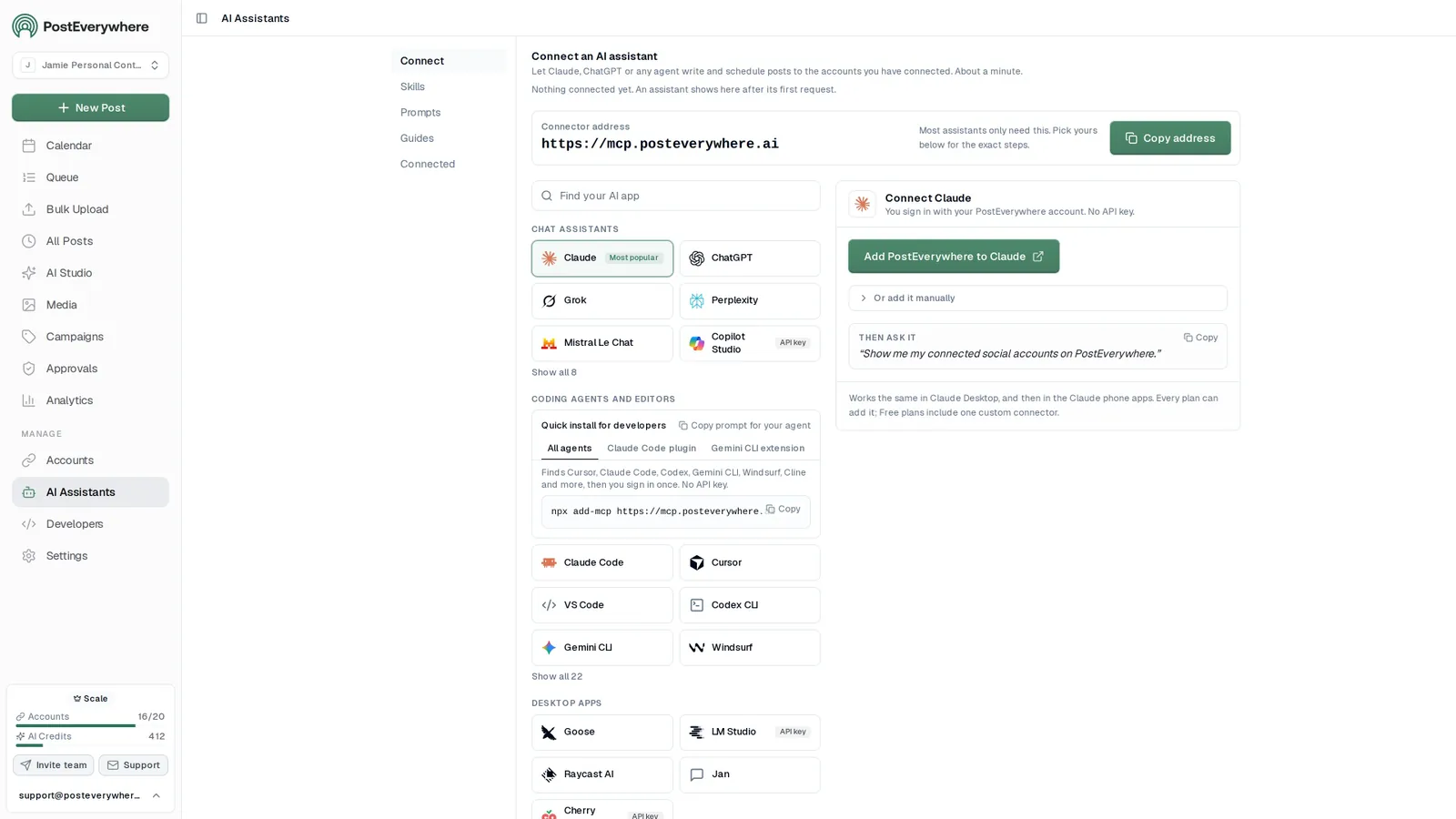
Ask ChatGPT, Claude or any AI agent how your posts did
Your agent reads the same post analytics you see in the dashboard, so a question in plain English comes back as a short report: which platform and which kind of post worked best, and what to post more of next week.
- Connect any AI agent.
- Add PostEverywhere to ChatGPT, Claude, Grok, Perplexity, Cursor or any other AI app that supports MCP with one address. It takes seconds.
- Ask in plain English.
- “How did my posts do last month? Tell me which platform and which kind of post worked best.” Your agent writes every post for you.
- It schedules and publishes.
- Your agent can post now, schedule for later or save a draft for you to review. Every post lands in your calendar, and scheduled posts go out on time through each network's official API.
$0 due today, cancel anytime
Connect your AI agent
Choose your AI agent and connect in seconds.
Works on every Claude plan, including free. Full Claude guide
- 1
Add to Claude
One click from Claude’s connector directory.
- 2
Sign up or sign in
Takes seconds, then you’re sent straight back.
- 3
Ask Claude
“Plan and schedule my posts for next week.”
Ask your agent
See all 15 skills and prompts“How did my posts do last month? Use PostEverywhere analytics and tell me which platform and which kind of post worked best.”
View skill“Write a short weekly report from my PostEverywhere data that I can paste into an email to my team.”
View skill“Find my best posts from the last 3 months in PostEverywhere and schedule new versions.”
View skill
Metrics by platform
What PostEverywhere tracks on each platform
Every network shares a different set of numbers through its official API, and some depend on the account type you connect. This is exactly what lands in your PostEverywhere analytics for each one.
| Platform | Post analytics in PostEverywhere |
|---|---|
| Views, impressions, likes, comments and saves for each post. | |
| Likes, comments, shares, clicks and video views for each post. Facebook does not share post reach or impressions. | |
| X (Twitter) | Impressions, likes, replies, reposts and bookmarks, pulled on demand with the Refresh button. |
| Impressions, clicks, likes, comments and shares for company Pages. Personal profiles do not report post analytics. | |
| TikTok | Views, likes, comments and shares. |
| Threads | Views, likes, replies and reposts, for accounts connected since 30 August 2026. |
| Bluesky | Likes, replies and reposts. Bluesky does not report views. |
| YouTube | Views, likes and comments. |
| Impressions, saves, Pin clicks and outbound clicks for Business and Creator accounts. Personal accounts can post but get no analytics. | |
| Telegram, Discord, WordPress and Google Business Profile | No post analytics. These channels publish normally and show in delivery tracking. |
Numbers appear wherever the platform reports them. Delivery status (sent or failed, and why) shows for every platform on the Delivery tab.
- Instagramnorthwind.coffeenorthwind.roastery
- LinkedInNorthwind Coffee
- TikToknorthwindcoffee
- YouTubeNorthwind Coffee
- Xnorthwindnorthwind_eu
- FacebookNorthwind Coffee
- BlueskyNo accounts connected
Up to 20 accounts on Scale. Your AI agent can post to any of them.
Why it matters
Why You Need Social Media Analytics in 2026
Posting without analytics is flying blind. Social media analytics shows you exactly which posts drive engagement and which platforms deliver the best ROI, so you make decisions backed by real performance data instead of guesses. If you're still evaluating options, our roundup of the best social media analytics tools compares the leading platforms side by side.
Organize your posts by campaigns and track their performance
Product Launch
Two-week launch across every channel
Total: 12Scheduled: 7Posted: 5
Created 9/28/2026
Weekly Tips
One quick tip every weekday
Total: 20Scheduled: 10Posted: 9Failed: 1
Created 9/1/2026
Holiday Sale
Offers and countdown posts
Total: 8Scheduled: 8Posted: 0
Created 9/30/2026
One dashboard, not seven apps. Checking Instagram, TikTok, LinkedIn, Facebook, YouTube, X and Threads analytics separately wastes hours every week. PostEverywhere pulls metrics from the platforms that report them into one view, so you compare performance, spot trends and act straight away.
Campaigns at a glance. Group posts into campaigns, such as a launch or a weekly tips series, through the API, MCP or CLI, and the Campaigns page shows how many are scheduled, posted or failed in each one. See how it stacks up against other social media management tools.
Pair it with free tools. Combine your analytics with the engagement rate calculator, industry benchmarks and the social media audit for a complete picture of your social presence.
Follow posts to conversions. Add UTM parameters to the links you post to track conversions in Google Analytics and measure ROI down to the individual post. Explore all analytics features in detail.
Analytics that drive results
Turn social media analytics into actionable strategy
Social media analytics aren't just vanity metrics. When you understand which content resonates on each platform, you stop producing posts that fall flat and focus on the formats that actually drive engagement, clicks and conversions. PostEverywhere connects your analytics directly to your scheduling workflow.
- Find what resonates. Sort published posts by views, likes, comments or shares and note the topics, formats and days behind your best ones.
- Repurpose the winners. See a post performing well? Send it to your other platforms with cross-posting, rewritten for each network.
- Adjust your calendar. Notice engagement drops at certain times? Move posts in your content calendar with a few clicks.
- Make more of what works. Use the AI content generator to create more of the content types your analytics show are working, and let it draft the captions while you focus on strategy.
- Benchmark the result. Compare your numbers with industry averages, or calculate your engagement rate for any profile.
$0 due today, cancel anytime
Post to (5 of 8 selected)
Select allLaunch week is here
Plan once, publish everywhere. Schedule your posts to Instagram, LinkedIn, X, Facebook and Threads from one calendar.
What will you ship this week? #contentmarketing #socialmedia
 spring-blend.jpg
How our team plans a whole launch week in one sitting, and the checklist we use for every network.
Launch week, planned in one sitting. The checklist we use for every network 👇
FAQ
Social Media Analytics FAQ
Straight answers about metrics, platforms and plans.
What is a social media analytics dashboard?
A social media analytics dashboard collects performance data, views, likes, comments, shares, saves, clicks, and engagement rates, from your social media accounts and displays it in one place. Instead of checking each platform separately, you see all your metrics in a unified dashboard.
Which platforms does PostEverywhere track analytics for?
PostEverywhere pulls post analytics from Instagram, Facebook, LinkedIn, TikTok, YouTube, X (Twitter), Threads, Pinterest and Bluesky into a single dashboard so you can compare performance side by side. What each platform reports varies: Facebook does not share post reach or impressions, X metrics refresh when you press Refresh, LinkedIn reports for company Pages only and Pinterest for Business and Creator accounts. Telegram, Discord, WordPress and Google Business Profile do not provide post analytics.
What metrics can I track with social media analytics?
PostEverywhere tracks views, impressions, likes, comments and shares for each post wherever the platform reports them, plus reach and engagement rate on the Reach tab and daily follower counts on the Audience tab. Post metrics refresh every 4 hours, and the Delivery tab shows anything that failed to publish and why.
How do social media analytics help improve my content strategy?
Analytics reveal which content types, topics, formats, and posting times drive the most engagement. By identifying patterns in your top-performing posts, you can create more of what your audience responds to and stop wasting time on content that underperforms.
Can I compare analytics across different platforms?
Yes. PostEverywhere lets you filter analytics by platform, account, or date range. Compare how the same post performs on Instagram versus LinkedIn, or see which platform drives the most engagement for your brand.
How is PostEverywhere different from native platform analytics?
Native analytics only show data for one platform at a time. PostEverywhere combines metrics from your connected platforms into one view, lets you compare cross-platform performance, and connects analytics directly to your scheduling workflow so you can act on insights immediately.
Do I need a business account for social media analytics?
For some platforms, yes. Instagram needs a Professional (Business or Creator) account, Facebook works with Pages, Pinterest reports analytics only for Business or Creator accounts, and LinkedIn analytics cover company Pages only, not personal profiles. YouTube, X, TikTok, Threads and Bluesky report post metrics for standard accounts. Switching to a business or creator account is free on the platforms that offer one.
How much does PostEverywhere analytics cost?
PostEverywhere includes analytics in all plans: Lite at $9/month (2 accounts), Starter at $19/month (5 accounts), Growth at $29/month (10 accounts), and Scale at $39/month (20 accounts). All plans include unlimited posts, AI tools, and cross-platform analytics with a 7-day free trial.
Still have questions?
Contact us or browse the full FAQ.
$0 due today, cancel anytime

What customers say


“This product just WORKS, I didn’t have any issues with it and everything went smoothly so far. For us, is a no brainer, I used to manually schedule posts in hours , now I do it in a minute. Love the Claude Connector /MCP , for us it’s worth every dollar.”
Laurentiu Cotet, RomaniaView original “The calendar view is really nice and neatly organized. Originally there wasn’t a way to thread an X post but now there is - that was my biggest complaint but is now fixed. I was able to very easily integrate my agent into it which allows me to quickly draft and schedule dozens of posts in minutes. Super easy, great UI.”
M W, United StatesView original “Thanks for providing this easy to use software that saves me lots of time and therefore makes me more consistent with posting. Good value.”
Lisa, AustraliaView original - ★★★★★Customer
“This tool has truly made my content posting so much easier, I can't work without it. I can schedule my posts days in advance while working on other projects. Set it and forget it.”
Kim V., Content Creator
Related Features & Tools
Explore related features and guides to get the most out of PostEverywhere.
AI Social Media Manager
AI that plans, writes and schedules your posts.
Social Media Scheduler
Schedule posts across all top platforms from one dashboard.
Content Calendar
Visual drag-and-drop calendar for planning and scheduling.
Analytics Features
Detailed look at every analytics feature in PostEverywhere.
Best Time to Post
Find optimal posting times for every platform.
Cross-Platform Publishing
Publish to all platforms at once with format optimization.
Social Media for Coaches
See which launch content actually filled the cohort.
Social Media for Financial Advisors
Compliant posts for advisers and accountants, planned around the financial year.
Engagement Rate Calculator
Calculate engagement rate for any social media profile.
Social Media Benchmarks
Compare your performance against industry averages.
Social Media Audit
Full profile health check across all platforms.
UTM Link Builder
Track campaign conversions with UTM parameters.
AI Content Generator
Generate captions, images, and content with AI.
Multi-Account Management
Manage up to 20 accounts from one workspace.