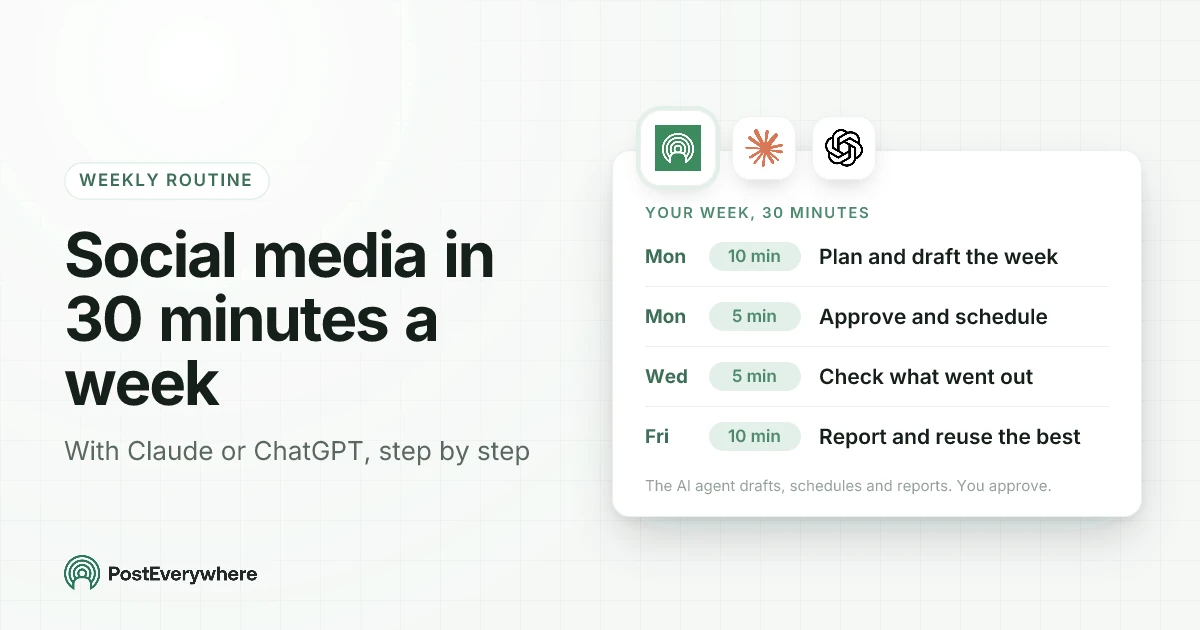
A weekly social media routine with an AI agent takes about 30 minutes: 10 minutes on Monday to plan and draft the week, 5 minutes to approve and schedule it, 5 minutes on Wednesday to check what went out, and 10 minutes on Friday to read the results and reuse what worked. Claude or ChatGPT does the writing, scheduling and checking through a scheduler like PostEverywhere. You make the decisions.
That split is the whole idea. Most people who try to "use AI for social media" end up pasting captions from a chat window into five different apps, which saves the writing time and keeps every other chore.
Once the agent can reach your scheduler, the chores go too: it can see your accounts, find your best times, save drafts, schedule them, notice a failed post and pull the numbers on Friday.
Below is the routine, with the exact prompts, what the agent does behind each one, and the places where a person should always look before anything goes out.
Written by Jamie Partridge, Founder of PostEverywhere.
The routine at a glance
| When | Time | You say | The agent does |
|---|---|---|---|
| Monday | 10 min | Plan and draft next week | Reads your accounts, what's already booked and your best times, then saves a draft for each post with a caption per platform |
| Monday | 5 min | Approve and schedule | Makes your edits, then schedules the drafts you approved |
| Wednesday | 5 min | Check the week so far | Lists what published and what failed, retries what it can and tells you what needs you |
| Friday | 10 min | Report and reuse | Summarises results per platform, names the posts that did best and drafts fresh versions for later |
Thirty minutes is realistic for one brand posting once a day on three or four platforms. Two posts a day, or a second brand, adds about ten minutes, mostly on Monday.
If you run several clients, the same routine works per client: see running it for several clients below.
Before your first week: 15 minutes of setup
You do this once. It's what makes the weekly prompts short.
- Connect your AI agent. In Claude, add PostEverywhere from the connector directory (how connectors work). In ChatGPT, open PostEverywhere in ChatGPT's Plugins and select Connect. Both take about a minute and need no API key. The setup guides for Claude and ChatGPT cover the details.
- Connect your social accounts in PostEverywhere. The agent can send you a link to connect one, but you complete the sign-in yourself.
- Tell the agent how you sound. In Claude, the PostEverywhere Brand Kit holds your voice, words to avoid and hashtags, and Claude reads it with the
get_brandtool. In ChatGPT, which doesn't have that tool yet, put the same notes in a project's instructions so every chat in it follows them (Projects in ChatGPT). Three things matter most: how you'd describe your tone in three words, a sentence that sounds exactly like you, and the words you never use. - Set your posting times. Either set weekly slots in the posting queue, or let the agent use your best times to post, which PostEverywhere works out from when your own posts have done best. New accounts start with what works across PostEverywhere on each platform.
- If someone else signs off posts, turn on approvals for the workspace. Drafts then wait for an owner or admin instead of publishing.
Haven't connected an agent yet? PostEverywhere works with Claude, ChatGPT and any other MCP client, and every plan includes it. Start a 7-day free trial.
Monday, 10 minutes: plan and draft the week
Start the week with one prompt that gives the agent the context it can't guess: what's happening this week and what you want people to do.
Plan my social posts for next week in PostEverywhere.
First check which accounts are connected and what's already scheduled.
This week: we're launching [thing] on Wednesday, and I want sign-ups for [offer].
One post a day, Monday to Friday, on Instagram, LinkedIn and X.
Write each platform's caption separately, keep my brand voice, and save
everything as drafts at my best times. Don't schedule anything yet.
Here's what happens behind that prompt:
- The agent lists your connected accounts (
list_accounts) and reads what's already booked, so it doesn't stack a new post on top of an existing one. - It asks PostEverywhere for your best times (
get_best_times) for each account. - In Claude, it reads your Brand Kit (
get_brand) before writing. - It saves each post as a draft (
create_postwithdraft: true), with a different caption per platform: a short hook and link for X, a longer, more professional version for LinkedIn, and a caption with hashtags for Instagram.
The last line of the prompt, "save everything as drafts", is the one that matters. Drafts are visible in your PostEverywhere calendar and go nowhere until you say so.
Two habits make Monday faster:
- Feed it real material. Paste the blog post, the product update or the event details. An agent writing from your own source material produces far better posts than one inventing angles. Our guide to repurposing content covers what to pull out of a long piece.
- Ask for one platform-native version, not one caption copied five times. The same caption pasted everywhere is one of the few things that really does hurt reach when you cross-post.
If you use Claude with our Claude skills for social media, "plan my content calendar for next week" triggers the planning skill, which already knows to check accounts, find best times and save drafts. The prompt above does the same job in any agent.
Monday, 5 minutes: approve and schedule
Open the week in the content calendar and read the drafts. This is the step you don't hand over. The agent is good at a first draft and bad at knowing that a client hates exclamation marks or that Thursday's offer was pulled.
Make changes in plain language:
Tuesday's LinkedIn post is too salesy. Lead with the customer problem instead.
Move Thursday's post to Friday, and drop the X version of Wednesday's.
Then schedule all the drafts for next week.
The agent edits the drafts (update_post) and schedules them (schedule_post). If you'd rather not pick times at all, ask it to schedule each draft at its next best time; PostEverywhere chooses the slot and the agent tells you which one it picked.
If approvals are on and the connection belongs to a team member, the drafts go for review instead, and an owner or admin approves them. A reviewer who sends a post back has to leave a note, so the agent always knows what to change.
Wednesday, 5 minutes: check what went out
Mid-week is when small problems surface: an expired Instagram connection, a video in the wrong format, a post that X refused. One prompt finds them:
What's gone out this week in PostEverywhere, and did anything fail?
Retry anything that can be retried, and tell me what needs me.
The agent reads each post's results per platform (get_post_results), retries the failures that can succeed on a second attempt (retry_failed_posts), and checks the health of any account that failed (get_account_health).
If an account's sign-in has expired, it can send you a reconnect link (create_reconnect_link), which you open to sign in again.
This is also the moment to add something timely. If news broke on Tuesday, "draft a LinkedIn post about [news] for tomorrow morning and show it to me first" slots it in without disturbing the rest of the week.
Our guide to scheduled posts that don't publish lists the usual causes if a failure keeps coming back.
Every platform from one place. Schedule to Instagram, TikTok, LinkedIn, X (Twitter), Facebook, YouTube and the rest of the top platforms from the same calendar, yourself or through your AI agent. See how scheduling works.
Friday, 10 minutes: report and reuse
Friday turns the week into decisions for next week.
Summarise this week's social results in PostEverywhere per platform.
Which three posts did best and why do you think so?
Then draft fresh versions of the best one for the week after next.
The agent pulls totals per platform for the week (get_analytics_summary) and lists the posts with their results (list_posts_advanced). Two things to watch:
- Only trust numbers the agent read from the tools. Ask "where did that number come from?" if a figure appears that you didn't see in the summary. Platforms that don't report a metric come back as "not measured", not zero, so a missing number means missing data, not a flop.
- Ask for reasons, then judge them yourself. The agent can spot that every top post opened with a question. Whether that's a pattern or a coincidence is your call.
The second half of the prompt is where the time saving compounds. A post that did well on LinkedIn usually has another life: a different hook a fortnight later, a carousel version for Instagram, a shorter take for X. The agent drafts them; you approve them on a future Monday.
Over a month, a third of your posts can come from what already worked.
If you send a weekly update to a boss or a client, end Friday with "turn this into a five-line summary I can paste into an email". The analytics dashboard has the same numbers if you want to check them.
Claude or ChatGPT: what's different
The routine works in both. The tools behind it differ in a few places:
| Claude | ChatGPT | |
|---|---|---|
| How you connect | Connector directory or custom connector | PostEverywhere in ChatGPT's Plugins |
| Tools available | 44 (45 through a custom connector) | 34 |
| Reads your Brand Kit | Yes (get_brand) |
Not yet: put your voice in project instructions |
| Writes captions with PostEverywhere's caption tool | Yes | It writes them itself in the chat |
| Ready-made social media skills | Yes (15 skills) | No |
| Several workspaces in one connection | Yes, it names the workspace before it posts | One workspace you choose |
Both can plan, draft, schedule, check results, retry failed posts, approve posts and report. If you already pay for one, use that one. If you manage several brands, Claude's all-workspaces access is the deciding difference.
Our guides to using Claude for social media and using ChatGPT for social media go deeper on each.
Running it for several brands or clients
The routine doesn't change; the Monday prompt names the brand. In PostEverywhere, each client usually has its own workspace with its own posts, calendar, queue and media. A Claude connection can reach all of them, so you can say:
Plan next week for my Acme workspace. Same format as last week.
Claude has to name the workspace when it creates or changes a post, so a draft can't land in the wrong client's calendar. If you'd rather keep a connection to one client's accounts, any connection can be limited to specific accounts.
With five or more clients, it often works better to split the routine: Monday planning for every client in one sitting, then approvals as each client signs off during the week.
Where you stay in charge
An agent that can schedule posts can also schedule the wrong post. Four rules keep the routine safe:
- Drafts first, always. Every planning prompt ends with "save as drafts". Nothing goes out until you've read it.
- One person approves. For a team, approvals make this a rule instead of a habit.
- Read the Wednesday answer, don't skim it. A failed post that nobody notices is worse than a skipped day.
- Know what the agent can't do. It doesn't reply to comments or messages, and it doesn't sign in to your accounts for you. Community management is still yours, and it's the part your audience notices most.
Everything the agent does through PostEverywhere is logged, so you can see later which post it created, changed or deleted.
Mistakes that cost more than 30 minutes
- Planning a week with no source material. "Write five posts about our business" produces five interchangeable posts. Give it the launch, the article or the customer story.
- Letting the agent publish straight away. The minute you save by skipping drafts is the minute you spend deleting a post that went out with a typo.
- The same caption everywhere. Ask for each platform separately. It costs the agent nothing.
- Posting more because it's easy. An agent makes ten posts a day as easy as one. Your audience doesn't want ten. Our guide to how often to post on social media has the per-platform numbers.
- Skipping Friday. Without the report, the routine never improves. The reuse step is where most of the saved time comes from.
Try the routine this week. Connect Claude or ChatGPT to PostEverywhere, run Monday's prompt, and see your week drafted in ten minutes. Every plan starts with a 7-day free trial.
How this connects under the hood
Claude and ChatGPT reach PostEverywhere through the Model Context Protocol, an open standard that lets AI agents call tools in other apps. PostEverywhere's hosted MCP server exposes the tools named in this guide, and Claude's skills are instruction files the agent loads when a task matches (how Agent Skills work).
If you want to see the mechanics step by step, our guide to scheduling social media posts with MCP walks through each call.
FAQ
Can Claude or ChatGPT post to social media without me?
Yes, if you ask them to: once connected to a scheduler like PostEverywhere, either one can publish or schedule posts. We recommend the opposite for a weekly routine. Have the agent save drafts, read them, then ask it to schedule. It adds five minutes and removes almost every mistake.
Does this work on the free version of ChatGPT?
The PostEverywhere app in ChatGPT's Plugins works on ChatGPT Free, Plus and Pro. On Business or Enterprise workspaces, an admin may need to allow it first. PostEverywhere itself needs an active plan or a 7-day free trial.
How long does the setup take?
About 15 minutes once: connect the agent, connect your social accounts, write your voice notes and set your posting times. After that, the weekly routine is about 30 minutes for one brand posting daily on three or four platforms.
Can the agent reply to comments and DMs?
No. The routine covers planning, writing, scheduling, checking and reporting. Replies and community management stay with you.
Will the agent make up results in the weekly report?
It shouldn't, but check. Ask it to report only numbers from PostEverywhere's analytics, and ask where a figure came from if it looks off. When a platform doesn't report a metric, PostEverywhere returns it as not measured rather than zero.
What if a scheduled post fails?
The Wednesday check catches it. The agent sees each platform's result, retries what can be retried and tells you what needs you, such as an account that has to be reconnected. You can also check failures yourself in the PostEverywhere app.
Can I run this routine for several clients?
Yes. Keep each client in its own workspace and name the client in the Monday prompt. Claude can work across all your workspaces in one connection; ChatGPT works in one workspace you choose.

Founder & CEO of PostEverywhere. Writing about social media strategy, publishing workflows, and analytics that help brands grow faster.