Content repurposing is the fastest way to stay visible on social media without burning out. Instead of creating something new for every platform every day, you take one strong piece of content (a blog post, a video, a podcast episode) and break it into 10 or more platform-native posts that each feel like they belong where they're published.
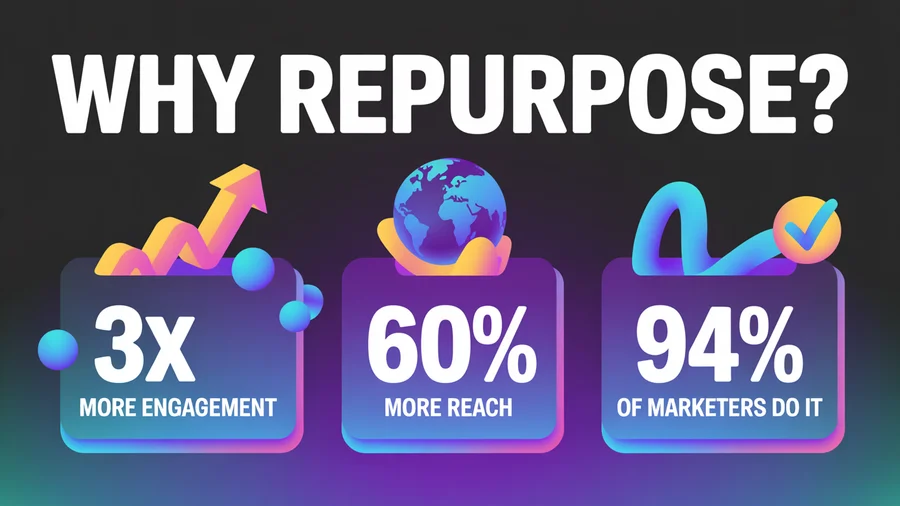
This isn't lazy marketing. It's how the most consistent creators and brands actually operate. 94% of marketers already repurpose content, and those who do it systematically report up to 3x more content output without increasing production time.
Here's the complete playbook: what to repurpose, how to adapt it for each platform, the tools that speed up the process, and a weekly workflow you can start using today.
TL;DR
- One blog post can become 10+ social media posts: carousels, threads, Reels, Shorts, quote graphics, and more.
- Adapt, don't copy. Each platform needs different formats, tones, and lengths. Identical cross-posts tend to earn lower reach.
- Use both. Cross-post time-sensitive updates and links; repurpose evergreen content (roughly a 20/80 split).
- Stagger distribution over 2–4 weeks to maximize each piece's lifespan.
- Use scheduling tools to batch-create and post to all social media at once.
Table of Contents
- Why Repurposing Works Better Than Creating From Scratch
- What Content Is Worth Repurposing
- How to Repurpose a Blog Post Into 10 Social Media Posts (Step by Step)
- How to Repurpose a Video Into 8 Social Media Posts
- Platform-Specific Adaptation Guide
- Cross-Posting vs. Repurposing: The Key Difference
- The Weekly Repurposing Workflow
- Tools That Make Repurposing Scalable
- 10 Common Repurposing Mistakes
- FAQs
Why Repurposing Works Better Than Creating From Scratch
The math is simple. If you publish two blog posts per week (written faster with the help of AI blog writing tools) and repurpose each into 10 social media posts, you have 20 pieces of content per week from just two creation sessions. Without repurposing, you'd need to come up with 20 original ideas, draft 20 pieces, and design 20 assets. Nobody has time for that.
But repurposing isn't just about efficiency. It's about reach. Your audience isn't on one platform; they're on five or six. A LinkedIn user might never see your Instagram carousel, and a TikTok viewer won't read your blog. Repurposing puts the same core idea in front of different audiences in the format they actually consume.
The numbers back this up:
- Repurposed content generates up to 3x more engagement than single-platform publishing
- Marketers who repurpose are 3x more likely to report content marketing success
- Multi-platform distribution boosts reach by 60% compared to single-platform strategies
Plan your repurposing pipeline visually in a content calendar so you can see gaps, avoid overlap, and maintain a consistent cadence.
What Content Is Worth Repurposing
Not everything deserves a second life. Repurpose content that has already proven it resonates: high engagement, strong traffic, or lots of shares. Repurposing weak content just multiplies its weakness.
Best candidates for repurposing
- Blog posts with strong organic traffic: they've already been validated by search
- Videos with high completion rates: the audience stayed, which means the content delivers
- Podcast episodes with listener highlights: specific insights or stories that stood out
- Webinars: a 60-minute webinar can yield 10–15 social clips plus multiple blog posts
- Data and original research: stats, benchmarks, and surveys are endlessly quotable
- Customer stories and case studies: social proof that works across every format
Skip these
- Time-sensitive announcements that are already stale
- Content that performed poorly in its original format
- Highly technical deep-dives that don't translate to visual or short-form formats
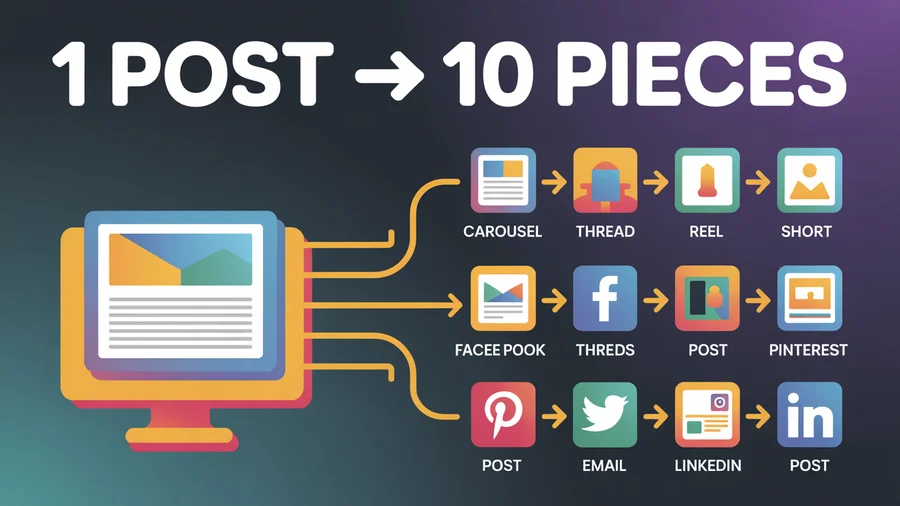
How to Repurpose a Blog Post Into 10 Social Media Posts (Step by Step)
Here's exactly how to turn a single blog post into 10 social media posts, each tailored for its platform. If your blog runs on WordPress, you can now publish the post itself from PostEverywhere and schedule these ten alongside it.
Post 1: Instagram carousel (8–10 slides)
Pull the blog's key points and turn each into one slide. First slide is the hook: a bold claim or question that stops the scroll. Last slide is a CTA ("Save this for later" or "Follow for more"). Use 4:5 aspect ratio (1080×1350px). Keep text large, scannable, and minimal, with no more than 30 words per slide. Maintain your Instagram aesthetic by using consistent colors and fonts across all carousel slides. Schedule with our Instagram scheduler.
Post 2: LinkedIn long-form post (150–300 words)
Take the blog's most data-driven insight and expand it with your perspective. LinkedIn rewards strong first lines, so lead with a stat or counterintuitive claim. End with a question to drive comments. Schedule it with our LinkedIn scheduler.
Post 3: X/Twitter thread (5–7 tweets)
Distill the blog into a numbered thread. Tweet 1 is the hook: the single most compelling claim. Each subsequent tweet covers one key point. Final tweet links back to the full blog post. Use our X scheduler to time it for peak engagement.
Post 4: Instagram Reel or TikTok (30–60 seconds)
Film a talking-head video covering the blog's single best tip. Hook in the first second, deliver the tip, end with a CTA. Use 9:16 vertical format at 1080×1920px. Add burned-in captions, because 85% of social video is watched without sound. Schedule your TikTok content with our TikTok scheduler.
Post 5: YouTube Short
Take the same vertical video (or a different tip from the blog) and optimize for YouTube: add #Shorts, include keywords in the title and description, and use a strong first frame as your thumbnail. Schedule your Shorts alongside the rest of your week.
Post 6: Facebook post with image
Write a short, community-friendly summary (40–80 characters for the hook) with a compelling image from the blog. Ask a question to drive comments. Facebook deprioritizes external links, so consider putting the link in the first comment instead.
Post 7: Quote graphic for Instagram feed
Pull the blog's most quotable line, overlay it on a branded template, and post it as a 1:1 square image. Tag any experts you quoted. These work well on Pinterest too.
Post 8: Threads text post
Take a single contrarian angle or one-liner from the blog and post it as a conversational Threads post. Keep it under 500 characters. Threads rewards authenticity and discussion, so don't make it feel promotional.
Post 9: Pinterest pin
Create a tall graphic (1000×1500px) with the blog title, a supporting stat, and your URL. Pinterest is a visual search engine, so include keywords in the pin description.
Post 10: Email newsletter teaser
Use the blog's intro + best insight as a teaser in your weekly email, linking to the full post. This isn't social media, but it's repurposing, and email drives more traffic than any single social platform.
One blog post. Ten platforms. One creation session. PostEverywhere lets you schedule all of these from a single dashboard with per-platform customization.
How to Repurpose a Video Into 8 Social Media Posts
Long-form video is one of the richest sources for repurposing. A 20-minute YouTube video can yield:
- 10–20 YouTube Shorts: clip the most valuable 30–60 second moments
- 10–20 TikToks/Reels: same clips, optimized with platform-specific captions and trending audio
- Audiogram clips: extract audio highlights with waveform visuals for podcast promotion
- Blog post: transcribe and restructure into a written article with embedded video
- Quote cards: pull standout text moments into shareable graphics
- LinkedIn text post: summarize the video's key insight in 150–300 words
- X thread: distill the video into 5–7 key takeaways
- Email newsletter: feature the video with a compelling hook and embed
When clipping video for Shorts, Reels, and TikTok, always export clean files without platform watermarks. TikTok-watermarked videos are downranked by Instagram and YouTube. Remove watermarks before cross-platform distribution.
Use cross-platform publishing to push your repurposed clips to every connected account simultaneously.
Platform-Specific Adaptation Guide
Each platform has different format requirements, caption norms, and audience expectations. An AI caption generator can help you adapt your message for each channel. Here's a quick reference.
Aspect ratios by platform
| Platform | Feed post | Stories/Reels/Shorts |
|---|---|---|
| 4:5 (portrait) or 1:1 | 9:16 | |
| TikTok | 9:16 | 9:16 |
| YouTube | 16:9 (long-form) | 9:16 (Shorts) |
| 1:1 or 1.91:1 | N/A | |
| 4:5 or 1:1 | 9:16 (Reels/Stories) | |
| X/Twitter | 16:9 or 1:1 | N/A |
Caption length and tone
| Platform | Optimal length | Tone |
|---|---|---|
| 138–150 chars (before "See More") | Visual-led, storytelling | |
| TikTok | Under 100 chars | Casual, search-optimized |
| 150–300 words | Professional, data-driven | |
| X/Twitter | 150–280 chars per tweet | Punchy, conversational |
| 40–80 chars for peak engagement | Friendly, community-focused | |
| Threads | Under 500 chars | Conversational, authentic |
| YouTube Shorts | Description: keyword-rich | Informational |
Hashtag counts
| Platform | Recommended |
|---|---|
| 5–10 | |
| TikTok | 3–5 |
| 3–5 | |
| X/Twitter | 1–2 |
| 2–3 | |
| YouTube Shorts | 3–5 in description |
Generate platform-optimized hashtags with our hashtag generator.
Cross-Posting vs. Repurposing: The Key Difference
Cross-posting and repurposing both involve publishing to multiple platforms, and most marketers use the terms interchangeably. That confusion leads to strategies that are half-hearted at both.
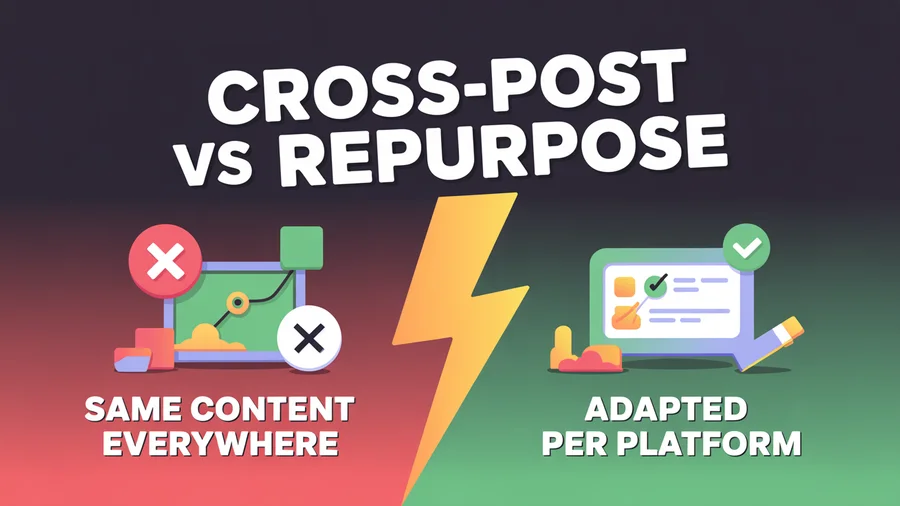
Cross-posting means publishing the same piece of content (same caption, same image or video, same hashtags) across multiple platforms with minimal changes. The goal is efficiency: instead of opening seven tabs and uploading seven times, you push one post everywhere in a single session. A LinkedIn text post republished word for word to X, Threads, and Facebook takes about 5 minutes across four platforms.
Repurposing means transforming the core idea into platform-native formats, each with its own structure, tone, and visual treatment. That is what the rest of this guide walks through.
Cross-posting vs. repurposing side by side
| Factor | Cross-posting | Repurposing |
|---|---|---|
| Time investment | 5-10 minutes per post | 30-60 minutes per post |
| Content originality | Same content everywhere | Unique format per platform |
| Engagement rate | Lower (not platform-optimized) | Higher (native to each platform) |
| Reach | Broader but shallower | Deeper per platform |
| Algorithm response | Neutral to negative (some platforms detect duplicates) | Positive (platform-native content is rewarded) |
| Spam risk | Higher, identical captions can trigger filters | Lower |
| Scalability | Very high, publish to all top platforms in minutes | Moderate, limited by creation time |
| Best for | Announcements, links, time-sensitive content | Evergreen content, thought leadership, brand building |
| Skill required | Low | Moderate to high |
| Content lifespan | Short (one publish cycle) | Long (each piece has its own lifecycle) |
| Risk | Audience fatigue from identical posts | Inconsistent messaging if poorly adapted |
Cross-posting optimizes for your time. Repurposing optimizes for your audience's experience. The best strategy uses both.
When cross-posting wins
Cross-posting is not lazy marketing. It is genuinely the better choice for:
- Time-sensitive content. Product launches, flash sales, and trending news reward speed over polish. You don't have time to build seven versions of a sale announcement.
- Link-sharing posts. When the goal is driving traffic to a blog post, podcast, or YouTube video, the post is just a vehicle for the link, and the content that matters is behind it.
- Consistent brand messaging. Mission statements, company values, and policy updates often need to be identical everywhere; adapting them risks diluting the message.
- Small teams with limited bandwidth. A solo founder can't create seven unique pieces per idea. Cross-posting keeps you visible and consistent, and consistency matters more than perfection.
- Testing which platforms respond to a topic. Cross-post an idea first, see where it gets traction, then invest your repurposing effort there.
When content repurposing wins
Repurposing takes more work, but the return is higher for:
- Evergreen content. A guide with a shelf life of months can be distributed over weeks, bringing new audiences to the same idea without repetition.
- Engagement-driven content. Each algorithm rewards content made for that platform: Reels and carousels on Instagram, long-form text with hooks on LinkedIn, fast-paced video on TikTok.
- Discoverability. Each repurposed piece has its own discovery path (YouTube search, Google, Instagram Explore), compounding your visibility.
- Thought leadership. Identical posts everywhere signal low effort. Native versions show you understand each audience.
- High-effort pillar content. If you spent days on a video or a 4,000-word guide, cross-posting a single link leaves value on the table.
The hybrid approach to repurposing and cross-posting
The real answer is not one or the other. It's both, applied to the right content. A practical starting split is roughly 20% cross-posted, 80% repurposed:
- Cross-post: company announcements, blog and podcast promotions, trending topics and timely takes, quick quotes, stats, and one-liners.
- Repurpose: evergreen blog posts into carousels, threads, and Shorts; long-form videos into clips; data-heavy posts into visuals; case studies into story formats.
In a typical week, that looks like writing one pillar post on Monday, repurposing it into a carousel, LinkedIn post, and X thread on Tuesday, cross-posting a product update to every platform on Wednesday, turning the pillar into a TikTok and YouTube Short on Thursday, and cross-posting a curated industry link with your commentary on Friday. That produces 10-12 pieces per week from one pillar post plus two cross-posted updates.
Not sure which to use for a specific piece? Ask three questions:
- Is it time-sensitive? Cross-post it. Speed matters more than optimization.
- Is it evergreen? Repurpose it. The extra effort pays off over weeks and months.
- Is the original format already platform-native? A vertical video works natively on TikTok, Reels, and Shorts, so cross-post it (here's how to post to Instagram and TikTok at the same time without watermark issues). A blog post needs transformation for visual platforms, so repurpose it.
The rule for either approach: never copy-paste captions verbatim across platforms. Identical captions and hashtags can result in accounts being flagged for spam. At minimum, customize the caption, hashtags, and format for each platform.
If you do cross-post for speed, PostEverywhere's cross-posting feature lets you customize each platform's version from one composer, so you get the efficiency of cross-posting with the effectiveness of repurposing.
Create once, customize everywhere. PostEverywhere lets you write one post and tailor the caption, hashtags, and media for each platform from a single dashboard.
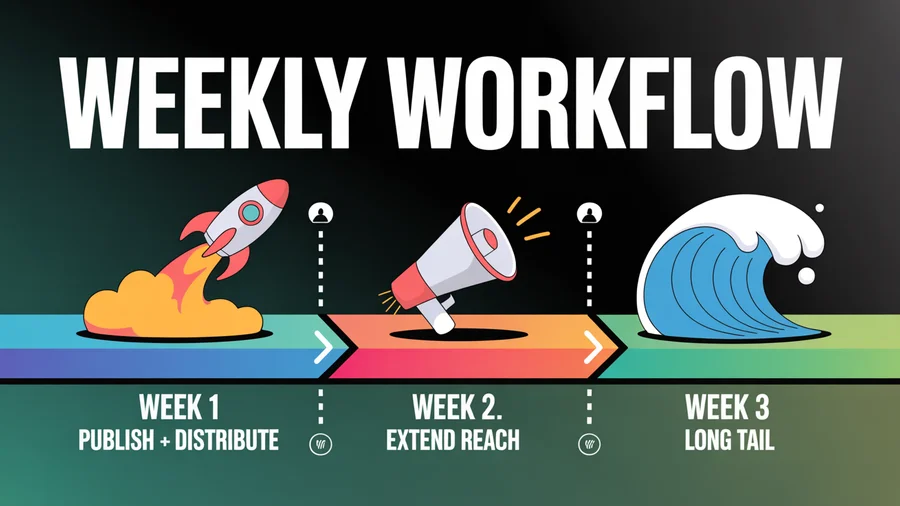
The Weekly Repurposing Workflow
Here's a practical workflow for repurposing one blog post per week across platforms.
Week 1 (publish week)
- Monday: Publish the pillar blog post on your website
- Monday: Tease it with an Instagram Story using a key stat
- Tuesday: Publish an X/Twitter thread (5–7 tweets) with a link in the final tweet
- Wednesday: Post an Instagram carousel (8–10 slides) with the same key points visually
- Thursday: LinkedIn long-form post with the most data-driven insight
- Friday: Facebook post with an image and a question hook
Week 2 (extend reach)
- Monday: Threads text post with one contrarian angle from the blog
- Wednesday: TikTok/Reel/Short: a 30–60 second talking-head covering one tip
- Friday: Quote graphic on Instagram feed and Pinterest
Week 3 (long tail)
- Tuesday: Second X thread from a different angle within the same post
- Thursday: Re-share the LinkedIn post with a slight variation
- Ongoing: Schedule 2–3 evergreen posts from the blog to drip out over the next 2 months
This staggered approach gives one blog post 4–6 weeks of social media mileage without creating anything new. Plan the full sequence in your content calendar and use queue-based scheduling to automate distribution.
Tools That Make Repurposing Scalable
Video clipping
- OpusClip: AI video clipping with virality scoring; turns a 60-minute video into 10+ social-ready clips
- Descript: Text-based video editing; edit video by editing the transcript
- CapCut: Free, auto-caption generation, mobile-friendly editing
Design
- Canva: Carousel templates, quote graphics, infographics; Magic Design generates slides from text prompts
- Use our AI image generator for custom visuals without leaving PostEverywhere
Scheduling and distribution
- PostEverywhere: Multi-platform scheduling with per-platform customization, cross-posting, and AI-assisted caption generation
- Schedule your full repurposing pipeline from a single calendar with optimal timing per platform
AI content generation
- Use our AI content generator to quickly create platform-specific caption variations from your blog post's key points
- Generate hashtags, hooks, and CTA variations without starting from scratch
10 Common Repurposing Mistakes
1. Copy-pasting across platforms verbatim. Each platform has distinct culture, vocabulary, and format requirements. Identical captions can also trigger spam detection.
2. Ignoring format specs. A TikTok can't succeed on Pinterest without format changes. Match the platform's aspect ratio, caption style, and tone.
3. Repurposing weak content. Only repurpose content that already performed well. Spreading a dud across six platforms multiplies the failure.
4. Publishing everything at once. Dumping all repurposed content on the same day wastes the asset's longevity. Stagger over 2–4 weeks.
5. Skipping captions and subtitles. 85% of social video is watched without sound. Any video without captions is losing the majority of its reach.
6. Leaving watermarks on. TikTok-watermarked videos get deprioritized on Instagram and YouTube. Always export clean files for each platform.
7. Duplicate content SEO issues. If republishing long-form content on Medium or LinkedIn Articles, use canonical tags pointing back to the original URL.
8. No tracking. Without analytics, you can't know which formats and platforms perform best. Set KPIs per platform and review weekly using social media analytics. Check your engagement rate across platforms.
9. Inconsistent branding. Each repurposed piece should maintain consistent visual identity (fonts, colors, logo) even as tone adapts per platform.
10. Overcomplicating the process. Keep the core message identical; change only the format, tone, and platform elements. Repurposing should save time, not add complexity.
For advanced automation, learn how to automate social media posting with an API.
FAQs
How many social media posts can I get from one blog post?
Typically 10–15 posts across platforms: an Instagram carousel, a LinkedIn post, an X thread, 1–2 short-form videos (Reel/Short/TikTok), a Facebook post, quote graphics, a Threads post, a Pinterest pin, and email content. The exact number depends on the blog's depth and how many distinct insights it contains.
Is cross-posting the same content bad for engagement?
Identical content posted across platforms usually performs worse than platform-adapted content, though "penalize" is too strong: cross-posted posts still get distributed, just with potentially lower reach. Instagram has confirmed that it prioritizes original content, and audiences expect native posts. Cross-posting works fine for announcements and link shares; for everything else, repurpose. At minimum, customize the caption, format, and hashtags for each platform.
What's the best pillar content format for repurposing?
Long-form video (20+ minutes) is the richest source because it yields short clips, transcripts, quotes, and visual assets. Blog posts are second, since they're easy to break into carousels, threads, and social summaries. Podcast episodes are third, especially when combined with audiogram tools.
How far apart should I space repurposed posts?
Distribute over 2–4 weeks. Post your highest-impact formats (carousel, thread, video) in week one, extend reach in week two (Threads, Pinterest, second thread), and schedule evergreen reposts in weeks three and four.
Will repurposing hurt my SEO?
Not if done correctly. Social media repurposing doesn't create duplicate content issues because social platforms aren't indexed the same way as web pages. If you republish the full text on Medium or LinkedIn Articles, use canonical tags pointing to the original URL.
How do I know which content is worth repurposing?
Check your analytics. Blog posts with high organic traffic, videos with strong completion rates, and social posts with high engagement are your best candidates. If something already works, repurposing extends its reach. If it didn't perform, repurposing won't fix it.
Can AI tools help with repurposing?
Absolutely. Tools like PostEverywhere's AI content generator can create platform-specific caption variations from your blog's key points. OpusClip can auto-clip video. Canva's Magic Design generates carousel slides from text. AI accelerates the process, but you still need to review for voice, accuracy, and platform fit.
Can I cross-post and repurpose the same content?
Yes, and you should. Cross-post time-sensitive announcements immediately for speed. Then repurpose your best-performing evergreen content into platform-native formats over the following weeks. The two strategies serve different purposes and work together naturally.
What is the best ratio of cross-posted to repurposed content?
A good starting point is 20% cross-posted and 80% repurposed. Cross-post announcements, links, and time-sensitive updates. Repurpose everything else. As you build systems and templates, you can shift more toward repurposing without increasing time investment.
What's the minimum I should customize when cross-posting?
At minimum: adjust the caption length and tone, change the hashtags, reformat the media to match the platform's specs, and stagger posting times. The cross-posting feature in PostEverywhere handles this from one composer.
The Bottom Line
Content repurposing isn't a hack; it's how smart marketers stay visible without burning out. One blog post, properly repurposed, gives you 10+ social media posts across every platform, distributed over weeks. The key is adapting each piece to feel native to where it's published while keeping the core message consistent. Know how often to post on each platform so your repurposed content hits the right frequency.
Start with your highest-performing content, use the workflow above, and schedule everything from one calendar. The content you've already created is your biggest untapped asset, so stop letting it sit on one page and put it to work everywhere.
If what you need is the same post adapted per network rather than transformed, that is cross-posting: see whether cross-posting hurts your reach and the best cross-posting tools for handling it.

Founder & CEO of PostEverywhere. Writing about social media strategy, publishing workflows, and analytics that help brands grow faster.