What aspect ratio does Pinterest use in 2026?
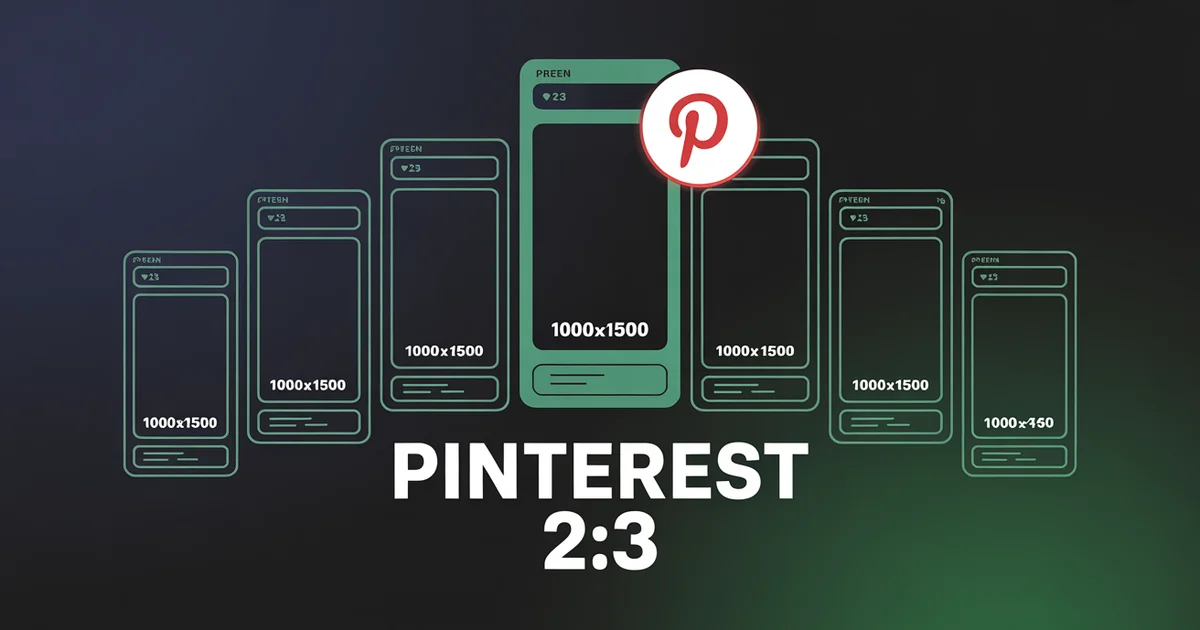
Pinterest uses 2:3 portrait (1000×1500 px), the only ratio it officially recommends for organic reach and the one major platform where 1:1 square actively underperforms. Video Pins use 2:3 or 9:16; anything taller than 1:2.1 gets cropped.
Every other network treats square as a viable fallback; Pinterest treats it as a mistake. The data backs it up: 2:3 pins consistently earn more impressions, saves, and click-throughs than any other shape. Get the ratio wrong and your Pin gets visually buried in a vertical-dominated feed.
This guide covers every Pinterest aspect ratio in 2026, including the merger of Idea Pins into the unified Pin format and the rise of Video Pins.
Schedule Pinterest Pins alongside Instagram, TikTok, and 8 other platforms. PostEverywhere keeps your Pinterest content at the 2:3 ratio that drives reach. Try the Pinterest scheduler →
The Pinterest Aspect Ratio Cheat Sheet
| Format | Aspect Ratio | Recommended Pixels | Status |
|---|---|---|---|
| Standard Pin | 2:3 | 1000×1500 | ✅ Recommended |
| Square Pin | 1:1 | 1000×1000 | ❌ Underperforms |
| Long / Giraffe Pin | up to 1:2.1 | 1000×2100 | Tolerated (max before crop) |
| Video Pin | 2:3 or 9:16 | 1000×1500 / 1080×1920 | ✅ |
| Carousel Pin | 1:1 or 2:3 | 1000×1000 / 1000×1500 | ✅ |
| Product Pin | 2:3 | 1000×1500 | ✅ |
| Idea Pin (organic) | merged into Video Pin | n/a | ❌ Retired as a format |
| Idea Ad (paid only) | 9:16 | 1080×1920 | Active |
| Promoted Pin (ad) | 2:3 | 1000×1500 | ✅ |
| Collection Ad | 1:1 or 2:3 | 1000×1000 / 1000×1500 | ✅ |
| Profile picture | 1:1 | 600×600 upload (165 display) | Circle display |
| Board cover | varies | 600×600 min |
The 2026 default: 2:3 portrait (1000×1500). Every other ratio underperforms. The only exception is video, where 9:16 is also strong for vertical-native content.
Why 2:3 Is the Only Pinterest Ratio Worth Optimising For
Pinterest is structurally different from other social platforms. The home feed is a masonry grid of vertical cards, not a chronological feed of single posts. In a masonry feed, taller pins occupy more vertical space, which means:
- More screen real estate per pin. Viewers see more of a 2:3 pin without scrolling.
- More chance to capture attention. Square or landscape pins get visually swallowed by taller neighbours.
- More design space for text overlays. Pinterest is text-on-image heavy (unlike TikTok's text-over-video model), and 2:3 gives the most usable text area.
Pinterest's own product specs cite 2:3 as the recommended ratio. Anything taller than 1:2.1 gets cropped in the feed; anything shorter than 2:3 occupies less space and earns less attention. That is why every successful Pinterest creator standardises on 1000×1500.
Standard Pin (2:3): the Recommended Pinterest Pin Size
- Aspect ratio: 2:3
- Recommended dimensions: 1000×1500 px
- Minimum: 600×900 px (1000 px wide or more is safer)
- Maximum before feed crop: 1:2.1 (for example, 1000×2100)
- Max file size: 20 MB (JPG, PNG, or WebP); under 5 MB keeps loading fast
- Best for: blog promotion, product shots, recipes, tutorials, lifestyle content
This is the standard Pinterest format: a single vertical image at 1000×1500. If you only do one thing on Pinterest, do this.
Square Pin (1:1)
- Aspect ratio: 1:1
- Recommended dimensions: 1000×1000 px
- Use case: carousel secondary cards, product shots that do not need vertical context
- Pitfall: tends to blend into the feed and gets less screen space than 2:3
Square Pins still upload fine, but they consistently underperform 2:3 on Pinterest specifically. Use 1:1 only as a fallback for cross-platform assets where one square image has to work everywhere. For Pinterest-first content, always use 2:3.
Long / Giraffe Pin (Up to 1:2.1)
- Aspect ratio: up to 1:2.1, the longest accepted before feed crop
- Recommended dimensions: 1000×2100 px
- Status in 2026: still supported but de-emphasised
- Pitfall: Pinterest crops anything taller than 1:2.1 in the feed, so a 1:3 "infographic Pin" (1000×3000) gets truncated unless tapped
If you are designing an infographic Pin, cap it at 1:2.1. Put your hook at the top so it survives the initial feed display, and place the full detail below for users who tap through.
Video Pin and Pinterest Video Dimensions
Video on Pinterest is rising fast and increasingly competes with Instagram and TikTok for vertical-content attention.
- Aspect ratios accepted: 1:1, 2:3, 9:16, 4:5
- Best for organic: 2:3 or 9:16, because both fill maximum feed space
- Recommended Pinterest video dimensions: 1000×1500 (2:3) or 1080×1920 (9:16)
- Duration: 4 seconds minimum, 15 minutes maximum
- Sweet spot: 6-15 seconds for engagement
- File: .MP4, .MOV, or .M4V; max 2 GB; H.264 or H.265
- Pitfall: a missing cover thumbnail, and horizontal video that gets cropped
If you are already shooting native 9:16 vertical for TikTok or Reels, you can post the same asset to Pinterest as a Video Pin with no resizing. This is the easiest cross-platform repurposing case on Pinterest.
Idea Pins and Idea Pin Size: Merged Into Video Pins
If you remember Pinterest having a TikTok-style multi-page format called "Idea Pins" (formerly Story Pins), it no longer exists as a separate organic format in 2026.
What happened:
- May 2023: Pinterest announced merging Pins and Idea Pins into one unified format.
- From August 2023: the new unified Pin format rolled out, collapsing the two creation flows into a single "Create Pin" option that handles images, video, or a mix.
- 2026: adding multiple images or videos to an organic Pin now renders as a Video Pin, and legacy Idea Pins are being converted to Video Pins. Idea Pins live on only as Idea Ads (paid).
Idea Ad spec (paid only) and its Idea Pin size:
- 9:16 aspect ratio, 1080×1920 px
- Up to 20 pages or clips
- Each page: a video clip up to 60 seconds, or a static image
Practical takeaway: do not plan organic Idea Pins in 2026. Use Video Pins at 9:16 if you want vertical short-form behaviour, and Standard Pins at 2:3 for everything else.
Carousel Pin (Multi-Image)
- Aspect ratio: all cards must share the same ratio, either 1:1 or 2:3
- Hero (first) card: 2:3 recommended (1000×1500 px)
- Cards per carousel: 2-5 organic; some collection-ad variants accept more
- File size: up to 32 MB per card
- Pitfall: mixed ratios force a centre-crop, so keep the ratio uniform across all cards
Carousels are useful for tutorials, before-and-after sets, and multi-product showcases. Keep the cover card (slide 1) compelling, because it is what shows in the feed before users tap to swipe.
Plan Pinterest content alongside every other platform. PostEverywhere keeps your 2:3 Pinterest pins separate from your 9:16 TikToks and 4:5 Reels, automatically. Try the social media scheduler →
Product Pin (Shopping)
- Aspect ratio: 2:3, the same as a standard Pin
- Recommended: 1000×1500 px
- Auto-populated: price, title, availability, and product link pulled from your merchant feed
- Pitfall: plain product-on-white shots underperform, because lifestyle product context wins on Pinterest's visual search
Promoted Pin (Standard Ad)
- Aspect ratio: 2:3
- Recommended: 1000×1500 px
- File: PNG or JPEG; max 20 MB
- Title: up to 100 characters
- Description: up to 800 characters
Collection Ad
- Hero image ratio: 1:1 or 2:3 (2:3 recommended at 1000×1500)
- Secondary images: must match the hero ratio; 1:1 is recommended to avoid centre-cropping
- File size: max 10 MB per image
For full ad spec coverage, see Pinterest's product specs documentation.
Profile and Board Assets, Including Pinterest Board Cover Size
Profile picture
- Display: 165×165 px (circle)
- Upload: 600×600 px square minimum
- Pitfall: off-centre logos or text get cropped by the circular mask
Pinterest board cover size
- Display: 222×150 px
- Upload: 600×600 px minimum
- Tip: a standard 1000×1500 Pin works fine as a board cover, because Pinterest lets you adjust the crop window
Board "showcase" header
- Aspect ratio: horizontal 16:9
- Use case: featured and curated boards
Pinterest TV (Live Shopping)
Pinterest TV, the platform's live shopping format, is still active and expanding in 2026. Pinterest announced a $450 million deal to acquire connected-TV ad company tvScientific in December 2025 (expected to close in the first half of 2026), and in March 2026 it launched its first shoppable CTV series, "Bring My Pinterest to Life", on The Roku Channel across the US, Canada, Mexico, and the UK.
- In-app live format: 9:16 vertical (1080×1920 px)
- CTV episodes: 16:9 horizontal
- Access: creator-application based, not self-serve
Common Pinterest Aspect Ratio Mistakes
Pinning square 1:1 images. They underperform badly on Pinterest specifically. Switch to 2:3.
Designing infographic Pins taller than 1:2.1. Anything beyond 1000×2100 gets cropped in the feed. Cap at 1:2.1 with the hook at the top.
Reusing Instagram 4:5 portrait directly. Crop to 2:3 (1000×1500), because the 1:1.25 difference matters on Pinterest's masonry feed.
Trying to bring back Idea Pins. They are merged into Video Pins. Use a Video Pin at 9:16 instead.
Plain product-on-white Product Pins. Lifestyle context outperforms isolated product shots in Pinterest's visual search.
Skipping the cover thumbnail on Video Pins. A missing cover significantly reduces taps.
Mixing aspect ratios in carousel Pins. All cards must share one ratio, or the centre-crop kicks in.
Using horizontal video in Video Pins. It crops badly in the masonry feed. Always use 2:3 or 9:16 for video on Pinterest.
Cross-Posting Video to Pinterest
Pinterest is the friendliest home for spare vertical video. A native 9:16 clip made for TikTok, Reels, or Shorts drops straight into a Pinterest Video Pin at 1080×1920 with no resizing, which makes Pinterest a low-effort extra surface for content you have already produced. The one habit to keep is adding a strong cover thumbnail so the Pin earns taps in the feed. If you publish vertical video regularly, cross-posting it to Pinterest is close to free reach. For the wider view of which ratio each network wants, see the video aspect ratios guide.
Tools to Get Pinterest Aspect Ratios Right
- Pinterest image resizer: convert any image to Pinterest's 2:3 ratio (1000×1500) in one click.
- AI image generator: outputs Pinterest-ready 2:3 Pins at 1000×1500.
- AI video generator: produces 9:16 vertical video for Pinterest Video Pins.
- Pinterest scheduler: schedule Pinterest alongside every other platform.
- Pinterest caption generator: write keyword-rich Pin descriptions.
- Best time to post: Pinterest-specific timing recommendations.
- Social media image sizes: every platform's dimensions in one reference.
For the cross-platform view, see social media aspect ratios and the Instagram aspect ratio guide.
One vertical asset, every platform. PostEverywhere posts your 9:16 video to TikTok, Reels, Shorts, and Pinterest Video Pins, automatically. Plans start at $9/mo. See pricing →
Pinterest File Sizes, Formats & Upload Limits
Getting the ratio right is step one. The upload limits and file formats matter too, because Pinterest compresses anything that exceeds its size ceilings, and that softens the crisp text overlays Pins depend on. Here is every accepted format and limit in one place.
| Format | Accepted file types | Max file size | Max resolution |
|---|---|---|---|
| Standard Pin | PNG, JPG, WebP | 20 MB | n/a |
| Video Pin | MP4, MOV, M4V | 2 GB | 1080p |
| Full-screen page (9:16) | PNG, JPG (image); MP4, MOV (video) | 16 MB per page | n/a |
| Carousel card | PNG, JPG | 32 MB per card | n/a |
| Profile picture | PNG, JPG | n/a | n/a |
A few upload habits keep quality high:
- Keep a 50 px safe zone. Hold text and logos away from the edges so nothing important is trimmed when Pinterest reframes the Pin on different devices.
- Compress to under 5 MB. You can upload up to 20 MB, but files under 5 MB load faster, and fast loading matters when 81% of Pinterest users browse on mobile. Use PNG for graphics with text and JPG for photos.
- Design mobile first. Preview every Pin at phone size before publishing. Text under 24 px becomes unreadable and thin details get lost.
- Warm colours outperform cool ones. Pins with warm tones (red, orange, brown) earn more saves than blue or green, with dominant-red Pins reported to get roughly twice the repins of blue Pins.
- Use faces selectively. Lifestyle and beauty Pins with faces tend to engage more, while product and food Pins usually perform better without them, letting the product be the hero.
- Always write alt text. Pinterest uses image alt text for accessibility and search ranking, and it is separate from your Pin description, so include your target keywords in both.
Frequently Asked Questions
What is the best Pinterest aspect ratio in 2026?
2:3 portrait (1000×1500 px). This is the only ratio Pinterest officially recommends for organic reach. Pinterest's masonry feed favours taller pins because they occupy more vertical screen space, 2:3 is the sweet spot between visibility and not being cropped.
Can I use square 1:1 Pins?
Yes, but they underperform 2:3 consistently on Pinterest specifically. Pinterest is the one major platform where square content is materially worse than vertical. Use 1:1 only for cross-platform fallback assets, not Pinterest-first content.
What's the maximum Pinterest aspect ratio?
1:2.1 (e.g., 1000×2100 px), anything taller gets cropped in the feed. "Long" or "Giraffe" Pins at this ratio are still supported but de-emphasised; design your hook at the top so it survives the initial feed display.
Are Idea Pins still available?
Not for organic creators. Pinterest deprecated organic Idea Pin creation during 2024 after announcing the merger of Pins and Idea Pins in May 2023. They survive only as Idea Ads (paid only). Use Video Pins at 9:16 if you want vertical short-form behaviour.
What's the Pinterest Video Pin aspect ratio?
2:3 (1000×1500 px) or 9:16 (1080×1920 px), both fill the maximum feed space. Duration is 4 seconds to 15 minutes, with 6–15 seconds being the engagement sweet spot. File types accepted: .MP4, .MOV, .M4V.
Can I cross-post my Reels or TikToks to Pinterest?
Yes, that's the easiest cross-platform case on Pinterest. Export at 1080×1920 (9:16) and the same asset works natively as a Pinterest Video Pin. This is the most efficient way to repurpose vertical video content to Pinterest.
What's the Pinterest profile picture size?
1:1 square, displayed as a 165×165 circle. Upload at 600×600 minimum. Off-centre logos or text get cropped by the circular mask, so keep your subject centred.
Did Pinterest change the max Pin ratio?
No. The maximum accepted ratio before feed-crop is still 1:2.1, unchanged in recent years. The bigger change was the deprecation of Idea Pins for organic creators in 2024.
Specs in this guide were verified in July 2026 against Pinterest's product specs documentation, Pinterest Create's unified Pin format update, Pinterest's tvScientific announcement, TechCrunch on the Pins/Idea Pins merger, and Sprout Social's image sizes guide. Pinterest updates specs periodically, and we refresh this page when it does. For more cross-platform context, see social media aspect ratios and the Instagram aspect ratio guide.

Founder & CEO of PostEverywhere. Writing about social media strategy, publishing workflows, and analytics that help brands grow faster.