Can you schedule Pins on Pinterest? Yes. With a Pinterest business account, create a Pin, select Publish at a later date and pick a day and time. Pinterest's help page says you can schedule a Pin up to 30 days in advance, one Pin at a time, with up to 10 Pins scheduled at once. It works on desktop and in the Pinterest app, and a business account is free. To plan further than 30 days, queue more than 10 Pins, schedule carousel Pins, or run Pinterest next to Instagram, TikTok and your other accounts, use a scheduler that publishes through Pinterest's official API, such as PostEverywhere for Pinterest.
Below: each route step by step, then Pin types, timing, and why scheduled Pins fail.
| Pinterest on desktop | Pinterest app | PostEverywhere | |
|---|---|---|---|
| Account type | Business account (free) | Business account (free) | Personal or business account |
| How far ahead | Up to 30 days | Up to 30 days | No limit of its own |
| How many waiting | Up to 10 scheduled Pins | Up to 10 scheduled Pins | As many as your calendar holds |
| Pin types | Standard image and video Pins | Standard Pins; several clips are stitched into one video Pin | Image Pins, video Pins and carousel Pins of 2 to 5 images |
| Bulk | One Pin at a time | One Pin at a time | One at a time, a posting queue, or a .csv of up to 200 posts |
| Cost | Free | Free | From $9 a month, 7-day free trial |
Can you schedule pins on Pinterest?
Pinterest's own scheduler. According to Pinterest's help page on scheduling Pins, business accounts can schedule standard Pins up to 30 days in advance, one at a time, with up to 10 scheduled for the future.
You can still change a scheduled Pin's date, title, board, description and link, but not its image or video.
The business account is the usual snag. Pinterest's guide to getting a business account says it is free: convert in Settings under Account management, keep your Pins and followers, and switch back any time. A private account must go public first.
A scheduler connected through the Pinterest API. Approved apps publish through Pinterest's Create Pin endpoint. That is PostEverywhere's route: your Pin waits until its time, then publishes to the board you picked.
A Pin created through the API is an ordinary Pin. How far it travels depends on the image, the words and how often people save and click it, as our guide to Pinterest's ranking signals explains.
How to schedule Pins on Pinterest on desktop
For a few Pins in the next month, Pinterest's own scheduler is free and quick. These steps come from Pinterest's help center.
Schedule a Pin on Pinterest on desktop
In a browser, logged in to a Pinterest business account.
- Log in to your business accountScheduling only shows up on business accounts. Convert a personal account first if you need to.
- Open Create PinClick Create at the top left. On some business accounts it sits under the menu icon, then Create, then Create Pin.
- Upload your image or videoClick the upload icon and pick the file. Selecting several images makes one Pin per image.
- Add the Pin detailsWrite the title and description, add the destination link, and choose the board.
- Select Publish at a later dateChoose the day and time the Pin should go live, up to 30 days out.
- Finish the PinIt is saved as a scheduled Pin and shows on your profile within a few minutes.
Know the limits first:
- 30 days and 10 Pins. A Pin a day for a week fits. Holiday Pins planned in September don't.
- No bulk and no calendar. Each Pin is scheduled on its own, and there is no month view.
- No new image after scheduling. To swap the image or video, delete the scheduled Pin and make a new one.
How to schedule a Pin on Pinterest in the app
Yes, on Android and iPhone, again from a business account. Pinterest's help page gives these steps:
- Open the Pinterest app, log in to your business account, tap the plus icon at the bottom of the screen and select Pin.
- Choose one or more images or videos. Several are stitched into a single video Pin.
- Tap Next, add text or effects if you want, and tap Next again.
- Fill in the title, description, link and board.
- Next to Schedule date, tap the arrow, pick the date and time, and tap Done.
- Tap Schedule, check the date and time, and tap Schedule again to confirm.
The 30-day window and the 10-Pin limit are the same as on desktop.
How to see scheduled Pins on Pinterest
Go to your profile. Scheduled Pins appear above your published Pins, though a new one can take a few minutes to show. Tap the ellipsis icon on a Pin to edit or delete it.
Pinterest's page on editing or deleting a Pin warns that a deleted Pin can't be recovered.
Plan Pins a season ahead, not 30 days. PostEverywhere holds each image, video and carousel Pin until its time, then publishes it to your board through Pinterest's official API. See how PostEverywhere schedules Pinterest.
How to schedule Pinterest Pins with PostEverywhere
This is the flow in PostEverywhere today, in a desktop or phone browser.
Schedule a Pinterest Pin with PostEverywhere
Image Pin, video Pin or carousel Pin.
- Connect PinterestIn Accounts, sign in with Pinterest. Personal and business accounts can both connect and publish.
- Open New Post and pick the accountSelect your Pinterest account. Add Instagram, Facebook or any other account if the same image should go there too.
- Add your mediaUpload one image, 2 to 5 images for a carousel Pin, or one video. A video Pin needs a cover image, which you upload in the composer.
- Choose the Board and SectionPick the board from the Board menu, and a Section if the board has them. Made a board on Pinterest a minute ago? Refresh the menu and it appears.
- Add the title, description and linkFill in Pin Title, Description, Destination URL and Alt Text. The Destination URL is where a click on the Pin goes.
- Pick a time and ScheduleChoose a date and time, a suggested time, or the next queue opening, then click Schedule.
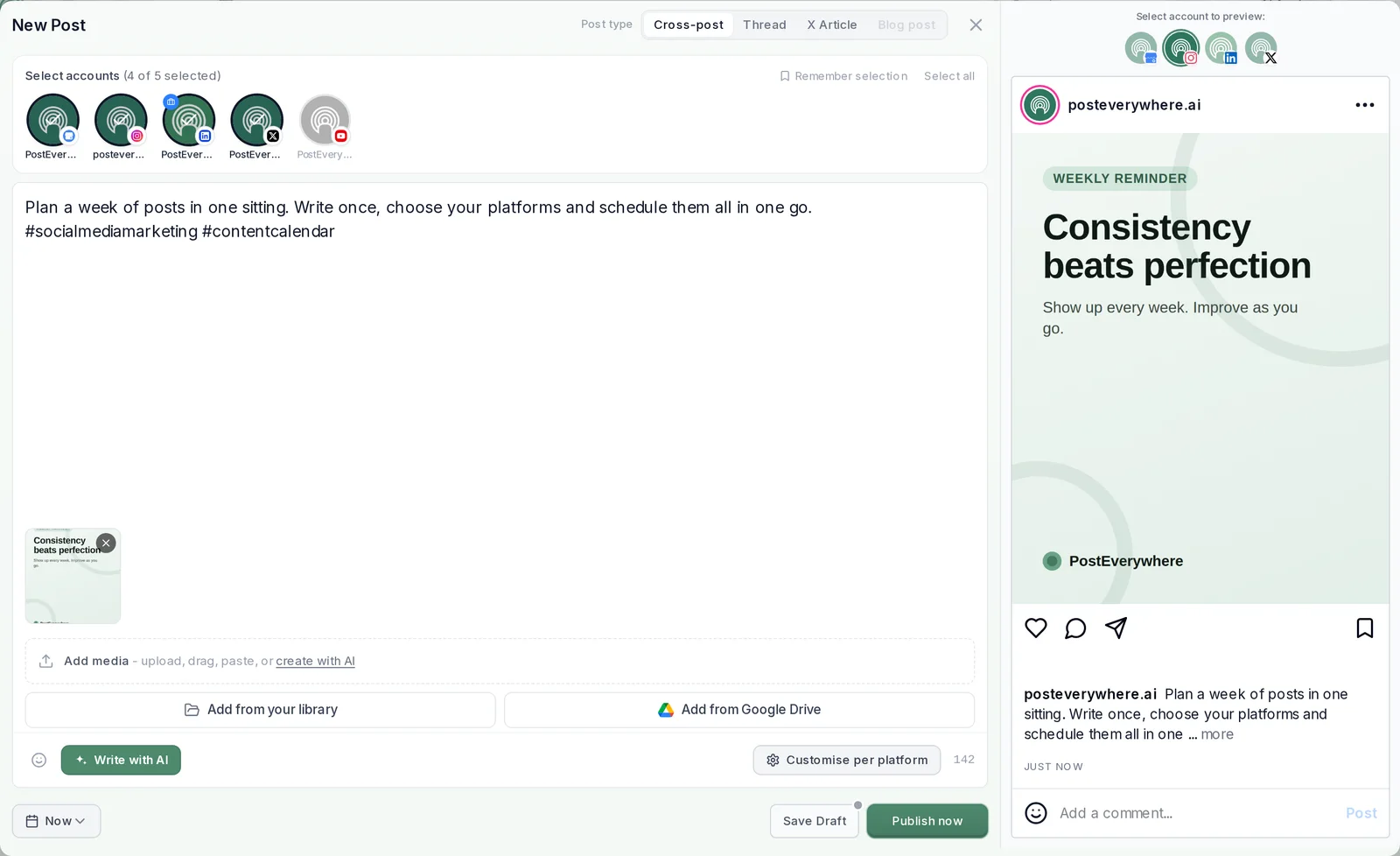
A few details worth knowing:
- No board? No failure. Leave Board empty and the Pin goes to your default board, then your first board. A board is created for you only if the account has none.
- One link per Pin. The Destination URL is the click target. Pinterest doesn't turn a link typed into the description into one.
- You can still change your mind. Until the Pin goes live, click it in the content calendar to edit the details, move it to another day, or delete it.
- You see what happened. Each Pin moves from Scheduled to Posted, or to Failed with Pinterest's reason and a Retry button.
Schedule a month of Pins in one sitting
Pins keep turning up in search for months, so batching pays. There are three ways to load a batch into PostEverywhere:
- One by one in the composer. Fine for five or six Pins.
- A queue of recurring time slots. Set your openings once, then choose "Next queue opening" on each Pin and it takes the next free slot.
- A .csv upload of the whole batch. Put your images in the Media library, then upload a .csv with one row per post: text, date, time and media filename. One upload takes up to 200 posts.
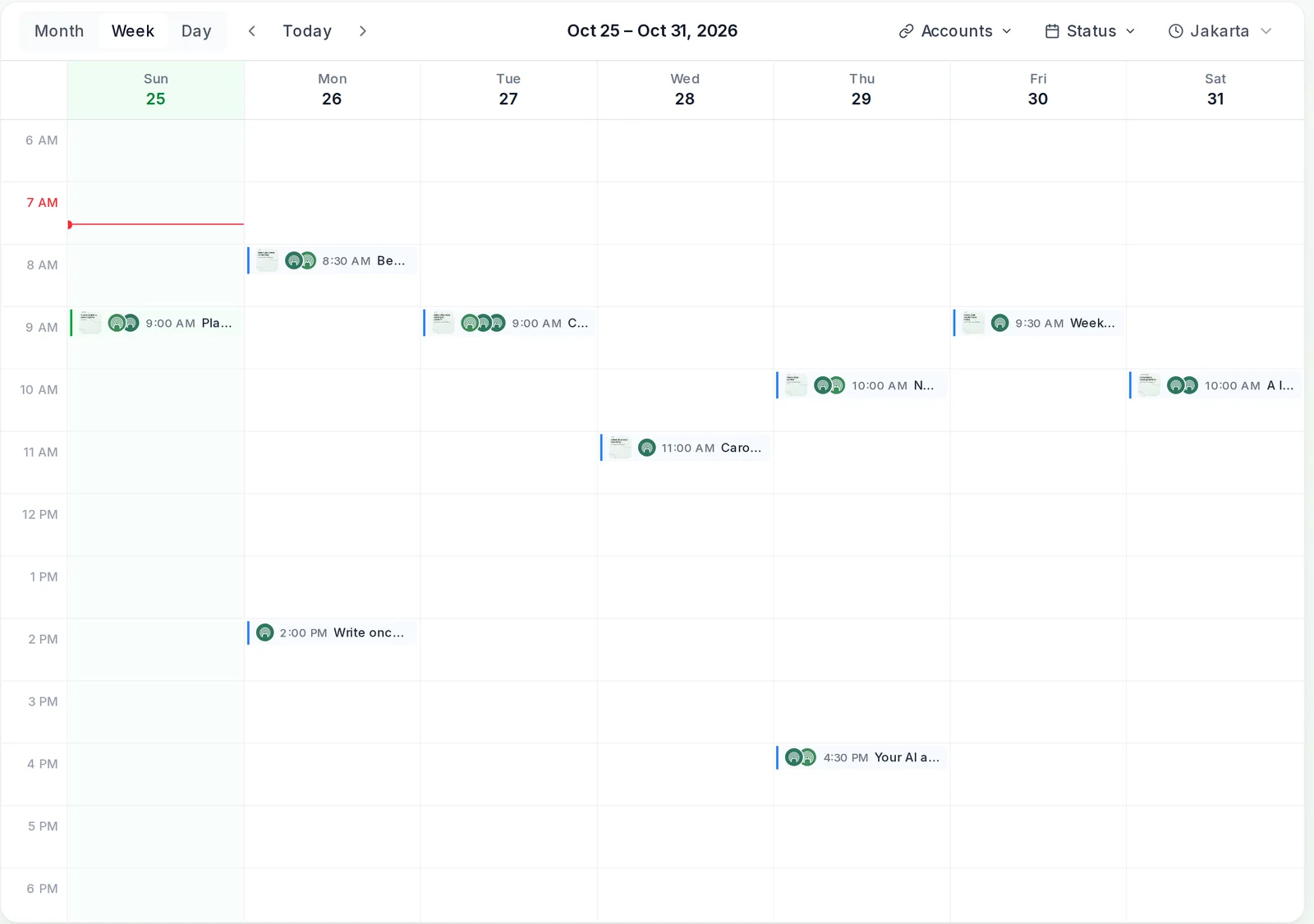
The calendar fills the other gap in Pinterest's scheduler: a view of the month. Spot three recipe Pins in a row and drag one to Thursday. For subjects, borrow from these 100 Pinterest content ideas.
Make the Pins once, then let them run. Load a month of Pins from a .csv or your queue and every one goes out on time, to the right board. Load your next batch from a .csv.
Scheduling image, video and carousel Pins
- Image Pins. Pinterest's ad specs page, which also covers standard Pins, recommends a 2:3 image such as 1000 x 1500 pixels and titles of up to 100 characters. Our Pinterest image sizes guide has every placement.
- Video Pins. The same page allows 4 seconds to 15 minutes, up to 2 GB. In PostEverywhere a video Pin also needs a cover image you upload.
- Carousel Pins. PostEverywhere schedules carousel Pins of 2 to 5 images, in the order you set. Pinterest's scheduling help doesn't cover carousels.
Sending the same picture to Instagram? See posting to Instagram and Pinterest at the same time.
Best time to schedule Pins
Timing matters less on Pinterest than on most networks, because Pins are found through search for weeks. Our Pinterest timing guide has the day-by-day detail.
In PostEverywhere, the when-to-post menu also shows suggested times; our page on how suggested posting times work explains them.
Why can't I schedule Pins on Pinterest?
| What you see | Likely cause | Fix |
|---|---|---|
| No Publish at a later date option | It's a personal account | Convert to a business account in Settings, free, or use a scheduler |
| The date won't save | It's more than 30 days out | Pick a date inside the window, or use a scheduler |
| Can't schedule another Pin | 10 Pins are already scheduled | Wait for one to publish, or use a scheduler |
| Wrong image on a scheduled Pin | Pinterest doesn't let you swap the media | Delete the scheduled Pin and make a new one |
| Pin failed after a password change | The connection to Pinterest has expired | Reconnect the account from Accounts, then retry |
| Carousel Pin refused | Fewer than 2 or more than 5 images | Keep a carousel Pin to 2 to 5 images |
| Video Pin won't schedule | No cover image | Upload a cover image in the composer |
| Text-only post won't go to Pinterest | Every Pin needs an image or video | Add an image, or design the words into one |
In PostEverywhere, failures show on the Pin itself and on the Delivery tab in Analytics, with Pinterest's reason. Our guide to scheduled posts that don't publish covers fixes across every network.
What you can't schedule on Pinterest
A few things stay on Pinterest itself:
- Ads. Paid Pins are built and run in Pinterest Ads Manager, not in the organic scheduler or a publishing tool.
- Product Pins from a catalog. These come from a product feed connected to your business account rather than from a scheduler.
- Group boards you don't own. In PostEverywhere these aren't confirmed, so test one with a single Pin before planning a week around it.
Pinterest's analytics help page says analytics need a business account. In PostEverywhere, Business and Creator accounts get impressions, saves, Pin clicks and outbound clicks in Analytics.
Your agent can schedule Pins too. Connect ChatGPT, Claude or any MCP client and ask it to pin this week's products to the right boards. Developers can use our guide to scheduling Pins with an API. See PostEverywhere for Pinterest.
FAQ
Can you schedule Pinterest Pins for free?
Yes. Pinterest's own scheduler is free, and so is the business account it needs. PostEverywhere is paid, from $9 a month, and every plan starts with a 7-day free trial. Compare plans and prices.
How far in advance can you schedule Pins on Pinterest?
Up to 30 days ahead in Pinterest's own scheduler. PostEverywhere has no limit of its own, so a holiday Pin can sit in the calendar two months early.
How many Pins can you schedule on Pinterest?
Up to 10 scheduled Pins at once in Pinterest's own scheduler, and you schedule them one at a time. In PostEverywhere there is no such cap, and a .csv upload takes up to 200 posts at a time.
Do you need a business account to schedule Pins on Pinterest?
For Pinterest's own scheduler, yes, and converting a personal account is free in Settings under Account management. PostEverywhere can schedule Pins from personal or business accounts; Pin analytics need a Business or Creator account.
Where do I see scheduled Pins on Pinterest?
On your profile, above your published Pins. Pins scheduled in PostEverywhere wait in its content calendar until they publish.
Can you edit a scheduled Pin?
Yes. On Pinterest you can change the publish date, title, board, description and link, but not the image or video. In PostEverywhere you can change the details, the time or the day until the Pin goes live.
Do scheduled Pins get less reach?
There is no sign of that. A Pin published through Pinterest's API is an ordinary Pin on your board, and how far it travels depends on the image, the words and how often people save and click it.
Can you schedule carousel and video Pins?
PostEverywhere schedules both: carousel Pins of 2 to 5 images, and video Pins with a cover image you upload. Pinterest's own scheduler covers standard Pins.
Sources
Every outside fact in this guide comes from the pages below. Product details for PostEverywhere come from the app itself.
- Pinterest Business Help Center: Schedule Pins
- Pinterest Business Help Center: Get a business account
- Pinterest Help Center: Edit or delete a Pin
- Pinterest Business Help Center: Review ad specs
- Pinterest Business Help Center: Review Pinterest Analytics
- Pinterest Developers: API v5, Create Pin

Founder & CEO of PostEverywhere. Writing about social media strategy, publishing workflows, and analytics that help brands grow faster.