One unified social media API for developers and AI agents
PostEverywhere's social media API lets you schedule, publish and generate captions across all top platforms, and pull analytics wherever each platform reports them, through one REST API, a typed SDK and a hosted MCP server. Skip the separate platform integrations, OAuth flows, and rate limits, and ship in an afternoon.
Get started from as little as $9 per month. $0 due today, cancel anytime.


 Works with any AI agent


Used by 2,831 happy customers
“This tool has truly made my content posting so much easier, I can't work without it. I can schedule my posts days in advance while working on other projects. Set it and forget it.”
One integration, every network
One social media API to replace every platform integration
Each social network ships its own API, OAuth flow, and media rules, and maintaining all of them is a moving target. PostEverywhere gives you one consistent interface for all of them, so you can post everywhere at once without wiring up the Meta Graph API, TikTok Content Posting API, and YouTube Data API separately. Full reference lives in the PostEverywhere API documentation.
- A single REST endpoint.
- Publish to any of the platforms through one Bearer-token API. One request shape, one set of docs, every platform covered.
- Official platform APIs.
- Every post goes out through the platform's sanctioned API, not browser automation. Compliant, reliable, and account-safe.
- Typed SDK and MCP server.
- Install @posteverywhere/sdk for full TypeScript types, or connect any AI agent through the hosted MCP server.
Instagram
Instagram Graph API
Facebook
Meta Graph API
X
X API v2
LinkedIn
LinkedIn Marketing API
TikTok
Content Posting API
Threads
Meta Threads API
Bluesky
AT Protocol
Telegram
Telegram Bot API
Discord
Discord webhooks
YouTube
YouTube Data API v3
Pinterest
Pinterest API
WordPress
WordPress REST API
Built for builders
Ship in an afternoon, not a quarter
Most of the work in a social integration is not posting, it is the plumbing: OAuth, token refresh, rate limits, retries, and media formatting for every network. PostEverywhere handles all of it so you can build an agent or product feature in hours. Create an API key on the Developers page, send it as a Bearer header, and make your first call. Read the social media scheduling API guide to see it end to end.
- No per-platform OAuth maze.
- Connect accounts once. The API manages tokens, refresh, and re-authentication across every platform on your behalf.
- Keys you control.
- Give each integration its own key with read, write or AI permissions, limit it to specific accounts, and revoke it at any time. A new key is shown once, with a command that works as-is.
- Rate limits and retries handled.
- Each key gets 60 requests a minute and 1,000 an hour. Built-in rate-limit handling and automatic retries mean one call reaches every network reliably.
API Keys
Create keys to authenticate API requests and MCP connections.
Copy your API key now - it won't be shown again
pe_live_8f3a2c19e4b75d0a96c1f2b83e7d4a5c09b6e1f7a2d8c4b3Try it now - this command works as-is
curl -H "Authorization: Bearer pe_live_8f3a2c19..." \
https://app.posteverywhere.ai/api/v1/accountsProduction
pe_live_8f3a2c19...read, write, aiall accountsLast used: Just nowZapier
pe_live_51d07be2...read, write1 accountLast used: 2d ago
More than posting
Schedule, generate, and measure from one API
The same API that publishes also schedules, creates content, and reports results. Generate captions with the AI content generator, produce visuals with the AI image generator, and pull cross-platform numbers from analytics, all through code.
- Schedule and publish.
- Schedule a post for any time and timezone, add it to your posting queue, or publish it now. Every account gets its own result, with a status, the live link and any error.
- Generate captions and images.
- Call the API to produce platform-tailored captions and images from a prompt, then publish them in the same flow.
- Read analytics and account health.
- Fetch post metrics wherever each platform reports them, plus the health of every connected account, with a single request.
POST /api/v1/posts
{ "content": "Launch week is here",
  "account_ids": [101, 102, 103, 104, 105],
"scheduled_for": "2026-10-06T09:00:00Z" }- northwind.coffeedoneviews 1,204 · likes 87
- Northwind Coffeedoneimpressions 612
- northwindverifyingattempts 1
- northwindcoffeeuploadingattempts 1
- Northwind Coffeeretry_schedulednext_retry_at 09:05
One request, one result per accountExample data
Hosted MCP server
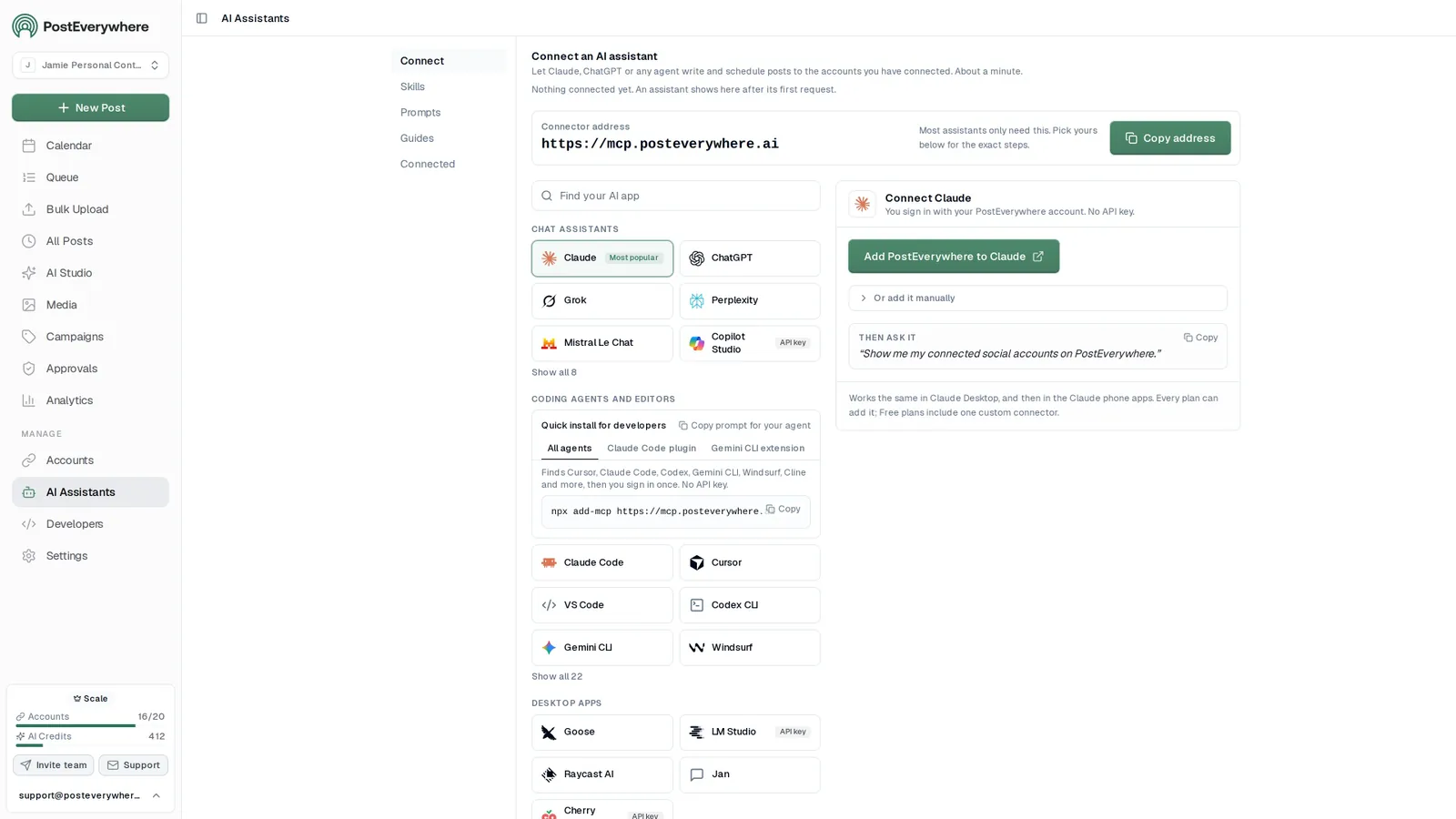
Give ChatGPT, Claude or any AI agent the same API
- Connect any AI agent.
- Add PostEverywhere to ChatGPT, Claude, Grok, Perplexity, Cursor or any other AI app that supports MCP with one address. It takes seconds.
- Ask in plain English.
- “Schedule this week's product posts to every account and tell me if any fail.” Your agent writes every post for you.
- It schedules and publishes.
- Your agent can post now, schedule for later or save a draft for you to review. Every post lands in your calendar, and scheduled posts go out on time through each network's official API.
$0 due today, cancel anytime
Choose your assistant and connect in seconds.
Works on every Claude plan, including free. Full Claude guide
- 1
Add to Claude
One click from Claude’s connector directory.
- 2
Sign up or sign in
Takes seconds, then you’re sent straight back.
- 3
Ask Claude
“Plan and schedule my posts for next week.”
Ask your agent
See all 15 skills and prompts“Check PostEverywhere for posts that failed this week. Tell me why each one failed, then retry the ones that can go out now.”
View skill“Look at my PostEverywhere queue for the next two weeks and tell me where the gaps are. Then suggest posts to fill them.”
View skill“Connect my Bluesky account to PostEverywhere.”
View skill
MCP tools
39 MCP tools behind the same API
The hosted MCP server at mcp.posteverywhere.ai exposes the API as tools an agent can call: 38 on the full server, with the Claude and ChatGPT connectors carrying most of them. create_post publishes now, schedules for a time, or saves a draft for you to review. See the MCP server docs for every parameter.
| Group | Tools |
|---|---|
| Posts | create_postschedule_postupdate_postdelete_postget_postlist_postslist_posts_advancedbulk_create_postsget_post_resultsretry_failed_postretry_failed_posts |
| Queue and best times | get_queueget_best_times |
| Media | upload_media_from_urllist_mediaget_mediadelete_media |
| AI | generate_imagegenerate_caption |
| Accounts | list_accountsget_accountget_account_healthcreate_connect_linkcreate_reconnect_linkconnect_credential_account |
| Insight | get_analytics_summaryget_meget_platform_rules |
| Campaigns | list_campaignscreate_campaignget_campaignupdate_campaigndelete_campaign |
| Webhooks | list_webhookscreate_webhookget_webhookupdate_webhookdelete_webhooktest_webhook |
Notes: bulk_create_posts takes up to 50 posts per call, generate_caption returns 1 to 5 captions, and create_connect_link returns a link that works for 10 minutes.
Claude Code, hostedRecommended
claude mcp add --transport http posteverywhere \
  https://mcp.posteverywhere.ai \
  --header "Authorization: Bearer pe_live_YOUR_KEY"
Any remote MCP client
URL     https://mcp.posteverywhere.ai
Header  Authorization: Bearer pe_live_YOUR_KEY
Run it locally
npx -y @posteverywhere/mcpLocal server in Claude Code
claude mcp add --scope user \
  --env POSTEVERYWHERE_API_KEY=pe_live_YOUR_KEY \
-- posteverywhere npx -y @posteverywhere/mcp- ChatGPT
- Claude
- Claude Code
- Cursor
- Cline
- Windsurf
- and any MCP client


Webhooks
Webhooks for every post, account and approval event
Subscribe to 15 event types instead of polling. Every delivery is signed with HMAC-SHA256 in the X-PostEverywhere-Signature header, and failed deliveries are retried with exponential backoff.
- Know the moment a post goes live.
- post.published arrives per platform with the platform post ID, so your app can link to it straight away.
- Catch problems early.
- post.failed, post.partially_failed and account.reconnect_needed tell you what needs attention before your audience notices.
- Verify every delivery.
- Check the signature against your webhook secret, and use the event ID header to ignore duplicates.
POST https://your-app.com/hooks/posteverywhere
X-PostEverywhere-Event: post.published
X-PostEverywhere-Timestamp: 1791277204
X-PostEverywhere-Signature: sha256=4f9a1c0e7b3d...

{
  "event": "post.published",
  "created_at": "2026-10-06T09:00:04Z",
  "data": {
    "platform": "instagram",
    "account_name": "northwind.coffee",
    "published_at": "2026-10-06T09:00:03Z",
    "platform_post_id": "18034529961"
  }
}
Events you can subscribe to include
post.scheduledpost.publishingpost.publishedpost.partially_failedpost.failedpost.deletedpost.approval_requestedpost.approvedpost.changes_requestedaccount.connectedaccount.disconnectedaccount.reconnect_neededmedia.uploadedmedia.deletedSDK, CLI and local MCP
An official Node.js SDK and CLI
Use the typed SDK from your own code, the CLI from your terminal or scripts, or run the MCP server on your own machine. All three use the same API key.
- Typed Node.js SDK.
npm install @posteverywhere/sdkfor a promises-based client with full TypeScript types and inline documentation.- Command-line tool.
npm install -g @posteverywhere/cli, runposteverywhere loginonce, then post and schedule from your terminal. Every command supports--json, so scripts and AI agents can drive it.- Local MCP server.
npx -y @posteverywhere/mcpruns the MCP server on your own machine with an API key, for offline or self-managed setups.
import PostEverywhere from '@posteverywhere/sdk';

const client = new PostEverywhere({
  apiKey: process.env.POSTEVERYWHERE_API_KEY,
});

const post = await client.posts.create({
  account_ids: [123],
  content: 'Shipping today.',
  scheduled_for: '2026-10-20T09:00:00Z',
});Full capability set
What you can build on the posting API
One Bearer token unlocks publishing, scheduling, media, AI generation, analytics, and webhooks across all top platforms. The table below lists what the API covers.
| Capability | What it does |
|---|---|
| One-call publishing | Send a single request and your post goes out to Instagram, TikTok, LinkedIn, Facebook, YouTube, X, Threads, Pinterest, Bluesky, Discord, Telegram, and WordPress through their official APIs.POST /posts |
| Scheduling | Schedule posts for any future time in any timezone, or publish now. Move or edit a scheduled post with one request. No cron jobs to maintain.scheduled_forPATCH /posts/{id} |
| Media upload | Upload images and video once and attach them to any post. Videos are converted to a platform-safe MP4 before they publish.POST /media/upload |
| AI caption and image generation | Generate platform-tailored captions and images from a prompt, then publish them in the same flow. Uses your plan's AI credits.POST /ai/generate-captionPOST /ai/generate-image |
| Analytics and account health | Pull post metrics and follower counts wherever each platform reports them, plus the health of every connected account.GET /analytics/summaryGET /accounts/{id}/health |
| Webhooks, campaigns, and bulk | Subscribe to delivery webhooks, group posts into campaigns, and create up to 50 posts in one bulk request.POST /posts/bulkPOST /webhooksPOST /campaigns |
import { PostEverywhere } from '@posteverywhere/sdk'

const client = new PostEverywhere({
  apiKey: process.env.POSTEVERYWHERE_API_KEY,
})

const me = await client.me.get()

// Subscribe to publish events
const hook = await client.webhooks.create({
  url: 'https://api.example.com/pe',
  events: ['post.published', 'post.failed'],
})

// Group posts into a campaign
const campaign = await client.campaigns.create({ name: 'Q3 Launch' })

// Aggregate counters in one call
const summary = await client.analytics.summary({ period: 'week' })
npm install @posteverywhere/sdkTyped resources, automatic retries, rate-limit awareNo-code and low-code automation
Works with n8n, Make, Zapier, Airtable, Retool, Postman and Bubble
If your tool can send an HTTP request, it can publish through the PostEverywhere API. We do not ship a native app in these marketplaces: each one uses the tool's own generic HTTP block to POST to https://app.posteverywhere.ai/api/v1/posts with a Bearer header, which is why setup takes minutes and does not break when a marketplace listing goes stale. For an agent-driven workflow, see how to connect PostEverywhere to n8n.
curl -X POST https://app.posteverywhere.ai/api/v1/posts \
  -H "Authorization: Bearer pe_live_your_key" \
  -d '{
    "content": "Launching our new feature today!",
    "account_ids": [1, 2, 3],
    "scheduled_for": "2026-10-06T09:00:00Z"
}'REST API
49 endpoints
Webhooks
15 event types
SDK + CLI
Node.js, npm
MCP server
Any AI agent
n8n: HTTP Request node. Set the method to POST, the URL to the posts endpoint, and add the Authorization header. Chain it after any trigger you already run.
Make: HTTP module. Use "Make a request", POST, and add the Authorization header under Headers. Map the caption straight from an earlier module.
Zapier: Webhooks by Zapier. Choose the Custom Request action, POST, and paste the header in. Any Zapier trigger can then publish a post.
Airtable: Run script automation. A fetch() call in an automation script turns a row into a scheduled post, so a content table becomes a publishing queue.
Retool: REST API resource. Add the base URL once as a resource with a Bearer header, and every query in the app can publish.
Postman: Collection. Set the Bearer token at collection level and every request inherits it, which is the fastest way to try the API before writing code.
Bubble: API Connector plugin. Add the endpoint as an API call with a Bearer header, then trigger it from any workflow.
Anything else: Any HTTP client. If a tool can send a POST request with a Bearer header, it can publish through the API.
Why teams build on the PostEverywhere API
Social media API pricing: one unified API from $9/mo, maintained for you
Wiring up social platforms yourself means a different integration for every network, each with its own auth, review process, and rate limits. PostEverywhere replaces all of it with one integration, and our roundup of the best social media APIs explains how the options compare.

Write three caption options for Friday's launch, make an image for each, and schedule them for 9am.
Called the PostEverywhere API
- POST
/ai/generate-caption3 captions - POST
/ai/generate-image×3default model, 4:5 - POST
/posts/bulk3 posts scheduled
Done. Three posts are scheduled for Friday at 9:00 AM, each with its own image. They are in your PostEverywhere calendar if you want to change anything.
One integration, not eight. Skip separate builds for Instagram, TikTok, LinkedIn, YouTube, Facebook, X, Threads and Bluesky. Bluesky is the exception that proves the rule: the AT Protocol needs no approval at all, but it cannot schedule.
Moving from another provider. Our guides on migrating from the Buffer API and the PostEverywhere API vs the Hootsuite API walk through the move. For a plain-English overview, see how to automate social media posting with an API.
Give software agency over your channels. Connect an AI agent through the MCP server, or use the REST API and SDK to build a social media agent that drafts, schedules, and publishes on its own. Self-hosted agents work the same way: OpenClaw calls the API through the PostEverywhere skills, as in the run shown here, and a personal agent such as Meta Muse can connect as a custom connector or build one from our OpenAPI file. Schedule Pinterest pins by API alongside every other network in the same queue.
The same engine as the product. Because the API drives the same engine as the rest of PostEverywhere, you also get cross-posting, multi-account management, and automation without extra work. The developer docs have the full endpoint reference, SDK, and webhook setup.
$0 due today, cancel anytime
Social media API FAQ
Social media API: your questions answered
Direct answers about the PostEverywhere social media API: platforms, pricing, limits, webhooks, approvals and AI agents.
What is a social media API?
A social media API lets software publish, schedule and read social media content without anyone clicking through each app. PostEverywhere's social media API is one REST API for all top platforms, so you integrate once instead of building a separate connection to Instagram, TikTok, LinkedIn, YouTube and the rest. It handles OAuth, token refresh, rate limits, retries and per-platform formatting for you.
Which platforms does the PostEverywhere API support?
All top platforms: Instagram, TikTok, LinkedIn, YouTube, Facebook, X (Twitter), Threads, Pinterest, Bluesky, Discord, Telegram and WordPress. Every post goes out through the platform's official API, and the platform list on this page shows which API each one uses. Facebook posts go to Pages, Instagram needs a Professional account, and Telegram works with channels, groups and supergroups where the bot is an admin.
What can you post through the social media API?
Text, images, video, carousels, X threads and first comments. Each post carries one video at most; carousels take up to 10 images on Instagram, 1 to 35 photos on TikTok and 2 to 5 images as a Pinterest carousel pin, and LinkedIn takes PDF document posts. Add a first comment with settings.firstComment on Instagram, Facebook, X, Threads and LinkedIn, and post to an X Community with platform_content.x.settings.community_id. Not supported: Instagram collab, location or product tags, LinkedIn polls and articles, Facebook Stories, and comment replies or DMs.
How much does the social media API cost?
API access is included on every plan, starting with Lite at $9/mo, and there is no separate API fee. Lite already includes API keys and the hosted MCP server; higher plans add connected accounts, AI credits and seats. There is no free plan: every plan starts with a 7-day trial, and a card is required.
Can I see a log of my API calls?
Yes. Every call made with an API key, including MCP tool calls from Claude, ChatGPT and Cursor, is listed on the Logs page in the dashboard with its status, duration, who made it and any error. Every response carries an X-Request-Id header that matches the log entry. Logs are kept for 30 days on every plan, with secrets redacted.
What are the rate limits?
Every API key can make 60 requests per minute and 1,000 per hour on every plan, and each response carries X-RateLimit-Limit, X-RateLimit-Remaining and X-RateLimit-Reset headers. Publishing to each platform has built-in retry and rate-limit handling, so a single call reaches every network reliably.
How does authentication work?
Your own code sends an API key as a Bearer header. An owner or admin creates keys on the Developers page, gives each one read, write or AI permissions, limits it to specific accounts and can revoke it at any time. AI assistants such as ChatGPT and Claude connect to the hosted MCP server by signing in to PostEverywhere and approving access, so no key is pasted into a chat.
Which webhook events can I subscribe to?
There are 15 event types: 7 for posts, 3 for accounts, 2 for media and 3 for approvals, including post.published, post.failed, post.partially_failed and account.reconnect_needed. Every delivery is signed with HMAC-SHA256 in the X-PostEverywhere-Signature header, and failed deliveries are retried with exponential backoff.
Can I create posts in bulk?
Yes. One bulk API call creates up to 50 posts. If you would rather use a spreadsheet, Bulk Upload in the app takes a .csv file of up to 200 posts.
Is there an SDK or npm package?
Yes. Install @posteverywhere/sdk for a fully typed Node client with promises and inline documentation. You can also call the REST API directly with a single Bearer token from any language, or run the MCP server locally with npx -y @posteverywhere/mcp.
Is there a command-line tool?
Yes. Install @posteverywhere/cli with npm install -g @posteverywhere/cli to post and schedule across all top platforms from your terminal. Run posteverywhere login once, connect your accounts, and publish. Every command also supports --json output, so the same CLI works as a tool for AI agents like Claude Code and Cursor.
Can I upload media from a URL?
Yes. POST /v1/media/upload-from-url fetches a public file for you. Images (JPEG, PNG, GIF, WebP, HEIC and HEIF) up to 25 MB are ready straight away; MP4 video up to 4 GB imports in the background, so you check the media item until it is ready. Imported media counts toward your storage.
Can I approve posts through the API?
Yes. POST /v1/posts/{id}/approve approves a pending post, and POST /v1/posts/{id}/request-changes sends it back with a note the author sees. Posts created with an API key skip approval by default; to send one for review, create it with draft: true and request_approval: true. GET /v1/queue and GET /v1/posts?approval=pending list what is waiting. The MCP server can read the queue but cannot approve posts or request changes.
Should an AI agent use the API or the MCP server?
Use the MCP server when an AI assistant such as ChatGPT, Claude or Cursor does the work in a conversation: it connects once, sees the tools and calls them in plain language, with nothing to install. Use the REST API or SDK when your own code, a backend job or a no-code tool such as n8n publishes. Both work on the same account and the same posts; see which social media tools AI agents can use for the wider picture.
Can the API tell me the best time to post?
Yes. GET /v1/best-times returns the best weekday and hour slots for one account, several accounts (one combined pick) or a whole platform, in the time zone you ask for. Each slot says what it is based on: the account's own posts, what works across PostEverywhere on that platform, or general guidance. next_best is the soonest good slot at least 30 minutes ahead, so pass its next.iso as scheduled_for when you create the post. Through MCP, create_post and schedule_post take schedule_at: "best_time" to do this in one step.
Can I delete a published post through the API?
Deleting a published post removes it from PostEverywhere only; it stays live on the platform. The exception is X: add ?delete_on_platforms=x to the delete request and the live X post is deleted too.
Does PostEverywhere have a native Zapier or n8n app?
Not today. Every automation tool connects through its own generic HTTP block (the n8n HTTP Request node, the Make HTTP module, Webhooks by Zapier, an Airtable script, a Retool REST resource, a Postman collection or the Bubble API Connector) against the REST API. It is one POST request with a Bearer header, so setup takes minutes and nothing needs installing.
How is this different from using each platform's API directly?
Each platform has its own API, OAuth flow, token refresh cycle, rate limits, and media rules. Building and maintaining all of them is weeks of work that keeps breaking as platforms change. PostEverywhere gives you one integration that handles OAuth, token refresh, rate limiting, retries, and per-platform formatting behind a single consistent interface.
Does it use official platform APIs or browser automation?
Official platform APIs only, including the Meta Graph API, TikTok Content Posting API, and YouTube Data API. There is no fragile browser automation or unofficial scraping, which means reliable delivery and accounts that stay in good standing.
Still have questions?
Contact us or browse the full FAQ.
$0 due today, cancel anytime
Start building on the PostEverywhere API
API access on every plan from $9/month. 7-day trial, cancel anytime.
Related Features & Resources
Explore related features and guides to get the most out of PostEverywhere.
Developer Docs & SDK
Endpoints, the typed Node SDK, and webhooks.
AI Agents & MCP
Connect Claude, ChatGPT, or Cursor via MCP.
Cross-Posting
Publish to all platforms at once.
Social Media Automation
Automate posting and workflows.
AI Content Generator
Generate captions via API.
Analytics
Pull cross-platform metrics by API.
Best Social Media APIs
How the API options compare.
Build a Social Media Agent
Ship an agent on the API.
Automate Posting with an API
Plain-English automation overview.
PostEverywhere vs Hootsuite API
API-to-API comparison.
Pricing
API access included on every plan.