The agentic Pinterest scheduler for image, video and multi-image Pins
Plan your Pinterest content from desktop, schedule pins for the times you choose, and bulk upload an entire month of content in minutes. 553 million monthly active users are searching, make sure your pins are there when they look. Plans from $9/mo. Or let ChatGPT, Claude or any AI agent schedule your Pins.
$0 due today, cancel anytime


Used by 2,831 happy customers
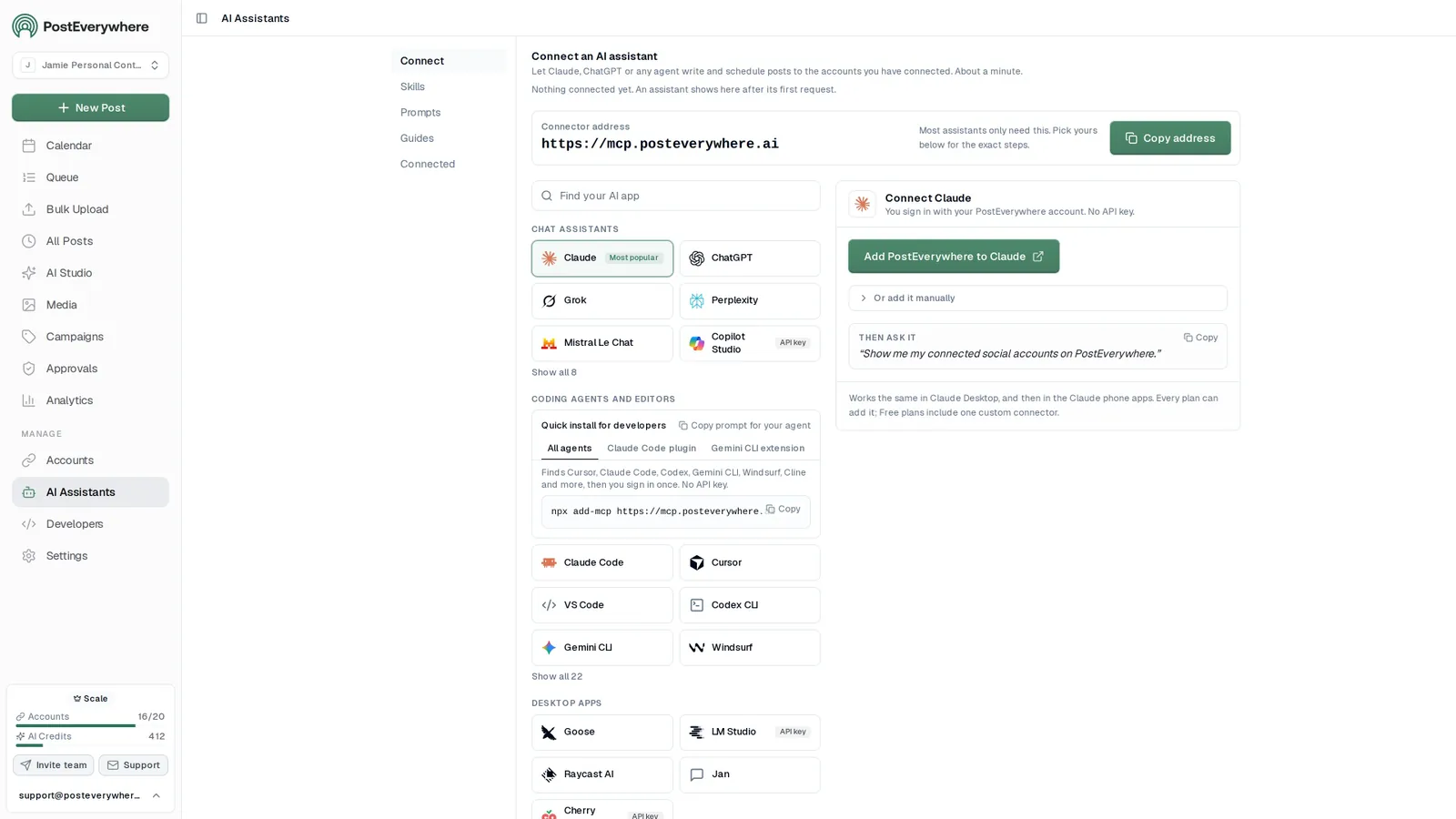
Connect your AI agent
Or let your AI agent schedule Pinterest for you
PostEverywhere is the agentic social media scheduler that works with all AI agents. Once connected to the hosted MCP server, your agent can draft, schedule and publish your pins through the same account your team uses, with the full API included on every plan.
- Connect any AI agent.
- Add PostEverywhere to ChatGPT, Claude, Grok, Perplexity, Cursor or any other AI app that supports MCP with one address. It takes about a minute.
- Ask in plain English.
- “Schedule pins for these three product photos next week.” Your agent writes every post for you.
- It schedules and publishes.
- Every post lands in your calendar, where you can check or edit it before it goes out on time through each network's official API.
$0 due today, cancel anytime
Connector address
https://mcp.posteverywhere.aiAI assistants
Plus any other MCP client. See every setup guide
How PostEverywhere publishes your Pinterest pins
To schedule a Pinterest pin, connect a Pinterest business account, upload your image or video, choose a board and destination link, pick a publish time, and let the Pinterest API publish it automatically. Image Pins, video Pins and multi-image Pins are all supported.
- Connect a Pinterest business account. The Pinterest API requires a business (not personal) account, which is free to switch to.
- Upload your pin. Add a vertical image (2:3) or a video pin for the best reach in search.
- Choose a board and destination link. Every pin needs a board; a destination URL sends clicks back to your site.
- Pick a date and time. Schedule ahead of seasonal search peaks, since Pinterest demand builds weeks early.
- Let it publish. PostEverywhere auto-publishes through the official Pinterest API at the scheduled time.
How to schedule Pinterest pins with the native scheduler
Pinterest has a free built-in scheduler on desktop. It works for occasional pins, but it only schedules up to 30 days ahead and one pin at a time, with no bulk upload, cross-posting or best-time suggestions.
- Log in to Pinterest on desktop and click Create, then Create Pin.
- Upload your image or video and add a pin title (up to 100 characters, keywords first) and description (up to 500 characters).
- Add a destination URL and choose a board.
- Click the calendar icon next to Publish instead of publishing, then choose your date and time.
- Click Schedule to confirm.
What types of Pinterest pins can you schedule?
PostEverywhere schedules image, video and carousel Pins; product Pins come from your catalog feed. Get the dimensions right first with our Pinterest image sizes guide.
| Pin type | Notes |
|---|---|
| Standard image pin | 1000x1500px (2:3) recommended |
| Video pin | 4 seconds to 15 minutes, .mp4 or .mov |
| Carousel pin | 2 to 5 images |
How far ahead to schedule Pinterest pins
Pinterest needs longer lead times than other platforms because people search for ideas well before they act on them.
| Content type | Schedule ahead | Why |
|---|---|---|
| Evergreen tips and how-tos | 1 to 2 weeks | Always relevant, no rush |
| Seasonal (holidays, events) | 45 to 60 days | Pinterest search peaks early |
| Product launches | 1 to 2 weeks | Time with the wider campaign |
| Trending topics | Same or next day | Capture momentum quickly |
| Blog promotions | Day of publication | Drive immediate traffic |
Visual planning
Schedule pins from a drag-and-drop calendar
See every scheduled pin across all your boards in one visual content calendar. Drag to reschedule, batch-create pin content, and auto-publish at the times you set. No more switching between Pinterest and every other app. Plan a month of content in one day.
- Content calendar.
- Monthly and weekly calendar views with drag-and-drop. Plan your entire Pinterest strategy alongside your other social platforms. See our guide to the best social media calendar tools.
- Posting queue.
- Set your posting times once and each new pin takes the next free opening. Peak times vary by niche, so start from general guidance and adjust.
- Board management.
- Organize pins across multiple boards and sections. Space your content to avoid spam triggers and maximize visibility across all platforms.
Mon
5
- 9:00 AM
Iced oat latte in 5 minutes
- 7:00 PM
Autumn cafe interior ideas
Tue
6
- 11:00 AM
Cold brew at home, step by step
- 8:00 PM
Pumpkin spice syrup recipe
Wed
7
- 9:00 AM
Latte art for beginners
AI content
Generate pin descriptions that rank in Pinterest search
Pinterest is a visual search engine, your pin titles and descriptions determine whether people find your content. PostEverywhere's AI content generator writes keyword-rich descriptions that drive discovery. Create pins faster with our Pinterest caption generator. Need caption ideas? We've got those too.
- SEO-optimized descriptions.
- AI generates pin descriptions with relevant keywords that help your content surface in Pinterest search results. Works like our AI caption generators for Instagram, LinkedIn, and TikTok.
- Bulk pin upload.
- Upload up to 200 posts at once from a .csv with captions, media and times. Same bulk scheduling workflow that works across all top platforms.
- AI image generation.
- Create custom pin graphics from text prompts with the AI image generator. Pick Portrait 4:5 or Story 9:16 before you generate so the image suits a Pin.
Board
Pin Title (optional)
First line shown in feeds. Keep it punchy.
Description
Pinterest indexes this for search. Hashtags work in the description.
Destination URL (optional)
Cross-platform publishing
One visual, every platform
Your best Pinterest content works on Instagram, Facebook, and beyond. Cross-post pins to other platforms with a single click, then tailor the caption for each one. Learn the difference between cross-posting and repurposing. Connect up to 20 accounts across all top platforms from one dashboard.
- Pin to post.
- Schedule a pin on Pinterest and simultaneously share it to Instagram, Facebook, LinkedIn, and more. One upload, all top platforms. See our complete cross-posting guide.
- Multi-account management.
- Manage multiple Pinterest business profiles alongside all your other social accounts. Perfect for agencies and teams managing client boards with approval workflows.
Post to (4 of 6 selected)
Select allIced oat latte in 5 minutes, ready before your first meeting.
Full recipe on the blog.
Everything included
Pinterest scheduler features
Every feature you need to schedule Pinterest pins, manage boards, and grow your Pinterest presence, included on every plan.
- Pin Scheduling
- Schedule image Pins, video Pins and multi-image Pins to publish automatically at the times you set, or let each one take the next opening in your posting queue.
- Visual Content Calendar
- See every scheduled pin across all your boards in a drag-and-drop calendar. Plan weeks or months of Pinterest content in one session.
- AI Pin Descriptions
- Generate keyword-rich pin descriptions and titles that drive search visibility on Pinterest using our AI writing tools.
- Bulk Pin Upload
- Upload dozens of pins at once via CSV. Schedule an entire month of Pinterest content in minutes, not hours.
- Board Management
- Organize pins across multiple boards and board sections. Rotate content to avoid spam triggers and maximize reach.
- Cross-Platform Publishing
- Schedule a pin on Pinterest and simultaneously post the same visual to Instagram, Facebook, and other platforms.
Why schedule Pinterest
Pinterest drives purchase intent like no other platform
Pinterest isn't just social media, it's a visual search engine with 553 million monthly active users actively looking for ideas to buy. 89% of weekly Pinterest users browse before making a purchase, and Pinterest shoppers spend 80% more monthly than users on other platforms. A Pinterest scheduling tool ensures your pins are visible when that buying intent peaks. If you sell products, Pinterest should be a cornerstone of your ecommerce social strategy.
Unlike platforms where content disappears in 24 hours, Pinterest pins have a lifespan of 3-6 months. That means every pin you schedule today can drive traffic for half a year. Bulk scheduling lets you front-load your Pinterest strategy and reap compounding returns. Optimize your pin images with our Pinterest image resizer and check the correct dimensions in our Pinterest image sizes guide.
The key to Pinterest growth is consistency, 1-5 high-quality pins per day, spread across relevant boards. Manual pinning is tedious and unsustainable. PostEverywhere's scheduler lets you batch your pin creation in one focused session and auto-publish throughout the week at the times you set. Learn how to stay consistent on social media without burning out. Your content stays on-track even when you're busy.
PostEverywhere handles Pinterest alongside every other top platform from one dashboard, Instagram, TikTok, YouTube, LinkedIn, Facebook, X, and Threads. Compare us to Tailwind alternatives to see the full-platform advantage. Check best times to post for data-driven scheduling, or see how we stack up in our best scheduling tools comparison.
Recurring posting times. Add posts to the queue and each takes the next free opening.
- Monday 09:00
- Tuesday 09:00
- Wednesday 09:00
- Thursday 09:00
- Friday 09:00
- SaturdayNo openings
- SundayNo openings
Next openings
Where the next posts added to the queue will land (UTC).
- 1 Mon, 12 Oct, 9:00 am
- 2 Tue, 13 Oct, 9:00 am
- 3 Wed, 14 Oct, 9:00 am
- 4 Thu, 15 Oct, 9:00 am
- 5 Fri, 16 Oct, 9:00 am
Suggested schedules
General starting points, not measured from your audience.
Steady weekdays
5 openings / week
Commute and lunch
7 openings / week
Always on
14 openings / week
Changing your openings does not move posts already in the queue. They keep the time they were given.
Works with all AI agents
Post to Pinterest from ChatGPT, Claude or any AI agent
A Pinterest MCP server lets an AI assistant schedule Pins through the official Pinterest API, choosing the board and writing the description without you opening Pinterest. Connect the account once and describe what you want pinned. Setup for every assistant is on the AI agents page.
- Board targeting.
- Tell the assistant which board a Pin belongs on and it routes it there.
- Search-oriented descriptions.
- Because Pin descriptions are indexed, the assistant can write them as keyword-aware copy rather than social captions.
- Destination links.
- Pins carry a destination URL, so a Pin can drive traffic to a specific page.
- Scheduled pinning.
- Queue Pins ahead rather than pinning live.
- A Pin always needs an image and a board.
- Pinterest has no text-only Pin, and every Pin must belong to a board. Both are needed before the assistant can schedule.
- Write for search, not for a feed.
- Pin descriptions are indexed and keep surfacing for months. Keyword-aware copy outperforms a social-style caption here more than on any other platform we support.
- Long shelf life.
- Pins can drive traffic long after posting, which makes evergreen content a better fit than time-sensitive announcements.
Pricing
Simple pricing, unlimited posts on every plan
Every plan posts to all top platforms and includes the API and hosted MCP server for your AI agent.
7-day free trial on every plan. Card required, $0 due today, cancel anytime. Compare every plan
Frequently Asked Questions
What does a Pinterest scheduler do?
A Pinterest scheduler lets you schedule pins in advance, auto-post at the times you set, bulk upload via CSV, and manage multiple boards from one dashboard. PostEverywhere combines Pinterest scheduling with every other top platform, AI content generation, and analytics, starting at $9/mo. Unlike Tailwind (Pinterest-only focus), PostEverywhere handles your entire social media workflow.
Can I try Pinterest scheduling before paying?
Yes. PostEverywhere has no free plan, but every plan starts with a 7-day trial that includes full Pinterest scheduling features, pin scheduling, bulk upload, AI descriptions, board management, and cross-platform publishing. Add your card to start, cancel anytime.
How do I schedule pins with PostEverywhere?
Connect your Pinterest business account to PostEverywhere, upload your image or video, write your pin title and description (or let AI generate them), select your target board, choose your publish date and time, and hit schedule. PostEverywhere auto-publishes via the official Pinterest API.
Does scheduling pins hurt Pinterest engagement?
No. Pinterest treats scheduled pins the same as manually published pins. The Pinterest API that PostEverywhere uses is the official, approved method for third-party publishing. In fact, scheduling at optimal times often increases engagement compared to posting whenever you happen to be online.
How many pins should I schedule per day?
Pinterest recommends 1-5 pins per day for consistent growth. Quality and relevance matter more than volume, Pinterest's spam detection flags accounts that pin excessively. PostEverywhere's smart scheduling helps you space pins throughout the day at optimal intervals.
Can I schedule Pinterest Idea Pins?
Idea Pins no longer exist as a separate format; Pinterest merged them into standard Pins in 2023. PostEverywhere schedules image, video and multi-image Pins via the Pinterest API.
Is PostEverywhere better than Tailwind for Pinterest?
Tailwind is a strong Pinterest-specific tool with SmartSchedule and SmartLoop features. PostEverywhere covers all top platforms (Pinterest, Instagram, TikTok, YouTube, LinkedIn, Facebook, X, Threads, Bluesky, Discord, Telegram, and WordPress) from $9/mo, so you don't need separate tools for each platform. If Pinterest is your only channel, Tailwind may be sufficient. If you manage multiple platforms, PostEverywhere saves you money and time.
What types of pins can I schedule?
PostEverywhere supports scheduling image Pins, video Pins and multi-image (carousel) Pins. You can upload images, videos, and GIFs directly in the composer.
How far in advance can you schedule Pinterest pins?
Pinterest's native scheduler lets you schedule pins up to 30 days ahead, one pin at a time, from desktop. PostEverywhere has no 30-day limit, which matters on Pinterest because seasonal searches build 45 to 60 days before the event: schedule Christmas pins in October and summer pins in March. Evergreen tips and product launches need only one to two weeks of lead time.
Can I schedule pins to group boards?
Yes. You can schedule pins to any board you have access to, including group boards. Select the board when you create the pin.
Can I manage multiple Pinterest accounts?
Yes. PostEverywhere supports connecting multiple Pinterest business accounts alongside your other social profiles. Manage up to 20 accounts across all top platforms from one dashboard, perfect for agencies and brands with multiple Pinterest profiles.
What is the best time to post on Pinterest?
Peak Pinterest engagement typically occurs on weekday evenings (8-11 PM), Saturday mornings, and Sunday afternoons. However, optimal times vary by niche, food and recipe pins perform best on weekends, while fashion and home decor see higher engagement on weekday evenings. Start from these general windows, then set your posting queue to the times that suit your niche.
What is a Pinterest MCP server?
An MCP server that exposes Pinterest publishing as tools an AI assistant can call, so Claude or ChatGPT can schedule Pins for you. PostEverywhere publishes through the official Pinterest API. It is not made by Pinterest; PostEverywhere runs it on the accounts you connect.
Grow Your Pinterest Presence
Explore related features and guides to get the most out of PostEverywhere.
Schedule via API
Automate Pinterest posting programmatically with our REST API. Included on all plans.
AI Social Media Agents
Autonomous agents that create, schedule, and optimize your Pinterest content automatically.
Pinterest Metrics & KPIs
Impressions, saves, outbound clicks, the Pinterest metrics that drive traffic.
Pinterest Content Calendar Template
Free template with fields for boards, pin titles, descriptions, and seasonal lead times.
For Photographers
Turn a delivered gallery into months of pins.
For Real Estate
Give every listing a full campaign, not one post.
Social Media Scheduler
Schedule to all top platforms from one dashboard.
Content Calendar
Plan your multi-platform strategy visually.
Cross-Platform Publishing
Publish pins to every network at once.
Bulk Scheduling
Upload CSV and schedule hundreds of pins.
AI Content Generator
Generate pin descriptions and captions with AI.
AI Image Generator
Create pin graphics from text prompts.
Social Media Analytics
Track pin performance across platforms.
Social Media Automation
Auto-post pins on a schedule you set.
Multi-Account Management
Manage multiple Pinterest profiles.
Team Workspaces
Collaborate on Pinterest with approval workflows.
Pinterest Image Resizer
Resize images to perfect Pinterest dimensions.
Pinterest Caption Generator
AI pin description writer.
Image Resizer
Resize for any platform in one click.
Hashtag Generator
Find trending hashtags for your pins.
Social Media Image Sizes
Every dimension for every platform.
Content Calendar Generator
Build a custom content plan.
Content Pillar Planner
Map out your Pinterest content strategy.
Alt Text Generator
Write accessible descriptions for pin images.
Color Palette Generator
Create on-brand color schemes for pins.
Best Time to Post Calculator
Find your optimal Pinterest posting times.
Instagram Scheduler
Cross-post pins as Instagram posts.
Facebook Scheduler
Share visuals to Facebook pages.
TikTok Scheduler
Repurpose pin content as TikTok videos.
LinkedIn Scheduler
Share infographic pins to LinkedIn.
YouTube Scheduler
Turn pin content into YouTube Shorts.
X Scheduler
Share pin links on X.
Threads Scheduler
Cross-post visual content to Threads.
How the Pinterest Algorithm Works
Smart Feed, fresh pins, and the four ranking signals.
How to Make Money on Pinterest
10 proven paths from affiliate to ecommerce.
How to Go Viral on Pinterest
Save-rate thresholds and viral pin templates.
How to Get More Pinterest Followers
10 tactics for growing your Pinterest audience.
100 Pinterest Content Ideas
100 pin ideas across 10 niches for batch planning.
25 Best AI Tools for Pinterest
Pin design, scheduling, SEO and analytics tools.
Best Time to Post on Pinterest
Day-by-day timing guide for maximum engagement.
Pinterest Image Sizes
Every pin dimension for 2026.
Pinterest Statistics 2026
40+ stats every marketer needs.
Tailwind Alternatives
Compare PostEverywhere to Tailwind.
Planoly Alternatives
Visual-first scheduling tools compared.
Best Cross-Posting Tools
Tools for publishing everywhere at once.
How to Bulk Schedule Posts
Step-by-step bulk scheduling guide.
Social Media Image Sizes Guide
Every dimension for every platform.
How to Stay Consistent on Social Media
Build a sustainable posting habit.
Social Media for Ecommerce
Drive sales with social media.
Best Social Media Calendar Tools
Top calendar tools compared.
How to Repurpose Content
Turn one piece into a post for every platform.
Grow Your Social Media Presence
Strategies for multi-platform growth.
Social Media for Small Business
Pinterest strategy for small businesses.
For Ecommerce Brands
Pinterest scheduling for online stores.
For Creators
Grow your Pinterest following.
ChatGPT vs Claude vs Perplexity for Social Media
Head-to-head AI tool tests across 12 marketing tasks.
How to Use AI for Social Media (Complete Guide)
The 7-step tool-by-tool workflow for AI content.
“This tool has truly made my content posting so much easier, I can't work without it. I can schedule my posts days in advance while working on other projects. Set it and forget it.”