Social media content calendar for every platform
No more messy spreadsheets. Drag-and-drop your content across all platforms, manage campaigns, and maintain a consistent posting schedule. Plan strategically with our free content calendar generator and content pillar planner.
Get started from as little as $9 per month. $0 due today, cancel anytime.


 Works with any AI agent


Used by 2,831 happy customers
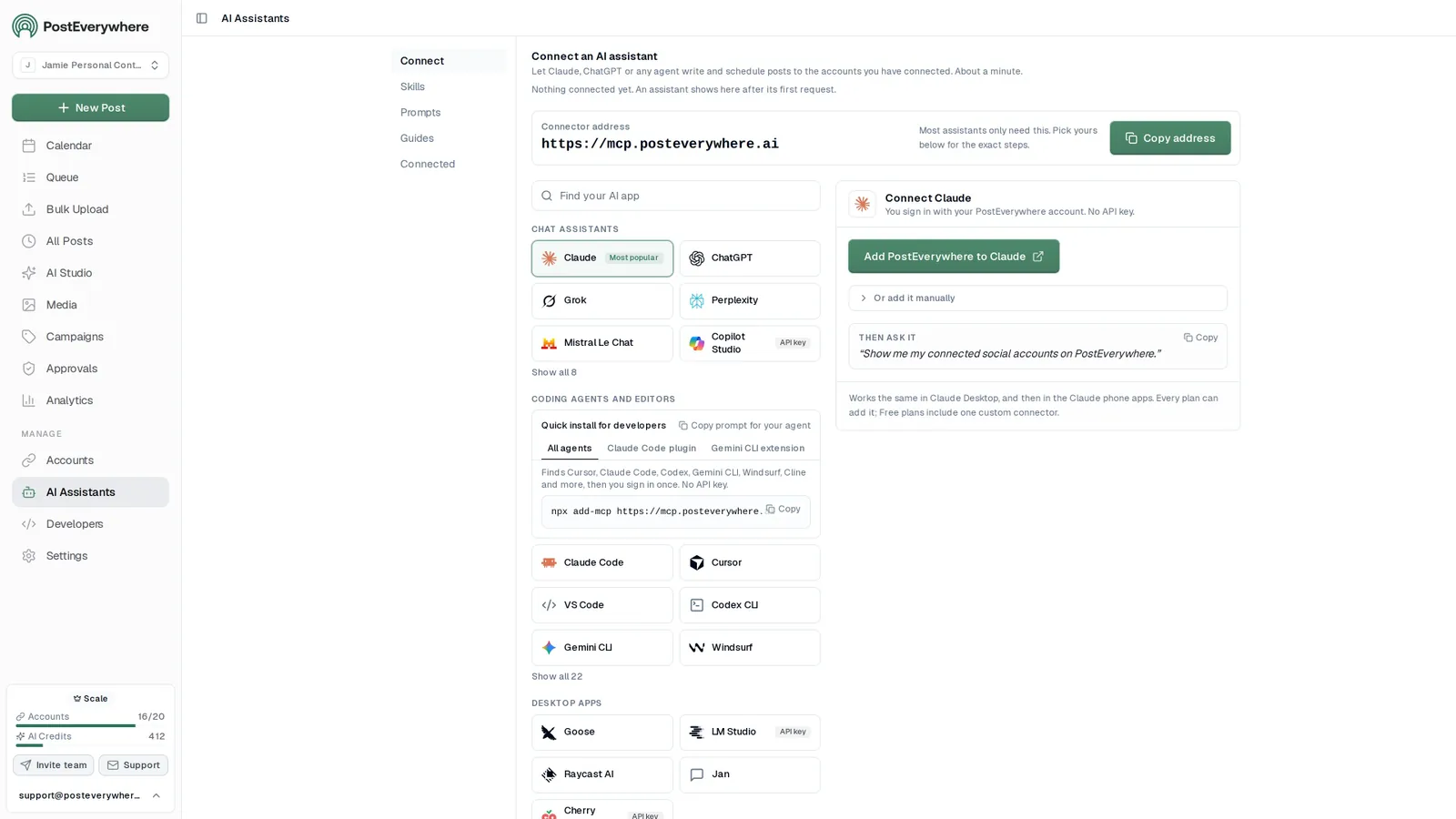
Connect your AI agent
Let your AI agent fill your content calendar
- Connect any AI agent.
- Add PostEverywhere to ChatGPT, Claude, Grok, Perplexity, Cursor or any other AI app that supports MCP with one address. It takes seconds.
- Ask in plain English.
- “Fill next week's calendar with five posts about our launch.” Your agent writes every post for you.
- It schedules and publishes.
- Your agent can post now, schedule for later or save a draft for you to review. Every post lands in your calendar, and scheduled posts go out on time through each network's official API.
$0 due today, cancel anytime
Connect your AI agent
Choose your assistant and connect in seconds.
Works on every Claude plan, including free. Full Claude guide
- 1
Add to Claude
One click from Claude’s connector directory.
- 2
Sign up or sign in
Takes seconds, then you’re sent straight back.
- 3
Ask Claude
“Plan and schedule my posts for next week.”
What your agent can do
Skills teach your agent the job. The 39 tools do the work.
- Plan a content calendarPlan a week or month of posts and fill your queue.
- Repurpose contentTurn a blog post, transcript or newsletter into a set of posts.
- Cross-post a videoOne video to TikTok, Reels, Shorts and more, with the right caption for each.
- Fix failed postsFind posts that didn't go out, explain why, and fix them.
- Weekly reportA short weekly or monthly report, ready to paste into an email.
- Brand voiceLearn how you write from your own posts and keep new posts in your voice.
Your content at a glance
A calendar built for social media teams
Monthly, weekly, and daily views with drag-and-drop scheduling. See every post across all platforms in one place, with each post's platforms and status at a glance, filterable by account.
- Drag-and-drop content calendar.
- Move posts between dates and time slots with simple drag-and-drop. Reorganize your social media calendar in seconds, not minutes.
- Multi-platform calendar view.
- See Instagram, TikTok, LinkedIn, Facebook, YouTube, X, Threads, Pinterest, Bluesky, Telegram, Discord, and WordPress posts all in one content calendar.
- Campaign planning.
- Group posts into campaigns, filter the calendar by account or status, and spot gaps in your content calendar instantly.
Mon
5
9:00 AM
Launch week is here
1:30 PM
Behind the scenes
Tue
6
10:00 AM
5 tips for faster scheduling
5:00 PM
Product teaser
Wed
7
9:00 AM
Customer story
3:00 PM
New templates
Done. 6 posts scheduled for the rest of the week, each one tailored for its platform.
Smart scheduling
A smarter content calendar for every platform
Set your posting times once and every new post takes the next free opening, so the calendar stays full without picking a time for each post. Use our best time to post research to choose your openings. Use our free best time to post calculator for personalized recommendations.
- Recurring posting times.
- Start from your suggested best times, based on when your posts have done best, from a general schedule like Steady weekdays, or set your own openings.
- Flexible calendar views.
- Switch between monthly, weekly, and daily content calendar views to focus on the big picture or fine-tune individual posts.
- AI content creation.
- Generate captions, images, and videos directly from your social media calendar. Fill a week of content in one session.
Recurring posting times. Add posts to the queue and each takes the next free opening.
- Monday 09:00
- Tuesday 09:00
- Wednesday 09:00
- Thursday 09:00
- Friday 09:00
- SaturdayNo openings
- SundayNo openings
Next openings
Where the next posts added to the queue will land (UTC).
- 1 Mon, 12 Oct, 9:00 am
- 2 Tue, 13 Oct, 9:00 am
- 3 Wed, 14 Oct, 9:00 am
- 4 Thu, 15 Oct, 9:00 am
- 5 Fri, 16 Oct, 9:00 am
Suggested schedules
General starting points, not measured from your audience.
Steady weekdays
5 openings / week
Commute and lunch
7 openings / week
Always on
14 openings / week
Changing your openings does not move posts already in the queue. They keep the time they were given.
Multi-account management
Every account, one social media calendar
Manage multiple brands, clients, or personal accounts from a single calendar. Connect up to 20 social accounts across all top platforms. Perfect for agencies and teams.
- Cross-platform publishing.
- Create one post, customize per platform, publish everywhere simultaneously from your content calendar.
- Account filtering.
- Filter your social media calendar by account or status. See exactly what matters to you.
- Instagramnorthwind.coffeenorthwind.roastery
- LinkedInNorthwind Coffee
- TikToknorthwindcoffee
- YouTubeNorthwind Coffee
- Xnorthwindnorthwind_eu
- FacebookNorthwind Coffee
- BlueskyNo accounts connected
Up to 20 accounts on Scale. Your AI agent can post to any of them.
Why a visual calendar
A social media planner and posting schedule in one view
The calendar is your social media planner and your posting schedule at once, so the plan and the posts never drift apart. You see exactly when you're posting and where the quiet periods are. No more "what are we posting today?" conversations: everyone on your team can see what's scheduled, what's in draft, and what's going live.
Schedule up to 200 posts in one go.
Drop your CSV here or click to upload
Max 200 posts per upload, 5MB max
october-posts.csv30 rows| date | platforms | content | media |
|---|---|---|---|
| Oct 5, 09:00 | Launch week is here | launch.mp4 | |
| Oct 6, 12:30 | 60-second product tour | tour.mp4 | |
| Oct 7, 09:00 | Three lessons from launch week | ||
| Oct 8, 17:00 | Customer spotlight | spot-1.jpg|spot-2.jpg |
+ 26 more rows
Fill the gaps with ideas. Fill your calendar with ideas using our free 30-day content generator, then turn the best ones into posts.
Balance your content mix at a glance. Ensure you have a healthy mix of Reels, educational posts, and promotional content across your calendar. Seeing every platform side by side makes patterns obvious.
Batch content creation is faster. Instead of creating one post at a time, open the calendar, see your gaps, and fill them in one session. Use bulk scheduling to upload a CSV of posts, or generate AI content (captions, images, and videos) in AI Studio.
Plan around key dates. Use our free social media holidays calendar to never miss trending moments.
Build your strategy first. Map the themes you post about with our content pillar planner, then give each pillar its regular days.
Preview the Instagram grid. See how your Instagram grid will look with our grid previewer before the posts go out.
$0 due today, cancel anytime
Or ask your agent to fill the calendar
See all skills and prompts“Use PostEverywhere to plan next week of posts for all my connected accounts. Suggest one post a day, show me the plan, then schedule it when I say yes.”
View skill“Look at my PostEverywhere queue for the next two weeks and tell me where the gaps are. Then suggest posts to fill them.”
View skill“Find my best posts from the last 3 months in PostEverywhere and schedule new versions.”
View skill
💡Related Features
iPhone app
PostEverywhere on your iPhone
The same calendar, accounts and posts as the web app, so you can keep things moving away from your desk.
- Compose and schedule on the go.
- Write a post, choose your accounts and schedule it from wherever you are.
- Your calendar in your pocket.
- See what is publishing today and what is next, including posts your AI agent scheduled.
- Know every post went out.
- Check what published and what needs attention, without opening your laptop.
 Google Play · coming soon
Free download, works with your PostEverywhere plan. See the iPhone app
Pricing
Simple pricing, unlimited posts on every plan
Every plan posts to all top platforms and includes the API and hosted MCP server for your AI agent.
7-day free trial on every plan. Card required, $0 due today, cancel anytime. Compare every plan
FAQ
Social Media Content Calendar FAQ
Straight answers about plans, platforms and how scheduling works.
What is a social media calendar?
A social media calendar is a planning tool that lets you organize, schedule, and visualize all your social media posts across platforms in one place. It shows what content is going live, when, and on which platform, helping you maintain a consistent posting schedule and avoid content gaps.
What is the best social media content calendar?
The best social media content calendar is one that publishes as well as plans. A spreadsheet or template shows the plan, but someone still has to copy each post into each app. A scheduling calendar like PostEverywhere holds the plan and the posts together: you see every platform in one view, drag posts to new dates, and they go out on time. Look for drag-and-drop rescheduling, per-platform previews, a posting queue and team review.
How do I create a content calendar for social media?
Pick the platforms you will post on and how often, then list your content pillars and the key dates for the month. Give each pillar regular days, write the posts in one batch, and schedule them into your calendar so each day has a post. Leave a few gaps for timely posts, and review what performed at the end of the month before planning the next one. For ready-made layouts, see our free content calendar templates.
How do I plan a month of social media content?
Start by identifying your content pillars and key dates for the month. Use a social media calendar tool like PostEverywhere to map out posts across platforms, batch-create content in one session, and schedule everything in advance. Our AI content generator can help you fill gaps quickly. Read our full guide on how to plan a month of content in one day.
What should a social media content calendar include?
A good social media content calendar should include post dates and times, the platform for each post, content type (Reel, Story, carousel, etc.), captions, hashtags, media assets, and campaign tags. PostEverywhere tracks all of these and color-codes posts by platform for easy visual planning. Use our free content calendar generator to get started.
How far ahead should I plan social media content?
Most social media managers plan 2-4 weeks ahead for regular content and 1-3 months ahead for campaigns and seasonal content. Planning too far ahead risks irrelevance, while planning too little leads to last-minute scrambling. A rolling 30-day calendar is a good baseline.
Can I drag and drop to reschedule posts?
Yes. PostEverywhere features drag-and-drop scheduling that lets you move posts between dates and time slots instantly. Reorganize your entire week of content in seconds, not minutes, no need to edit individual posts.
Does PostEverywhere support all social media platforms?
Yes. PostEverywhere supports Instagram, TikTok, LinkedIn, Facebook, YouTube, X (Twitter), Threads, Pinterest, Bluesky, Telegram, Discord, and WordPress, all manageable from one unified calendar view. You can create one post and customize it per platform before publishing everywhere simultaneously. Learn more about cross-platform publishing.
How much does a social media calendar tool cost?
PostEverywhere starts at $9/month for the Lite plan (2 accounts), with Growth at $29/month for 10 accounts and Scale at $39/month for 20. All plans include the visual calendar, drag-and-drop scheduling, and cross-platform publishing. A 7-day free trial is available with cancel anytime. See full pricing details.
Can teams collaborate on the same calendar?
Yes. PostEverywhere supports team collaboration with shared calendars, so everyone can see what is scheduled, what is in draft, and what is going live. Team members can create, review, and approve content from the same calendar view. Learn more about multi-account management.
Still have questions?
Contact us or browse the full FAQ.
$0 due today, cancel anytime
“This tool has truly made my content posting so much easier, I can't work without it. I can schedule my posts days in advance while working on other projects. Set it and forget it.”