Schedule YouTube videos and Shorts with auto-publishing
Upload your videos, write titles and descriptions, set a publish date, and move on. Your content goes live on schedule without you touching YouTube again.


Used by 874 happy customers
“This tool has truly made my content posting so much easier, I can't work without it. I can schedule my posts days in advance while working on other projects. Set it and forget it.”
Kim V. · Content Creator
Video scheduling
Schedule YouTube videos and Shorts in advance
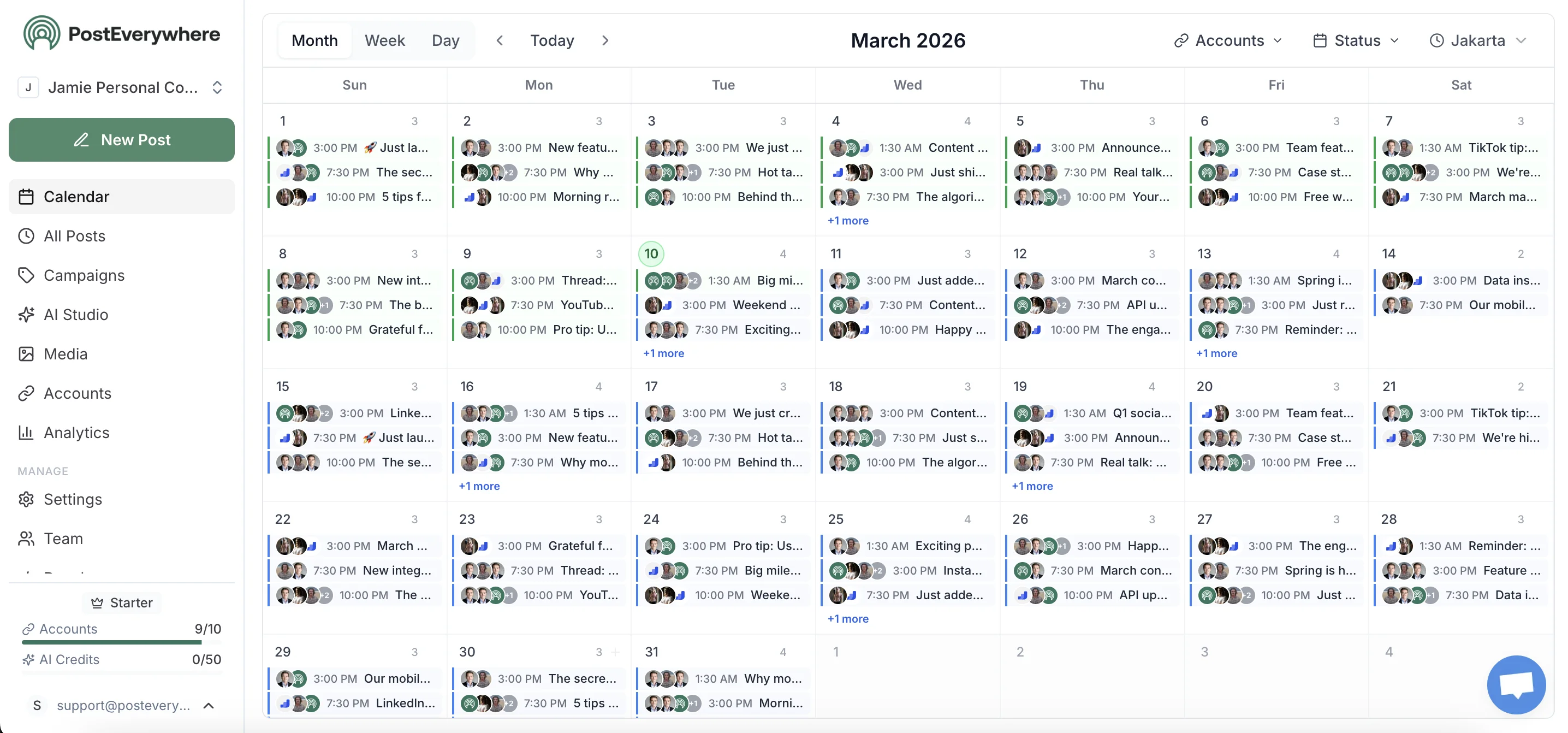
Schedule long-form videos and YouTube Shorts from a visual calendar. Set titles, descriptions, and thumbnails in advance — then auto-publish on your schedule.
- YouTube scheduling calendar.
- Schedule YouTube videos and Shorts in a drag-and-drop calendar. Plan and schedule weeks of uploads ahead of time.
- AI titles and descriptions.
- Generate SEO-optimized titles and descriptions to boost discoverability when you schedule YouTube videos.
- Schedule consistent uploads.
- Never miss an upload day. Schedule YouTube Shorts and videos on a set cadence and let auto-publishing handle the rest.
Can You Schedule YouTube Videos?
Yes — you can schedule YouTube videos and Shorts using YouTube Studio (free) or third-party tools like PostEverywhere for cross-platform scheduling.
This page is for creators who want to schedule YouTube uploads right now — not just learn about it.
Regular Videos
Full scheduling in YouTube Studio
YouTube Shorts
Upload and schedule vertical video
Premieres
Schedule with countdown timer
Community Posts
Limited third-party support
Can I schedule YouTube Shorts?
Yes. Upload your vertical video (under 60 seconds, 9:16 aspect ratio), and schedule it like a regular video. Both YouTube Studio and PostEverywhere support Shorts scheduling.
Does scheduling affect YouTube algorithm ranking?
No. YouTube's algorithm evaluates scheduled videos identically to manually uploaded ones. Ranking depends on click-through rate, watch time, and session duration — not how the video was published.
How far in advance can I schedule?
YouTube Studio has no strict limit — you can schedule months ahead. Most creators schedule 1-4 weeks in advance. PostEverywhere supports unlimited advance scheduling.
What Types of YouTube Content Can You Schedule?
| Content Type | Can Schedule? | Notes |
|---|---|---|
| Regular videos | ✓ Yes | Upload, set visibility to "Scheduled" |
| YouTube Shorts | ✓ Yes | Under 60 seconds, 9:16 aspect ratio |
| Premieres | ✓ Yes | Includes countdown timer and live chat |
| Community posts | ⚠ Limited | Limited API support for scheduling |
| Live streams | ⚠ Setup only | Can schedule start time, must go live manually |
How to Schedule YouTube Videos (Step-by-Step)
Schedule your first YouTube video in under 5 minutes. Here's how.
Connect your YouTube channel
Link your YouTube channel to PostEverywhere via Google sign-in. You'll need to authorize video upload permissions. Multiple channels can be connected.
Upload your video
Drag and drop your video file (MP4 recommended). Add a title using our YouTube title generator, write a description with our description generator, and add tags.
Add thumbnail and settings
Upload a custom thumbnail — create one with our YouTube thumbnail maker. Set visibility, category, and end screen elements.
Pick your date and time
Choose when to publish. Best windows: weekday afternoons 2-4 PM and evenings 6-9 PM. Check our guide on the best times to schedule YouTube Shorts.
Schedule and done
Click Schedule. Your video will auto-publish at the selected time. View all scheduled uploads in your content calendar.
7-day free trial · cancel anytime
Free YouTube Creator Tools
Optimize your videos before you upload with our free YouTube utilities.
Title Generator
Generate click-worthy YouTube titles optimized for search and CTR.
Use ToolThumbnail Maker
Create eye-catching thumbnails that drive clicks and views.
Use ToolDescription Generator
Write SEO-optimized video descriptions with timestamps and links.
Use ToolHashtag Generator
Find trending YouTube hashtags and tags to boost discoverability.
Use ToolWhy Use a YouTube Scheduler?
A YouTube scheduler helps creators maintain consistent upload schedules and maximize video performance. According to Hootsuite research, consistent posting is crucial for YouTube growth. Here's why YouTubers and brands use our YouTube scheduling tools:
Schedule YouTube Videos in Advance
Plan and schedule YouTube videos and Shorts for the entire week or month from one content calendar. Our YouTube scheduling tool lets you upload videos, write titles and descriptions, add tags, and schedule everything to auto-publish at your preferred times. Maintain consistent uploads without daily manual publishing using our cross-platform publishing tools.
Auto-Publish to YouTube Automatically
Schedule YouTube videos to publish automatically at specific times. Our YouTube scheduler handles auto-publishing—even when you're editing new content, sleeping, or traveling. No more staying up late to hit publish at midnight. Learn more about YouTube scheduled publishing.
Visual Content Calendar for YouTube
Plan your YouTube content strategy with a visual calendar. See all scheduled videos and Shorts at a glance, drag-and-drop to reschedule uploads, and organize content by series or campaign. Perfect for maintaining a consistent YouTube posting schedule.
AI Title & Description Generator
Generate engaging YouTube titles with our YouTube title generator, create SEO-optimized descriptions using our description generator, and discover trending tags with our hashtag generator. Read our guide on multi-platform content strategy.
YouTube Scheduling Limitations You Should Know
Thumbnails may not upload with scheduled videos
Some third-party schedulers can't upload custom thumbnails via YouTube's API. Verify your thumbnail uploaded correctly, or add it manually in YouTube Studio after the video is scheduled. YouTube Studio's native scheduler handles thumbnails without issues.
Large file upload times
YouTube videos can be up to 256GB. Uploading through a third-party tool means the file goes through their servers first, which can take significantly longer than uploading directly to YouTube Studio. For files over 5GB, consider uploading directly.
End screens and cards
Most third-party tools can't add end screens, info cards, or chapters when scheduling. You'll need to add these in YouTube Studio after the video is uploaded. This is a YouTube API limitation, not a tool limitation.
Processing time after upload
YouTube needs time to process your video after upload (SD first, then HD/4K). If you schedule a video to publish 30 minutes after upload, it may only be available in 360p initially. Upload at least 2-4 hours before your scheduled publish time for full quality.
Monetization settings
Monetization claims and mid-roll placement can't be configured through third-party schedulers. Set these manually in YouTube Studio before the video goes live to avoid missing initial ad revenue.
Who Uses Our YouTube Scheduler?
Whether you're a full-time creator managing upload schedules, a brand repurposing video content across platforms, or an educator publishing course content — our scheduling tools keep your channel consistent. Track your growth with our YouTube engagement calculator and estimate earnings with our YouTube money calculator.
PostEverywhere vs Other YouTube Schedulers
How does PostEverywhere compare to YouTube Studio, TubeBuddy, and vidIQ for scheduling YouTube videos?
| Feature | PostEverywhere | YouTube Studio | TubeBuddy | vidIQ |
|---|---|---|---|---|
| Price | From $19/mo | Free | From $4.99/mo | From $7.50/mo |
| AI title/description | ✓ Built-in | ✗ | ✓ Yes | ✓ Yes |
| Cross-platform posting | ✓ 8 platforms | ✗ YouTube only | ✗ YouTube only | ✗ YouTube only |
| Bulk scheduling | ✓ Yes | ✗ One at a time | ⚠ Limited | ✗ |
| Visual content calendar | ✓ Yes | ✗ | ✗ | ✗ |
| SEO keyword research | ⚠ Basic | ✗ | ✓ Advanced | ✓ Advanced |
| Free tier | ✓ 7-day trial | ✓ Always free | ✓ Free plan | ✓ Free plan |
Bottom line: YouTube Studio is fine for single-channel creators who only post to YouTube. TubeBuddy and vidIQ excel at SEO research. PostEverywhere is best for creators who post across multiple platforms and want AI content generation, batch scheduling, and a visual calendar — starting at $19/mo.
Troubleshooting Common YouTube Scheduling Issues
Video published in low quality (360p/480p)
YouTube processes videos from lowest to highest quality. If your video goes live immediately after upload, viewers will only see 360p. Upload at least 2-4 hours before your scheduled time (longer for 4K) to ensure full HD/4K is available at publish.
Scheduled video didn't publish
Check three things: (1) Your YouTube channel connection is still active. (2) The video wasn't flagged by YouTube's automated content review. (3) The video finished processing before the scheduled time. If using a third-party tool, verify the API connection hasn't expired.
Custom thumbnail didn't upload
Some API limitations prevent thumbnail upload via third-party tools. Verify your channel is verified (required for custom thumbnails). If the thumbnail is missing, add it manually in YouTube Studio — the video stays "unlisted" until the scheduled time, so you have time to add it.
Video upload is extremely slow
When using third-party schedulers, your video uploads to their servers first, then to YouTube — doubling the upload time. For large files (over 2GB), consider uploading directly to YouTube Studio and using PostEverywhere to schedule smaller cross-platform content like Shorts.
Shorts aren't showing in the Shorts shelf
Ensure your video is under 60 seconds, in 9:16 aspect ratio (1080x1920), and includes #Shorts in the title or description. YouTube may take up to 24 hours to categorize content as a Short. Landscape or square videos won't appear in the Shorts shelf.
How YouTube Scheduling Works in 2026
YouTube offers built-in scheduling through YouTube Studio: upload your video, set the visibility to "Scheduled," and pick a date and time. The video sits as a private upload until the scheduled time, when it automatically goes public. This is free for all YouTube channels and works for both regular videos and Shorts.
Third-party schedulers like PostEverywhere add features YouTube Studio doesn't offer: cross-platform posting (publish the same Shorts to TikTok, Instagram Reels, and Facebook simultaneously), batch uploading multiple videos at once, AI-powered title and description generation, and a visual content calendar for planning your upload schedule across all platforms.
YouTube's algorithm does not penalize scheduled videos. Whether you upload and publish immediately or schedule for next week, the algorithm evaluates your video the same way — based on click-through rate, watch time, and session duration. Consistent uploading is what drives growth, and scheduling makes consistency effortless. Learn more about ranking signals in our guide to how the YouTube algorithm works, and find the best times to schedule YouTube Shorts.
Official YouTube Integration
PostEverywhere uses the official Google YouTube API for secure video publishing.
💡Related Guides
YouTube Scheduler Features
Comprehensive YouTube creator tools designed to help you build a successful channel, maximize monetization, and grow your audience. Optimize your profile with our YouTube bio generator to attract more subscribers.
Schedule YouTube Videos
Schedule YouTube videos with premiere options, flexible timing, and organized content calendar.
YouTube Shorts Scheduler
Schedule YouTube Shorts alongside regular videos for maximum short-form video reach.
YouTube Auto Publisher
Auto-post to YouTube at your preferred times without manual intervention.
AI Title & Description Generator
Generate SEO-optimized titles, descriptions, and tags with AI assistance.
YouTube Content Calendar
Plan video releases in a visual calendar with drag-and-drop scheduling.
What you can manage on YouTube
- • Video uploads & premieres
- • SEO-optimized titles & descriptions
- • Custom thumbnails
- • Video tags & categories
- • Community posts
- • Monetization settings
See YouTube's creator guidelines: YouTube Creator Hub.
Works great with these features
YouTube Scheduling Best Practices
Proven strategies to maximize views, watch time, and subscriber growth on YouTube.
Consistency is king on YouTube
Upload on a consistent schedule (e.g., every Tuesday and Friday at 2 PM). YouTube's algorithm rewards channels that upload consistently. According to YouTube Creator Academy, consistent uploading is one of the top factors for channel growth. Use our scheduling tool to maintain your upload cadence even during busy weeks.
Optimize titles for CTR (Click-Through Rate)
Your title should be compelling yet accurate. Use numbers ("5 Ways to..."), create curiosity ("The Secret to..."), or promise value ("How to 10x..."). Keep titles under 60 characters so they don't get cut off in search results. Our AI assistant analyzes successful titles in your niche and suggests optimized variations.
Write SEO-optimized descriptions with timestamps
Put important keywords in the first 150 characters of your description (appears above "Show more"). Add chapter timestamps to improve watch time and viewer experience. Include relevant links to your website, social media, and related videos. Learn more about YouTube SEO best practices.
Thumbnails drive 90% of click decisions
Use high-contrast colors, clear text (3-5 words max), and close-up faces with strong expressions. Create professional thumbnails with our YouTube thumbnail maker. Test thumbnail variations to see what drives the highest CTR. Successful thumbnails are simple, intriguing, and accurately represent the video content. Avoid clickbait—YouTube's algorithm penalizes misleading thumbnails.
Upload when your audience is most active
Check YouTube Analytics to see when your subscribers are online. Generally, weekday afternoons (2-4 PM) and evenings (6-9 PM) work well. For Shorts, post during commute hours (7-9 AM, 5-7 PM). Our scheduler lets you queue videos to publish at these optimal times automatically, even if you're sleeping or working.
Hook viewers in the first 30 seconds
80% of viewers decide whether to keep watching in the first 30 seconds. Start with your best content, create a "pattern interrupt," or use a compelling hook ("In this video, you'll learn..."). Avoid long intros—get to the value immediately. Check out YouTube's recommendation algorithm insights.
YouTube Scheduler FAQs
- How can I optimize my YouTube videos for better search rankings?
- Our AI generates SEO-optimized titles, descriptions, and tags based on trending keywords. Use our engagement rate calculator to track performance and our money calculator to estimate revenue potential. We also suggest optimal video length, thumbnail design, and posting times to maximize discoverability.
- Can I schedule video premieres and manage community posts?
- Yes. Schedule video premieres to build anticipation, manage community posts to engage subscribers, and coordinate launches across multiple social platforms from one dashboard.
- How do I track my YouTube monetization and revenue?
- Monitor ad revenue, channel memberships, Super Chat earnings, and sponsorship opportunities. Track which content types generate the most revenue to optimize your monetization strategy.
- What's the best posting schedule for YouTube growth?
- Consistency is crucial. Most successful channels post 1-3 times per week at consistent times. We identify when your audience is most active and suggest optimal upload schedules.
- Can I manage multiple YouTube channels?
- Absolutely. Manage multiple channels, coordinate team members, set approval workflows, and track performance across all your YouTube properties from one unified dashboard.
Learn More About Youtube for Business
Explore official Youtube resources to maximize your social media strategy:
YouTube Creator Academy
Official YouTube resources for content creators
creatoracademy.youtube.comYouTube API Documentation
Technical documentation for YouTube platform integration
developers.google.comYouTube Help Center
Official support and troubleshooting from YouTube
support.google.comYouTube Blog
Latest YouTube features, updates, and creator news
blog.youtubeRelated Video & Content Scheduling Tools
Maximize your video content strategy with these cross-platform scheduling tools and guides.
Schedule via API
Automate YouTube posting programmatically with our REST API. Included on all plans.
AI Social Media Agents
Autonomous agents that create, schedule, and optimize your YouTube content automatically.
7 Best YouTube Schedulers
We tested 7 YouTube schedulers for long-form, Shorts, and community posts.
YouTube thumbnail sizes
Every dimension and format spec for the platform.
YouTube Metrics & KPIs
Watch time, CTR, audience retention — the YouTube metrics that drive growth.
YouTube Content Calendar Template
Free template with fields for long-form, Shorts, thumbnails, and SEO titles.
AI Content Generator
Create AI thumbnails, Shorts, and video descriptions for YouTube.
AI Image Generator
Generate eye-catching custom thumbnails for YouTube videos and Shorts.
Social Media Scheduler
Batch schedule YouTube Shorts alongside all your other social media content.
TikTok Scheduler
Schedule TikTok videos alongside YouTube Shorts for maximum short-form reach.
Instagram Scheduler
Schedule Instagram Reels to complement your YouTube content strategy.
Threads Scheduler
Draft and schedule Threads updates to share your video content.
Pinterest Scheduling
Schedule pins and idea pins.
X Scheduler
Share YouTube videos on X to drive traffic to your channel.
Facebook Scheduler
Cross-post YouTube content to Facebook for extended reach.
Social Media Content Calendar
Plan YouTube videos in a unified calendar with all social platforms.
Cross-Platform Publishing
Publish YouTube content updates across all social platforms.
Post to All Social Media at Once
Step-by-step guide to cross-posting across all platforms.
What our customers say
“This tool has truly made my content posting so much easier, I can't work without it. I can schedule my posts days in advance while working on other projects. Set it and forget it.”
Kim V.
Content Creator