The YouTube algorithm isn't one system. It's five places that each pick videos their own way. Home, Suggested Videos (Up next), Search, Subscriptions and Shorts each lean on different signals. What gets you views in Search won't necessarily get you recommended on Home, and what works for Shorts has little in common with long-form.
PostEverywhere schedules your YouTube videos and Shorts at the times your audience is online, so you can put this guide into practice. See how it works.
YouTube says its recommendation system learns every day from over 80 billion signals to work out what each viewer is likely to enjoy. For the latest platform data, see our YouTube statistics roundup, and track the YouTube metrics and KPIs that matter for your channel.
YouTube also measures whether viewers were glad they watched, not just whether they watched. It asks some viewers to rate videos and predicts those ratings for everyone else. This guide breaks down how each surface works in 2026, what YouTube itself has said about its ranking signals, and the tactics that drive views, subscribers and reach.
TL;DR
- YouTube recommends videos in several places: Home, Up next, Search, Subscriptions and Shorts each work differently
- Home leans mainly on your watch history; Up next leans mainly on the video you're watching
- Satisfaction counts: YouTube asks viewers to rate videos and only counts highly rated viewing as "valued watch time"
- YouTube Shorts average 200 billion daily views, and Shorts can now run up to 3 minutes
- YouTube says publish time "is not known to impact a video's long-term performance", though it can help early views
- In our own data from 9,500+ videos, Sunday morning and Friday afternoon did best and evenings did worst
- Schedule your uploads with a social media scheduler to keep a steady rhythm
Table of Contents
- How YouTube's Algorithm Works (By Surface)
- The Ranking Factors That Matter
- The Satisfaction-Weighted Discovery Shift
- How the Shorts Algorithm Works
- YouTube Features That Affect the Algorithm
- What Actually Works in 2026
- 10 YouTube Algorithm Myths Debunked
- YouTube vs. Other Platforms: How the Algorithms Differ
- Recent Algorithm Updates (2025-2026 Timeline)
- FAQs
- Next Steps
How YouTube's Algorithm Works (By Surface)
Each YouTube surface has its own recommendation logic, built for a different moment in a viewer's day.
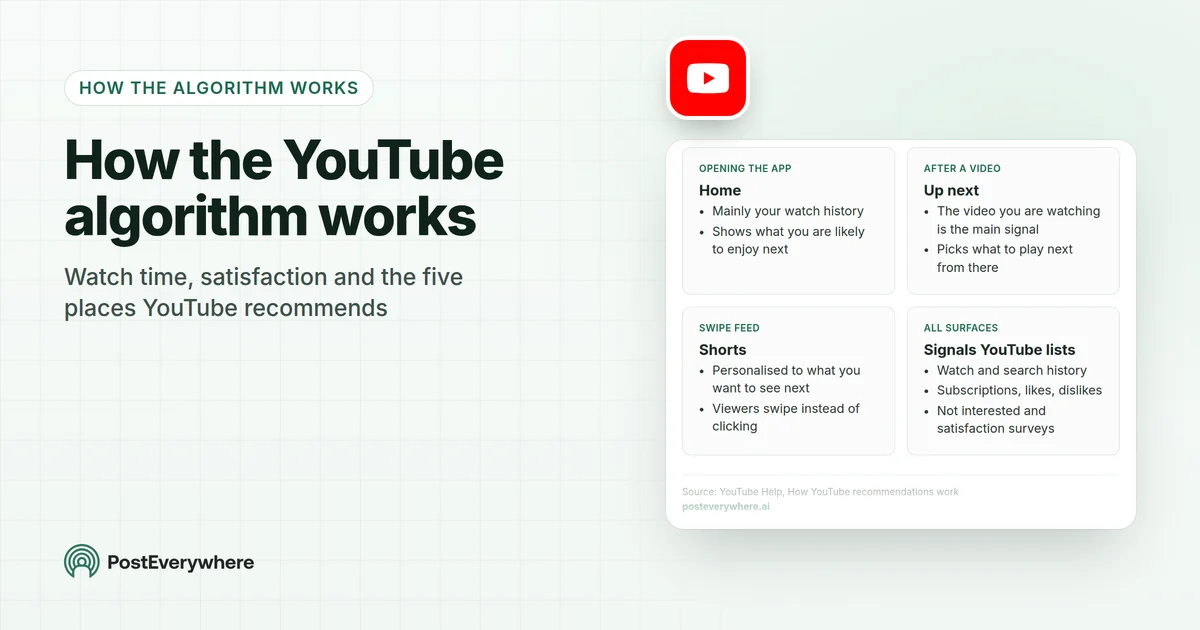
Where YouTube recommends videos, and what drives each
Each place in the app leans on different signals, so a video can do well in one and not another.
- Opening the appHome
- Mainly your watch history
- Shows what you are likely to enjoy next
- After a videoUp next
- The video you are watching is the main signal
- Picks what to play next from there
- Swipe feedShorts
- Personalised to what you want to see next
- Viewers swipe instead of clicking
- All surfacesSignals YouTube lists
- Watch and search history
- Subscriptions, likes, dislikes
- Not interested and satisfaction surveys
Home Feed
The personalised feed viewers see when they open YouTube. YouTube says that for the homepage, its system "primarily relies on your watch history".
Beyond that, YouTube lists signals such as search history, subscriptions, likes, dislikes, "Not interested" and satisfaction surveys. New and small channels can appear on Home when viewers who see their videos click and keep watching.
Suggested Videos
The recommendations that appear beside or after the current video, called Up next. Here YouTube uses "the video you're currently watching as the main signal when suggesting a video to play next."
That's why a video on a similar topic to what people are already watching can pick up a lot of suggested views. If your video leads naturally into another of yours, viewers can keep watching your channel.
YouTube Search
The one place where the viewer tells YouTube exactly what they want. Relevance comes first: does the title, description and the video itself match the search? From there, YouTube also considers how well videos have satisfied people who searched for the same thing.
Small channels can outrank large ones if their video answers the search better, and two people searching the same words may see different results because search is personalised too. Saying your main keyword early in the video helps make the topic clear.
Tags are a much smaller piece of the puzzle than they used to be, but they still help with common misspellings; you can build a tag list for any video with our free YouTube tag generator.
Subscriptions Feed
Shows uploads from channels you subscribe to. It's the most direct way to reach your existing audience, which is why getting viewers to subscribe still matters.
Shorts Feed
A personalised swipe feed with its own logic, covered in detail in the Shorts section below.
The Ranking Factors That Matter
YouTube's official help pages and talks by Todd Beaupré, YouTube's head of growth and discovery, give a clear picture of what the algorithm weighs.
Primary Signals
| Signal | What YouTube says or shows | Details |
|---|---|---|
| Watch time and retention | Watch time is a core signal | How long people watch and how much of the video they see. Your retention graph in YouTube Studio shows where viewers leave |
| Click-through rate (CTR) | Shown in YouTube Studio | The share of impressions that become views. Driven by thumbnails and titles. Shorts are swiped, not clicked |
| Satisfaction surveys | Named by YouTube | YouTube asks viewers to rate videos and predicts the answer for everyone else |
| Likes, dislikes and shares | Named by YouTube | Direct signals of whether people enjoyed a video |
| "Not interested" and "Don't recommend channel" | Named by YouTube | Viewers can tell YouTube to show them less of something |
| Viewer history | Named by YouTube | Watch history, search history and subscriptions |
How Context Changes Signal Weight
Beaupré has explained that YouTube uses signals such as time of day and device to find videos that fit the moment, so what someone wants on a TV in the evening can differ from what they want on a phone at lunch.
This means there's no single formula. The algorithm adapts to the viewer, the device and the surface they're on.
The Satisfaction-Weighted Discovery Shift
"Satisfaction-weighted discovery" is a name commentators gave to this, not YouTube's own term. The idea behind it is real, though, and YouTube has described it in its own words.
How YouTube measures satisfaction, not just watch time
YouTube asks some viewers to rate what they watched, then predicts those ratings for everyone else.
- Ask viewersSurveys ask some viewers to rate a video they watched from one to five stars.
- Predict for everyoneA model learns to predict how everyone else would have rated it.
- Count valued timeOnly viewing rated four or five stars counts as valued watch time.
- RecommendVideos people are glad they watched are more likely to be recommended.
YouTube's VP of Engineering explained on the official YouTube blog that clicks alone are an incomplete signal, because a click doesn't mean someone enjoyed the video. So YouTube layers in:
- Satisfaction surveys: some viewers are asked to rate a video they watched from one to five stars
- Predicted satisfaction: because most viewers never answer a survey, YouTube trained a model to predict how they would have rated a video
- Valued watch time: only viewing rated four or five stars counts as "valued watchtime"
- Direct feedback: likes, dislikes, shares and "Not interested" all feed in
YouTube's help page puts it simply: surveys help the system understand "satisfaction, not just watch time."
The practical implication: videos that win clicks but leave viewers disappointed (misleading titles, padded content) work against themselves. Track the YouTube metrics and KPIs that show whether people stay and come back.
How the Shorts Algorithm Works
Shorts work differently from long-form videos because viewers swipe through a feed instead of choosing from thumbnails. YouTube says the Shorts feed is "personalized to reflect what we think you want to see next".
How It Works
- A first audience: a new Short is shown to some viewers in the Shorts feed
- Wider reach if it lands: if those viewers keep watching rather than swiping away, the Short can be shown to more people
YouTube doesn't publish the exact rollout, but YouTube Studio shows a "viewed vs. swiped away" figure for every Short, which tells you how the first seconds are working.
Key Differences from Long-Form
- CTR matters less: viewers swipe through Shorts rather than clicking thumbnails. "Viewed vs. swiped away" is the number to watch
- Views count differently: since 31 March 2025, each play or replay of a Short counts as a view, and the old measure is shown as "engaged views"
- Maximum length: 3 minutes: Shorts can run up to three minutes, up from 60 seconds
- The hook is everything: with no thumbnail to sell the click, the first second has to stop the swipe
Shorts as a Testing Ground
Many creators use Shorts to test ideas cheaply before making a long-form video on the same topic. YouTube hasn't published how Shorts views affect long-form recommendations, so treat Shorts as their own channel of discovery and judge them on their own numbers.
Shorts Performance Benchmarks
| Metric | Value |
|---|---|
| Daily Shorts views | 200 billion on average |
| Maximum length | 3 minutes |
| How views are counted | Every play or replay |
| Best times in our data | Friday around 5 PM and Sunday around 9 AM |
| Weakest time in our data | Evenings, 6 PM to midnight |
Our Shorts numbers come from 6,500+ Shorts scheduled with PostEverywhere; see the full breakdown in our YouTube Shorts timing guide.
Publishing when your viewers are online helps a video's first day. PostEverywhere schedules your YouTube videos and Shorts for the exact times you choose, and suggests times from your own results where the platform shares them. See the YouTube scheduler.
YouTube Features That Affect the Algorithm
Thumbnails & Test and Compare
Your thumbnail and title decide whether someone clicks from Home, Up next or Search. YouTube's Test & Compare feature lets you upload up to three thumbnails for a video and see which one viewers watch most. Best practices:
- Show a clear subject, often a face, that reads at a glance
- Use bold, short text and high-contrast colours
- Design for small phone screens first
- Size: 1280x720 pixels, 16:9 aspect ratio
Chapters (Timestamps)
Chapters split a video into sections viewers can jump between, and they can appear as key moments in Google search results. They make long videos easier to navigate, which helps people find the part they came for instead of leaving.
End Screens & Cards
These point viewers to your next video, so one view can lead to another. A clear "watch this next" at the end of a video keeps people on your channel instead of leaving YouTube.
Community Posts
Posts let you share text, polls, quizzes, images, GIFs and videos with your audience between uploads. Access is tied to having advanced features enabled rather than a subscriber count. They're a simple way to stay in front of subscribers between videos.
Collaboration Feature
YouTube's Collaborations feature, announced at Made on YouTube 2025, lets you invite other creators onto a video. The video is shown to the audiences of all the creators involved, with each creator's name and a subscribe button.
For two channels with overlapping audiences, it's one of the easiest ways to reach new viewers.
Premieres
Schedule a video as a Premiere and viewers can wait for it together with a live chat countdown. YouTube's own help suggests checking when your viewers are online to pick a time for your Premiere, because a Premiere is one of the few cases where timing really matters.
What Actually Works in 2026
Video Length
| Type | Good starting point | Notes |
|---|---|---|
| General long-form | 7-15 minutes | Room for depth without padding |
| Monetization | 8 minutes or more | Mid-roll ads are available on videos of 8 minutes or longer |
| Conversations/podcasts | 30+ minutes | Long formats suit viewers watching on TV |
| Shorts | Up to 3 minutes | Make it as long as the idea needs and no longer |
The rule behind every row: make the video as long as it needs to be to keep people watching. Padding a video to hit a length hurts retention.
Posting Frequency
| Strategy | Frequency | Why |
|---|---|---|
| Minimum viable | 1 long-form a week | A steady rhythm your subscribers can expect |
| Growth | 2-3 long-form a week | More chances for a video to take off, if quality holds |
| With Shorts | A few Shorts a week | A cheap way to test ideas and reach new viewers |
| Aggressive Shorts | 1-2 Shorts a day | For channels built around short-form |
Quality matters more than quantity: a great video every two weeks beats a weak one every day.
YouTube Algorithm Tips for Returning Channels
Coming back after a break doesn't put your channel in a penalty box. YouTube's growth team told Search Engine Journal that it aims "to not overemphasize historical data if that data isn't particularly predictive of future video performance".
In 2019, YouTube's then-CEO Susan Wojcicki wrote that across millions of channels, creators who took a break got more views on average when they came back than just before they left, as CNBC reported.
- Restart with your strongest idea. Each new video is matched with the viewers most likely to enjoy it, so the first one back matters more than the gap.
- Upload when your viewers are online. YouTube Studio's When your viewers are on YouTube report shows the hours; it helps a video's first day.
- Pick a schedule you can keep. A pace you can sustain beats a burst of uploads followed by another break.
Best Times to Upload
YouTube itself says that "publish time is not known to impact a video's long-term performance", but "publishing videos when your audience is most active can be beneficial for early viewership." So timing helps a video's first days, not its whole life.
Our own data from 9,500+ YouTube videos scheduled with PostEverywhere agrees that days barely matter, with a few windows a little ahead:
- Best windows: Sunday 8 to 11 AM and Friday 3 to 6 PM, in your audience's local time
- Weakest time: weekday evenings after 6 PM; 6 to 9 PM is when the most videos go up
- Days: every day was within 8% of a channel's usual views

| Day | 6-9 AM | 9 AM-noon | Noon-3 PM | 3-6 PM | 6-9 PM | 9 PM-midnight |
|---|---|---|---|---|---|---|
| Monday | +10% | +4% | -6% | 0% | -6% | -11% |
| Tuesday | -14% | -10% | -13% | +4% | -7% | +10% |
| Wednesday | +3% | -6% | -3% | -3% | -18% | -1% |
| Thursday | -14% | +3% | -10% | -6% | -6% | -22% |
| Friday | +9% | +6% | -4% | +13% | -5% | -18% |
| Saturday | +10% | -11% | -7% | -1% | +8% | +7% |
| Sunday | 0% | +13% | +4% | +17% | -14% | -21% |
For the full day-by-day breakdown, see our best time to post on YouTube guide, and check the "When your viewers are on YouTube" report in YouTube Studio's Audience tab for your own channel.
Content Hooks
- Show the viewer what they'll get in the first few seconds of a long-form video
- Hook within the first second or two for Shorts
- Tease what's coming in the first 15 seconds of long-form
- Make Shorts loop naturally, so a replay feels seamless
What to Avoid
- Misleading thumbnails and titles: they win clicks, then lose viewers, which works against you
- Ignoring Shorts entirely: they're a cheap way to test ideas and reach new viewers
- Watermarked reposts: reposting TikToks with watermarks looks unoriginal
- Long gaps between uploads: a steady rhythm keeps subscribers coming back
Let your AI agent do the scheduling. Ask Claude or ChatGPT to draft a week of YouTube posts and schedule them with PostEverywhere, at your best times. Connect your AI agent.
10 YouTube Algorithm Myths Debunked
1. "The algorithm ignores new/small channels" YouTube's growth team describes recommendations as matching videos to each viewer when they open the app, not pushing videos out. A small channel's video can be recommended to anyone it suits.
2. "Posting every day guarantees growth" If daily posting lowers quality, viewers watch less of each video and recommendations follow. YouTube says publish time isn't known to affect long-term performance, so what you upload matters far more than how often or when. Quality over frequency.
3. "Your channel's overall performance determines each video's success" Each video gets its own chance. Beaupré has said: "If your last video wasn't so great and your next video is great, we want to realize the potential of each video." One weak video doesn't put your channel in a "penalty box".
4. "The algorithm finds audiences FOR your videos" YouTube explains it the other way round. Beaupré: "A lot of creators think of YouTube as pushing videos out to a bunch of people, but it's actually more the reverse." The system finds videos for viewers.
5. "Higher production quality ranks higher" The algorithm responds to how viewers behave (watching, rating, coming back), not to production budgets. A well-lit phone video people watch to the end can beat a cinematic production that viewers abandon.
6. "You can trick the algorithm with clickbait" Misleading thumbnails win clicks but lose viewers quickly, and YouTube's satisfaction surveys are designed to catch videos people regret watching. Clickbait works against itself.
7. "Tags, titles, and descriptions are everything" Metadata tells YouTube what a video is about, but how viewers respond decides how far it goes. Titles matter most for the click; tags matter least.
8. "There's one single algorithm" YouTube recommends videos in several places, and each leans on different signals: Home on watch history, Up next on the current video, Shorts on its own personalised feed.
9. "Shorts cannibalize long-form views" YouTube hasn't published evidence either way. Plenty of channels run both successfully. Treat Shorts as a separate way to reach new viewers and point the ones who enjoy them to your longer videos.
10. "Videos only go viral in the first 48 hours" No. YouTube's growth team has said recommendations can surface older videos when interest returns, so don't judge a video on its first days alone.
Evergreen videos can pick up views for months or years through search and suggested.
YouTube vs. Other Platforms: How the Algorithms Differ
| Factor | YouTube | TikTok | |
|---|---|---|---|
| Core model | Watch history, the current video and search | Interest graph (For You feed); schedule with our TikTok scheduler | Different ranking for Feed, Stories, Reels and Explore |
| Signals the platform highlights | Watch time, satisfaction surveys, likes, dislikes | Finishing videos, shares, what you watch | Watch time, likes per reach, sends per reach |
| Virality | Slower but long-lasting | Fast | Moderate |
| Content lifespan | Months to years | Days to weeks | Days to weeks |
| Discovery | Search, recommendations and subscriptions | Mostly the For You feed | Explore and the Reels feed |
| Monetization | Ad revenue share on long-form and Shorts | Creator Rewards on videos of a minute or more | Brand deals and creator programmes |
| New creator friendliness | Good, video by video | High | Moderate |
YouTube's fundamental advantage is evergreen content. A YouTube video can rank in search and keep collecting views for years. On TikTok and Instagram, most posts have a shelf life of days to weeks.
YouTube is also a search engine in its own right. People come looking for answers, so a video that answers a common question can be found long after it's posted, unlike TikTok and Instagram where discovery is mostly browsing.
The trade-off: TikTok makes it easier for a brand-new account to get a quick hit, because follower count isn't a direct factor there. YouTube asks for more work upfront (thumbnails, titles, hooks) but rewards it over a much longer timeframe.
For how Instagram's separate algorithms compare, see our Instagram algorithm guide. For Facebook's approach, see our Facebook algorithm guide.
Recent Algorithm Updates (2025-2026 Timeline)
August 2026: YouTube said views across YouTube are counted from the first frame going forward, starting 24 August 2026.
January 2026: YouTube CEO Neal Mohan's annual letter named managing low-quality "AI slop" as a priority, extending YouTube's existing spam and clickbait systems to tackle it.
Late 2025: YouTube announced Collaborations, letting several creators share one video and its audience.
March 2025: Shorts view counting changed. Since 31 March 2025, each play or replay counts as a view, with the old measure kept as "engaged views."
October 2024: Shorts could run up to three minutes, up from 60 seconds.
Ongoing: YouTube keeps folding satisfaction (surveys, likes, dislikes, "Not interested") into recommendations, as its engineering team has described.
Key Platform Stats
| Metric | Value |
|---|---|
| Signals the system learns from daily | 80 billion+ |
| YouTube Shorts daily views | 200 billion on average |
| Paid to creators, artists and media companies (past 4 years) | $100 billion+ |
| US GDP contribution (2024) | $55 billion |
| US adults who use YouTube | 84% (Pew Research, 2026) |
| Best upload windows, our data | Sunday 8-11 AM, Friday 3-6 PM |
For how these numbers compare across every major platform, see our complete social media statistics for 2026.
For the latest platform changes, see our trends guide.
For exact dimensions and format specs, see our YouTube thumbnail size guide.
2026 Algorithm Updates: What to Know
What's worth knowing from YouTube's recent changes:
- Hype helps smaller channels. Fans can hype long-form videos from channels in the YouTube Partner Program with 500 to 500,000 subscribers, and hypes count for more on smaller channels. Hyped videos compete for a spot on the Hype leaderboard.
- Satisfaction keeps gaining ground. Watch time still matters, but YouTube combines it with surveys, likes, dislikes and "Not interested" to judge whether viewers were glad they watched. A short video people love can beat a long one they abandon.
- Search is about answering the question. A clear title, a description that matches the topic and a video that answers the search early all help.
- Shorts have their own feed. Judge Shorts on their own numbers, such as "viewed vs. swiped away", rather than long-form metrics like click-through rate.
Spend your time on posts worth sharing, not on posting them. PostEverywhere publishes to YouTube and every other top platform from one calendar. Start your 7-day free trial. Plans start at $9 a month.
How PostEverywhere helps with the YouTube algorithm
Every algorithm in this guide rewards the same habits: posting consistently, posting when your audience is online, and making each post fit the platform. PostEverywhere is built for that:
- Schedule YouTube videos and Shorts with titles, descriptions and custom thumbnails; square or vertical videos up to 3 minutes go out as Shorts
- Upload when your viewers are online: best-time suggestions learn from when your own videos get the most views
- Write and adapt captions with AI Studio, and keep a steady rhythm with the posting queue
- Let your AI agent do it: ask Claude or ChatGPT to draft and schedule a week of posts through PostEverywhere (connect your AI agent)
See the PostEverywhere YouTube scheduler, or start a 7-day free trial; plans start at $9 a month.
FAQs
Does the YouTube algorithm favor certain channel sizes?
No. YouTube's growth team describes recommendations as matching videos to viewers, so a small channel's video can be recommended to anyone it suits. What matters is how viewers respond: whether they watch, rate it well and come back, not your subscriber count.
How often should I post on YouTube in 2026?
One to three long-form videos a week is a good target if you can keep the quality up, plus a few Shorts a week if they suit your channel. Quality matters more than frequency. Use a YouTube scheduling tool to keep a steady rhythm.
Do YouTube Shorts help or hurt long-form performance?
YouTube hasn't published evidence that Shorts help or hurt long-form recommendations. Many channels use Shorts to reach new viewers and test ideas, then point interested viewers to longer videos. Judge each format on its own numbers.
What's the ideal YouTube video length in 2026?
As long as the video needs to keep people watching. Long-form often works at 7 to 15 minutes, mid-roll ads need 8 minutes or more, conversations and podcasts often run 30 minutes or longer, and Shorts can run up to 3 minutes.
How do satisfaction surveys affect my videos?
YouTube asks some viewers to rate videos from one to five stars and has trained a model to predict those ratings for everyone else. Only viewing rated four or five stars counts as "valued watch time", so videos that leave people satisfied do better than ones they regret.
Do thumbnails really matter that much?
Yes. On Home, Up next and Search, your thumbnail and title decide whether someone clicks at all. YouTube's Test & Compare feature lets you test up to three thumbnails per video. Design them to read clearly on a small phone screen.
Can old videos go viral on YouTube?
Yes, this is one of YouTube's big advantages. YouTube's growth team has said recommendations can surface older videos when interest returns, and evergreen videos keep collecting views through search and suggested for months or years.
How does the YouTube algorithm handle AI-generated content?
YouTube CEO Neal Mohan named managing low-quality "AI slop" as a 2026 priority, extending YouTube's spam and clickbait systems to tackle it. AI-assisted videos that viewers enjoy can still do well; low-quality ones face the same satisfaction problems as any other weak video.
Want to put these algorithm insights into practice? Read our complete guide to getting more YouTube subscribers for 15 data-backed growth strategies built on the ranking signals covered above.
Next Steps
YouTube's algorithm in 2026 rewards one thing above all: videos that satisfy viewers. Clicks alone aren't enough. YouTube looks at whether people watched, rated the video well and came back.
The creators who win are the ones who consistently deliver on what their thumbnails and titles promise, keep viewers watching, and make people want to come back.
Put this into action on YouTube
- Schedule YouTube with PostEverywhere: plan long-form and Shorts in advance
- Find your best posting times: our own data on the best time to post on YouTube
- Generate video ideas with AI: titles, descriptions and hooks
How other platform algorithms compare
AI workflow for YouTube content
- How to use Claude for social media: Claude for YouTube scripts and long descriptions
- The complete guide to using AI for social media: a multi-step workflow for titles, scripts and thumbnails
Sources
Every outside fact in this article comes from the pages below. Our own figures come from posts scheduled with PostEverywhere, as explained where they appear.
- YouTube Help: How YouTube recommendations work
- YouTube Official Blog: YouTube CEO Neal Mohan’s 2026 Letter: The Future of YouTube
- YouTube Help: YouTube performance FAQ & Troubleshooting
- Search Engine Journal: How YouTube’s Recommendation System Works In 2025
- YouTube Official Blog: On YouTube’s recommendation system
- YouTube Help: Get started creating YouTube Shorts
- YouTube Help: Understand three-minute YouTube Shorts
- YouTube Official Blog: New in YouTube Studio: Ask AI, Title A/B Testing & More
- Search Engine Journal: YouTube Algorithm Myths Debunked: Insights From The Growth Team
- CNBC: YouTube CEO tells video creators to take some time off
- YouTube Help: Understand your YouTube audience - Computer
- Pew Research Center: Americans' Use of Social Media in 2026
- YouTube Help: Hyping videos eligibility, availability & policies

Founder & CEO of PostEverywhere. Writing about social media strategy, publishing workflows, and analytics that help brands grow faster.