Updated June 4, 2026
Schedule social media posts to every platform from one dashboard
Schedule posts to 11 platforms (Instagram, LinkedIn, TikTok, YouTube, Facebook, X, Threads, Pinterest, Bluesky, Discord, Telegram) from one dashboard. Use our AI post generator, content calendar, and best time calculator for optimal results.


Used by 2,831+ happy customers
“This tool has truly made my content posting so much easier, I can't work without it. I can schedule my posts days in advance while working on other projects. Set it and forget it.”
Kim V. · Content Creator
See it in action
Watch how PostEverywhere simplifies your social media workflow
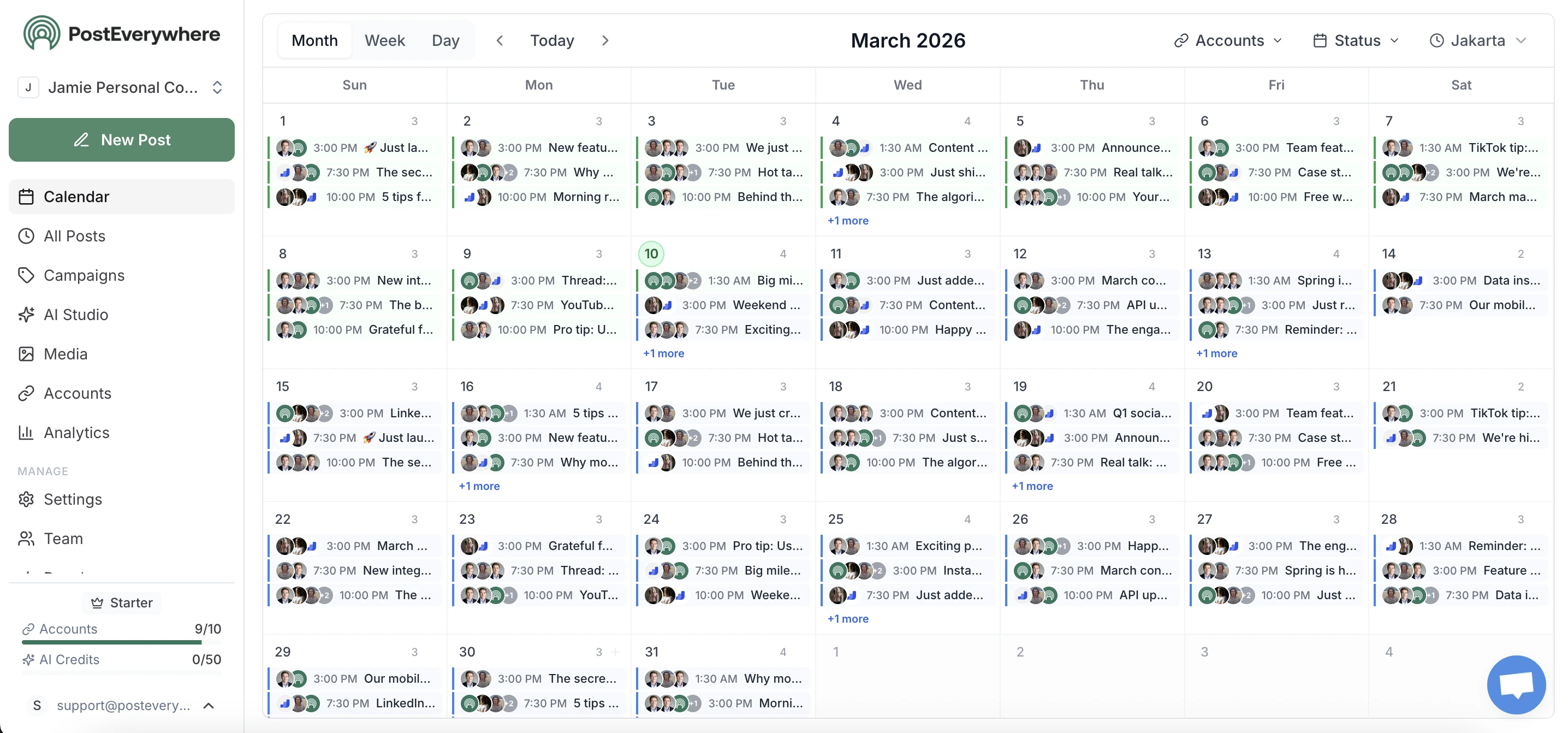
All-in-one scheduling
Schedule posts across every platform from one calendar
See every scheduled social media post across all 11 supported platforms (Instagram, LinkedIn, TikTok, YouTube, Facebook, X, Threads, Pinterest, Bluesky, Discord, Telegram) in a single calendar view. Drag-and-drop to reschedule, batch-create posts, and never miss a publishing window.
- Visual scheduling calendar.
- Monthly, weekly, and daily views with drag-and-drop scheduling. See every scheduled social media post at a glance.
- AI caption generation.
- Generate platform-optimized captions, hashtags, and content ideas in seconds with built-in AI tools.
- Auto-schedule at the best time.
- Schedule social media posts at optimal times based on your audience activity. Built-in retry logic handles rate limits automatically.
AI content studio
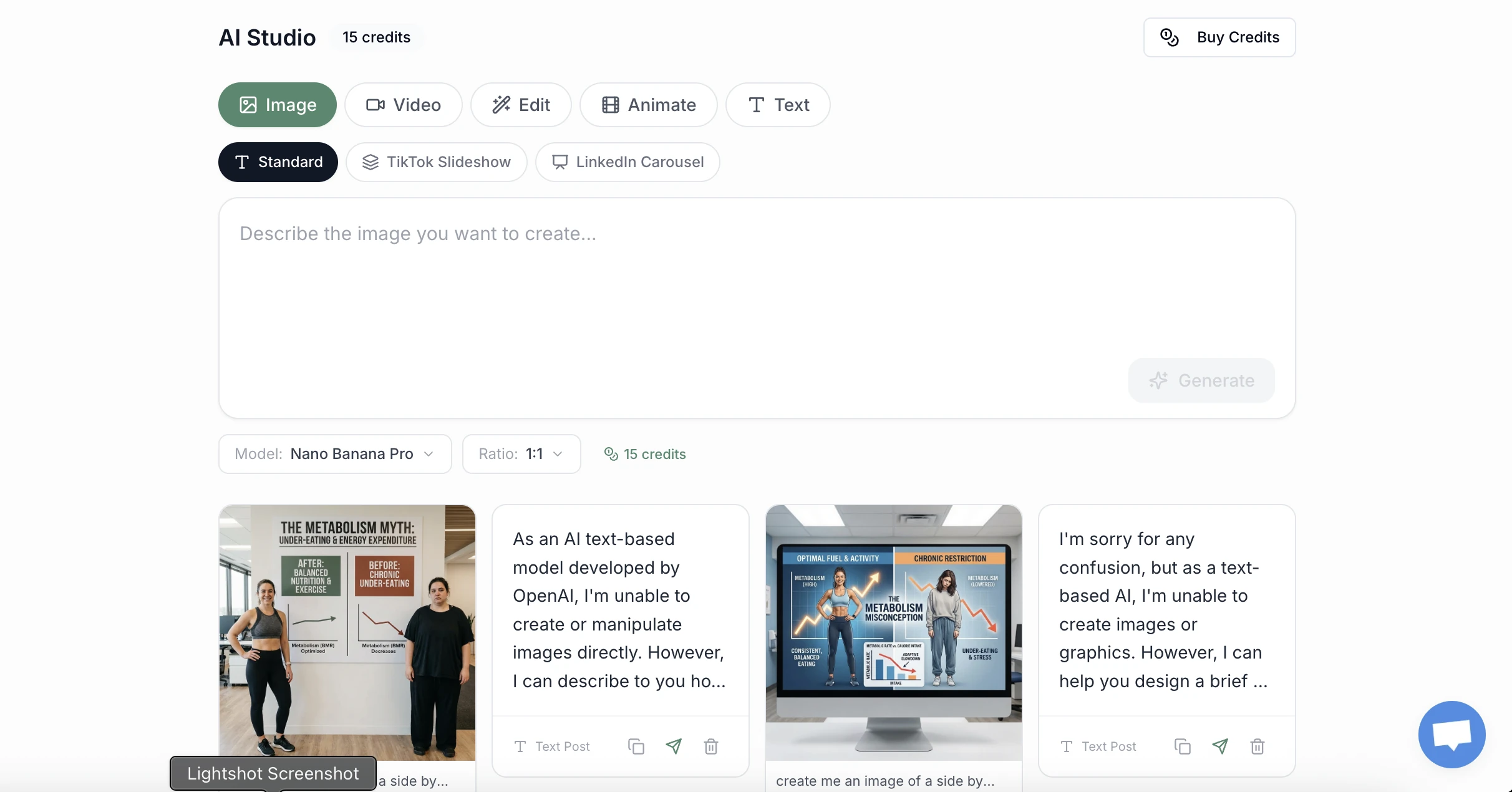
Generate captions, images, and video with AI
Stop staring at a blank screen. PostEverywhere's AI studio generates scroll-stopping captions, on-brand images, and short-form video ready to publish across all platforms. Use our AI content generator to create weeks of content in minutes.
- AI caption writer.
- Generate platform-native captions with hashtags, hooks, and CTAs. Edit inline or publish as-is.
- AI image generation.
- Create custom visuals from text prompts using models like Flux, Ideogram, and DALL-E directly inside the composer.
- Brand-consistent output.
- Set your brand voice, tone, and visual style once. Every AI-generated asset stays on-brand automatically.
Cross-platform analytics
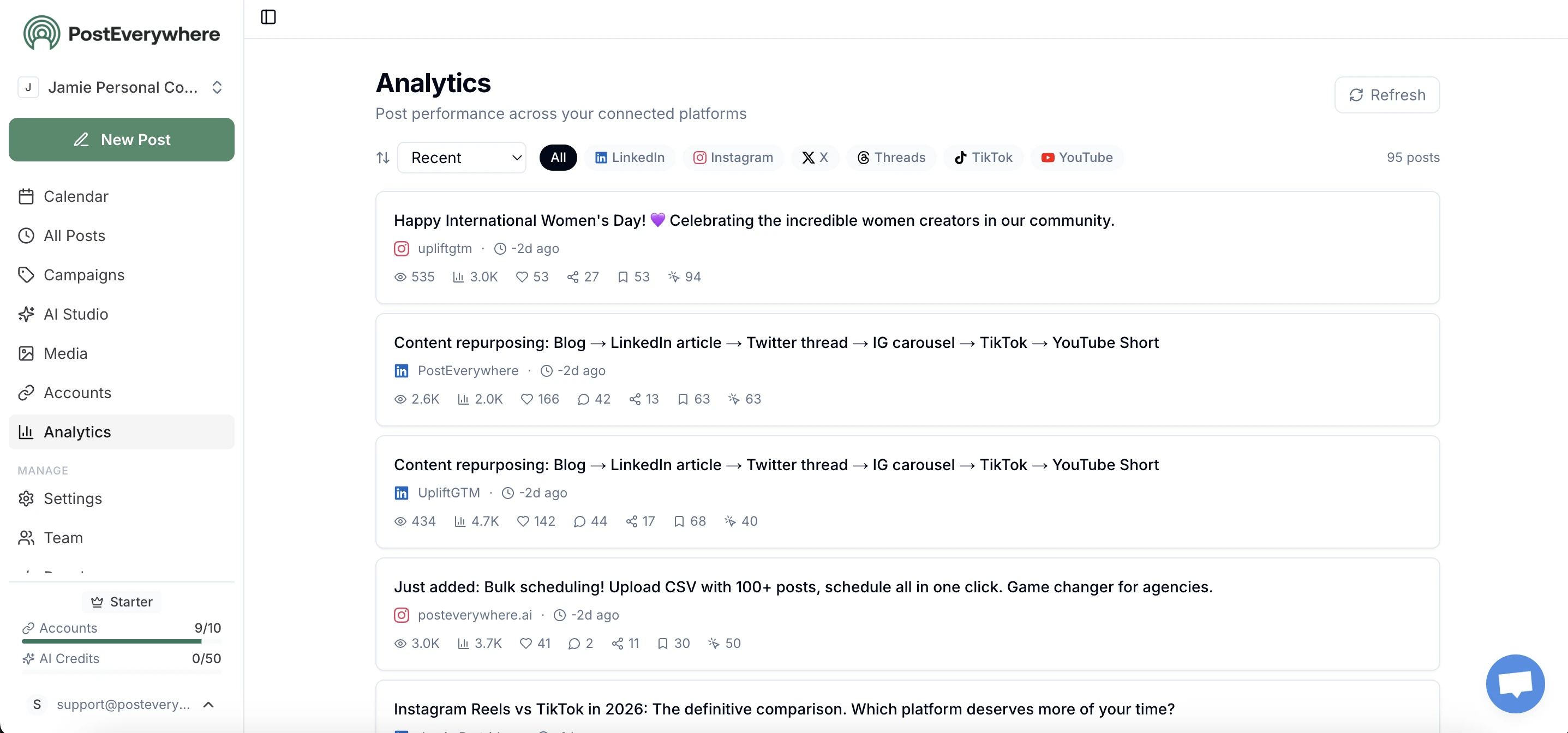
Track what works, do more of it
See views, likes, shares, and engagement for every post across every platform in one dashboard. Identify top-performing content and optimize your strategy with data, not guesses. Benchmark against industry averages or calculate your engagement rate.
- Unified metrics.
- Views, impressions, likes, comments, shares, saves, and clicks for every post across every connected platform in one dashboard.
- Performance trends.
- See what content types, posting times, and platforms drive the most engagement over time.
- Per-post insights.
- Drill into individual posts to see exactly how they performed across each platform you published to.
Platform-specific schedulers
Schedule to 11 social networks via their official APIs
PostEverywhere supports every major social platform via the official API: Instagram Graph API, TikTok Content Posting API, YouTube Data API v3, LinkedIn Marketing API, Meta Graph API for Facebook, X API v2, Meta Threads API, Bluesky AT Protocol, Pinterest API, Telegram Bot API, and Discord webhooks. No browser-automation workarounds, no manual confirmation steps.
- Official APIs only.
- Direct integration with each platform official API means scheduled posts publish reliably without violating terms of service.
- Per-platform format rules.
- Each platform has different aspect ratio, length, and caption rules. PostEverywhere validates dimensions and content per platform automatically.
- Token refresh handling.
- Platform tokens expire on different cycles (TikTok every 60 to 90 days, others longer). PostEverywhere notifies you before tokens expire.
Multi-account management
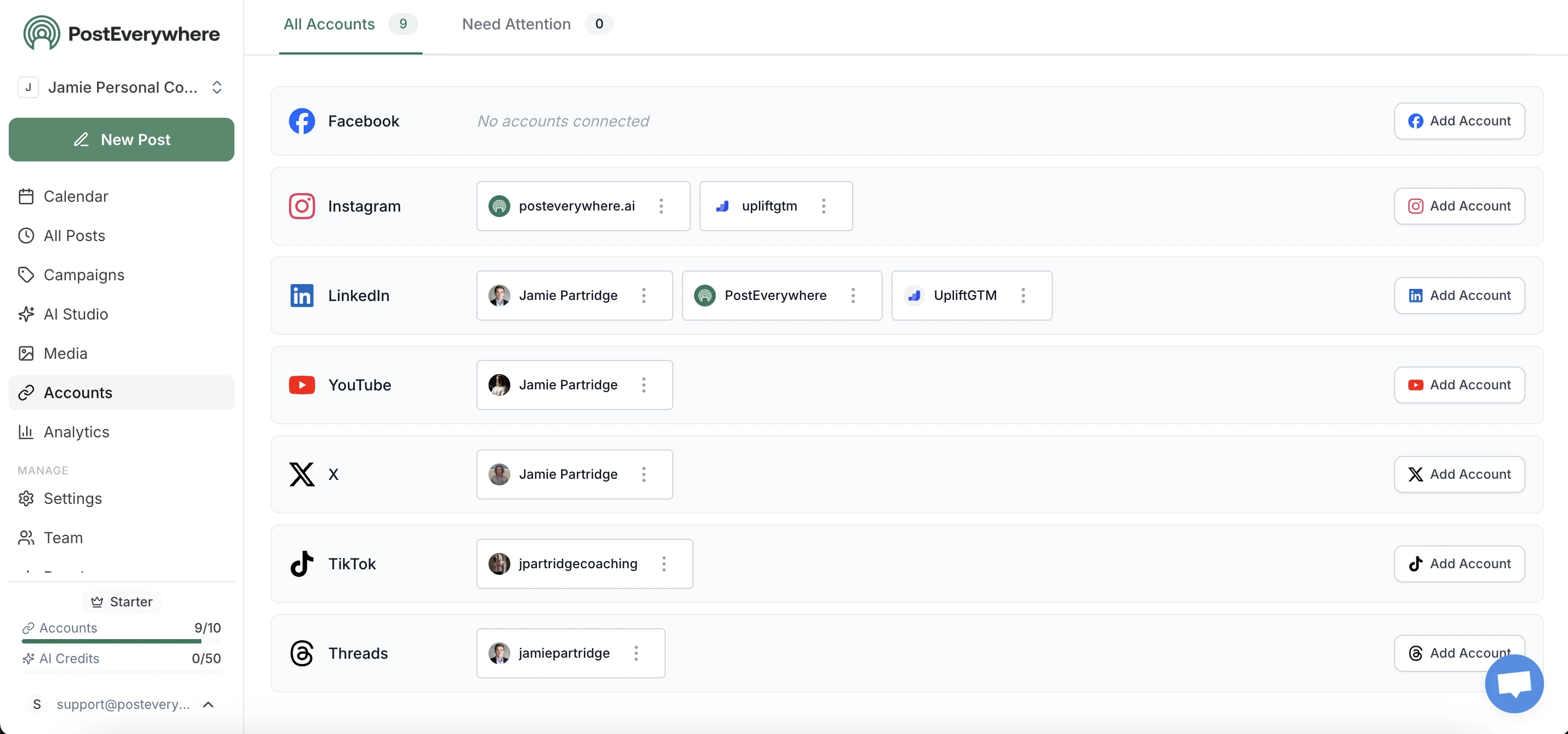
Schedule to 40 accounts without switching logins
Manage multiple brands, clients, or personal accounts from one social media scheduler. Connect up to 40 social accounts across all 11 platforms. Switch between accounts instantly with no logging in and out. Perfect for agencies and teams.
- Connect up to 40 accounts.
- Instagram, TikTok, YouTube, LinkedIn, Facebook, X, Threads, Pinterest, Bluesky, Discord, and Telegram, all connected and ready to publish.
- Schedule once, publish everywhere.
- Create one post, customize per platform, schedule to all simultaneously. Auto-adjusts format and dimensions for each social network.
How Social Media Scheduling Works in 2026
A social media scheduler lets you plan posts in advance and have them auto-publish across multiple platforms at specific times. Instead of logging into 11 different apps every day, you create content once: write the caption, upload media, pick your platforms and times, and the scheduler handles publishing. This is the core workflow behind social media scheduling.
Modern schedulers go beyond basic timing. PostEverywhere includes AI content generation for captions and images, cross-platform publishing with automatic format optimization, bulk scheduling via CSV upload, a visual content calendar for planning, and best time to post analytics that tell you when your audience is most active on each platform. Sizing visuals correctly matters too. Our social media aspect ratios cheat sheet covers every platform's accepted ratios in one table.
No social media platform penalizes scheduled posts. Instagram, LinkedIn, TikTok, YouTube, Facebook, X, Threads, Pinterest, Bluesky, Discord, and Telegram all treat scheduled content identically to manual posts. What determines reach is content quality, engagement signals, and timing, all of which scheduling helps you nail consistently. Scheduling is one part of a complete social media management workflow. Compare your options in our guide to the best social media scheduling tools, our head-to-head comparison, or, if you run client work, our roundup of agency social media tools.
The biggest mistake first-time users make with social media schedulers is treating every platform identically. A 280-character X post does not fit the LinkedIn long-form expectation. A vertical TikTok hook needs rewriting for the YouTube Shorts SEO context. An Instagram Reel caption with 30 hashtags reads as spam on Bluesky. PostEverywhere's composer encourages per-platform variations of the same core post, which is why customers using cross-platform publishing well outperform customers who publish identical copy everywhere by 2 to 3x on engagement.
Posting cadence varies dramatically by platform. X rewards 5 to 15 posts per day. LinkedIn rewards 3 to 5 thoughtful posts per week. TikTok rewards consistent daily publishing. Instagram rewards a balanced mix of 4 to 7 feed posts plus daily Stories and 3 weekly Reels. YouTube rewards 2 to 3 long-form videos per week plus daily Shorts. PostEverywhere's calendar makes hitting platform-specific cadences realistic by removing the manual upload friction that causes most accounts to slip. See our best time to post guide for cadence and timing windows per platform.
Compare Social Media Schedulers
See how PostEverywhere compares to other social media scheduling tools on price, platforms, and AI
| Tool | Price | Platforms | AI Features | |
|---|---|---|---|---|
| Buffer | $6-120/mo | 8 | Limited | |
| Hootsuite | $99-739/mo | 10 | Basic | |
| Later | $25-80/mo | 6 | Captions only | |
| Sprout Social | $249-499/mo | 9 | Advanced | |
| PostEverywhere | $19-79/mo | 11 | Full (images, video, captions) | View Pricing |
Frequently Asked Questions
What is a social media scheduler?
A social media scheduler is a tool that lets you plan and automatically publish posts to platforms like Instagram, LinkedIn, TikTok, YouTube, Facebook, X, Threads, Pinterest, Bluesky, Discord, and Telegram at scheduled times. Instead of manually posting, you batch your content creation and schedule posts days or weeks in advance.
Which platforms can I schedule to?
PostEverywhere supports 11 social platforms: Instagram (posts, Reels, Stories, carousels), LinkedIn (profiles and company pages), TikTok, YouTube (videos and Shorts), Facebook (pages and Reels), X (Twitter), Threads, Pinterest, Bluesky, Discord, and Telegram. All from one unified dashboard.
Is scheduling better than posting manually?
Yes, for consistency. Scheduling lets you post at optimal times (even while you sleep), batch your content creation to save time, and maintain a consistent posting schedule. Use our content repurposer to adapt posts for different platforms efficiently. Instagram and other platforms don't penalize scheduled posts.
Can I schedule to multiple platforms at once?
Yes. PostEverywhere's cross-posting feature lets you create one post and publish it to all connected platforms simultaneously, with automatic format optimization for each platform's requirements.
How much does a social media scheduler cost?
PostEverywhere starts at $19/month (Starter: 10 accounts, 50 AI credits), $39/month (Growth: 25 accounts, 500 AI credits), or $79/month (Pro: 40 accounts, 2000 AI credits). All plans include unlimited posts and a 7-day free trial. Cancel anytime.
Do I need a business account to schedule?
For Instagram and Facebook, yes - you need a Business or Creator account connected via Meta's API. For other platforms, personal accounts work fine. Switching to a business account is free and reversible.
Does scheduling hurt my reach or engagement?
No. Instagram, LinkedIn, TikTok, YouTube, Facebook, X, Threads, Pinterest, Bluesky, Discord, and Telegram all treat scheduled posts identically to manual posts. Scheduling can actually improve reach because you can consistently post at optimal times when your audience is most active.
Can I schedule Instagram Reels and Stories?
Yes. PostEverywhere supports scheduling Instagram Reels, Stories, carousels, and standard feed posts. You can also schedule TikTok videos, YouTube Shorts, and LinkedIn carousels, all from the same composer.
What's the best time to schedule social media posts?
Optimal posting times vary by platform and audience. PostEverywhere analyzes your followers' activity patterns and recommends the best times to post for each connected account. Generally, weekday mornings (9-11 AM) and early evenings (5-7 PM) in your audience's timezone perform well.
Can I bulk schedule posts?
Yes. PostEverywhere supports bulk scheduling. Upload a CSV or use the batch composer to create, customize, and schedule an entire week or month of content in one session. See our dedicated bulk scheduling page for the full workflow.
How does cross-platform publishing actually work?
You create one post in our composer, select which of the 11 platforms to publish to, and PostEverywhere auto-adjusts format, dimensions, and caption length per platform. Instagram captions can be longer than X tweets, vertical 9:16 video fits TikTok and Reels but needs reframing for YouTube long-form, and hashtag limits differ. We handle all of that automatically while letting you override per platform when you want platform-specific copy.
What happens if a scheduled post fails to publish?
PostEverywhere automatically retries failed posts up to 3 times with exponential backoff. If the post still fails (usually due to expired tokens or platform rate limits), we notify you via email and in-app so you can reconnect the account or adjust scheduling. Failed posts never silently disappear, and you always have a clear audit trail of what was attempted and when.
Can I schedule posts to private or member-only audiences?
Yes for platforms that support it. PostEverywhere supports scheduling to Discord channels (public and private servers where the bot has permissions), Telegram channels and groups, Facebook Groups (admin permissions required), and LinkedIn Company Pages. Instagram, X, and TikTok scheduled posts use your account's default visibility settings.
Is there a free plan or trial?
PostEverywhere offers a 7-day free trial on all plans (Starter $19/mo, Growth $39/mo, Pro $79/mo). The trial includes all features, all 11 platforms, AI credits, and bulk scheduling. Credit card is required to start the trial to prevent abuse, but you can cancel anytime during the trial with no charge.
Can I use a social media scheduler with a team?
Yes. Growth and Pro plans include team workspaces where multiple users can collaborate on scheduling, draft approval, and analytics. Each team member can have role-based permissions (admin, editor, contributor, viewer) and you can connect client accounts under separate workspaces if you run an agency. All 11 platforms work across the team.
Related Scheduling Tools & Guides
Explore platform-specific schedulers, AI tools, and guides to level up your social media strategy.
Schedule via API
Automate social media posting programmatically with our REST API. Included on all plans.
AI Social Media Agents
Autonomous agents that create, schedule, and optimize your social media content automatically.
Instagram Scheduler
Schedule Instagram posts, Reels, and Stories with auto-publishing.
TikTok Scheduler
Schedule TikTok videos with best-time recommendations.
YouTube Scheduler
Schedule YouTube Shorts and videos with thumbnail support.
LinkedIn Scheduler
Schedule LinkedIn posts for profiles and company pages.
Facebook Scheduler
Schedule Facebook posts and Reels to pages with auto-posting.
X (Twitter) Scheduler
Schedule tweets and threads with character count optimization.
Threads Scheduler
Draft and schedule Threads posts with direct auto-publishing.
Pinterest Scheduler
Schedule pins and idea pins to boards.
AI Content Generator
Generate captions, hashtags, and post ideas with AI.
Cross-Platform Publishing
Post to every network at once from one dashboard.
Social Media Content Calendar
Plan content visually with drag-and-drop scheduling.
ChatGPT vs Claude vs Perplexity for Social Media
Head-to-head AI tool tests across 12 marketing tasks.
How to Use AI for Social Media (Complete Guide)
The 7-step tool-by-tool workflow for AI content.
“This tool has truly made my content posting so much easier, I can't work without it. I can schedule my posts days in advance while working on other projects. Set it and forget it.”