Schedule TikTok videos and go viral on autopilot
Batch upload your TikToks, schedule them for peak hours, and auto-publish while you focus on filming your next video. No more scrambling to post at the right time.


Used by 874 happy customers
“This tool has truly made my content posting so much easier, I can't work without it. I can schedule my posts days in advance while working on other projects. Set it and forget it.”
Kim V. · Content Creator
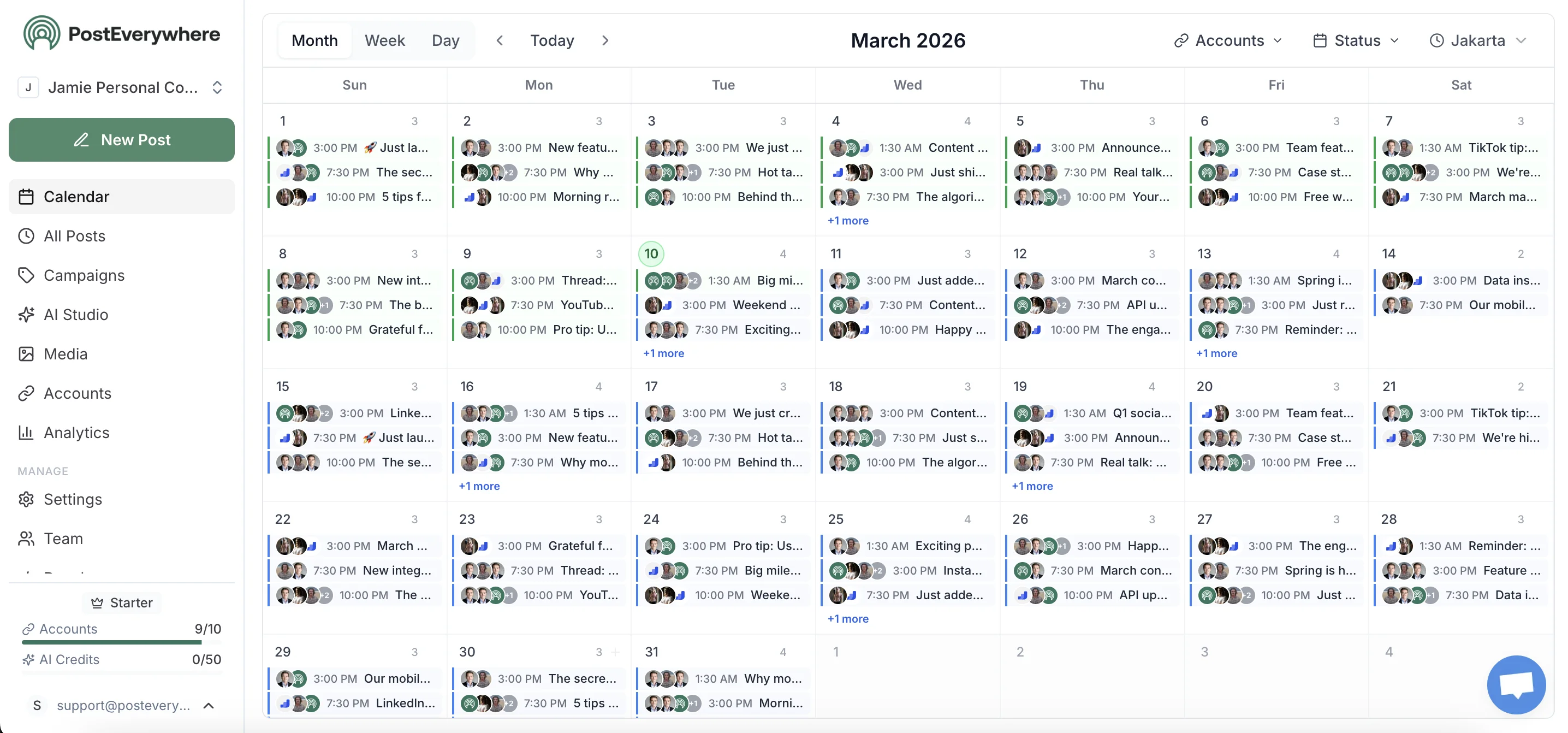
See it in action
Watch how PostEverywhere simplifies your TikTok scheduling
Batch and schedule
Schedule TikTok posts a month in advance
Upload videos in bulk, set cover images, and schedule your entire TikTok content pipeline. Auto-publish at peak engagement times without manual posting.
- Bulk schedule TikTok posts.
- Schedule dozens of TikTok videos at once. Set individual publish times or let smart scheduling handle it.
- AI captions and hashtags.
- Generate trending captions and hashtag sets when you schedule TikTok posts for maximum discoverability.
- Schedule TikToks at peak times.
- Schedule TikTok posts when your audience is most active. Built-in analytics track what times drive the most views.
Can You Schedule TikTok Videos?
Yes—you can schedule TikTok videos automatically using TikTok's native scheduler or third-party tools like PostEverywhere.
This page is for people who want to schedule TikToks right now—not just learn about it.
Business accounts
Full scheduling supported
Creator accounts
Full scheduling supported
Can I schedule TikToks from desktop?
Yes. PostEverywhere lets you upload and schedule TikTok videos directly from your computer—no phone required.
Does TikTok penalize scheduled posts?
No. TikTok's algorithm treats scheduled videos identically to manually posted content. What matters is engagement and watch time.
What's the best time to post on TikTok?
Generally 6-10 AM, 2-6 PM, and 7-11 PM in your audience's timezone. Check your TikTok Analytics for your specific audience.
What Types of TikTok Content Can You Schedule?
| Content Type | Schedulable? | Notes |
|---|---|---|
| Short videos (15s-60s) | ✓ | Optimal for virality |
| Long videos (1-10 min) | ✓ | For tutorials/storytelling |
| Captions & hashtags | ✓ | Up to 4,000 characters |
| Cover images | ✓ | Custom thumbnails supported |
| Trending sounds | ⚠ | Must be added before upload |
| Duets/Stitches | ✗ | Must be created in-app |
How to Schedule TikTok Videos (Step-by-Step)
Want to schedule your first TikTok right now? You can do it in under 2 minutes.
Connect your TikTok account
Link your TikTok Business or Creator account. Authorize publishing permissions when prompted.
Upload your video
Drag and drop your video (MP4, MOV). Videos should be 9:16 vertical ratio, 15 seconds to 10 minutes. Use our TikTok image resizer to ensure perfect dimensions for cover images.
Write your caption and hashtags
Add a hook-first caption and 3-5 relevant hashtags. Use our free TikTok caption generator to create engaging copy.
Choose date and time
Select when you want your video to go live. Best times: 6-10 AM, 2-6 PM, or 7-11 PM in your audience's timezone.
Schedule and done
Click Schedule. Your video will auto-publish at the selected time—no further action needed.
7-day free trial · cancel anytime
Free TikTok Growth Tools
Increase your watch time and go viral with our free TikTok utilities.
TikTok Caption Generator
Generate viral TikTok captions with hooks, CTAs, and trending hashtags.
Use ToolViral Hook Generator
Generate the first 3 seconds of your script to stop the scroll instantly.
Use ToolViral Score Predictor
Audit your captions and hooks against the TikTok algorithm before posting.
Use ToolTikTok Bio Generator
Generate the perfect TikTok bio with fun, creator, and professional styles.
Use ToolWhy Schedule TikTok Videos?
- Batch scheduling — Schedule a week of TikToks in one session instead of posting daily
- Auto-posting — Videos go live automatically, even when you're sleeping or traveling
- Visual calendar — See all scheduled content at a glance, drag-and-drop to reschedule
- Track performance — Monitor your growth with our TikTok engagement rate calculator and TikTok money calculator to estimate earnings
TikTok Scheduling Limitations
Know before you schedule. These platform restrictions apply to all TikTok schedulers.
10-day scheduling limit (native app)
TikTok only allows scheduling up to 10 days in advance via the native app. Third-party tools like PostEverywhere use the API to schedule weeks or months ahead.
No trending audio via API
When scheduling through third-party tools, you cannot add TikTok trending sounds. Only original audio or uploaded music is supported. Add trending audio manually in the TikTok app before exporting your video.
Video must be 9:16 vertical
TikTok requires vertical format (1080x1920). Horizontal or square videos won't appear on the For You page properly and will have lower reach.
Token expiration (60-90 days)
Third-party connections expire every 60-90 days. Reconnect if scheduled posts fail. PostEverywhere notifies you before your token expires so you never miss a post.
Duet and Stitch settings
These interactive features can't be configured through most scheduling APIs. Set your Duet and Stitch preferences manually in TikTok after posting if needed.
Who Uses Our TikTok Scheduler?
Whether you manage one account or dozens, PostEverywhere scales with you. Schedule TikTok alongside all your other platforms from our unified social media scheduler. Track your growth with our TikTok engagement rate calculator.
PostEverywhere vs Other TikTok Schedulers
See how we compare to the most popular TikTok scheduling tools.
| Feature | PostEverywhere | TikTok Studio | Later | Buffer |
|---|---|---|---|---|
| Price | $19/mo | Free | From $25/mo | From $5/mo per channel |
| AI caption generation | ✓ | ✗ | ✓ | ✓ |
| Cross-platform posting | 8 platforms | TikTok only | Multiple | Multiple |
| Bulk scheduling | ✓ | ✗ | ✓ | ✓ |
| Visual content calendar | ✓ | ✗ | ✓ | ✓ |
| AI image generation | ✓ | ✗ | ✗ | ✗ |
| Free trial | 7 days | Always free | 14 days | 14 days |
PostEverywhere is the only TikTok scheduler with built-in AI image generation and 7-platform cross-posting. View full pricing.
Troubleshooting Common TikTok Scheduling Issues
Quick fixes for the most common problems when scheduling TikTok videos.
Video didn't publish at the scheduled time
The most common cause is token expiration. Third-party API connections expire every 60-90 days and need to be reconnected. Also check that your video meets TikTok's format requirements (MP4, 9:16 ratio) and that it hasn't been flagged by TikTok's content review process. PostEverywhere sends notifications when your connection needs refreshing.
"Video processing failed" error
This usually means the video format or codec isn't compatible. Use MP4 with H.264 encoding for best results. Keep file size under 500MB and ensure the video is at least 3 seconds long. Re-export from your editing tool with these settings and try again.
Low views on scheduled posts
Scheduling does not affect the TikTok algorithm. Low views are caused by the same factors as any post: weak hook, low watch time, or poor timing. Focus on your first 3 seconds and post when your audience is most active. Learn more in our guide to how the TikTok algorithm works.
Audio missing from scheduled video
TikTok's trending audio library cannot be accessed via the scheduling API. Only original audio or music embedded in the video file works through third-party schedulers. To use trending sounds, add them in TikTok first, save the video, then upload the exported file to your scheduler.
Can't schedule to Business account
Verify that a Business or Creator account is connected, not a Personal account. Personal accounts don't support API scheduling. Switch to a Business or Creator account in TikTok settings, then reconnect the account in PostEverywhere. The switch is free and instant.
How TikTok Scheduling Works in 2026
TikTok's built-in scheduler, available through TikTok Studio on desktop, lets you schedule one video at a time up to 10 days in advance. While useful for casual creators, this 10-day limit and one-at-a-time workflow makes it impractical for brands and agencies managing content calendars weeks or months ahead. Third-party scheduling tools like PostEverywhere connect through TikTok's official Content Posting API to remove these restrictions entirely.
The real advantage of using a dedicated TikTok scheduler is the workflow it unlocks. With PostEverywhere, you can cross-post to 8 platforms simultaneously, generate captions and hooks with our AI content generator, batch-upload an entire week of content, and visualize everything on a drag-and-drop content calendar. Instead of logging into TikTok daily, you can plan and schedule all your content in a single session.
One of the most common concerns is whether scheduling affects reach. It does not. TikTok's algorithm treats scheduled videos identically to manually posted content — ranking is determined by watch time, completion rate, shares, and engagement signals, not how the video was published. For a deep dive into what actually drives visibility, read our complete guide to how the TikTok algorithm works in 2026.
TikTok Scheduler Features
Our free TikTok scheduler trial includes powerful features to schedule TikTok videos from desktop and auto-post content that goes viral.
Schedule TikTok Videos
Upload, preview, and schedule TikTok videos from desktop with flexible timing to maximize views and engagement.
TikTok Auto Poster
Auto-post TikTok videos at your preferred times with timezone support and visual content calendar.
AI Caption Generator
Generate TikTok captions and attention-grabbing hooks that stop the scroll and drive engagement.
TikTok Hashtag Research
Discover trending TikTok hashtags and viral topics to increase your content's discoverability and reach.
Bulk Schedule TikToks
Schedule multiple TikToks at once. Batch-create content for the week or month from one dashboard.
What you can publish on TikTok
- • Short-form videos (15s-10min)
- • Viral captions & hooks
- • Trending hashtags
- • Custom thumbnails
- • Video series & challenges
- • Cross-platform content
See TikTok's creator guidelines: TikTok creator resources.
Works great with these features
Official TikTok Integration
PostEverywhere uses the official TikTok Content Posting API for secure publishing.
💡Related Guides
How to Schedule TikTok Posts: 3 Methods Compared
Scheduling TikTok content in advance is one of the most effective ways to stay consistent and grow your audience. But not every scheduling method offers the same level of control. Here are three approaches — and what each one actually lets you do.
1. TikTok's Built-In Scheduler
TikTok added a native scheduling feature in 2023, and it works — with caveats. You can schedule a video up to 10 days in advance, but only from the desktop web app. There is no bulk scheduling, no content calendar view, and no way to manage multiple accounts from one dashboard. If you are posting once or twice a week to a single account, the native scheduler is functional. For anything beyond that, the 10-day window and lack of batch uploads become a bottleneck fast.
The native scheduler also does not support caption generation, hashtag suggestions, or cross-posting to other platforms. You are limited to scheduling one video at a time, which makes it difficult to plan content around trends or campaigns. For a deeper look at how TikTok surfaces content, see our guide on how the TikTok algorithm works.
2. Meta Business Suite
A common question we hear: "Can I schedule TikTok posts through Meta Business Suite?" The short answer is no. Meta Business Suite supports scheduling for Facebook and Instagram, but it does not support TikTok. If you are already using Meta's tools for your Facebook and Instagram content, you will still need a separate solution for TikTok.
3. PostEverywhere — Schedule TikTok Videos Months Ahead
A dedicated TikTok scheduling tool like PostEverywhere removes most of the limitations you hit with native scheduling. Instead of a 10-day window, you can schedule TikTok videos weeks or months in advance. Upload videos in bulk, drag and drop them onto a visual content calendar, and publish automatically at the times your audience is most active.
PostEverywhere also includes an AI caption generator that writes hooks, captions, and hashtag sets for each video — so you spend less time writing and more time creating. Once a video is scheduled for TikTok, you can cross-post it to Instagram Reels, YouTube Shorts, Facebook, and LinkedIn with a single click using cross-posting.
For creators and brands managing multiple accounts, the difference is significant. The native TikTok scheduler requires you to log into each account individually, schedule one video at a time, and repeat. PostEverywhere lets you manage every account from one dashboard, batch-schedule an entire week of content in minutes, and review everything on a shared calendar. If you want to learn more about optimal posting cadence, check out our best time to post on TikTok guide or our full walkthrough on how to schedule TikToks.
TikTok Scheduler FAQs
- What is the best TikTok scheduler?
- The best TikTok scheduler lets you schedule TikTok videos from desktop with auto-posting, AI captions, and a visual content calendar. PostEverywhere is rated as one of the best TikTok schedulers for creators and brands.
- Is there a free TikTok scheduler?
- Yes! PostEverywhere offers a free TikTok scheduler trial for 7 days. You can schedule TikTok videos from desktop, auto-post content, and test all features with cancel anytime.
- Can I schedule TikTok videos from desktop?
- Absolutely. Our TikTok scheduler app lets you schedule TikTok videos from desktop—upload videos, add captions and hashtags directly from your computer without using your phone.
- Can I bulk schedule TikTok videos?
- Yes, our TikTok scheduling software lets you bulk schedule TikTok videos and schedule multiple TikToks at once. Upload a CSV or use the batch composer to create content for the entire week or month.
- How do I auto-post to TikTok?
- Use our TikTok auto poster to schedule videos in advance. Set your preferred date and time, and our TikTok scheduler will automatically publish your content.
- What's the best time to schedule TikTok posts?
- Generally, 6-10 AM, 2-6 PM, and 7-11 PM work well for TikTok. Our TikTok scheduler lets you test different times to find what works best for your audience.
Quick TikTok Scheduling Tips
- •Post consistently — 3-5 times per week minimum for algorithm visibility
- •Best times — 6-10 AM, 2-6 PM, and 7-11 PM in your audience's timezone
- •Hook in 3 seconds — 85% of viewers decide to scroll or stay immediately
- •Hashtags — Use 3-5 relevant hashtags, not 30. Try our TikTok hashtag generator to find trending tags
Learn more: How to schedule TikToks
PostEverywhere is one of the best TikTok schedulers for creators, brands, and agencies. Bulk schedule TikTok videos, add AI-generated captions, and post to Instagram, YouTube Shorts, and more from one unified dashboard. Perfect your profile with our TikTok bio generator to convert viewers into followers. Developers can automate TikTok publishing via our TikTok API docs.
Learn More About Tiktok for Business
Explore official Tiktok resources to maximize your social media strategy:
TikTok For Business
Official TikTok business resources and advertising solutions
tiktok.comTikTok Creator Portal
Resources and best practices for TikTok content creators
tiktok.comTikTok Developers
Technical documentation for TikTok platform integration
developers.tiktok.comTikTok Help Center
Official support and troubleshooting from TikTok
support.tiktok.comRelated Platform Schedulers & Guides
Expand your short-form video strategy across platforms with these scheduling tools and guides.
Schedule via API
Automate TikTok posting programmatically with our REST API. Included on all plans.
AI Social Media Agents
Autonomous agents that create, schedule, and optimize your TikTok content automatically.
9 Best TikTok Schedulers
We tested 9 TikTok schedulers for auto-publishing and analytics.
TikTok video sizes
Every dimension and format spec for the platform.
TikTok Metrics & KPIs
The TikTok metrics that drive growth — completion rate, watch time, FYP reach.
TikTok Content Calendar Template
Free template with columns for trending sounds, hooks, hashtags, and cadence.
AI Content Generator
Generate AI videos, captions, and hooks for TikTok in seconds.
AI Image Generator
Create eye-catching AI cover images and thumbnails for TikTok videos.
Social Media Scheduler
Automate TikTok video scheduling with captions, hashtags, and optimal posting times for growth.
Instagram Scheduler
Schedule Instagram Reels alongside TikTok videos for maximum reach.
Threads Scheduler
Draft and schedule Threads updates to complement your video content strategy.
Pinterest Scheduling
Schedule pins and idea pins.
X Scheduler
Schedule X posts and threads to share TikTok content with your Twitter audience.
YouTube Scheduling Tool
Schedule YouTube Shorts to complement your TikTok content strategy.
Facebook Scheduler
Cross-post TikTok-style videos to Facebook for broader audience reach.
Social Media Content Calendar
Plan TikTok videos in a visual calendar with drag-and-drop scheduling.
AI Content Assistant
Generate TikTok captions, hooks, and hashtags with AI-powered suggestions.
Cross-Platform Publishing
Post TikTok content across Instagram, YouTube, and Facebook simultaneously.
Post to All Social Media at Once
Step-by-step guide to cross-posting across all platforms.
Campaign Management
Organize TikTok content into campaigns with tags and performance tracking.
What our customers say
“This tool has truly made my content posting so much easier, I can't work without it. I can schedule my posts days in advance while working on other projects. Set it and forget it.”
Kim V.
Content Creator