Social media scheduler for every platform, from one dashboard
Schedule social media posts to all top platforms (Instagram, LinkedIn, TikTok, YouTube, Facebook, X, Threads, Pinterest, Bluesky, Discord, Telegram, WordPress) from one dashboard. Works with ChatGPT, Claude and any AI agent: just ask it to write and schedule your posts, and PostEverywhere publishes them on time.
Get started from as little as $9 per month. $0 due today, cancel anytime.


 Works with any AI agent


Used by 2,831 happy customers
The social media scheduling guide
A social media scheduler for every network, not one at a time
What is a social media scheduler? A social media scheduler is a tool that lets you plan posts in advance and automatically publishes them to networks like Instagram, LinkedIn, TikTok, YouTube, Facebook, and X at set times. Instead of posting manually in each app, you batch your content and queue it from one dashboard. PostEverywhere schedules to all top platforms (Instagram, LinkedIn, TikTok, YouTube, Facebook, X, Threads, Pinterest, Bluesky, Discord, Telegram, WordPress), with a free social media post generator, a content calendar and a best time calculator built in. Or let ChatGPT, Claude or any AI agent schedule for you.
Post to (5 of 8 selected)
Select allLaunch week is here
Plan once, publish everywhere. Schedule your posts to Instagram, LinkedIn, X, Facebook and Threads from one calendar.
What will you ship this week? #contentmarketing #socialmedia
 spring-blend.jpg
How our team plans a whole launch week in one sitting, and the checklist we use for every network.
Launch week, planned in one sitting. The checklist we use for every network 👇
One queue, every network. A social media post scheduler holds your content in a queue and publishes it to each network at the time you set, through that network's official API. Instead of opening every app separately, you write once, adapt per platform, and every scheduled social media post goes out on its own.
The place the plan lives. Used as a content scheduler for the whole calendar, it stops being a publishing tool and starts being the place the plan lives. You can see a month at a glance, drag a post to a better slot, and know what is queued without opening a single network.
Not only people scheduling. It is also no longer only people doing the scheduling. AI agents, scripts and automations now fill the same calendar through our API and MCP server. Our State of AI Agents in Social Media report has the full data.
Step by step
How to schedule social media posts
To schedule social media posts, connect your accounts, create a post once, choose which platforms to publish to, pick a date and time, and let the scheduler auto-publish through each network's official API. You can queue days or weeks of content in a single session.
- Connect your social accounts. Link Instagram, LinkedIn, TikTok, YouTube, Facebook, X, and any of the other supported networks to one dashboard.
- Create your post. Write the caption and add media (upload it, add it from Google Drive, or generate both with the AI content generator).
- Pick your platforms. Choose which networks to publish to and tailor the caption per platform where it matters.
- Choose a date and time. Schedule for your audience's peak window using best-time-to-post data, or drop it into your queue.
- Let it publish. PostEverywhere auto-publishes through each platform's official API at the scheduled time, with automatic retry on rate limits.
Or hand all five steps to an AI agent. Connect ChatGPT, Claude or any MCP client to PostEverywhere once (the hosted MCP server at mcp.posteverywhere.ai signs in with OAuth in Claude and ChatGPT, so there is nothing to install; Cursor, Codex and Claude Code use the @posteverywhere/mcp package), then ask in plain English: "schedule this week's posts to LinkedIn and Instagram at 9am". The agent writes a version for each platform, schedules it, and every post lands in the same calendar so you can review it before it goes out. Setup takes about a minute on the AI agents page.
Recurring posting times. Add posts to the queue and each takes the next free opening.
- Monday 09:00
- Tuesday 09:00
- Wednesday 09:00
- Thursday 09:00
- Friday 09:00
- SaturdayNo openings
- SundayNo openings
Next openings
Where the next posts added to the queue will land (UTC).
- 1 Mon, 12 Oct, 9:00 am
- 2 Tue, 13 Oct, 9:00 am
- 3 Wed, 14 Oct, 9:00 am
- 4 Thu, 15 Oct, 9:00 am
- 5 Fri, 16 Oct, 9:00 am
Suggested schedules
General starting points, not measured from your audience.
Steady weekdays
5 openings / week
Commute and lunch
7 openings / week
Always on
14 openings / week
Changing your openings does not move posts already in the queue. They keep the time they were given.
How it works
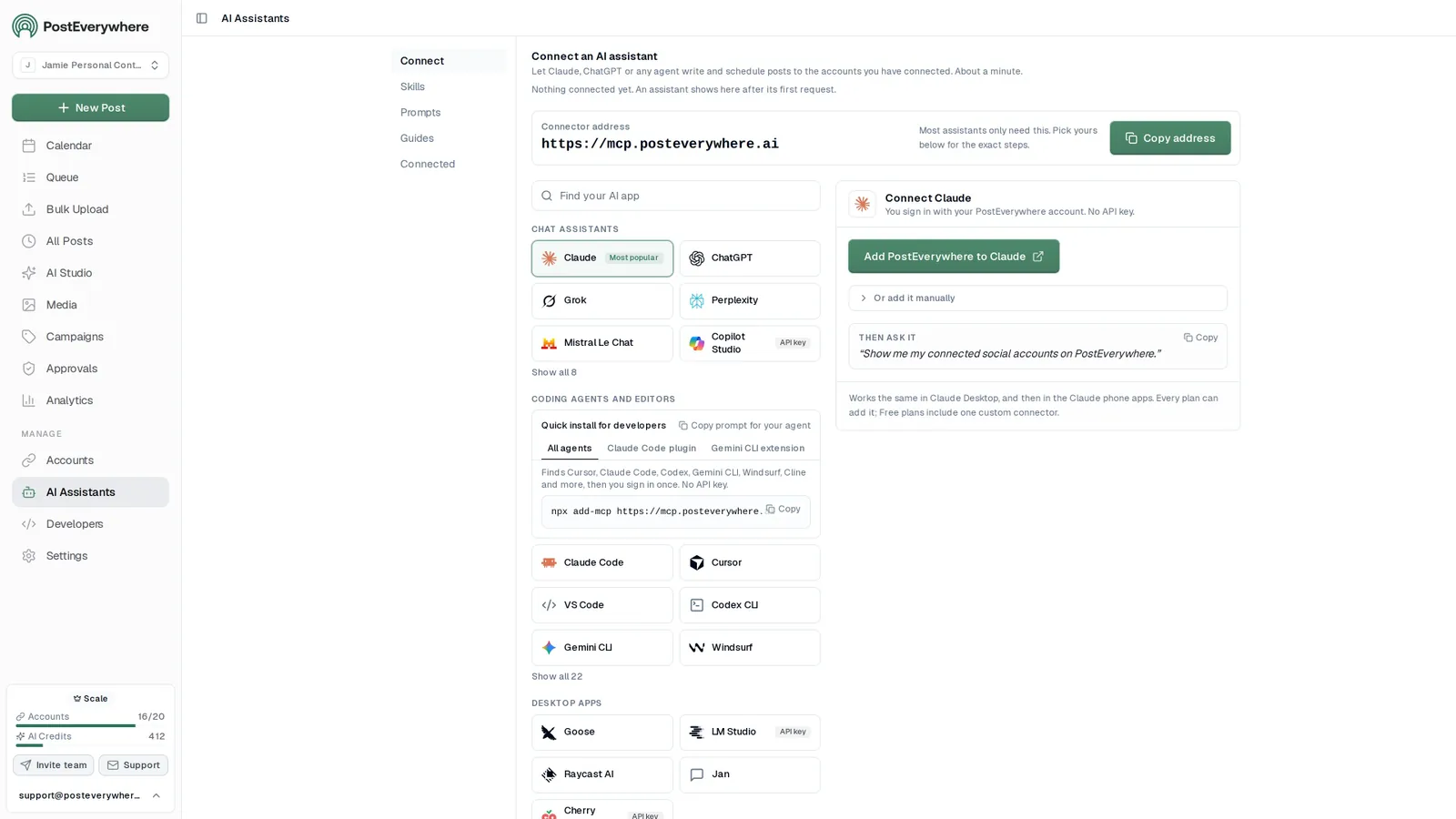
See the social media scheduler in action
Connect your accounts once. Then write once and schedule everywhere, or let your AI agent do it.
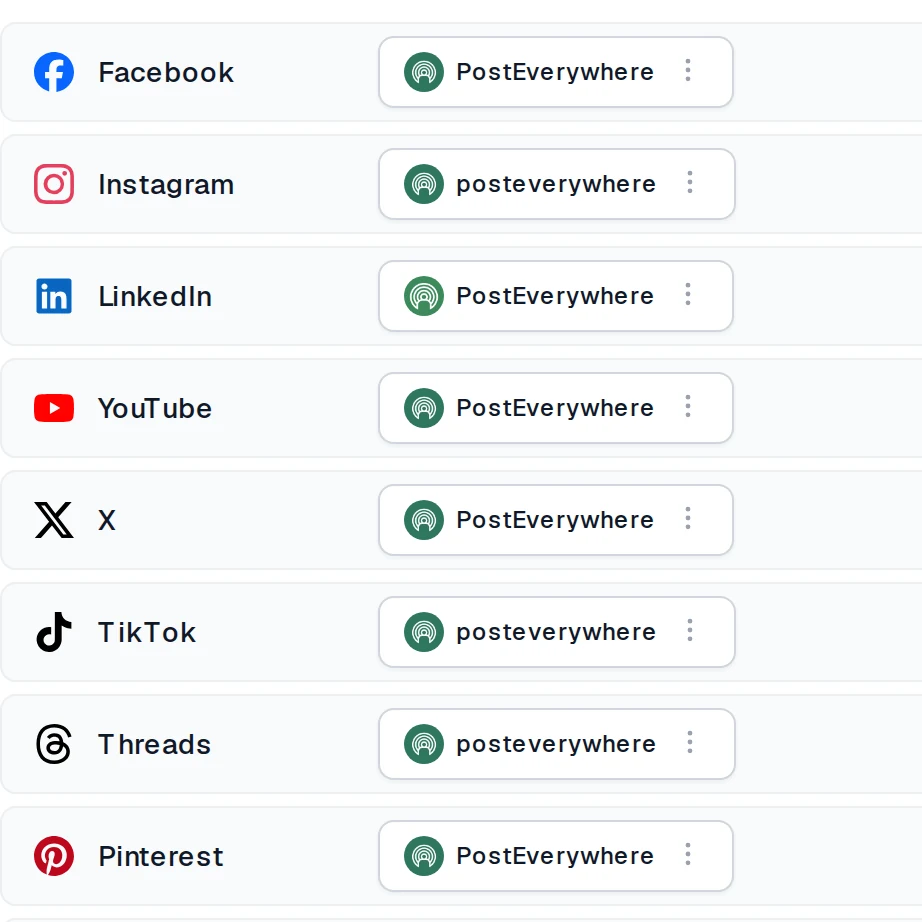
Step 1
Connect your accounts
Link Instagram, TikTok, LinkedIn, YouTube and every other network you post to, in a few clicks.
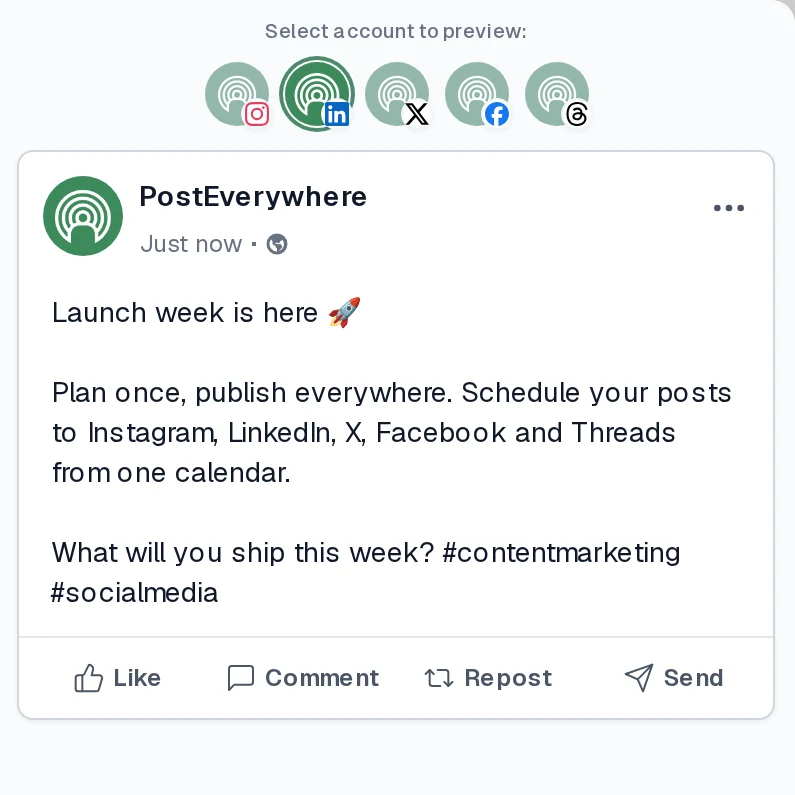
Step 2
Write once, tailor per platform
Create the post once, or ask your AI agent to write it, then choose where it goes and preview exactly how it will look on each network.
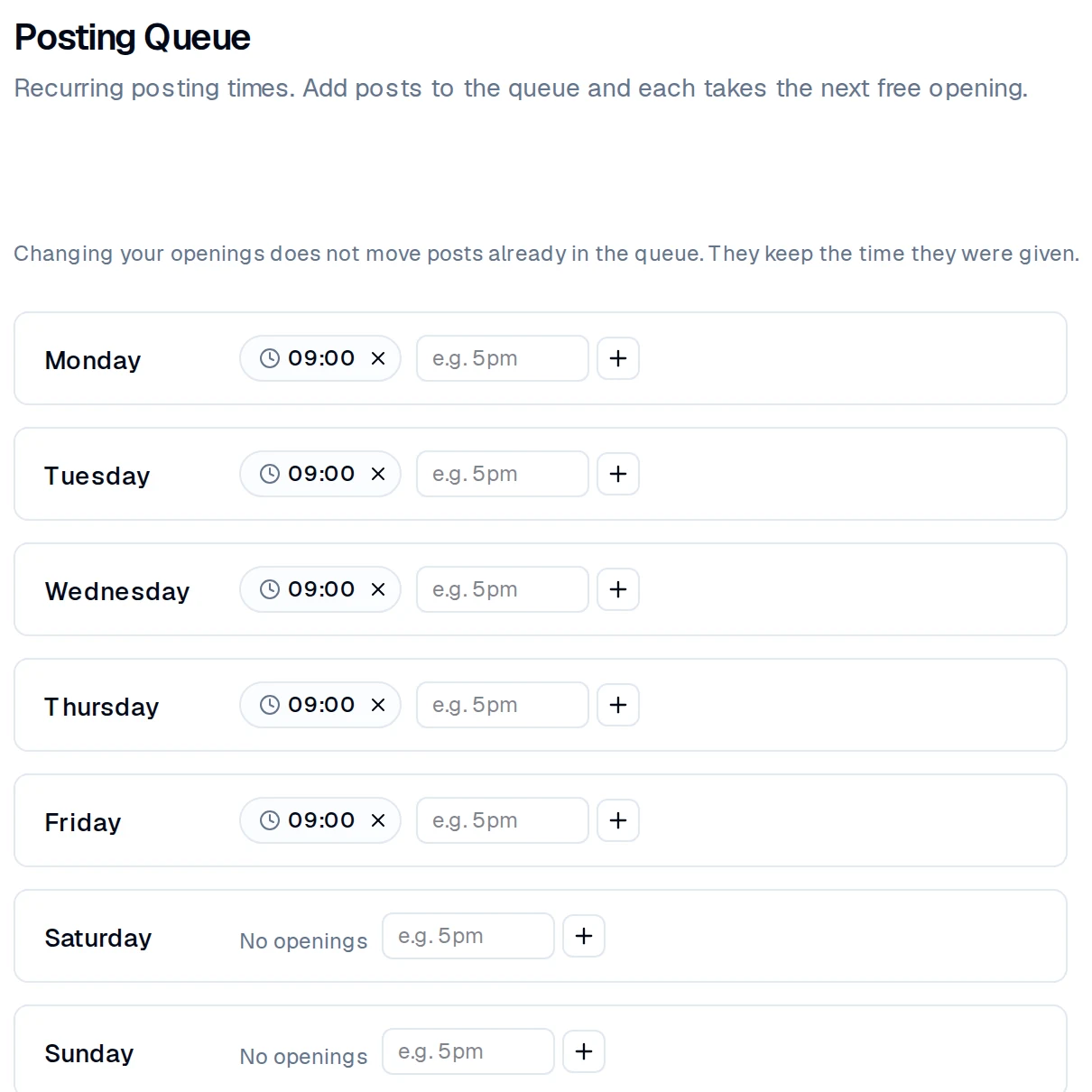
Step 3
Schedule it and it publishes
Pick a time, drop it into your queue, or ask your AI agent to schedule it. PostEverywhere publishes through each network's official API.
Everything in the social media scheduler
Schedule social media posts across every platform from one calendar
The social media scheduler calendar shows every scheduled post across all top supported platforms (Instagram, LinkedIn, TikTok, YouTube, Facebook, X, Threads, Pinterest, Bluesky, Discord, Telegram, WordPress) in a single calendar view. Drag-and-drop to reschedule, batch-create posts, and never miss a publishing window. Posts your AI agent schedules land here too, so you can edit, move or delete them before they go out.
- Visual scheduling calendar.
- Monthly, weekly, and daily views with drag-and-drop scheduling. See every scheduled social media post at a glance.
- AI caption generation.
- Generate platform-optimized captions, hashtags, and content ideas in seconds with built-in AI tools.
- Queue posts into your openings.
- Set your posting times once and each new post takes the next free opening. Built-in retry logic handles rate limits automatically.
Mon
5
9:00 AM
Launch week is here
1:30 PM
Behind the scenes
Tue
6
10:00 AM
5 tips for faster scheduling
5:00 PM
Product teaser
Wed
7
9:00 AM
Customer story
3:00 PM
New templates
Done. 6 posts scheduled for the rest of the week, each one tailored for its platform.
AI captions and images inside the scheduler
Generate captions, images and video inside your social media scheduler
Stop staring at a blank screen. The AI studio built into the social media scheduler generates captions, on-brand images, and short-form video ready to publish across all platforms. Use our AI content generator to create weeks of content in minutes. Connected AI agents can write captions too, and code agents on the full MCP server can create images, using the same AI credits.
- AI caption writer.
- Generate platform-native captions with hashtags, hooks, and CTAs. Edit inline or publish as-is.
- AI image generation.
- Create custom visuals from text prompts with a choice of image models, from photorealism to text in images, in AI Studio.
- Brand-consistent output.
- Set your brand voice, tone, and visual style once. Every AI-generated asset stays on-brand automatically.
What do you want to create today?
A bright flat-lay of our new coffee blend on a marble counter, soft morning light, room for a headline.

Image models
Video models · 5s or 10s
Analytics for every scheduled post
See how every scheduled social media post performed
See views, likes, shares, and engagement for every post you schedule, wherever each platform reports them, in one dashboard. Identify top-performing content and optimize your strategy with data, not guesses. Benchmark against industry averages or calculate your engagement rate.
- Unified metrics.
- Views, likes, comments, shares and more for every post, wherever each connected platform reports them, in one dashboard.
- Performance trends.
- See which posts and platforms drive the most engagement over time.
- Per-post insights.
- Drill into individual posts to see exactly how they performed across each platform you published to.
Publishing activity
Posts published per week, by platform
- 3
- Published today
- 2
- Scheduled today
- 14
- Published this week
- 9
- Scheduled this week
Social media schedulers for each platform
Schedule social media posts to all top networks via their official APIs
The social media scheduler publishes to every major platform via its official API: Instagram Graph API, TikTok Content Posting API, YouTube Data API v3, LinkedIn Marketing API, Meta Graph API for Facebook, X API v2, Meta Threads API, Bluesky AT Protocol, Pinterest API, Telegram Bot API, Discord webhooks, and the WordPress REST API for blog posts. No browser-automation workarounds, no manual confirmation steps. Whether you or your AI agent schedules the post, it goes out through the same official API.
- Official APIs only.
- Direct integration with each platform official API means scheduled posts publish reliably without violating terms of service.
- Per-platform format rules.
- Each platform has different aspect ratio, length, and caption rules. PostEverywhere validates dimensions and content per platform automatically.
- Connection health.
- Platform tokens expire on different cycles (TikTok every 60 to 90 days, others longer). The Accounts page flags any account that needs attention, so you can reconnect it before a post is due.
Instagram
Instagram Graph API
Facebook
Meta Graph API
X
X API v2
LinkedIn
LinkedIn Marketing API
TikTok
Content Posting API
Threads
Meta Threads API
Bluesky
AT Protocol
Telegram
Telegram Bot API
Discord
Discord webhooks
YouTube
YouTube Data API v3
Pinterest
Pinterest API
WordPress
WordPress REST API
One social media scheduler for multiple accounts
Schedule social media posts for 20 accounts without switching logins
Manage multiple brands, clients, or personal accounts from one social media scheduler. Connect up to 20 social accounts across all top platforms. Switch between accounts instantly with no logging in and out, and your AI agent can post to any of them: just tell it which accounts. Perfect for agencies and teams.
- Connect up to 20 accounts.
- Instagram, TikTok, YouTube, LinkedIn, Facebook, X, Threads, Pinterest, Bluesky, Discord, Telegram, and WordPress, all connected and ready to publish.
- Schedule once, publish everywhere.
- Create one post, customize per platform, schedule to all simultaneously. Auto-adjusts format and dimensions for each social network.
- Instagramnorthwind.coffeenorthwind.roastery
- LinkedInNorthwind Coffee
- TikToknorthwindcoffee
- YouTubeNorthwind Coffee
- Xnorthwindnorthwind_eu
- FacebookNorthwind Coffee
- BlueskyNo accounts connected
Up to 20 accounts on Scale. Your AI agent can post to any of them.
Connect your AI agent
Let ChatGPT, Claude or any AI agent run the scheduler
- Connect any AI agent.
- Add PostEverywhere to ChatGPT, Claude, Grok, Perplexity, Cursor or any other AI app that supports MCP with one address. It takes seconds.
- Ask in plain English.
- “Write next week's posts for every platform and schedule one a day at 9am.” Your agent writes every post for you.
- It schedules and publishes.
- Your agent can post now, schedule for later or save a draft for you to review. Every post lands in your calendar, and scheduled posts go out on time through each network's official API.
$0 due today, cancel anytime
Connect your AI agent
Choose your assistant and connect in seconds.
Works on every Claude plan, including free. Full Claude guide
- 1
Add to Claude
One click from Claude’s connector directory.
- 2
Sign up or sign in
Takes seconds, then you’re sent straight back.
- 3
Ask Claude
“Plan and schedule my posts for next week.”
Ask your agent
See all 15 skills and prompts“Use PostEverywhere to plan next week of posts for all my connected accounts. Suggest one post a day, show me the plan, then schedule it when I say yes.”
View skill“Turn this article into five posts for LinkedIn, X and Threads, and spread them across next week in PostEverywhere: [paste link or text].”
View skill“Look at my PostEverywhere queue for the next two weeks and tell me where the gaps are. Then suggest posts to fill them.”
View skill
iPhone app
PostEverywhere on your iPhone
The same calendar, accounts and posts as the web app, so you can keep things moving away from your desk.
- Compose and schedule on the go.
- Write a post, choose your accounts and schedule it from wherever you are.
- Your calendar in your pocket.
- See what is publishing today and what is next, including posts your AI agent scheduled.
- Know every post went out.
- Check what published and what needs attention, without opening your laptop.
 Google Play · coming soon
Free download, works with your PostEverywhere plan. See the iPhone app
Pricing
Simple pricing, unlimited posts on every plan
Every plan schedules to all top platforms and includes the full API and hosted MCP server. Each starts with a 7-day trial.
Lite
Everything you need for 2 accounts
- 2 social accounts
- Unlimited posts, all top platforms
- 10 AI credits/mo
- 1 team member · 1 workspace
- Full API + hosted MCP server for AI agents
- AI Studio: image, video, captions
Card required, cancel anytime
Starter
For solo creators running one brand
- 5 social accounts
- Unlimited posts, all top platforms
- 25 AI credits/mo
- 2 team members · 1 workspace
- Full API + hosted MCP server for AI agents
- AI Studio: image, video, captions
Card required, cancel anytime
Growth
For content creators
- 10 social accounts
- Unlimited posts, all top platforms
- 100 AI credits/mo
- 3 team members · 1 workspace
- Full API + hosted MCP server for AI agents
- AI Studio: image, video, captions
Card required, cancel anytime
Scale
For teams & small agencies
- 20 social accounts
- Unlimited posts, all top platforms
- 500 AI credits/mo
- 5 team members · 5 workspaces
- Full API + hosted MCP server for AI agents
- AI Studio: image, video, captions
Card required, cancel anytime
Compare every feature on the pricing page.
Scheduling in 2026
How Social Media Scheduling Works in 2026
A social media scheduler lets you plan posts in advance and have them auto-publish across multiple platforms at specific times. Instead of logging into a different app for every platform every day, you create content once: write the caption, upload media, pick your platforms and times, and the scheduler handles publishing. That is the core workflow of social media scheduling. The biggest change in 2026 is who does the scheduling.
Plan a two-week campaign for our launch and schedule every post.
PostEverywhere
create_campaignProduct Launchlist_accounts5 accountsbulk_create_posts12 posts
Done. I created the Product Launch campaign and scheduled 12 posts in it across Instagram, LinkedIn and X over the next two weeks. They are on your calendar, and the campaign shows their progress on the Campaigns page.
Your AI agent can do the scheduling. AI assistants now operate a social media scheduler directly through the Model Context Protocol (MCP), so a request typed into ChatGPT, Claude or any other AI agent becomes drafted, scheduled posts. Agents tend to write a tailored post for each platform rather than one caption for all of them, which is exactly what a scheduler with per-platform rules is built for. See the AI agents page or the full adoption data.
Beyond basic timing. Modern schedulers include AI content generation for captions and images, cross-platform publishing with automatic format optimization, bulk scheduling via CSV upload, a visual content calendar and best time to post guidance for each platform. Our social media aspect ratios cheat sheet covers every platform's accepted ratios in one table.
Tailor every platform. The biggest mistake first-time users make is treating every platform identically. A 280-character X post does not fit the LinkedIn long-form expectation, a vertical TikTok hook needs rewriting for YouTube Shorts SEO, and an Instagram caption's hashtag block reads as spam on Bluesky. PostEverywhere's composer encourages per-platform variations of the same core post.
No reach penalty. No social media platform penalizes scheduled posts: they are treated identically to manual ones. Reach comes from content quality, engagement signals and timing, all of which scheduling helps you nail consistently. Scheduling is one part of a complete social media management workflow. Compare options in the best social media scheduling tools table below, our head-to-head comparison, or our roundup of agency social media tools.
Posting cadence varies dramatically by platform. The calendar makes platform-specific cadences realistic by removing the manual upload friction that causes most accounts to slip. See our best time to post guide for timing windows per platform.
- X (Twitter)5 to 15 posts per day.
- LinkedIn3 to 5 thoughtful posts per week.
- TikTokConsistent daily publishing.
- Instagram4 to 7 feed posts, daily Stories and 3 Reels a week.
- YouTube2 to 3 long-form videos per week plus daily Shorts.
Compared
The best social media scheduling tools compared
We tested 13 social media scheduling tools on platform coverage, learning curve and AI. PostEverywhere is the best overall value, from $9/month with unlimited posts; the others each fit a narrower job, from approvals to Instagram grids. Rival prices change often, so check each vendor's pricing page before you buy.
| Tool | Built for | Platforms | AI features |
|---|---|---|---|
| PostEverywhere | Overall value, teams and AI agents | 12 | Captions, images and video |
| Planable | Team collaboration and approvals | 9 | Yes |
| Hootsuite | Enterprises | 20+ | Yes |
| Statusbrew | Multi-account teams | 9 | Yes |
| Sprout Social | Agency analytics | 8 | Yes |
| Buffer | Simplicity | 11 | Yes |
| Later | Visual brands | 6 | Yes |
| Agorapulse | Community inboxes | 7 | Yes |
| SocialBee | Content recycling | 10 | Yes |
| Sendible | White-label agencies | 7 | Yes |
| Metricool | Analytics on a budget | 8 | Yes |
| Publer | Budget option | 9 | Business plan |
| Planoly | Instagram grids | 5 | No |
AI features
AI features in social media schedulers compared
Most schedulers now say "AI", but many only pass a prompt to a chat model and return a caption. We compared what each one actually does: writing captions, generating images, suggesting posting times from your own audience data, and letting an AI agent schedule for you. See the AI content generator and the hosted MCP server for how PostEverywhere handles each.
| Tool | AI captions | AI images | Best-time suggestions | AI agent / MCP access |
|---|---|---|---|---|
| PostEverywhere | Yes | Yes | Yes, based on when your posts have done best (what works across PostEverywhere, or general guidance, until an account has enough posts) | Hosted MCP server for ChatGPT, Claude and any agent |
| Buffer | Yes (AI Assistant on every plan) | No | Limited | MCP server |
| Hootsuite | Yes (OwlyWriter, OwlyGPT) | Via Canva or Adobe Express | Yes | Not in our agent test |
| Sprout Social | Yes (AI Assist) | No | Yes | Trellis agent for the inbox |
| Later | Yes (Captivate, Instagram-focused) | No | Yes | Not in our agent test |
| SocialBee | Yes (AI Copilot) | Limited (DALL-E) | Limited | Not in our agent test |
For the tools an agent can operate end to end, see our ranking of social media scheduling tools for AI agents.
Real cost
What the cheapest social media schedulers really cost
Headline prices mislead because every social media scheduler charges for a different unit: per channel, per brand, per social set or per tier. The only fair comparison is the total monthly cost at the number of accounts you actually run, so work out each tool's bill at your own account count before you compare.
| Tool | Pricing unit | As you add accounts | Posting limits |
|---|---|---|---|
| PostEverywhere | Per tier of accounts | Lite $9 for 2, Growth $29 for 10, Scale $39 for 20 | Unlimited on every plan |
| Buffer | Per channel | Rises with every channel you add | Free tier: 3 channels, 10 scheduled posts each |
| Later | Per social set of 8 profiles | Another social set past 8 profiles | Capped per profile each month |
How PostEverywhere prices it. One price per tier of accounts, with unlimited posts on every plan: Lite $9 (2 accounts), Starter $19 (5), Growth $29 (10) and Scale $39 (20), each with a 7-day trial and a card required. There is no free plan.
When a free tier is cheaper. If you post only occasionally, a free tier is cheaper still: Buffer's covers 3 channels with 10 scheduled posts each, and Metricool's covers 1 brand with 20 posts a month. They cap volume rather than features, so they suit testing a workflow and run out quickly once you post daily. Before subscribing anywhere, also check seat charges if more than one person touches the queue.
$0 due today, cancel anytime
Schedule to all top platforms with unlimited posts from $9/month.
FAQ
Social media scheduler FAQs
Straight answers about plans, platforms and how scheduling works.
What is a social media scheduler?
A social media scheduler is a tool that lets you plan and automatically publish posts to platforms like Instagram, LinkedIn, TikTok, YouTube, Facebook, X, Threads, Pinterest, Bluesky, Discord, Telegram, and WordPress at scheduled times. Instead of manually posting, you batch your content creation and schedule posts days or weeks in advance.
What is the best social media scheduler?
PostEverywhere is the best social media scheduler for most teams: it schedules to all top platforms from $9/month, includes AI captions, images and video, and works with ChatGPT, Claude and any other AI agent through a hosted MCP server on every plan. Other tools win narrower jobs: Planable for approvals, Hootsuite for enterprise, Later for Instagram-first planning, Metricool for a free analytics-led tier. The comparison table on this page covers all 13 tools we tested.
Which platforms can I schedule to?
PostEverywhere supports all top social platforms: Instagram (posts, Reels, Stories, carousels), LinkedIn (profiles and company pages), TikTok, YouTube (videos and Shorts), Facebook (pages and Reels), X (Twitter), Threads, Pinterest, Bluesky, Discord, Telegram, and WordPress. All from one unified dashboard.
How do I schedule social media posts?
With a scheduler it takes five steps: connect your accounts, create one post (or batch upload several), pick your platforms and tailor the caption and crop for each, choose a date and time or let the tool suggest a best time, then let the posts publish automatically. In PostEverywhere you do all of this once for every connected platform instead of repeating it in each app, or you ask ChatGPT, Claude or any other AI agent to do all five steps for you.
Can I schedule social media posts without a third-party tool?
Yes. Most platforms have native scheduling: Instagram and Facebook through Meta Business Suite, LinkedIn, TikTok Studio, X and YouTube Studio. The catch is that you schedule separately on each platform, with no shared calendar, and each one has its own window (TikTok allows 10 days ahead, Instagram officially 75 days via Meta Business Suite, though many users hit a limit around 30 days in practice, LinkedIn 3 months). Native tools suit 1 to 3 posts a week on one or two platforms; a scheduler makes more sense once you post several times a week across more networks.
Is a scheduling tool better than native scheduling?
If you only post to one network, native scheduling may be enough. If you publish across multiple platforms, manage multiple accounts or work in a team, a scheduling tool wins on time saved, consistency and insight: one calendar instead of several, one composer for per-platform variations, and analytics in one place instead of fragmented across apps.
How do I measure the ROI of a social media scheduler?
Track the time you save per week, how consistently you post, and changes in impressions and engagement. If hours saved multiplied by your hourly value exceeds the subscription cost, the tool pays for itself. PostEverywhere's social media ROI calculator (under Tools) helps you run the numbers.
How much does a social media scheduler cost?
PostEverywhere starts at $9/month (Lite: 2 accounts), $19/month (Starter: 5 accounts), $29/month (Growth: 10 accounts), or $39/month (Scale: 20 accounts). Every plan includes unlimited posts, all top platforms, and the full API and hosted MCP server, so any AI agent can schedule for you. Each starts with a 7-day trial: $0 today, card required, cancel anytime.
What happens if a scheduled post fails to publish?
If a publish hits a temporary problem, the post shows as Retrying while PostEverywhere tries again. If it still cannot go out, it is marked Failed with the platform's reason, so you can fix the cause (often an expired connection) and retry it from the dashboard, or have your AI agent retry it with retry_failed_post. Failed posts never silently disappear.
Is there a free plan or trial?
There is no free plan. PostEverywhere offers a 7-day trial on all plans (Lite $9/mo, Starter $19/mo, Growth $29/mo, Scale $39/mo). The trial includes all features, all top platforms, AI credits, and bulk scheduling. A credit card is required to start the trial to prevent abuse, but you can cancel anytime during the trial with no charge.
Can I use a social media scheduler with a team?
Yes. Starter includes 2 seats, Growth 3 and Scale 5, each with Owner, Admin and Member roles, and from Starter up you can require approval so members submit posts for an owner or admin to approve. Scale ($39/mo) also includes 5 workspaces, so an agency can keep client accounts separate. All top platforms work across the team.
What is the best AI social media scheduler?
PostEverywhere is the best AI social media scheduler for most people. It writes captions and generates images inside the composer, and its hosted MCP server lets ChatGPT, Claude or any other AI agent create and schedule posts for you, from $9/month. Other tools fit narrower needs: Buffer includes its AI Assistant for captions on every plan, Sprout Social's Trellis agent suits enterprise inbox teams, and Hootsuite pairs OwlyWriter with governance features.
Can an AI agent schedule my social media posts?
Yes. PostEverywhere includes a hosted MCP server on every plan, so ChatGPT, Claude, Cursor or any other MCP client can draft, schedule, edit and check the results of your posts across all top platforms. It covers the whole job, from bulk scheduling and media upload to publish results and analytics, and it posts to WordPress as well as the social networks. In ChatGPT and Claude it signs in with OAuth, so there is nothing to install. Every post lands in your calendar, so you can check or edit it before it publishes.
What is the cheapest social media scheduler?
It depends on how many accounts you run. For very low volume, a free tier is cheapest: Buffer's covers 3 channels with 10 scheduled posts each, and Metricool's covers 1 brand with 20 posts a month. For unlimited posting, PostEverywhere Lite is $9/month for 2 accounts, and at 10 and 20 accounts PostEverywhere Growth ($29) and Scale ($39) usually cost less than per-channel pricing, so compare the total bill at your own account count. PostEverywhere has no free plan: every plan starts with a 7-day trial and a card is required.
Still have questions?
Contact us or browse the full FAQ.
$0 due today, cancel anytime
Start with the agentic social media scheduler today
From $9/month. 7-day trial, cancel anytime.
Related schedulers and guides
Other social media schedulers in our range, plus AI tools and guides for scheduling social media posts.
Schedule via API
Automate social media posting programmatically with our REST API. Included on all plans.
AI Social Media Agents
Autonomous agents that create, schedule, and optimize your social media content automatically.
Instagram Scheduler
Schedule Instagram posts, Reels, and Stories with auto-publishing.
TikTok Scheduler
Schedule TikTok videos with best-time recommendations.
YouTube Scheduler
Schedule YouTube Shorts and videos with thumbnail support.
LinkedIn Scheduler
Schedule LinkedIn posts for profiles and company pages.
Facebook Scheduler
Schedule Facebook posts and Reels to pages with auto-posting.
X (Twitter) Scheduler
Schedule tweets and threads with character count optimization.
Threads Scheduler
Draft and schedule Threads posts with direct auto-publishing.
Pinterest Scheduler
Schedule pins, video Pins and multi-image Pins to boards.
AI Content Generator
Generate captions, hashtags, and post ideas with AI.
Cross-Platform Publishing
Post to every network at once from one dashboard.
Social Media Content Calendar
Plan content visually with drag-and-drop scheduling.
ChatGPT vs Claude vs Perplexity for Social Media
Head-to-head AI tool tests across 12 marketing tasks.
How to Use AI for Social Media (Complete Guide)
The 7-step tool-by-tool workflow for AI content.
“This tool has truly made my content posting so much easier, I can't work without it. I can schedule my posts days in advance while working on other projects. Set it and forget it.”