Best Buffer Alternatives for Social Media Scheduling (2026)


Buffer is one of the most well-known social media scheduling tools on the planet. It's clean, it's simple, and its free tier is genuinely useful. But once you start managing more than a handful of accounts, the per-channel pricing model starts to sting.
Let me be real: I used Buffer for over a year before switching. The product itself is solid. The publishing workflow is fast, the browser extension is handy, and it just works. I have nothing bad to say about Buffer as a product for solo creators managing two or three channels.
But here's where things break down. Buffer charges $5–$10 per channel per month on its paid plans. If you're running a business with an Instagram account, a Facebook page, a LinkedIn profile, an X account, and a YouTube channel, that's five channels. At $5 each on the Essentials plan, you're already at $25/mo — and that's for a single brand. Add a second brand or a few more profiles and you're suddenly paying $50–$100/mo for what amounts to a scheduling tool without AI image generation, advanced analytics, or cross-posting in the way most competitors handle it.
That's why I went looking for alternatives. Not because Buffer is bad, but because the pricing math stops making sense once you scale past a few accounts. There are tools that give you 10, 25, even 40 connected accounts for a flat monthly rate — with features Buffer doesn't offer at any price.
Here are the seven Buffer alternatives I tested, starting with the one I ended up building my workflow around.
Quick Comparison: Best Buffer Alternatives at a Glance
| Tool | Best For | Starting Price | Accounts | AI Features |
|---|---|---|---|---|
| PostEverywhere | Best overall alternative to Buffer | $19/mo | 10-40 | Full (captions, images, video) |
| Hootsuite | Enterprise teams | $99/mo | 10+ | Basic |
| Later | Visual-first brands | $25/mo | 1 set | Captions only |
| SocialBee | Content recycling | $29/mo | 5-25 | AI Copilot |
| Sendible | Agencies | $29/mo | 6-60 | Limited |
| Metricool | Free alternative to Buffer | Free | 1 brand | None |
| Loomly | Approval workflows | $65/mo | 10 | Basic |
For a direct head-to-head comparison, see our detailed PostEverywhere vs Buffer comparison.
1. PostEverywhere — Best Overall Buffer Alternative

If you're reading this on the PostEverywhere blog, you already know I'm biased. So let me get that out of the way and focus on the specifics of why I think this is the strongest Buffer replacement for most people.
The biggest difference between PostEverywhere and Buffer is the pricing model. Instead of charging per channel, PostEverywhere uses flat-rate plans. The Starter plan gives you 10 connected accounts for $19/mo. That's every platform — Instagram, Facebook, LinkedIn, X, YouTube, TikTok, Threads — all included. On Buffer's Essentials plan, 10 channels would cost you $50/mo. On Buffer's Team plan, that's $100/mo.
But it's not just about price. PostEverywhere was built for the era of AI-assisted content creation. Every plan includes AI content generation credits that help you write captions, brainstorm post ideas, and repurpose content across platforms. The Growth plan at $39/mo bumps you to 25 accounts and 500 AI credits. The Pro plan at $79/mo gives you 40 accounts and 2,000 credits. Buffer doesn't offer anything comparable — you'd need a separate AI writing tool on top of your scheduling costs.
The AI image generator is the feature that personally sealed the deal for me. Instead of hunting through stock photo sites or opening Canva in another tab, you can generate on-brand images directly inside the scheduler. It uses Ideogram V3, which produces genuinely good results — not the weird AI artifacts you'd expect. This alone saves me 20–30 minutes per batch of posts.
The visual calendar gives you a drag-and-drop overview of everything scheduled across all your accounts. You can see Instagram posts next to LinkedIn articles next to YouTube Shorts, all in one view. Buffer has a calendar too, but it feels more basic by comparison. PostEverywhere's version lets you cross-post and post to all social media at once with platform-specific formatting — so your LinkedIn post gets a professional tone while your Instagram caption gets hashtags, all from the same piece of content.
Multi-account management is where the flat-rate model really shines. If you're a freelancer managing three clients, or a small agency with five brands, you don't need to do mental math about how many channels each client needs. You just connect the accounts and go. The best time to post feature analyzes each account's audience and recommends optimal posting windows, which matters more than most people realize — posting at the wrong time can cut your reach by 60% or more.
For platform-specific scheduling, PostEverywhere covers all the major networks: Instagram scheduling with carousel and Reels support, Facebook scheduling for pages and groups, LinkedIn scheduling including document posts, X/Twitter scheduling with thread support, and YouTube scheduling for videos and Shorts. You also get access to the hashtag generator and engagement rate calculator as free tools built into the platform.
The 7-day free trial doesn't require a credit card, so you can test everything before committing. That's something Buffer also does well with their free tier, but the difference is that PostEverywhere's trial gives you full access to every feature — not a limited version.
Pricing: Starter $19/mo (10 accounts), Growth $39/mo (25 accounts), Pro $79/mo (40 accounts). 20% off annual billing.
Best for: Creators, small businesses, and agencies who manage 5+ social accounts and want AI tools bundled in.
The catch: It's newer than Buffer, so the community and third-party integration ecosystem is still growing. If you need 50+ integrations with other marketing tools, Buffer's been around longer and has more connections.
Ready to stop paying per channel? Start your free PostEverywhere trial — 10 accounts, AI image generation, and flat-rate pricing from day one.
2. Hootsuite — Best for Enterprise Teams
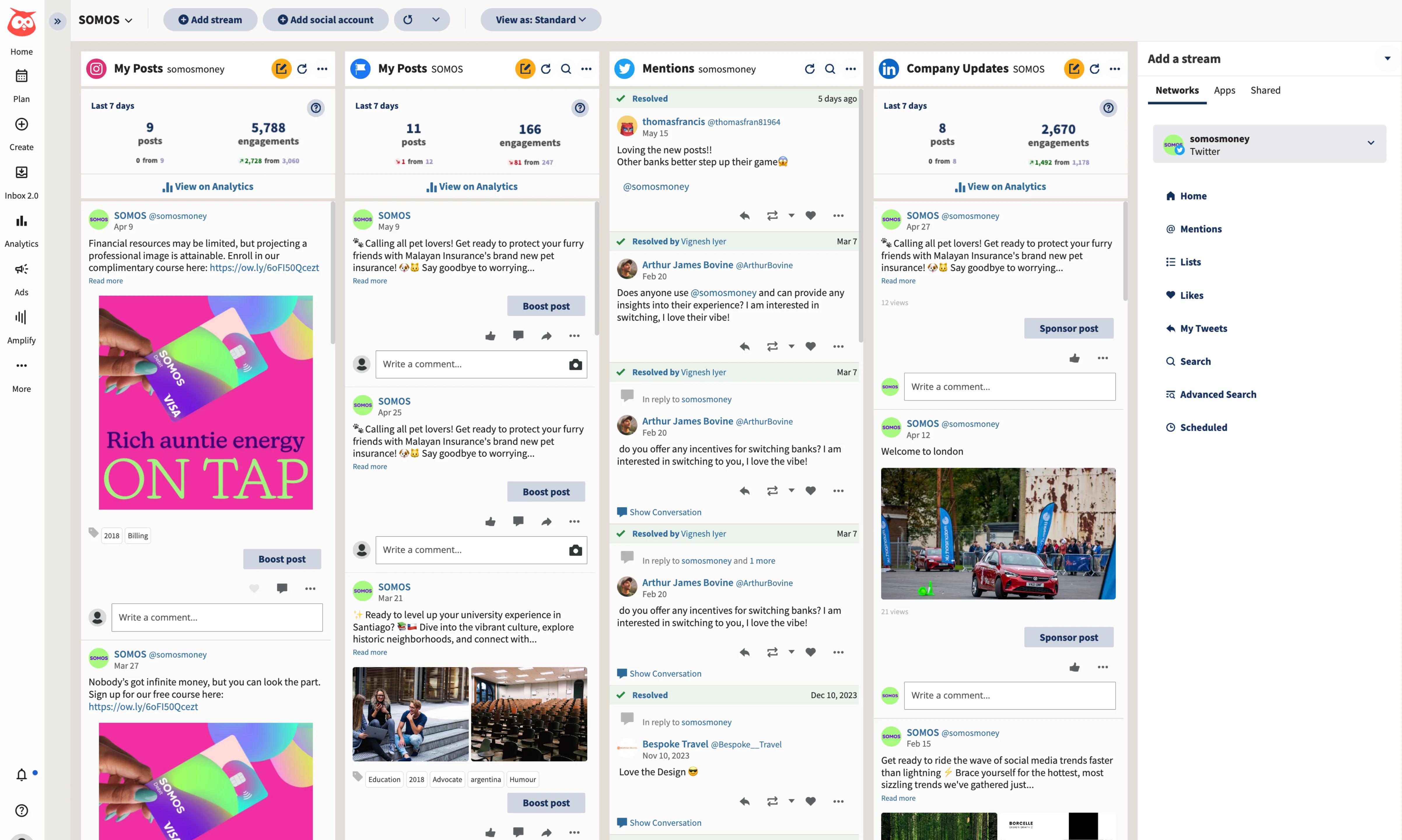
Hootsuite is the tool your marketing director probably used back in 2015. It's been around forever, and it's evolved into a full-blown social media management platform that goes way beyond scheduling. The dashboard handles publishing, monitoring, analytics, social listening, and even ad management. If Buffer feels too simple for your needs, Hootsuite is the opposite end of the spectrum.
The social listening feature is what sets Hootsuite apart from most Buffer alternatives. You can track brand mentions, monitor competitor activity, and analyze sentiment across platforms — all from the same tool you use to schedule posts. Buffer doesn't offer anything like this. For larger teams that need to stay on top of brand conversations in real time, it's genuinely valuable.
The analytics suite is also significantly deeper than Buffer's. You get custom reports, benchmarking against competitors, and ROI tracking that ties social activity to business outcomes. The team collaboration features include approval workflows, content libraries, and role-based permissions that actually make sense for organizations with multiple people touching social media.
Pricing: Starts at $99/mo for 1 user and 10 social accounts. Enterprise pricing goes much higher.
Best for: Marketing teams at mid-size to large companies who need social listening, advanced analytics, and team workflows.
The catch: That $99/mo starting price is steep, and Hootsuite's interface can feel overwhelming if you're coming from Buffer's clean simplicity. You're paying for a lot of features you might not use. The learning curve is real.
3. Later — Best for Visual-First Brands
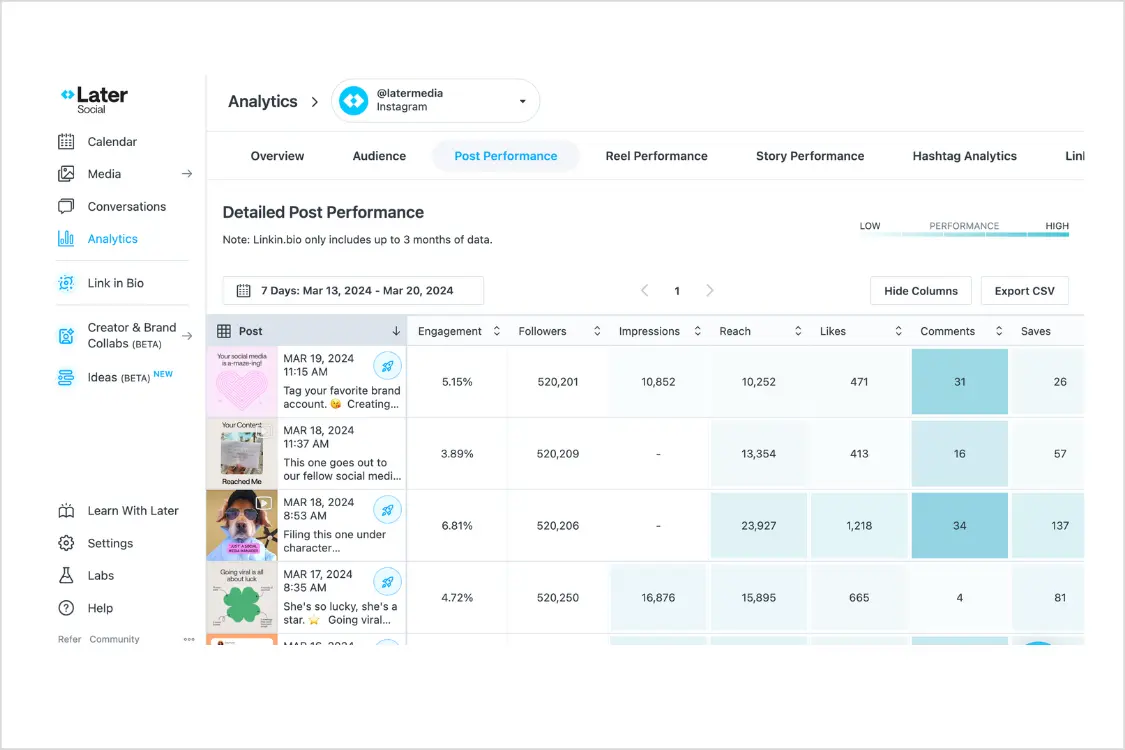
Later started as a visual planner for Instagram, and it still leans heavily into that identity. If your social strategy revolves around aesthetics — you're a photographer, a fashion brand, a food blogger — Later's visual grid preview and media library are hard to beat. You can drag and drop images into a visual calendar and see exactly how your Instagram grid will look before anything goes live.
The link-in-bio tool (Linkin.bio) is another standout. It turns your Instagram feed into a clickable landing page, which is useful if you're driving traffic from Instagram to your website or product pages. Buffer has a similar feature, but Later's version is more polished and customizable.
Here's the thing though: Later dropped X/Twitter support entirely. If you need to schedule tweets, Later isn't an option. They've also got a 30-post-per-month limit on their base plan, which fills up fast if you're posting daily across even two platforms. The pricing starts at $25/mo, which sounds reasonable until you realize how quickly you'll hit those limits.
Pricing: Starter $25/mo (1 social set, 30 posts/mo). Growth and Advanced plans available.
Best for: Instagram-focused creators and visual brands who prioritize grid aesthetics and link-in-bio functionality. Also compare Planoly alternatives for more visual-first schedulers.
The catch: No X/Twitter support. The 30-post limit on the base plan is restrictive for anyone posting more than once a day. You'll outgrow it fast.
4. SocialBee — Best for Content Recycling
SocialBee takes a fundamentally different approach to content scheduling. Instead of creating individual posts and assigning them to time slots, you organize content into categories — like "blog promotion," "tips," "user-generated content" — and SocialBee automatically fills your schedule based on the category rotation you set up. It's a system that rewards planning and works particularly well for evergreen content.
The evergreen recycling feature is the real selling point. You can mark posts as evergreen, and SocialBee will automatically re-queue them according to your schedule. If you've got a library of tips, quotes, or blog posts that stay relevant, this means you set them up once and they keep posting indefinitely. Buffer has no built-in content recycling — once a post is published, it's done unless you manually reschedule it.
SocialBee also includes an AI Copilot that helps generate content and suggests posting schedules based on your niche. It's not as deep as a dedicated AI writing tool, but it's integrated well enough that it speeds up the content creation process. The platform supports all major networks and starts at $29/mo for 5 social profiles.
Pricing: Bootstrap $29/mo (5 profiles), Accelerate $49/mo (10 profiles), Pro $99/mo (25 profiles).
Best for: Solopreneurs and small businesses with evergreen content libraries who want a "set it and forget it" scheduling system.
The catch: The category-based system has a learning curve. If you prefer the simplicity of Buffer's "write a post, pick a time, publish" workflow, SocialBee's approach can feel over-engineered at first. For more content recycling tools, see our MeetEdgar alternatives and ContentStudio alternatives guides.
5. Sendible — Best for Agencies
Sendible was built specifically for agencies, and it shows. The white-label reporting lets you slap your own logo on client reports and dashboards, which matters when you're managing social media for paying clients. The unified inbox pulls in messages and comments from all connected platforms, so you can respond to clients' audience engagement without switching between apps.
The content suggestion engine recommends articles and content based on topics you set, which helps fill gaps in your content calendar. The CRM-style client management features let you organize accounts by client, set up separate dashboards, and control access for team members working on different accounts. If you're running a social media agency and Buffer feels too basic for client work, Sendible is purpose-built for your workflow.
The integration list is solid too — it connects with Canva, Google Analytics, Google My Business, and WordPress, among others. The reporting is more detailed than Buffer's and designed to be client-facing from the start.
Pricing: Creator $29/mo (6 profiles), Traction $89/mo (24 profiles), White Label $240/mo (60 profiles).
Best for: Social media agencies that need white-label reporting, client management, and team collaboration.
The catch: The interface is functional but dated. It doesn't have the modern, clean feel of Buffer or newer tools. And for solo users, you're paying for agency features you'll never use.
6. Metricool — Best Free Alternative
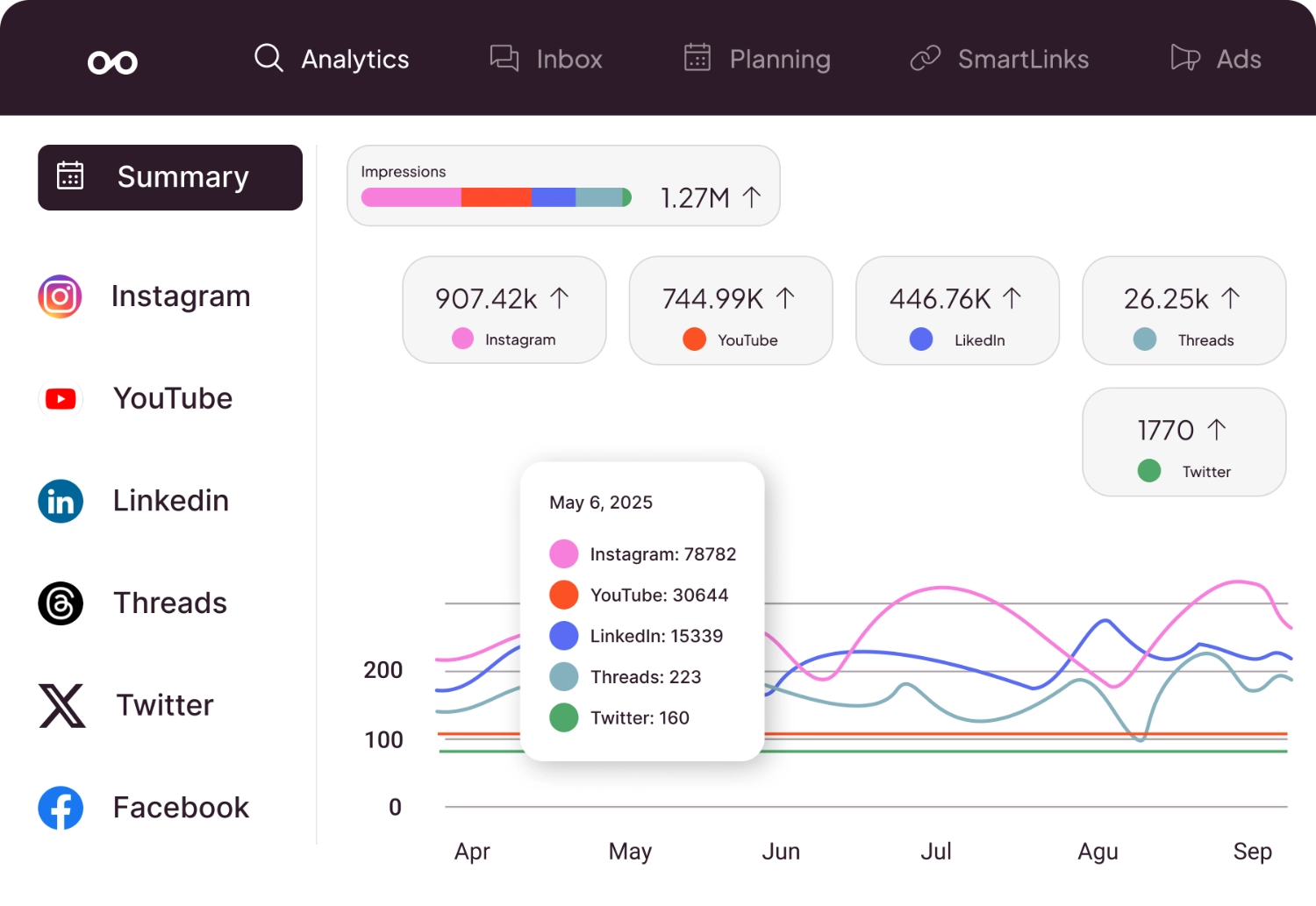
If price is your primary concern and you're looking for a Buffer alternative with a genuinely useful free tier, Metricool deserves a close look. The free plan gives you one brand and 20 scheduled posts per month, which isn't a lot, but the analytics you get for free are surprisingly detailed. You can track performance across Instagram, Facebook, X, LinkedIn, TikTok, and YouTube without paying a cent.
The competitor tracking feature is Metricool's secret weapon. Even on the lower-tier plans, you can add competitor accounts and benchmark your performance against theirs. Buffer doesn't offer competitor analysis at any price point. For small businesses that want to understand where they stand relative to similar brands, this is genuinely actionable data.
The paid plans start at $22/mo and scale up based on the number of brands and connected accounts. The analytics dashboard is clean, visual, and easy to interpret — which matters because the best analytics in the world are useless if nobody on your team actually looks at them. Metricool also supports ad management for Facebook and Google Ads, which is an unusual addition for a scheduling tool at this price point.
Pricing: Free (1 brand, 20 posts/mo), Starter $22/mo, Advanced and Enterprise plans available.
Best for: Budget-conscious creators and small businesses who want strong analytics and competitor tracking without paying premium prices.
The catch: The free plan is limited to 20 posts, so you'll likely need to upgrade quickly. The scheduling interface is functional but not as intuitive as Buffer's. Content creation tools are minimal compared to platforms with AI features.
7. Loomly — Best for Approval Workflows
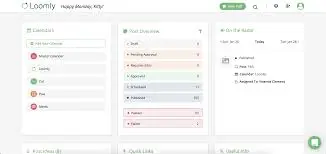
Loomly positions itself as a "brand success platform," which is marketing-speak, but the product actually delivers on the collaboration front. The approval workflow system is the most polished of any tool on this list. You can create posts, route them through team members for feedback, require manager approval, and track the entire process with a clear audit trail. For teams where multiple stakeholders need to sign off on social content before it goes live, this is a genuine time-saver.
The post inspiration feature gives you content ideas based on trending topics, RSS feeds, holidays, and social media best practices. It's a nice touch for those days when you're staring at a blank screen wondering what to post. The platform also generates post mockups that show exactly how your content will appear on each platform, which helps catch formatting issues before publishing.
Loomly used to be a mid-priced tool, but a significant price increase bumped the base plan to $65/mo for just 3 users and 10 social accounts. That's a hard sell when competing tools offer more accounts for less money. If you're coming from Buffer's affordable pricing, Loomly's jump might feel steep unless you specifically need those approval workflows.
Pricing: Base $65/mo (3 users, 10 accounts), Standard $175/mo (6 users), Advanced $369/mo, Premium $649/mo.
Best for: Marketing teams that need structured approval workflows and content collaboration with clear accountability.
The catch: The recent price hike makes it hard to recommend for small teams. At $65/mo for the base plan, you're paying more than most alternatives on this list while getting fewer accounts. The value is in the workflow, not the features-per-dollar. For a deeper look at Loomly and similar approval tools, see our Loomly alternatives guide.
Want flat-rate pricing with no per-channel fees? See PostEverywhere's plans — manage up to 40 accounts with AI content and image generation included.
How to Choose the Right Buffer Alternative
Picking the right tool depends on what's actually frustrating you about Buffer. Here's how to think through it:
If you're tired of per-channel pricing, PostEverywhere and Metricool both offer flat-rate models that include multiple accounts. PostEverywhere gives you 10 accounts for $19/mo where Buffer would charge $50–$100/mo for the same number of channels.
If you need more AI features, PostEverywhere is the clear pick. Built-in AI content generation and AI image generation mean you don't need separate subscriptions to ChatGPT, Canva, or stock photo sites. SocialBee's AI Copilot is also decent for content suggestions.
If you're an agency, Sendible's white-label features and client management tools are purpose-built for that workflow (compare Sendible alternatives). Hootsuite works too if you have the budget and need social listening on top of scheduling.
If your content is mostly visual, Later's grid preview and visual planner are still the best in class — just know you're giving up X/Twitter support.
If you're on a tight budget, Metricool's free tier gives you more analytics than Buffer's free plan, though you're limited to 20 scheduled posts per month.
If you need team approvals, Loomly's workflow system is the most polished, but you'll pay a premium for it.
What Makes Buffer Good (and Where It Falls Short)
I want to be fair to Buffer because it gets a lot right. The product has 195,000+ users for a reason. The interface is one of the cleanest in the industry. Setup takes five minutes. The free tier — 3 channels with 10 scheduled posts each — is genuinely useful for beginners who just need to get started. And the browser extension for sharing content on the go is still one of the best implementations out there.
Buffer also deserves credit for being transparent about their company culture and pricing. They publish their revenue numbers publicly and have been a model for remote work practices. As a company, they walk the talk.
Where Buffer falls short is at scale. The per-channel pricing model was designed for a world where most people managed two or three social accounts. Today, even a small business might have eight accounts across Instagram, Facebook, LinkedIn, X, Threads, TikTok, YouTube, and Pinterest. At $5–$10 per channel, that math gets ugly fast.
Buffer also lacks AI image generation, has limited analytics compared to tools like Metricool or Hootsuite, and doesn't offer content recycling the way SocialBee does. The social media scheduling landscape has evolved significantly, and Buffer's feature set hasn't quite kept pace with what newer tools are offering.
Looking for a side-by-side comparison? See our complete social media tool comparison guide with head-to-head matchups.
Why People Actually Switch From Buffer
I talk to a lot of people who've left Buffer, and it's rarely because the product broke or the support was bad. The reasons are more practical than that. Here are the patterns I see over and over:
The per-channel pricing adds up silently. This is the number one reason. You start with two or three channels on the free plan, it works great, you upgrade to Essentials, and you add channels one by one. Before you know it, you're running eight platforms (Instagram, Facebook, LinkedIn, X, Threads, TikTok, YouTube, Pinterest) and paying $48/mo or more. That slow creep is what makes it dangerous — no single channel feels expensive at $6, but collectively they cost more than most flat-rate alternatives.
Limited AI features compared to what's now available. Buffer added a basic AI assistant for captions, and it's fine. But when you compare it to what tools like PostEverywhere or SocialBee include — full AI content generation, AI image generation, bulk repurposing across platforms — Buffer's AI offering feels like an afterthought. If you're producing content at any kind of volume, you end up paying for a separate AI writing tool anyway, which negates the cost savings of Buffer's lower base price.
No auto-publish for Reels and certain formats. This one catches people off guard. Buffer supports Instagram Reels, but it sends a push notification to your phone to manually publish — it doesn't auto-post. If you're batch-scheduling a week of Reels on a Sunday evening, having to wake up at 6am on Tuesday to hit "publish" defeats the entire purpose of a scheduler. Tools like PostEverywhere and Later handle Reels auto-publishing natively.
Analytics are gated behind higher tiers. Buffer's free and Essentials plans give you basic post-level metrics, but if you want audience demographics, engagement trends over time, or any kind of reporting you can show a client, you need the Team plan. At $10/channel, that's $80/mo for eight channels — just to see the data you need to make informed decisions. Metricool gives you better analytics for free.
No content recycling. If you've got a library of evergreen tips, blog promotion posts, or product highlights, Buffer makes you reschedule each one individually. There's no way to set up a rotation of your best-performing content and let it loop automatically. SocialBee and others solved this years ago.
I want to be clear: none of these are dealbreakers for everyone. If you manage three channels, don't care about AI, and post once a day, Buffer is still an excellent choice. But if any of those pain points resonate, it's worth looking at what else is out there.
Buffer vs PostEverywhere: A Detailed Comparison
Since you're reading this on the PostEverywhere blog, let me lay this out as honestly as I can — including where Buffer wins.
| Feature | Buffer (Essentials) | PostEverywhere (Starter) |
|---|---|---|
| Monthly price | $6/channel ($48 for 8) | $19/mo flat (10 accounts) |
| Connected accounts | Pay per channel | 10 included |
| AI captions | Basic AI assistant | 50 AI credits included |
| AI image generation | Not available | Included (Ideogram V3) |
| Auto-publish Reels | No (push notification) | Yes |
| Content recycling | No | No |
| Analytics | Basic (advanced on Team plan) | Included on all plans |
| Free plan | 3 channels, 10 posts each | 7-day full trial, no credit card |
| Cross-posting | Manual per platform | One-click with platform formatting |
| Integrations | 50+ (Zapier, Canva, etc.) | Growing (fewer than Buffer) |
| Browser extension | Excellent | Not yet available |
Where Buffer wins: Buffer's free plan is genuinely more generous for getting started — three channels with 10 scheduled posts each, no time limit. PostEverywhere offers a 7-day trial instead. Buffer also has a more mature integration ecosystem and a browser extension that's one of the best in the industry. If you're a solo creator with two or three channels and no budget, Buffer's free plan is hard to beat.
Where PostEverywhere wins: The moment you need more than three or four channels, PostEverywhere's flat pricing becomes significantly cheaper. At eight channels, you're saving $29/mo compared to Buffer Essentials. You also get AI image generation, auto-publish for Reels, and a visual calendar with cross-posting built in — features Buffer either doesn't offer or charges extra for. Check our pricing page for current plan details.
The honest take: If simplicity and a free tier matter most to you, keep Buffer. If you manage five or more accounts and want AI tools included, PostEverywhere saves you money and gives you more features. I built PostEverywhere specifically because I hit the ceiling with Buffer's pricing model — but I still recommend Buffer to friends who are just starting out with one or two platforms.
Buffer's Per-Channel Pricing Trap: The Real Math
This is the section I wish someone had written for me two years ago. Buffer's pricing page shows $5–$10 per channel per month, which sounds reasonable in isolation. But let me walk through what actually happens as you grow:
3 channels (Instagram, LinkedIn, X) on Essentials: $18/mo — Totally reasonable. This is where Buffer feels like a great deal.
5 channels (add Facebook page + YouTube): $30/mo — Still manageable, but you're now paying more than PostEverywhere's Starter plan, which gives you 10 accounts.
8 channels (add Threads, TikTok, Pinterest): $48/mo — You're now paying more than PostEverywhere's Growth plan ($39/mo for 25 accounts) while getting fewer features and no AI tools.
10 channels (second brand or two more profiles): $60/mo — At this point, you could have PostEverywhere Pro's 40 accounts for $79/mo, or 25 accounts on Growth for $39/mo.
15 channels (agency with 2-3 clients): $90/mo — You're approaching Hootsuite territory without getting Hootsuite-level features.
And if you're on the Team plan at $10/channel for better analytics? Double all those numbers.
The trap isn't that any single channel is expensive. It's that the cost scales linearly while flat-rate tools give you step-function value. PostEverywhere's $19/mo covers 10 accounts. Publer offers similar flat-rate pricing. Even SocialBee at $29/mo gives you five profiles with content recycling included.
If you're running a small agency or a multi-brand business, run the numbers on your specific situation before committing to per-channel pricing. The best social media scheduling tools almost universally use flat-rate models now, and there's a reason for that.
Migration Guide: How to Switch From Buffer
If you've decided to move away from Buffer, here's the step-by-step process I followed. It took me about 45 minutes to fully transition:
Step 1: Export your content from Buffer. Go to your Buffer dashboard, navigate to Settings, and look for the export option. You can download your scheduled and published posts as a CSV file. Save this — it contains your post copy, links, and scheduling history. Even if you don't import everything into your new tool, it's a useful reference.
Step 2: Screenshot your analytics. Before you disconnect anything, take screenshots or export reports from Buffer's analytics. Once you cancel your plan, you'll lose access to historical performance data. If you've been running campaigns, this data matters for benchmarking against your new tool.
Step 3: Choose your new tool and sign up. If you're going with PostEverywhere, start the 7-day free trial — no credit card required, so there's no overlap cost. For other alternatives, most offer trial periods too. Don't cancel Buffer yet.
Step 4: Connect your social accounts. In your new tool, connect all the social profiles you had in Buffer. This is just re-authorizing through each platform's OAuth flow — Instagram, Facebook, LinkedIn, X, etc. It takes about two minutes per account. Having them connected to Buffer simultaneously won't cause any issues.
Step 5: Re-create your posting schedule. Set up your preferred posting times in the new tool. If your new platform supports CSV import (PostEverywhere and SocialBee both do), you can bulk-upload your Buffer export to recreate upcoming posts. Otherwise, use this as an opportunity to refresh your content queue — most of us have stale posts sitting in our Buffer queue anyway.
Step 6: Run both tools in parallel for a week. This is optional but worth doing. Schedule new posts in your new tool while letting any remaining Buffer posts publish as planned. This gives you a safety net and lets you compare the experience side by side.
Step 7: Cancel Buffer and clean up. Once you're confident the new tool is working, cancel your Buffer subscription and disconnect your social accounts from Buffer. Done.
Pro tip: If you've been using Buffer's link shortener (buff.ly), check your analytics to see how much traffic those links drive. You may want to set up equivalent tracking in your new tool using UTM parameters before switching.
Which Buffer Alternative Is Right for You?
If you've made it this far, you've got a lot of options to sort through. Here's my decision framework based on what I've seen work for different types of users:
Your top priority is saving money: Go with PostEverywhere if you need five or more accounts — the flat $19/mo for 10 accounts is the best value in this list. If you're on a zero budget, Metricool's free plan or Buffer's own free tier will get you started. Also check our best free social media scheduling tools roundup.
Your top priority is simplicity: Honestly? Keep Buffer. Its interface is the cleanest in the industry, the learning curve is basically zero, and if you're managing three or fewer channels, the per-channel pricing is still competitive. Don't switch for the sake of switching.
Your top priority is AI-powered content creation: PostEverywhere is the strongest option here, with AI captions, AI image generation, and content repurposing built into every plan. SocialBee's AI Copilot is a solid second choice if you also want content recycling.
Your top priority is advanced features and analytics: Hootsuite gives you the deepest feature set — social listening, competitive benchmarking, ad management — but at $99/mo, it's a significant investment. Metricool offers surprisingly strong analytics at a fraction of the price.
Your top priority is agency client management: Sendible is purpose-built for this. White-label reports, client dashboards, and team permissions designed for agency workflows. PostEverywhere's multi-account management works well for smaller agencies that want flat-rate pricing without the agency-specific overhead.
Your top priority is Instagram and visual content: Later remains the best visual planner with its grid preview and Linkin.bio tool. Check our best Instagram scheduler guide for a deeper comparison. Just know you're giving up X/Twitter support entirely.
Your top priority is "set and forget" evergreen posting: SocialBee's category-based scheduling and automatic content recycling is unmatched. If you've built a library of evergreen content and want it to keep working for you without manual re-scheduling, SocialBee is the pick.
The right answer depends on what's actually frustrating you about Buffer today. If it's price, switch to a flat-rate tool. If it's features, switch to something with more depth. If it's neither — if Buffer just works for you — there's no shame in staying put. The best social media scheduling tool is the one that fits your specific workflow.
Frequently Asked Questions
What is the best free alternative to Buffer?
Metricool offers the strongest free tier among Buffer alternatives, with one brand, 20 scheduled posts per month, and surprisingly detailed analytics including competitor tracking. Buffer's own free plan gives you 3 channels with 10 posts each, which is more generous on channels but lighter on analytics. For a full-featured trial, PostEverywhere offers a 7-day free trial with access to all features including AI image generation.
Is PostEverywhere cheaper than Buffer?
For most users, yes. Buffer charges $5–$10 per channel per month, so 10 channels costs $50–$100/mo. PostEverywhere's Starter plan includes 10 accounts for a flat $19/mo, and the Growth plan gives you 25 accounts for $39/mo. The savings increase as you add more accounts.
Can I migrate my scheduled posts from Buffer?
Most Buffer alternatives don't offer direct migration of scheduled posts. You'll need to export your content from Buffer (available in CSV format) and manually re-upload it to your new tool. Some platforms like PostEverywhere and SocialBee support bulk scheduling via CSV import, which speeds up the process.
Which Buffer alternative is best for Instagram?
Later is the strongest choice if Instagram is your primary platform, thanks to its visual grid preview and Linkin.bio feature. However, if you also need to manage other platforms alongside Instagram, PostEverywhere's Instagram scheduler supports feed posts, Stories, Reels, and carousels while also covering every other major network.
Does Buffer support AI content generation?
Buffer has added basic AI assistance for caption writing, but it doesn't include AI image generation or the depth of AI features found in tools like PostEverywhere or SocialBee. If AI-powered content creation is important to your workflow, you'll want an alternative that includes AI content generation and image creation natively.
Which Buffer alternative is best for agencies?
Sendible is purpose-built for agencies with white-label reporting, client dashboards, and team management features. Hootsuite is another option if you have the budget and need social listening alongside client management. For smaller agencies that want flat-rate pricing and AI tools, PostEverywhere's multi-account management supports up to 40 accounts on the Pro plan.
Why do people switch from Buffer?
The most common reasons are per-channel pricing that gets expensive with multiple accounts, limited AI features compared to newer tools, no content recycling or evergreen posting, and analytics that don't go deep enough for data-driven teams. Buffer's simplicity is its biggest strength and its biggest limitation — at some point, most growing businesses need more.
Is Hootsuite better than Buffer?
Hootsuite offers significantly more features than Buffer — social listening, advanced analytics, ad management, and team workflows. But it also costs significantly more, starting at $99/mo compared to Buffer's $5/channel. If you need those enterprise features, Hootsuite is the better tool. If you want simple scheduling without the complexity, Buffer is more appropriate. For something in between, a social media scheduler like PostEverywhere offers more features than Buffer at a lower price than Hootsuite.
Still using Buffer? Try PostEverywhere free for 7 days and see why creators and businesses are switching to flat-rate social media scheduling with built-in AI.
Founder & CEO of PostEverywhere. Writing about social media strategy, publishing workflows, and analytics that help brands grow faster.