The LinkedIn algorithm rewards posts that the right people stop to read and talk about, not posts that collect the most clicks. LinkedIn says it ranks your feed on three kinds of signals: who you are, what the post is, and what you do on LinkedIn. Its engineers have also written about scoring posts lower when people scroll straight past them.
PostEverywhere schedules your LinkedIn posts at the times your audience is online, so you can put this guide into practice. See how it works.
Very few people post, which is why it's worth understanding. Column Content's LinkedIn statistics report that only 1% of LinkedIn users post content weekly, and that 40% of B2B marketers say LinkedIn is their most effective channel for high-quality leads. For more platform data, see our LinkedIn statistics roundup.
This guide covers what LinkedIn has said about how its feed works, what 360Brew is (and isn't), the ranking factors that matter, the formats that perform, and when to post, using our own data from more than 6,500 LinkedIn posts scheduled with PostEverywhere.
TL;DR
- LinkedIn ranks the feed in passes: candidate posts are gathered from your network, pages you follow and suggested posts, then scored together for how likely you are to read and respond
- LinkedIn's help centre names three signal groups: identity (your profile), content (what the post is about, how recent it is) and activity (what you react to, comment on and share)
- Dwell time is confirmed by LinkedIn Engineering: posts people skip are scored lower
- 360Brew is a 150-billion-parameter model described in a LinkedIn research paper as a research pre-production model; LinkedIn hasn't said how much of the live feed it runs
- Document posts led engagement in Socialinsider's 2025 data (7.00%), followed by multi-image posts (6.45%) and video (6.00%)
- In our data, Wednesday 9 AM to noon was the best time to post on LinkedIn, 67% above an account's usual post. Use the best LinkedIn scheduler to hit it every week
Table of Contents
- How LinkedIn's Algorithm Actually Works
- 360Brew: What LinkedIn's AI Ranking Research Says
- The Ranking Factors That Matter
- Content Formats: What Performs Best
- LinkedIn Features That Affect the Algorithm
- What Actually Works in 2026
- 8 LinkedIn Algorithm Myths Debunked
- LinkedIn vs. Other Platforms: How the Algorithms Differ
- Recent Algorithm Changes (2025-2026 Timeline)
- FAQs
- Next Steps
How LinkedIn's Algorithm Actually Works
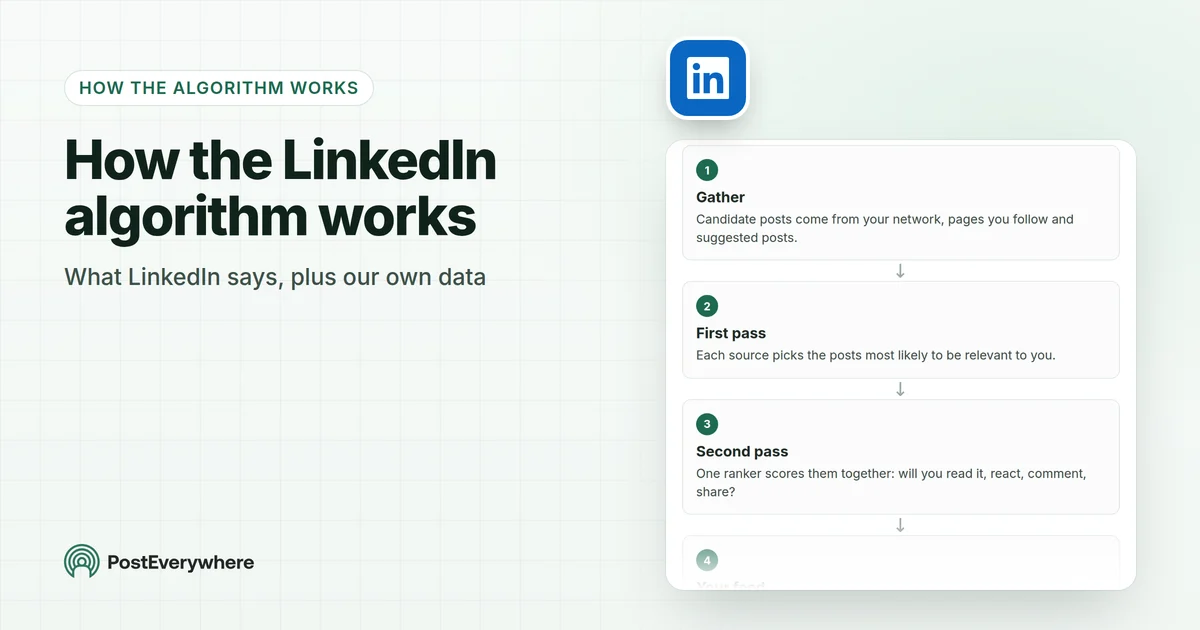
LinkedIn's feed isn't one formula. Its engineers have described a two-pass system: first-pass rankers pick likely candidates from each source (your network, job recommendations, sponsored updates), then a second-pass ranker scores everything together into one personalised list.
The goals they named were whether you'll view a post, whether you'll join the conversation by sharing, commenting or reacting, and whether creators get timely responses.
How LinkedIn builds your feed
LinkedIn's engineers describe ranking the feed in passes, then learning from what members actually stop to read.
- GatherCandidate posts come from your network, pages you follow and suggested posts.
- First passEach source picks the posts most likely to be relevant to you.
- Second passOne ranker scores them together: will you read it, react, comment, share?
- Your feedThe highest-scoring posts appear. LinkedIn says it aims for real conversations, not just clicks.
Practitioners usually describe what happens to a single post in three stages. LinkedIn hasn't published this breakdown itself, so treat it as a useful model rather than a specification.
Stage 1: Quality Filtering
A new post is checked first. Hootsuite's explainer describes this as a check that starts with spam filtering, before engagement signals, your connections and interest targeting come into play. Posts that are easy to read, stick to one topic and don't stuff in irrelevant hashtags give the filter no reason to hold them back.
Stage 2: The "Golden Hour"
Creators call the first hour after posting the "golden hour". LinkedIn hasn't published a time window, but its engineers list timely responses to creators as one of the feed's goals, and early comments and reactions are the first evidence of whether a post is worth showing more widely.
Staying around to reply in that first hour helps the conversation get going.
Stage 3: Relevance & Expertise Ranking
LinkedIn then matches the post to each reader. Its help centre says it looks at whether a post "provides knowledge or advice", what it's about, how recent it is, and whether it comes from someone the reader follows or is connected to.
Posts with original insight, specific detail or practical advice give it the most to work with. This is also where 360Brew comes in.
360Brew: What LinkedIn's AI Ranking Research Says
360Brew is a large ranking model described in a research paper by LinkedIn's team, first posted in January 2025. The paper describes a 150-billion-parameter, decoder-only model, trained on LinkedIn's data, that handles "over 30 predictive tasks" across LinkedIn and performs as well as or better than the production systems it was compared with in offline tests. The authors call it a "research pre-production model".
What it does: Instead of many separate models, each built around hand-made features, 360Brew works from natural-language descriptions of a task and of a member's behaviour and connections. That means it can read the meaning of a post and a profile, not just count signals.
What we know and don't know:
- The paper describes the model and its offline results. LinkedIn hasn't said publicly how much of the live feed runs on it
- Commentators such as Pettauer argue it compares each post with the author's profile (headline, About and Experience), so a clear profile helps your posts get matched to the right readers
- None of this changes the basics: a model that reads meaning rewards posts that are specific and useful
What this means for creators: As one analysis put it, "There's no shortcut anymore, as 360Brew recognizes authentic engagement." Write about the topics you know, and make your profile say clearly what those are.
The Ranking Factors That Matter
LinkedIn's help article on LinkedIn relevance is the most direct statement of what the feed looks at. It groups the signals into three kinds.
What LinkedIn looks at to rank your feed
LinkedIn groups the signals it uses to decide what you see into three kinds.
- Who you areIdentity
- Your profile: location, workplace, skills
- Your wider professional background
- What the post isContent
- What it's about and whether it shares knowledge or advice
- How recent it is and how people respond
- Whether it's from someone you follow or are connected to
- What you doActivity
- What you react to, comment on or share
- Time spent viewing content
- Who you follow and who follows you
1. Relevance
How closely a post matches what a reader cares about professionally. LinkedIn looks at the topic of the post, its language and tone, and the reader's own profile and activity.
Distribution works more like precise delivery to the people most likely to care than a broadcast to all your followers.
2. Expertise & Creator Authority
Whether the post shares real knowledge. LinkedIn's help centre names "whether it provides knowledge or advice" as a content signal. Posting consistently about a few topics you know, with specific detail rather than generic advice, gives the feed a clear picture of who your posts are for.
3. Engagement Quality
Not all engagement is equal. Here is what LinkedIn has said and what others have measured:
| Signal | What we know | Source |
|---|---|---|
| Comments and conversation | Joining the conversation is one of the goals LinkedIn's engineers named for the feed. Replying to comments boosted engagement by about 30% in Buffer's analysis of 72,000 posts | LinkedIn Engineering, Buffer |
| Dwell time | Officially confirmed. LinkedIn measures time "on the feed" and "after the click", and scores posts lower when people are likely to skip them | LinkedIn Engineering |
| Shares, comments and reactions | LinkedIn's help centre lists what you react to, comment on or share as activity signals | LinkedIn Help |
| Saves | AuthoredUp's own research found one save gave a post about 5x more reach than one like | AuthoredUp |
| Negative signals | LinkedIn treats a skipped post as a negative outcome. Hiding and reporting posts also tell it what you don't want to see | LinkedIn Engineering |
A post with a few thoughtful comments is worth more than one with many passive reactions. For a framework of what to measure, see our guide to LinkedIn metrics and KPIs.
LinkedIn rewards posts people stop to read, so post when your network is at work. PostEverywhere schedules your LinkedIn posts, documents and carousels for the exact times you choose, and suggests times from your own results where the platform shares them. See the LinkedIn scheduler.
Content Formats: What Performs Best
Socialinsider's 2026 LinkedIn benchmarks report average engagement rates by impressions for each format. LinkedIn's overall average was 5.20%.
| Format | Engagement rate (2025) | Engagement rate (2024) |
|---|---|---|
| Document posts (carousels) | 7.00% | 6.10% |
| Multi-image posts | 6.45% | 6.60% |
| Video | 6.00% | 5.60% |
| Single image | 5.30% | 4.85% |
| Text-only | 4.50% | 4.00% |
| Polls | 4.20% | 4.40% |
| Links | 3.25% | 3.30% |
Important Nuances
Document posts lead, but generic ones don't. Socialinsider's numbers are averages. Detailed case studies, original data and specific frameworks give readers a reason to swipe to the end, which is exactly the reading time LinkedIn measures.
For when a document post beats a written one, see our breakdown of carousels versus plain text posts.
Video grew. Video's average engagement rose between 2024 and 2025 in Socialinsider's data. Keep it short, captioned and filmed for a feed where many people watch with the sound off.
Single images can underperform text. In River's test of 300 posts, "Posts with a single image get 30% less reach than text-only posts with identical content." Use an image when it adds something, not by default.
Text posts are underrated. A well-written text post holds attention, and that reading time is a signal LinkedIn measures. LinkedIn posts allow up to 3,000 characters, but only the first lines show before "see more", so your hook needs to land fast.
LinkedIn Features That Affect the Algorithm
Newsletters
LinkedIn newsletters reach subscribers through notifications as well as the feed, so they don't depend on feed ranking in the same way posts do. Keep them focused on genuine insight rather than length.
LinkedIn Articles
Articles are long-form pages on LinkedIn that can also be found through search engines. Treat them like blog posts: put the topic in the title and headings, and write for the reader first.
Polls
Polls are quick to answer and invite comments, though their average engagement rate was among the lowest formats in Socialinsider's 2025 data (4.20%). Duration options are 1 day, 3 days, 1 week or 2 weeks.
Collaborative Articles
LinkedIn has scaled back the incentives here. It retired the gold Community Top Voice badge that members earned through Collaborative Articles from 8 October 2024.
What Actually Works in 2026
Posting Strategy
Here is when posts did best in our own data, from more than 6,500 LinkedIn posts scheduled with PostEverywhere, each compared with the same account's usual post. If you haven't scheduled on LinkedIn before, here is how to schedule LinkedIn posts with the clock icon or a scheduler.

| Day | 6-9 AM | 9 AM-noon | Noon-3 PM | 3-6 PM | 6-9 PM | 9 PM-midnight |
|---|---|---|---|---|---|---|
| Monday | +6% | +9% | +7% | +1% | +22% | too few |
| Tuesday | +3% | +1% | +7% | +12% | +12% | too few |
| Wednesday | -2% | +67% | +10% | +3% | +24% | too few |
| Thursday | -7% | -8% | -13% | -5% | +22% | too few |
| Friday | -8% | +5% | 0% | -1% | too few | too few |
| Saturday | too few | +55% | +18% | too few | too few | too few |
| Sunday | too few | too few | +18% | +9% | too few | too few |
| Factor | Recommendation |
|---|---|
| Frequency | 2 to 5 posts a week, Buffer's "sweet spot" from more than 2 million posts |
| Best day | Wednesday in our data, followed by Saturday and Sunday. Thursday was the weakest |
| Best times | Wednesday 9 AM to noon, with 10 AM the single best hour. See our full best time to post on LinkedIn guide |
| Golden Hour | Stay around for the first hour after posting and reply to genuine comments |
| Format rotation | Mix document posts, text, video and images using a LinkedIn content calendar template |
| Profile | Make your headline and About section say clearly what you post about |
Content That the Algorithm Rewards
- Specificity over generality. Concrete details (company names, real numbers, timeframes) give LinkedIn's relevance signals more to match
- Knowledge and advice. LinkedIn's help centre names "whether it provides knowledge or advice" as a content signal
- Thoughtful questions. End posts with a genuine question that invites discussion
- Professional storytelling. Personal stories with a professional lesson give people a reason to read to the end
- Topic consistency. Posting about a few specific topics helps the right readers find you
What to Avoid
- Engagement bait. "Like if you agree" and "Comment YES" prompts produce reactions without reading, and reading time is what LinkedIn measures
- Generic carousels. Ten generic tips on stock photos give readers no reason to swipe
- Generic, interchangeable posts. A model that reads meaning has nothing to match a vague post to
- Engagement pods. Comments from the same small group every time say nothing about whether a post is relevant to anyone else
- Single images by default. In River's test they reached 30% fewer people than the same text on its own
Let your AI agent do the scheduling. Ask Claude or ChatGPT to draft a week of LinkedIn posts and schedule them with PostEverywhere, at your best times. Connect your AI agent.
8 LinkedIn Algorithm Myths Debunked
1. "External links always kill reach" Not proven. LinkedIn hasn't published a link penalty. Links did have the lowest average engagement rate of any format in Socialinsider's data (3.25%), so make the post worth reading on its own before you link out.
2. "Hashtags are essential for reach" They aren't. LinkedIn's Laura Lorenzetti told Buffer that hashtags are "a nice to have, not a need to have." LinkedIn's ranking reads what a post is about, so clear writing matters more.
A few relevant hashtags are fine; stuffing irrelevant ones can look like spam.
3. "Engagement pods still work" LinkedIn ranks each post on whether it is relevant to each reader. A pod's comments come from the same people every time, which adds little evidence that anyone else will care. Your time is better spent replying to real comments.
4. "Images always boost engagement" Not single images. In River's test of 300 posts, single-image posts got 30% less reach than the same text alone. Multi-image and document posts did well in Socialinsider's averages.
5. "More engagement = better reach" Not all engagement is equal. Dwell time is a confirmed signal, and LinkedIn's engineers say they aim for "time well spent" rather than more time spent. A post people read and discuss beats one that collects quick reactions.
6. "Posting more = lower reach per post" Buffer's analysis of more than 2 million posts found the opposite: accounts posting 11 or more times a week saw "nearly triple the engagements per post" of once-a-week posters.
7. "You need to post at the 'perfect time'" Timing helps but it isn't magic. In our data from more than 6,500 posts, Wednesday mornings did 67% better than an account's usual post, while the whole of Thursday came out 7% below usual.
Post at a good time, then be around to reply.
8. "Longer posts always perform better" Length isn't the point; reading time is. A short post with a strong hook can hold attention as well as a long one. Write as long as the idea needs and make the first lines count.
LinkedIn vs. Other Platforms: How the Algorithms Differ
| Factor | TikTok | ||
|---|---|---|---|
| Primary goal | Professional relevance and conversation | Interest and relationships | Entertainment and interest |
| Key signal | Comments, dwell time, shares | Watch time, sends, likes | Watch time, completion, shares |
| Discovery | Network plus suggested posts | Explore and Reels | For You feed |
| Content lifespan | Can resurface for 2 to 3 weeks | Days | Days to weeks |
| Algorithm type | Relevance and relationship-based | Separate rankings per surface | Interest and behaviour-based |
| B2B fit | The main B2B platform | Brand building | Younger audiences |
LinkedIn's key differentiators:
- Professional context. LinkedIn factors in your profile, skills and workplace to decide what's relevant
- Conversation over virality. While TikTok and Instagram reward fast-spreading content, LinkedIn's stated goals include conversation and timely responses to creators
- Expertise. LinkedIn looks at whether a post shares knowledge or advice
- Language models. With 360Brew, LinkedIn's researchers are building ranking that reads meaning rather than counting signals
- Longer lifespan. LinkedIn may show relevant posts that are two to three weeks old
Spend your time on posts worth sharing, not on posting them. PostEverywhere publishes to LinkedIn and every other top platform from one calendar. Start your 7-day free trial. Plans start at $9 a month.
Recent Algorithm Changes (2025-2026 Timeline)
2026. Writers continue to track how far 360Brew reaches into the live feed. LinkedIn itself hasn't published a rollout schedule.
April 2025. The Algorithm Insights 2025 report, built on 1.8 million posts, found that "Reach is down by 50% for most creators."
January 2025. LinkedIn's researchers publish the 360Brew paper: a 150-billion-parameter model for ranking and recommendation across more than 30 tasks.
October 2024. LinkedIn retires the gold Community Top Voice badge earned through Collaborative Articles.
Ongoing. Falling organic reach mirrors trends across all platforms; see our social media statistics for the full picture.
Key Platform Stats
| Metric | Value |
|---|---|
| Average engagement rate (by impressions) | 5.20% |
| Highest-engagement format (2025) | Document posts, 7.00% |
| B2B marketers who call LinkedIn their most effective channel for quality leads | 40% |
| Users who post weekly | About 1% |
| Best time to post in our data | Wednesday 9 AM to noon |
For the latest platform changes, see our trends guide.
For exact dimensions and format specs, see our LinkedIn image sizes guide.
2026 Algorithm Updates: What's Confirmed
What has, and hasn't, been confirmed about LinkedIn's feed in early 2026:
- 360Brew is real, but its reach is unconfirmed. The research paper describes the model; LinkedIn hasn't said how much of the live feed uses it.
- Saves are worth making. AuthoredUp's research found a save gave about 5x the reach of a like. Frameworks, templates and reference material are the kind of posts people save.
- Engagement bait doesn't help. LinkedIn measures reading time and scores skipped posts lower, so prompted one-word replies add little.
- Knowledge and advice are named signals. LinkedIn's help centre lists "whether it provides knowledge or advice" among the things it looks at.
These shifts are part of a broader pattern across every network; see our running log of 2026 algorithm changes for how they stack up platform by platform.
How PostEverywhere helps with the LinkedIn algorithm
Every algorithm in this guide rewards the same habits: posting consistently, posting when your audience is online, and making each post fit the platform. PostEverywhere is built for that:
- Schedule posts, videos and PDF document posts to your personal profile and your company Page
- Post when your network is reading: best-time suggestions learn from when your own LinkedIn posts do best
- Write and adapt captions with AI Studio, and keep a steady rhythm with the posting queue
- Let your AI agent do it: ask Claude or ChatGPT to draft and schedule a week of posts through PostEverywhere (connect your AI agent)
See the PostEverywhere LinkedIn scheduler, or start a 7-day free trial; plans start at $9 a month.
FAQs
Does the LinkedIn algorithm penalize scheduling tools?
No. LinkedIn provides an official API that scheduling tools like PostEverywhere use to publish posts through our LinkedIn integration. The algorithm ranks content on relevance and engagement, not on how it was published. What matters is being around to reply to comments.
How often should I post on LinkedIn in 2026?
2 to 5 times a week is Buffer's sweet spot. Its analysis of more than 2 million posts found that posting more often didn't hurt per-post results: accounts posting 11 or more times a week saw nearly triple the engagements per post of once-a-week posters.
Do hashtags still matter on LinkedIn?
Barely. LinkedIn's Laura Lorenzetti called hashtags "a nice to have, not a need to have" in an interview with Buffer. LinkedIn's ranking reads what a post is about, so clear writing matters more. A few relevant hashtags are fine; stuffing irrelevant ones looks like spam.
Does LinkedIn penalize external links?
LinkedIn hasn't published a link penalty. Link posts did have the lowest average engagement rate of any format in Socialinsider's 2025 data, so make the post useful on its own and keep the link as an extra.
What's the best content format for LinkedIn in 2026?
Document posts (carousels) had the highest average engagement rate in Socialinsider's 2025 data, at 7.00%, followed by multi-image posts (6.45%) and video (6.00%). Mixing formats keeps your feed varied.
How does LinkedIn's 360Brew affect my content?
360Brew is a large ranking model described in a LinkedIn research paper; LinkedIn hasn't said how much of the live feed uses it. Because it reads meaning, specific, knowledgeable posts and a clear profile give it the most to work with.
Why is my LinkedIn reach declining?
Many creators have seen falling reach: the Algorithm Insights 2025 report, built on 1.8 million posts, found reach down by 50% for most creators. Focus on posts people stop to read, reply to comments, and post at your best times.
Is LinkedIn better for B2B than other platforms?
For most B2B companies, yes. 40% of B2B marketers say LinkedIn is their most effective channel for high-quality leads, according to Column Content. Its professional context (job titles, skills, industries) helps business posts reach the right readers.
Next Steps
LinkedIn's message in 2026 is consistent: posts that the right people read and discuss travel further than posts built to collect clicks. Write about what you know, make your profile clear, and be around for the conversation.
The opportunity is significant: with only about 1% of users posting weekly, posting consistently about topics you know puts you in a small minority. For 15 growth strategies built on these signals, read our guide to growing your LinkedIn following.
Here's how to put this guide into action:
- Schedule around the golden hour: plan posts in advance with PostEverywhere so you're free to reply in the first hour
- Find your best posting times: Wednesday mornings led in our data from more than 6,500 posts
- Generate expertise-driven posts: brainstorm hooks, frameworks and angles that show you know the subject
- Build a cross-platform presence: turn LinkedIn authority into reach on every other network
- See how the other feeds rank: the same signals play out very differently on Instagram and TikTok
- Selling coaching or consulting? See how coaches turn LinkedIn posts into discovery calls, with templates and launch timing.
Sources
Every outside fact in this article comes from the pages below. Our own figures come from posts scheduled with PostEverywhere, as explained where they appear.
- Column Content: LinkedIn Statistics: 2026 Shocking Facts You Need to Know
- LinkedIn: Community-focused Feed optimization
- Hootsuite: How the LinkedIn algorithm works in 2026
- arXiv: (2501.16450) 360Brew: A Decoder-only Foundation Model for Personalized Ranking and Recommendation
- Pettauer: LinkedIn 360Brew: The New Physics of Visibility
- The Linked Blog: 360Brew and the LinkedIn Algorithm: What We Know, What’s Confirmed, and What Remains Unclear?
- LinkedIn: LinkedIn relevance - Optimizing the member experience
- Buffer: How LinkedIn’s Algorithm Works in 2026, According to the LinkedIn Team
- LinkedIn: Understanding dwell time to improve LinkedIn feed ranking
- AuthoredUp: How the LinkedIn Algorithm Works in 2025 (Data-Backed Facts)
- Socialinsider: LinkedIn Organic Benchmarks 2026
- River: The 2026 LinkedIn Algorithm: What Actually Works
- Social Media Today: LinkedIn Removes Its Top Voice Badges for Collaborative Articles
- Buffer: How Often Should You Post on LinkedIn in 2026? Data From 2 Million+ Posts
- LinkedIn: The Algorithm InSights Report 2025 is HERE, Are You Ready?

Founder & CEO of PostEverywhere. Writing about social media strategy, publishing workflows, and analytics that help brands grow faster.