What's the best Later alternative? PostEverywhere is the best Later alternative overall, and the one built for AI agents: Claude or ChatGPT can write, schedule and publish your posts to all top platforms, including X, which Later dropped, on plans from $9/month (10 accounts for $29/month).
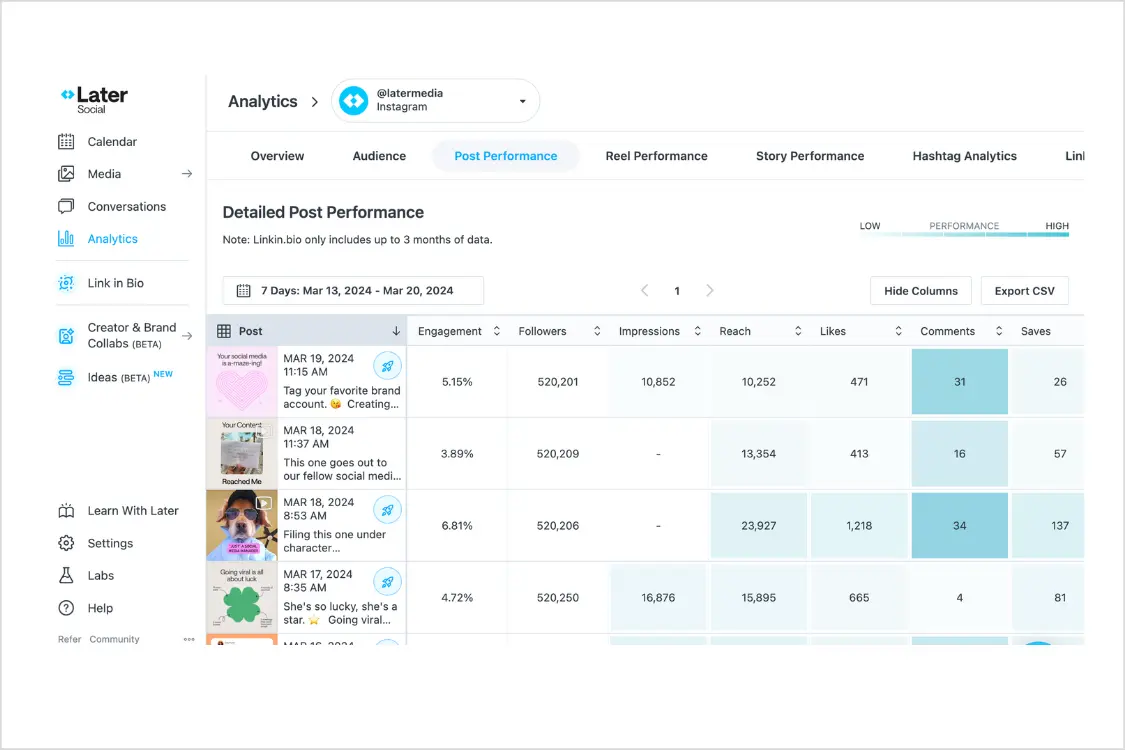
Later was one of the first tools I used when I started scheduling Instagram posts. The visual planner was genuinely innovative. Drag a photo onto a calendar, see how your grid would look, hit publish. For Instagram-only creators in 2018, it was perfect.
But Later never evolved beyond that Instagram DNA. And in the last two years, it's gotten worse: the free plan is gone, X/Twitter support was dropped in August 2025, and the Starter plan now sits at $25/month for a single social set with capped scheduling.
If you're managing more than one platform — or more than one client — you've probably already felt the squeeze.
I spent three weeks testing every credible Later alternative on the market. I scheduled real posts, tested AI features, compared pricing at scale, and tracked what actually published correctly. Here are the eight tools that stood out.
For a direct head-to-head comparison, see our detailed PostEverywhere vs Later comparison.
For a pure pricing view, see how the cheapest options compare.
Why people are leaving Later
Before diving into alternatives, it's worth understanding what changed. Later's core product hasn't kept up with what social media managers actually need in 2026.
The free plan is gone. Later killed it in 2024 and never reintroduced it. The tool that built its user base on generous free access now starts at $25/month — and that only gets you one social set (one profile per platform), capped scheduling, and a small allowance of AI credits.
For context, PostEverywhere's Growth plan gives you 10 accounts for $29/month.
X/Twitter support was dropped. In August 2025, Later quietly removed X/Twitter from its platform list. If your content strategy includes X — and most B2B brands, journalists, and thought leaders still rely on it — Later simply doesn't work anymore.
You'd need a separate tool for one of the most important platforms for real-time engagement.
Trustpilot tells a story. Later currently sits at 1.3 out of 5 on Trustpilot. The complaints are consistent: unexpected charges after cancellation, difficulty reaching support, and features that disappeared without notice. That rating isn't a blip — it reflects a pattern.
Instagram-first design limits everything else. Later's content calendar, preview tools, and analytics were all built around Instagram's grid format. When you try to schedule a LinkedIn carousel or a YouTube Short, the experience feels bolted on rather than native. Cross-platform scheduling shouldn't feel like an afterthought, and tools that handle cross-posting on social media properly treat every network as a first-class citizen.
If Later still works for your Instagram-only workflow, there's nothing wrong with staying. But if you need more platforms, more posts, or more AI firepower — these alternatives deliver.
1. PostEverywhere: best Later alternative for AI agents
PostEverywhere is the agentic social media scheduler built for AI agents. Later is built around dragging photos onto an Instagram grid; PostEverywhere is built around asking Claude or ChatGPT to plan, write and schedule your week across every platform, or posting from your own stack through the REST API, webhooks and MCP server.

Full disclosure: this is our product. I'm including it first because it was built specifically to solve the problems I kept running into with Later and similar tools. You should absolutely compare it against every other option on this list.
PostEverywhere started as a personal project after I got tired of juggling three different schedulers to cover every platform I posted to. The goal was simple: one dashboard where you can create, schedule, and post to all social media at once: Instagram, Facebook, LinkedIn, X/Twitter, YouTube, TikTok, Threads and more, without switching tabs.
The AI content generator is where PostEverywhere diverges most sharply from Later. Instead of 5-10 AI credits that run out after a couple of sessions, every plan includes AI credits, and bought top-ups never expire.
You can generate full captions, rework posts for different platform tones, and create variations for A/B testing — all inside the scheduler. The AI image generator takes it further, creating custom visuals directly in your workflow instead of sending you to Canva or Photoshop.
The content calendar gives you a drag-and-drop view across all connected accounts. Unlike Later's Instagram-centric grid planner, this calendar treats every platform equally. You can see your LinkedIn thought leadership piece sitting next to your Instagram Reel and your YouTube Short in the same weekly view. Best time to post suggestions are baked in, based on when your posts have done best, so you're not guessing.
Cross-posting works the way it should: write a post once, adapt it for each platform's format and character limits, then schedule everything in one action. Whether you want to post to Instagram and TikTok at the same time or push the same content to Threads, X, and LinkedIn, it handles the format adjustments automatically.
The hashtag generator suggests tags based on your content and trending data, which saves the manual research that Later's limited AI credits barely touch.
Platform-specific schedulers give you native features for each network. The Instagram scheduler handles feed posts, Stories, and Reels. The Facebook scheduler supports Pages, links, video and Reels. The LinkedIn scheduler covers personal profiles and company pages. The X scheduler handles threads and polls.
And the YouTube scheduler manages Shorts and long-form videos, where Later's YouTube support centres on Shorts.
Pricing: Lite at $9/month (2 accounts), Starter at $19/month (5 accounts), Growth at $29/month (10 accounts), and Scale at $39/month (20 accounts). All plans include a 7-day free trial. Annual billing saves 20%.
Best for: Anyone who wants to automate with AI agents, plus teams and creators who need cross-posting tools across every platform.
The catch: No free plan, only a 7-day trial. No link-in-bio tool like Later's Linkin.bio and no Instagram grid preview. It's built for posting across platforms, not for planning a grid.
Worth a look: PostEverywhere's pricing page breaks down exactly what you get at each tier. The 7-day trial requires a card.
2. Buffer: a Later alternative for simple queue scheduling
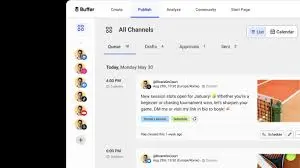
Buffer suits former Later users who mainly want a simple posting queue. It covers the core scheduling workflow without Later's social-set model.
Buffer's strength is radical simplicity. The interface does exactly what you'd expect and nothing more. You write a post, pick your channels, choose a time, and schedule it. There's no learning curve, no feature overload, no upsell popups interrupting your workflow.
For solo creators or freelancers managing a handful of accounts, that simplicity is a feature, not a limitation.
Paid plans start at $5 per channel per month. If you manage five channels, that's $25/month, the same price as Later's Starter plan, but without the 30-post cap. Buffer doesn't limit how many posts you can schedule on paid plans.
We dig into both pricing models side-by-side in our Later vs Buffer comparison if you're trying to pick between just those two.
The analytics are basic but functional. You'll get engagement metrics and best time to post suggestions, but nothing approaching the depth of enterprise tools. If you need detailed reporting, you'll outgrow Buffer quickly.
Pricing: Free (3 channels, 10 posts each). Paid plans from $5/month per channel.
Good for: Solo creators and freelancers who want dead-simple scheduling on a budget.
The catch: Collaboration features are minimal. Analytics won't satisfy data-driven teams. No AI content generation.
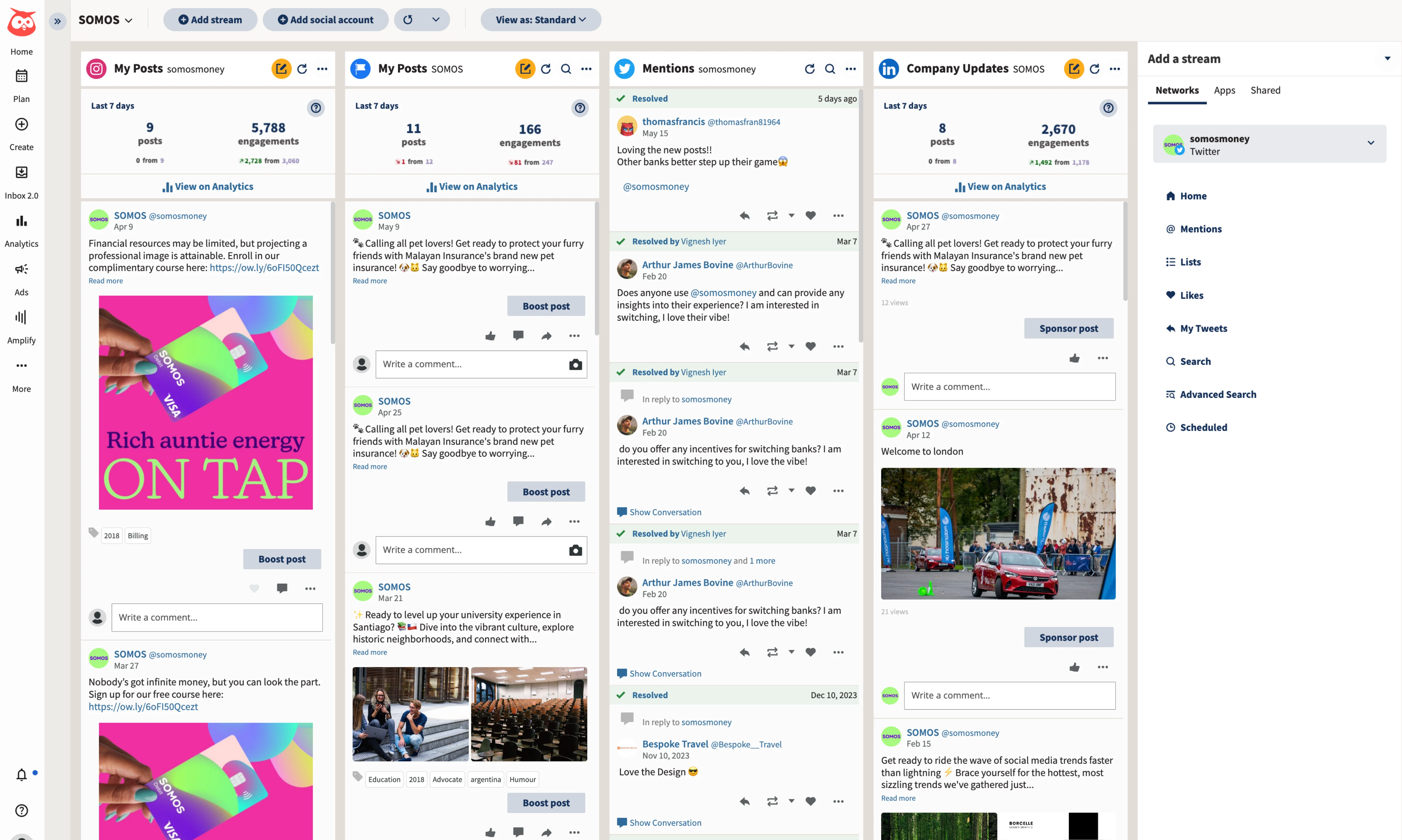
3. Hootsuite: for enterprise teams leaving Later
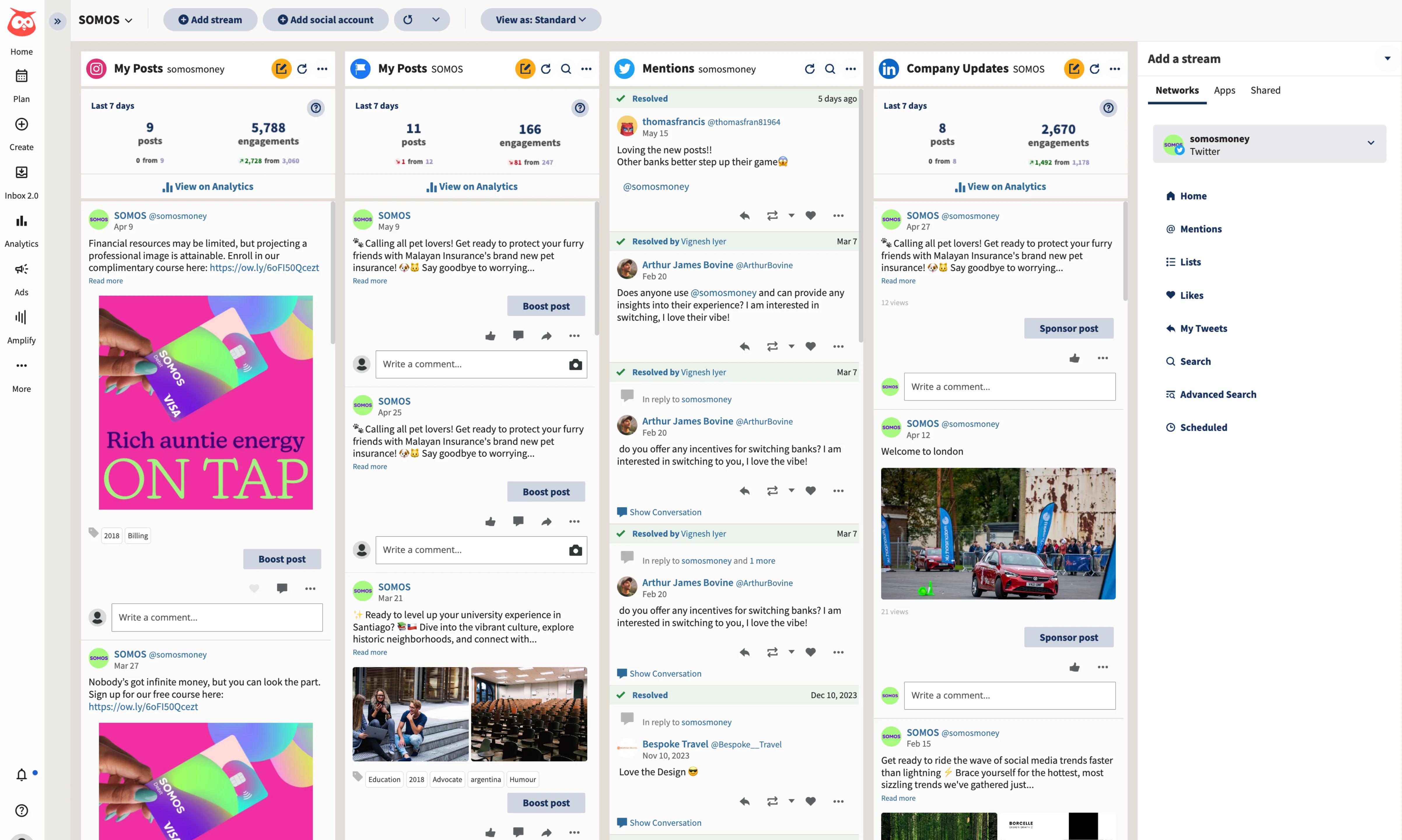
Hootsuite sits at the opposite end of the spectrum from Later. Where Later was built for Instagram creators, Hootsuite was built for enterprise social media teams managing dozens of accounts across complex approval chains.
The social listening features are what set Hootsuite apart. You can monitor brand mentions, track competitor activity, and identify trending conversations across platforms — capabilities Later never offered. The unified inbox pulls messages, comments, and mentions from every connected account into a single stream, which is essential if your team handles high-volume customer interactions on social.
Hootsuite supports every major platform including X, which Later dropped. The analytics are comprehensive with customizable reports you can schedule for automatic delivery to stakeholders. If you're presenting social media performance to a C-suite, Hootsuite's reporting looks professional out of the box.
The downside is obvious: it's expensive. At $99/month for the base plan, it is one of the priciest tools on this list, and the interface has a learning curve that smaller teams may not want to invest in.
If you are deciding between just these two, our Later vs Hootsuite breakdown goes feature by feature.
Pricing: Plans start at $99/month.
Good for: Large teams and agencies that need social listening, enterprise analytics, and complex approval workflows.
The catch: Expensive. Steep learning curve. Overkill for small teams or individual creators.
Related: Our Hootsuite alternatives guide covers options if Hootsuite's price tag is too steep but you still need enterprise-level features.
4. Planoly: for Instagram grid planning
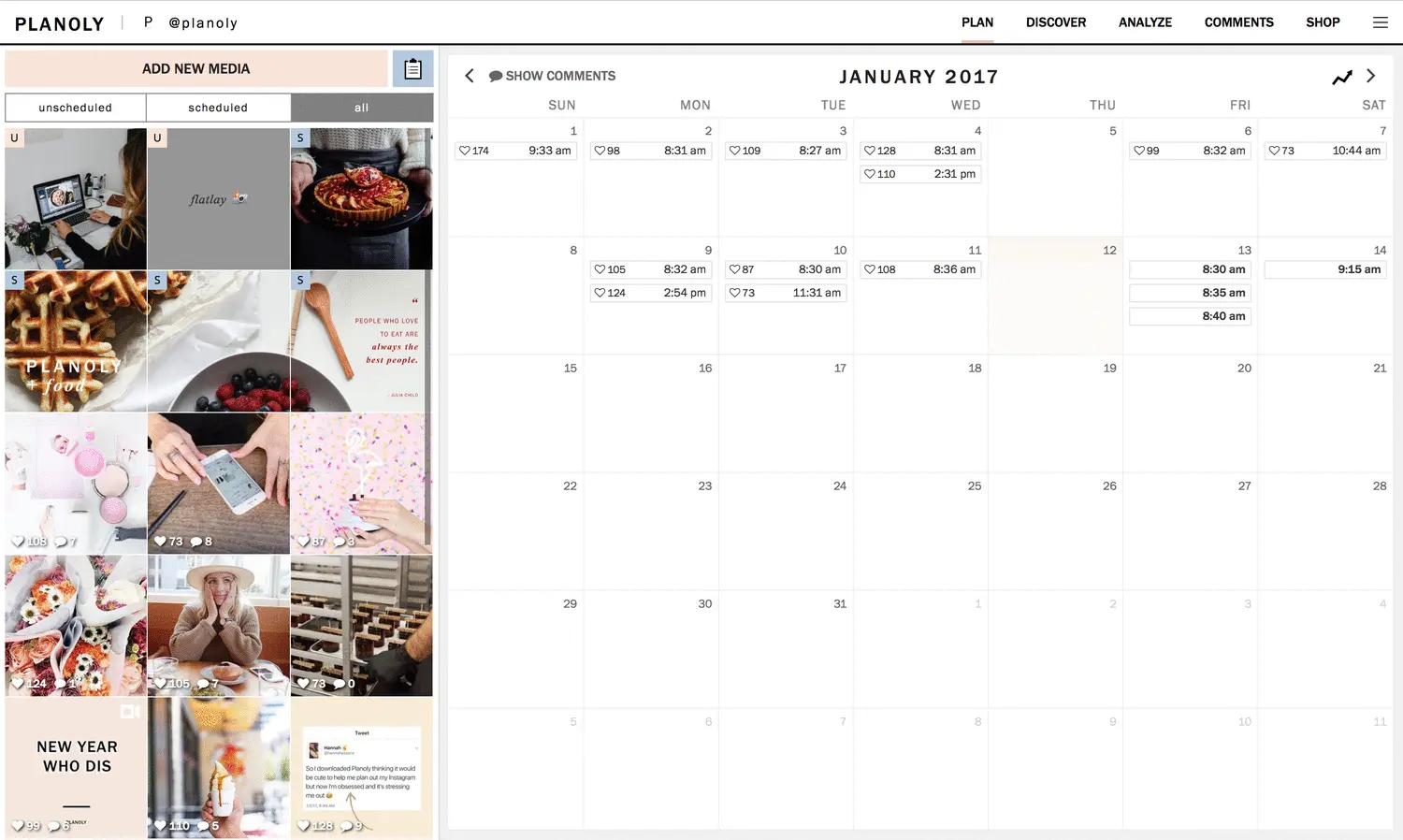
Planoly is the tool most similar to Later in philosophy. Both started as Instagram grid planners, both prioritize visual content, and both cater to creators who care deeply about feed aesthetics.
If you're leaving Later specifically because of pricing or the free plan removal — but you still want that visual grid planning experience — Planoly is worth considering. At $16/month, it's cheaper than Later's $25 Starter plan, and the grid preview tool works just as well for planning your Instagram aesthetic.
Planoly's social set now covers Instagram, Facebook, X, Pinterest, LinkedIn, YouTube, Threads and TikTok, one profile each, so it has caught up on breadth. Its tools are still built around the Instagram grid first.
Pricing: Plans start at $16/month.
Good for: Instagram-focused creators who want visual grid planning at a lower price than Later.
The catch: The Starter plan is 1 social set and 1 user, and the workflow is still Instagram-first. If you need agency-level Instagram scheduling, our Sked Social alternatives and Dash Social alternatives guides cover tools with deeper visual analytics.
5. SocialBee: for evergreen content recycling
SocialBee approaches scheduling differently from Later or any other tool on this list. Instead of a linear content calendar, SocialBee organizes posts into categories — tips, promotions, behind-the-scenes, curated content — and rotates through them automatically.
This category-based system is powerful for evergreen content. If you have blog posts, product features, or educational content that stays relevant for months, SocialBee will keep resharing it in a balanced rotation without you manually re-scheduling each piece. Later has no equivalent feature.
SocialBee also includes an AI assistant (Copilot) that can generate post variations, suggest content categories, and help you maintain a consistent posting schedule. It's more sophisticated than Later's limited AI credits, though not as deeply integrated as PostEverywhere's AI content generator.
The interface has a learning curve — the category system takes some setup before you see the benefits. But once your categories are configured, SocialBee essentially runs your content schedule for you.
Pricing: Plans start at $29/month.
Good for: Brands with evergreen content libraries who want automated content rotation.
The catch: Setup takes time. The category system isn't intuitive at first. Analytics are basic.
6. Tailwind: for a Pinterest and Instagram combo
Tailwind occupies a specific niche: it's built for anyone who treats Pinterest as a primary marketing channel alongside Instagram. Later never invested heavily in Pinterest, so Tailwind fills a real gap.
Tailwind's SmartSchedule feature analyzes when your audience is most engaged and automatically suggests optimal posting times. Its Pinterest-specific features include pin scheduling, board management, and Tailwind Communities for content sharing.
For Instagram, Tailwind offers a visual planner and hashtag suggestions similar to Later's core features. The combination of strong Pinterest tools and solid Instagram support makes Tailwind a natural upgrade for Later users who also manage Pinterest accounts.
Tailwind now sells its plans per Pinterest account rather than as one flat tier, so what you pay depends on how many Pinterest accounts you run.
Pricing: Sold per Pinterest account. Check Tailwind's site for current pricing.
Good for: Creators and e-commerce brands that rely on both Pinterest and Instagram.
The catch: Limited beyond Pinterest and Instagram. Not a true multi-platform social media scheduler. If you want Pins on the same calendar as everything else, PostEverywhere schedules Pinterest alongside all top platforms.
7. Agorapulse: a social inbox for Later refugees
Agorapulse focuses on one job: it turns your social media comments, DMs, and mentions into a manageable inbox. If you've been using Later and struggling with engagement management across platforms, Agorapulse's unified inbox is built for that.
Every comment, mention, and direct message from every connected platform lands in a single inbox. You can assign conversations to team members, label them, and mark them as handled. For agencies or brands that receive hundreds of social interactions daily, this inbox is the main reason to consider it.
The scheduling and publishing features are solid but not the star of the show. Agorapulse covers all major platforms including YouTube, and the content calendar is clean and functional. The analytics include ROI tracking, which helps connect social media activity to business outcomes.
Pricing: Plans start at $79 per user per month.
Good for: Teams that need social media inbox management alongside scheduling.
The catch: Per-user pricing gets expensive fast for larger teams. The inbox focus means scheduling features aren't as polished as dedicated scheduling tools. For a deeper look, see our Agorapulse alternatives guide.
8. Metricool: analytics on a budget
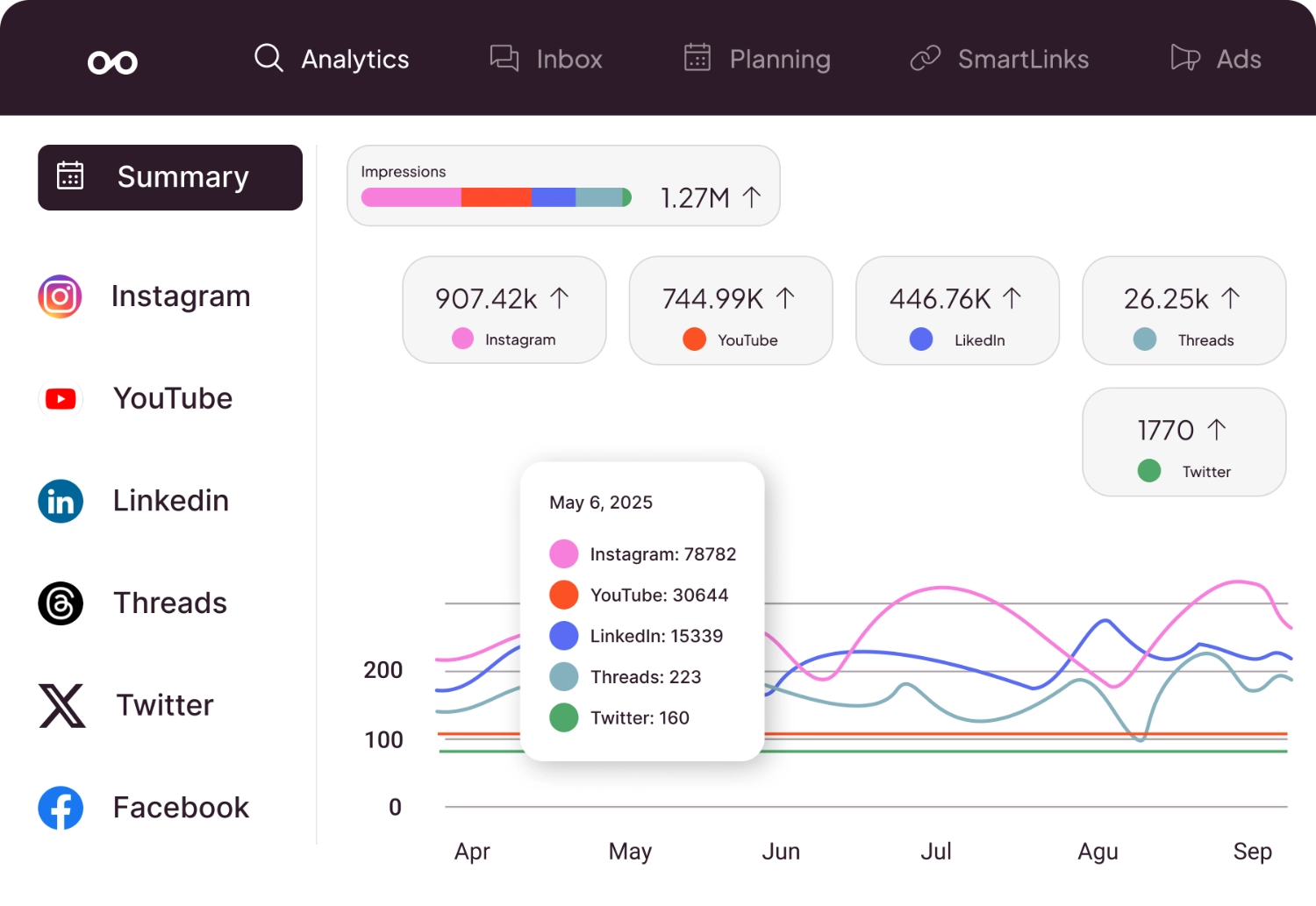
Metricool is a Spanish-based tool built around analytics, with scheduling on top.
The competitor analysis feature is the standout. You can track your competitors' posting frequency, engagement rates, and follower growth alongside your own metrics. Later never offered anything like this, and most tools that do charge enterprise prices for it.
Metricool also handles scheduling across Instagram, Facebook, X/Twitter, LinkedIn, TikTok, YouTube, Pinterest, and Google Business Profile. The ad management feature lets you run and track Facebook and Google ads from the same dashboard, which is a nice bonus for small businesses managing their own paid campaigns.
Paid plans start at $25/month and include more features than Later offers at a similar price point.
Pricing: Free plan available. Paid plans from $25/month.
Good for: Data-driven marketers who want competitor analysis and detailed analytics without enterprise pricing.
The catch: Interface can feel cluttered. Customer support responses can be slow. If analytics are your top priority, our Iconosquare alternatives guide covers more analytics-focused tools.
Keep reading: Our guide to the best social media scheduling tools ranks all of these options (and more) across every category that matters.
Why people switch from Later
The "leaving Later" pattern I see most often isn't one dramatic breaking point — it's a slow accumulation of friction. Here's what I hear from people who've already made the switch.
Pricing crept up while value stayed flat. Later's Starter plan used to feel reasonable when it came with a free tier underneath it. Now that the free plan is gone and Starter sits at $25/month for a single social set, the value equation has shifted.
You're paying more and getting less flexibility than tools like PostEverywhere or Buffer offer at the same price or lower. The Growth plan jumps to $37.50/month and the Scale plan to $82.50/month, even on annual billing, prices that put Later in the same bracket as tools with far deeper feature sets.
Instagram-first DNA holds everything back. Later was built around Instagram's visual grid, and that shows every time you try to use it for something else. Scheduling a LinkedIn article or a YouTube Short in Later feels like using the wrong tool for the job — because it is.
The content calendar, the preview tools, the analytics dashboards — they all assume Instagram is your primary platform. If you're running a multi-platform strategy in 2026, that assumption is a liability.
AI features fell behind. Later's Starter plan ships with a tight monthly cap on AI credits, enough to generate a handful of captions before you're locked out until next month.
Meanwhile, tools like PostEverywhere's AI content generator include 10 credits a month on the cheapest plan and 500 on Scale. SocialBee's Copilot runs circles around Later's AI too. If you're using AI to speed up content creation (and in 2026, you should be), Later's credits feel like a demo, not a feature.
Reels scheduling still has rough edges. This one surprises people because Instagram is supposed to be Later's strength. But auto-publishing Reels through Later has been inconsistent — cover image selection is limited, audio options are restricted, and some users report posts defaulting to notification-based publishing instead of true auto-publish.
For a tool that charges premium prices for Instagram scheduling, that's a hard sell when competitors handle Reels natively.
Platform support keeps shrinking, not growing. Dropping X/Twitter in August 2025 was the most visible cut, but Later's YouTube support is built around Shorts and it has been slow to build out TikTok features beyond basic post scheduling. The platform trend is moving in the wrong direction.
You want a scheduler that's adding platforms, not removing them.
To be fair: if your workflow is purely Instagram feed posts and Stories, and you rely heavily on Linkin.bio, Later still does those things well. The visual grid planner is still a strength. But for everyone else, the reasons to switch keep stacking up.
Switching from Later to PostEverywhere
I'm obviously biased here, so I'll be straightforward about where Later wins and where it doesn't. This is the short version; the full feature-by-feature and pricing breakdown lives in our PostEverywhere vs Later comparison.
Pricing. PostEverywhere Growth is $29/month for 10 social accounts. Later Starter is $25/month for 1 social set (one profile per platform) with a limited AI credit allowance. PostEverywhere Scale is $39/month for 20 accounts versus Later's Scale at $82.50/month billed annually.
PostEverywhere is cheaper at every tier and more generous with account limits.
Platform coverage. PostEverywhere supports Instagram, Facebook, LinkedIn, X/Twitter, TikTok, YouTube, Threads, and Pinterest. Later supports Instagram, Facebook, TikTok, Pinterest, LinkedIn, Threads, YouTube and Snapchat, but dropped X/Twitter. If X matters to your strategy, Later simply doesn't work.
Check our best social media scheduling tools comparison for a full platform matrix.
AI features. PostEverywhere includes an AI content generator, AI image generator, and best time to post suggestions based on when your posts have done best. Later's AI is limited to basic caption suggestions with a tight credit cap. This is the widest gap between the two products.
Auto-publishing. PostEverywhere auto-publishes to all supported platforms including Reels, TikToks, and YouTube Shorts. Later auto-publishes to most formats but has documented issues with Reels cover images and audio. Both tools handle standard feed posts reliably.
Visual grid planning. This is where Later genuinely wins. Later's Instagram grid preview, where you can drag and rearrange posts to see how your feed will look before publishing, is well made.
PostEverywhere's content calendar is a strong drag-and-drop planner, but it doesn't offer the same Instagram-specific grid aesthetic view. If feed aesthetics drive your brand, Later has an edge here.
Link-in-bio. Later's Linkin.bio is a polished, well-integrated feature. PostEverywhere doesn't currently offer a link-in-bio tool. If that's central to your Instagram strategy, this matters.
The honest summary: Later is the better choice if you're Instagram-only and need grid planning plus Linkin.bio. PostEverywhere is the better choice for everything else — more platforms, more AI, more accounts, lower price.
Most people leaving Later are leaving because they've outgrown that Instagram-only model, which is exactly where PostEverywhere was designed to step in.
Compare yourself: PostEverywhere's pricing page lets you see exactly what each tier includes. Every plan starts with a 7-day trial.
Later's 2026 pricing changes
Later's pricing has gone through several shifts, and the current structure (as of October 2026) sits at three tiers built around "social sets" (one profile per supported platform per set). Prices below are per month on annual billing:
- Starter: $18.75/month: 1 social set (8 profiles), 1 user, 30 posts per profile per month, 5 AI credits
- Growth: $37.50/month: 2 social sets (16 profiles), 2 users, 180 posts per profile, 50 AI credits, approvals and a social inbox
- Scale: $82.50/month: 6 social sets (48 profiles), 4 users, unlimited posts, 100 AI credits
Later offers a 14-day free trial, and annual billing saves 25%, so monthly billing costs more.
The biggest change in the last two years wasn't a single price increase — it was the removal of the free plan in 2024 and the steady creep upward on every paid tier through 2025 and into 2026.
The free plan had been Later's primary acquisition funnel for years, bringing in creators who would eventually upgrade. Removing it pushed casual users toward Buffer and Metricool (which still offer free tiers) and left Later competing on features against tools that are either cheaper or more capable at the same price.
The social-set model is the other pain point. A "social set" caps you at one profile per platform, so if you manage two Instagram accounts (a brand and a personal page, say), you either pay for a second set or upgrade tiers.
For agencies and creators with multiple accounts on the same platform, the math gets ugly quickly. The Growth plan at $37.50/month (billed annually) covers two social sets, so at most two profiles per platform, for about the same price as PostEverywhere's Scale plan ($39/month for 20 accounts, any mix of platforms).
Migration guide: switching from Later to another tool
If you've decided to move, here's the practical process I recommend. It takes about 30-60 minutes for most accounts.
Step 1: Export your content from Later. Go to Settings > Account > Export Data. Later will email you a CSV with your scheduled posts, captions, and publishing history. Download this before you cancel — you lose access to your data once your subscription ends.
Save any media files (images, videos) separately, as the export may only include file references, not the actual assets.
Step 2: Screenshot your content calendar. Before disconnecting anything, screenshot your upcoming two weeks of scheduled content. This gives you a visual reference for what needs to be re-created in your new tool.
Note any posts with specific publishing times tied to your best time to post data.
Step 3: Set up your new tool first. Create your account on your chosen alternative and connect all your social profiles before touching Later. Make sure auto-publishing permissions are granted correctly — Instagram in particular requires reconnecting through Meta Business Suite. Test with a single post to confirm everything works.
Step 4: Recreate your queued posts. Using your exported CSV and screenshots, rebuild your upcoming content schedule in the new tool. This is the most time-consuming step, but most social media schedulers let you bulk-upload content or import from CSV.
If you're moving to PostEverywhere, the cross-posting feature lets you adapt a single post across platforms in one step, which speeds up the rebuild significantly.
Step 5: Disconnect social accounts from Later. Once your new tool is confirmed working and your queue is rebuilt, go back to Later and disconnect your social accounts. This is important — having two tools with auto-publish access to the same accounts can cause duplicate posts or API conflicts.
Step 6: Cancel your Later subscription. Cancel through Settings > Subscription. Keep an eye on your billing statement for the next month — multiple Trustpilot reviews mention unexpected charges after cancellation. If you're on an annual plan, check whether you're eligible for a prorated refund.
Step 7: Save your Linkin.bio URL (if applicable). If you've been using Later's Linkin.bio and have it in your Instagram bio, update your bio link to a new landing page or link-in-bio tool before cancelling. Otherwise your Instagram bio will point to a dead page.
Which Later alternative is right for you
Not every tool on this list is right for every situation. Here's a quick decision tree based on what actually matters most to your workflow.
Budget is your top priority → Buffer (paid from $5/channel) and Metricool (paid from $25/month) both have low entry prices. If you need more AI and platform coverage on a budget, PostEverywhere at $29/month is the best value paid option.
Visual Instagram planning is non-negotiable → Stay close to what you know with Planoly ($16/month). It replicates Later's grid-planning experience at a lower price. Just know you're trading platform breadth for Instagram depth. If you want both, try PostEverywhere's Instagram scheduler.
Multi-platform scheduling with AI → PostEverywhere was built for exactly this. All top platforms, AI content generation, AI image generation, and a unified content calendar — all starting at $9/month.
If you're tired of Later's Instagram-centric limitations, this is the most direct upgrade. It also covers more nuanced workflows like posting to Instagram and Threads at the same time without the cross-app friction Later builds in.
Enterprise features and social listening → Hootsuite ($99/month+) is built for large teams. If you need brand monitoring, complex approval chains, and C-suite-ready reporting, it covers those. It's expensive, though.
Evergreen content recycling → SocialBee ($29/month) is the only tool on this list that automatically rotates content categories. If you have a library of blog posts, tips, or product highlights that stay relevant for months, SocialBee keeps them circulating without manual effort.
Pinterest + Instagram combo → Tailwind (priced per Pinterest account) is purpose-built for this pairing. If Pinterest is a real revenue channel for your business (especially e-commerce), Tailwind's pin scheduling and community features are built for it.
Social inbox management → Agorapulse ($79/user/month) turns social media comments, DMs, and mentions into a ticketing system. If your team is drowning in engagement across platforms, the unified inbox is the reason to pay its higher per-user price.
How to choose the right Later alternative
The right alternative depends entirely on why you're leaving Later. Here's a framework:
If you left because of the free plan removal: Buffer and Metricool still have limited free tiers as of October 2026. PostEverywhere has no free plan, but its 7-day trial (card required) covers all top platforms.
If you left because Later dropped X/Twitter: PostEverywhere, Buffer, Hootsuite, SocialBee, Agorapulse, Planoly and Metricool (as a paid add-on) all support X/Twitter. Tailwind does not. If you mostly want to post the same thing to Twitter and Threads, any of those tools will let you syndicate from one composer rather than reposting manually.
If you need more accounts than Later's social-set model allows: Every tool on this list lets you connect multiple profiles per platform on a single plan. PostEverywhere is the best value at scale; Buffer's per-channel pricing also stays low for smaller setups.
If you need AI content generation: PostEverywhere has the deepest AI integration. SocialBee's Copilot is decent. Buffer and Hootsuite have basic AI features. Later's 5-10 AI credits on Starter are barely functional.
If you need YouTube scheduling: PostEverywhere, Hootsuite, Agorapulse, Planoly and Metricool all support YouTube. Later's YouTube support centres on Shorts, and Tailwind doesn't cover YouTube.
If you manage a team or agency: Hootsuite, Agorapulse, and PostEverywhere all offer collaboration and approval workflows.
Later alternatives FAQ
Is Later still worth paying for in 2026?
Only if your workflow is exclusively Instagram (plus maybe Pinterest) and you can live with one profile per platform on Starter. At $25/month for one social set with limited AI credits, Later is overpriced compared to alternatives. PostEverywhere covers all top platforms for $29/month with 10 accounts.
What happened to Later's free plan?
Later removed its free plan in 2024 and hasn't brought it back as of October 2026. The cheapest option is now the Starter plan at $18.75/month billed annually, which includes one social set.
Buffer and Metricool still have limited free tiers, and PostEverywhere offers a 7-day trial (card required).
Why did Later drop X/Twitter?
Later quietly removed X/Twitter support in August 2025, likely due to API cost increases and platform instability. If X is part of your strategy, PostEverywhere, Buffer, Hootsuite, or Metricool all support X scheduling.
Can I migrate my content from Later?
Most Later alternatives don't offer direct migration tools. You'll need to export your content calendar from Later (Settings > Export Data) and manually re-upload to your new tool. The switch typically takes 30-60 minutes for most accounts.
What's the cheapest Later alternative?
Planoly at $16/month ($14 billed annually) and Buffer at $5 per channel are low-cost options, though Planoly is Instagram-first. PostEverywhere starts at $9/month and offers the best value when you factor in AI credits and platform coverage.
Which Later alternative supports the most platforms?
PostEverywhere covers all top platforms, including Instagram, Facebook, LinkedIn, X/Twitter, TikTok and YouTube. Metricool also covers X/Twitter, YouTube, Pinterest and Google Business Profile. Later supports eight platforms, but not X/Twitter.
Do any Later alternatives have a link-in-bio tool?
Later's Linkin.bio is one of its genuinely unique features. Buffer, Hootsuite, and some other alternatives offer basic link-in-bio pages, but none are as polished as Later's version. If link-in-bio is critical to your workflow, consider keeping Later for that feature while scheduling with a different tool.
Is PostEverywhere better than Later?
For multi-platform scheduling, AI features, and value per dollar, yes. PostEverywhere supports all top platforms (including X/Twitter, which Later dropped, and full-length YouTube videos), includes significantly more AI credits, and works out cheaper at the Growth and Scale tiers.
Later is still better if you only need Instagram grid planning and Linkin.bio.
The bottom line
Later built something genuinely useful when Instagram scheduling was the whole game. But social media management has moved on, and Later hasn't moved with it. Dropping X/Twitter, killing the free plan, and capping posts at 30/month on a $25 plan are decisions that push users toward alternatives that offer more for less.
If I had to pick one recommendation: PostEverywhere gives you the broadest platform coverage, the most AI firepower, and the best pricing of any Later alternative on this list. But every tool here solves a specific problem — pick the one that matches your actual workflow, not just the one with the longest feature list.
Coming from a repurposing tool instead of a scheduler? See Repurpose.io alternatives.
Weighing Later against the other big incumbent rather than the field? Later vs Hootsuite compares them directly, and the two fail in opposite directions.

Founder & CEO of PostEverywhere. Writing about social media strategy, publishing workflows, and analytics that help brands grow faster.