YouTube Shorts now pulls in over 200 billion daily views from 2 billion monthly users. That's a staggering amount of attention — and most creators aren't capturing even a fraction of it. The YouTube Shorts strategy that works in 2026 isn't about posting random clips and hoping one goes viral. It's about understanding how the algorithm evaluates your content, engineering hooks that stop the scroll, and building a system that converts casual viewers into loyal subscribers.
Here's the good news: at an average of 12–18 new subscribers per Short with 10K+ views, reaching 10,000 subscribers is a realistic goal within 3–6 months if you post consistently and follow the playbook in this guide.
TL;DR
- The Shorts algorithm ranks by swipe-away rate (lower is better), watch time relative to length, and engagement signals — not subscriber count.
- Hook viewers in the first 1–3 seconds or they swipe. No intro, no pleasantries.
- Post 3–5 Shorts per week at audience-active times (2–4 PM or 8–11 PM).
- Convert viewers to subscribers with verbal CTAs, the Related Video feature, and niche consistency.
- Monetize through YPP ad revenue sharing ($0.01–$0.07 per 1,000 views) plus indirect channels like long-form, products, and affiliates.
Table of Contents
- How the YouTube Shorts Algorithm Works in 2026
- The First 3 Seconds: Hook Formulas That Stop the Scroll
- What to Post: Content Types That Grow Channels Fastest
- How Often to Post YouTube Shorts
- How to Convert Viewers Into Subscribers
- Shorts SEO: Titles, Descriptions, and Hashtags
- Editing Tips: Pacing, Text Overlays, and Loops
- How YouTube Shorts Monetization Works
- 10 Common Shorts Mistakes to Avoid
- Case Studies: Channels That Grew Via Shorts
- FAQs
How the YouTube Shorts Algorithm Works in 2026
The Shorts algorithm operates independently from YouTube's long-form recommendation engine. When you upload a Short, it enters a testing phase — shown to a small group of viewers who match the content's predicted interest. Based on how that initial audience responds, the algorithm decides whether to push it to a wider audience or let it fade.
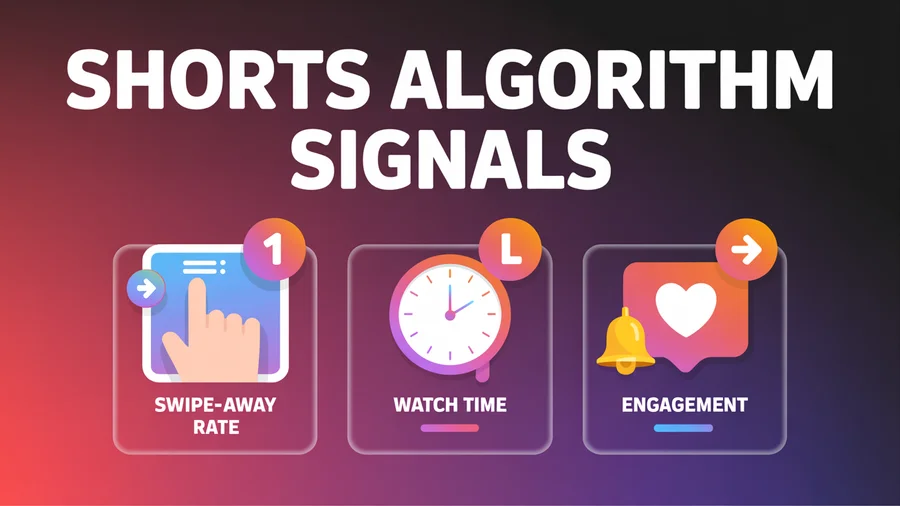
The three signals that matter most:
Swipe-away rate: The percentage of viewers who swipe past your Short without watching. This is the single most important metric. A Short where 70% of viewers swipe away in the first two seconds is dead on arrival.
Watch time relative to length: The algorithm compares how long viewers watch against how long your Short is. A 25-second Short with 95% completion vastly outperforms a 55-second Short with 40% completion. This is why shorter, tighter Shorts often outperform longer ones.
Engagement signals: Likes, comments, shares, and — critically — the "subscribe" action taken after watching. A Short that converts viewers into subscribers signals extremely high quality to the algorithm.
An important 2026 update: the Shorts algorithm now runs an explore-exploit loop. It explores new audience segments for each Short while exploiting known interests of viewers who've engaged with similar content. This means even small creators get genuine discovery opportunities — but only if early viewer signals are strong.
Want to post your Shorts when your audience is actually watching? PostEverywhere's YouTube scheduler lets you queue Shorts at optimal times across your entire content calendar.
The First 3 Seconds: Hook Formulas That Stop the Scroll
You have fewer than 3 seconds before a viewer decides to swipe. The hook is everything — and it is not your intro. Skip all pleasantries. No channel name, no "welcome back," no context-setting. Start in media res.

6 proven hook formulas
The Bold Statement: "Nobody tells you this about [topic]." Opens a knowledge gap that demands resolution.
The Curiosity Gap: "Here's why [X] works — and it's not what you think." The viewer needs to stay to find out.
The Counter-Intuitive Claim: "Stop doing [common thing]. Do this instead." Challenges existing beliefs and triggers engagement.
The Visual Hook: Open with the most visually striking moment — show the "after" before the "before." Transformation reveals are irresistible.
The Problem/Pain Hook: "Struggling with [problem]? Watch this." Directly addresses a pain point the viewer identifies with.
The Result Hook: Start with the outcome. "I gained 5K subscribers in 30 days — here's exactly how." Proof first, process second.
Deliver the hook faster than your normal speaking pace. Urgency signals importance. A slow, deliberate opener on a Short is a death sentence.
Use our AI content generator to brainstorm hook variations and test different angles quickly.
What to Post: Content Types That Grow Channels Fastest
Not all Shorts are created equal. The content type you choose determines whether you'll get raw views, actual subscribers, or neither.
For maximum viral reach
- Entertainment: Pranks, challenges, satisfying process videos — 32% of Shorts views come from entertainment content
- Before/after transformations: The reveal format triggers compulsive rewatching
- Reaction and commentary clips: Ride trending moments for algorithm boosts
For subscriber conversion (viewers who actually subscribe)
- Educational quick tips: Viewers subscribe to get more useful information in the same niche
- "Part 1 of X" series: Require watching another Short or video to get the full answer
- Cliffhanger Shorts: Tease long-form content to pull viewers deeper into your channel
For monetization (highest RPM niches)
- Personal finance: Tips, hacks, budgeting frameworks
- Tech and AI tutorials: Tool walkthroughs, comparisons, demos
- Business and entrepreneurship: Startup lessons, growth strategies
The dual content model
The most effective YouTube Shorts strategy uses 60–70% long-form content and 30–40% Shorts, both covering the same niche. See our YouTube Shorts vs TikTok comparison for how to distribute your effort across platforms. This matters because Shorts build awareness while long-form builds depth, watch time, and higher ad revenue. Channels combining both formats grow subscribers 41% faster than those using only one format.
Use repeatable formats
A recognizable series format — "Did you know...?", "The [X] Mistake", "One-tip Tuesday" — makes it easy for first-time viewers to binge your back-catalog and quickly understand what your channel is about. Plan your content themes in a visual calendar so you can see the week at a glance and avoid gaps.
How Often to Post YouTube Shorts
The data is clear: consistency beats volume.
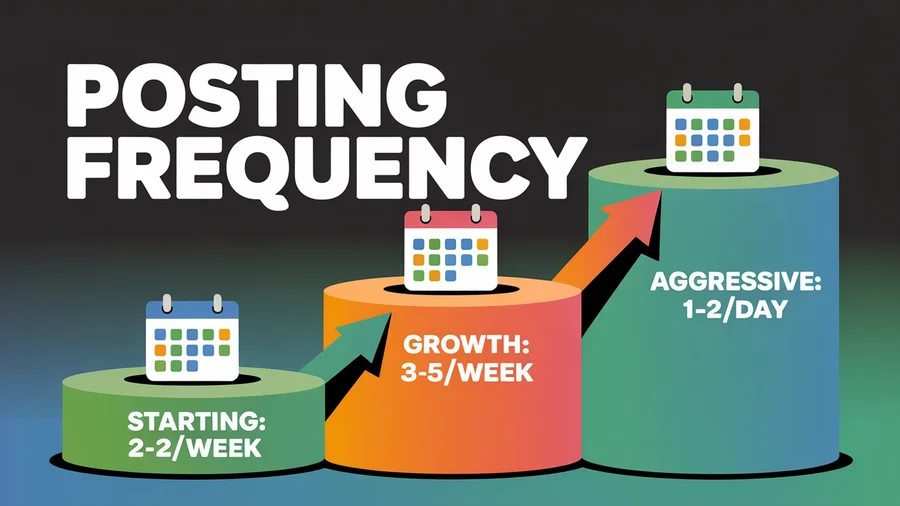
| Stage | Recommended frequency | Why |
|---|---|---|
| Starting out | 2–3 Shorts/week | Enough to gather data without burnout |
| Growth phase | 3–5 Shorts/week | Sweet spot — correlates with 2–3x subscriber growth |
| Aggressive growth | 1–2 Shorts/day | Maximizes algorithm "lottery tickets" |
Channels posting consistently grow subscribers 67% faster, see 89% higher audience retention, 156% more total watch time, and 234% more video recommendations compared to sporadic posters, according to YouTube Creator Insider data.
When to post
- Peak engagement windows: 2–4 PM and 8–11 PM (viewer's local time)
- Best days: Tuesday through Thursday — mid-week engagement is highest. See our best time to post data for platform-specific windows.
- Weekend posting: Lower but still significant; captures weekend scrollers
Always check your YouTube Studio Analytics > Audience tab for your specific audience's activity times. Better yet, use PostEverywhere's best-time scheduling to automatically publish when your audience is most active.
Stop guessing when to post. Schedule your Shorts at data-backed optimal times and protect your posting cadence — even when your week gets busy.
Quality over quantity
One Short per day that hooks viewers and holds retention beats five mediocre Shorts. The 2026 algorithm penalizes consistently poor-performing content by suppressing future distribution for your channel. Think of each Short as a signal to YouTube about your channel's quality level.
How to Convert Viewers Into Subscribers
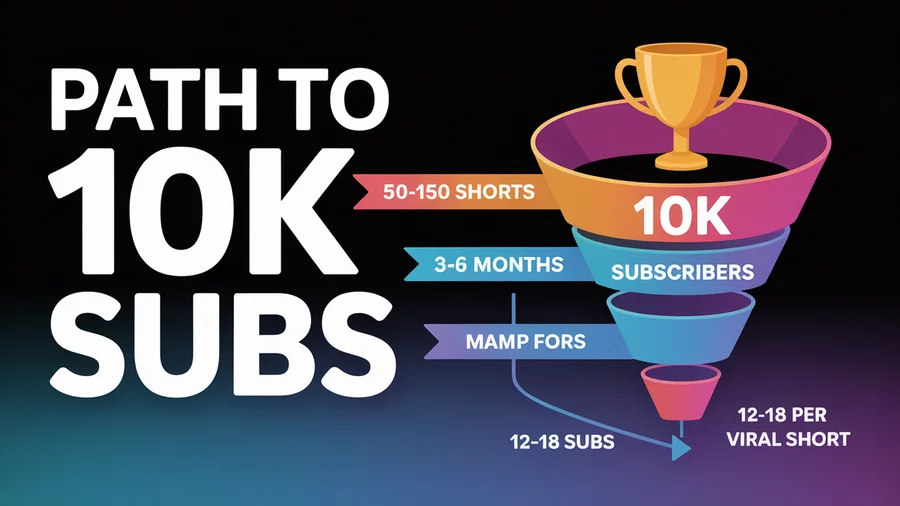
Here's the uncomfortable truth: a Short with 10,000 views typically brings only 12–18 new subscribers. That's a conversion rate of roughly 0.1–0.18%. Since 74% of Shorts views come from non-subscribers, the potential audience is enormous — but conversion requires deliberate strategy.
5 tactics that work
1. Verbal CTA in the final 5 seconds Explicitly ask viewers to subscribe and give a specific reason: "Subscribe — I post one finance tip every Tuesday." Generic "smash that subscribe button" CTAs are noise. Specific value promises convert.
2. Text overlay CTA Bold on-screen text reinforcing the subscribe prompt, placed in the safe zone of the frame. An arrow pointing toward the subscribe button location at the bottom of the Shorts player adds visual direction.
3. Related Video link YouTube's Related Video feature lets you attach a link to a specific long-form video directly within a Short. It appears as a clickable title below your channel handle. Point to it in the video and say "Full breakdown right here." This is the single most direct mechanism for converting Shorts viewers into long-form viewers.
4. Series and teaser content Structure Shorts as "Part 1" or "here's what happened next..." to direct viewers to follow-up content. Promise value that's only delivered in the next piece.
5. Niche consistency Subscribers who find you via Shorts will only subscribe if they can tell what your channel is about within seconds. A clear niche equals higher conversion. A chaotic, mixed-topic channel equals low conversion.
The math to 10K subscribers
At 12–18 subscribers per viral Short (10K+ views), you need roughly 550–830 viral Shorts to hit 10K subscribers from Shorts alone. But with a mix of viral hits and steady performers, the realistic timeline is 50–150 Shorts over 3–6 months — posting 3–5 per week with strong niche focus and consistent quality.
Track your subscriber conversion rate using YouTube Studio analytics and compare it against your engagement rate benchmarks. Use our engagement rate calculator for quick calculations.
Shorts SEO: Titles, Descriptions, and Hashtags
YouTube Shorts are searchable — and with the January 2026 introduction of Shorts-specific search filters, SEO matters more than ever.
Title optimization
- Keep titles short and punchy, front-loaded with the primary keyword
- Good: "30-Sec Spicy Noodle Hack" — Bad: "How to Make Spicy Noodles in Under 30 Seconds (Easy Recipe)"
- Add a curiosity gap where possible: "You're making X wrong" or "Nobody talks about this X trick"
- Titles display in search results and on the Shorts shelf — they're the second-most important SEO element after the video content itself
Description optimization
- Include the primary keyword in the first sentence
- Add 2–3 related keywords naturally
- Keep it concise — viewers rarely read Shorts descriptions, but the algorithm reads every word
- Include a subscribe CTA and related video link
Hashtag strategy
Use 3–5 relevant hashtags per Short. YouTube only displays the first 3 visually near your title, so choose those carefully. The formula:
- 1 broad tag (#Shorts or #YouTubeShorts) for categorization
- 1–2 niche-specific tags for targeted discovery
- 1–2 topic-specific tags for the video's subject
Never exceed 60 total hashtags — YouTube ignores all of them if you surpass this limit.
Spoken words matter
YouTube's voice recognition indexes spoken content. Saying your target keyword out loud in the Short itself is an SEO signal. Captions (burned-in or uploaded) also get indexed, improving searchability. Use our hashtag generator to find high-performing tags for your niche, and pair them with structured video tags from our YouTube tag generator — Shorts still inherit your channel's metadata signals, so consistent tag-keyword overlap helps the algorithm cluster your content.
Editing Tips: Pacing, Text Overlays, and Loops
Pacing and pattern breaks
Create micro-payoffs every 2–3 seconds to re-engage viewers who might drift. Pattern break techniques:
- Camera angle cuts or zoom in/out
- Text overlays appearing on screen
- B-roll cutaways from talking head
- Sound effects on transitions
- Jump cuts between sentences
Edit out all pauses, filler words ("um," "uh"), and dead air. Dead air kills retention in Shorts far more than in long-form. Jump cuts aren't just acceptable — they're expected.
Text overlays
Over 60% of mobile viewers watch video without sound. Text overlays aren't optional — they're essential.
- Use bold, high-contrast text readable at a glance on a small phone screen
- Keep individual text elements on-screen for at least 2 seconds
- Animated word-by-word text synced to speech outperforms static blocks
- Position all text within the safe zone — avoid the bottom 20% and top 10% where UI elements overlap
- Burned-in captions increase retention by 15–25%
Engineering loops
A loopable Short achieves average percentage viewed above 100% — an extremely strong algorithm signal. Here's how:
- End with a visual or audio cue that seamlessly connects to the opening
- Use the "infinite loop" format where the ending is the same frame as the beginning
- A loop rate of 15%+ rewatches is considered strong content by the algorithm
Thumbnails
In the Shorts feed, YouTube displays an auto-generated frame — not your custom thumbnail. Custom thumbnails only appear in search results and on your channel page. Make your first frame visually compelling since it's your de facto thumbnail in the feed.
How YouTube Shorts Monetization Works
YouTube Partner Program (YPP) for Shorts
To earn from Shorts ads, you need:
- 500 subscribers + 3 million Shorts views in the last 90 days (for limited access), or
- 1,000 subscribers + 10 million Shorts views in 90 days (for full access)
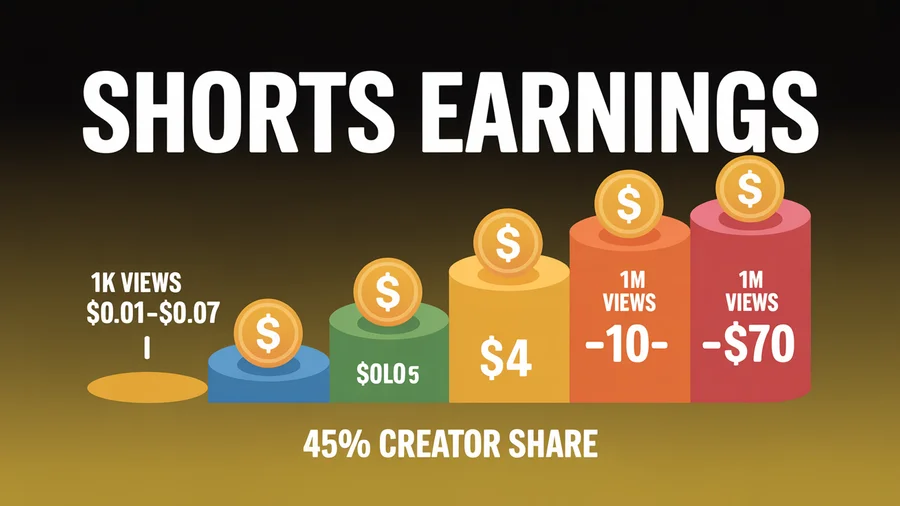
Revenue comes from ads displayed between Shorts in the feed. YouTube pools ad revenue from the Shorts feed and distributes it based on your share of total views. Creators keep 45% of their allocated Shorts ad revenue (compared to 55% for long-form).
Real earnings expectations
| Views | Estimated earnings |
|---|---|
| 1,000 views | $0.01–$0.07 |
| 100,000 views | $1–$7 |
| 1 million views | $10–$70 |
| 10 million views | $100–$700 |
At $0.03–$0.07 RPM, Shorts ad revenue alone won't pay the bills. The real monetization case for Shorts is indirect: building an audience that watches your long-form content (where CPMs reach $5–$20+), purchases your products, or clicks affiliate links. This is the core argument we work through in long-form vs short-form video — short-form drives discovery, long-form captures the revenue, and channels that lean exclusively on one format usually leave 100x to 1000x revenue per view on the table.
Beyond ad revenue
- Channel memberships and Super Thanks — available once you reach YPP eligibility
- Affiliate links in descriptions — drive traffic to products you recommend
- Product sales — use Shorts as top-of-funnel awareness for digital or physical products
- Brand sponsorships — brands increasingly sponsor Short-form content
Finance and tech niches command the highest CPMs, even for Shorts. If you're in a high-value niche, the indirect revenue compounds faster. Track your performance with our engagement rate calculator and compare against platform benchmarks.
Manage your YouTube content alongside every other platform. PostEverywhere lets you schedule Shorts, long-form uploads, and cross-platform content from one calendar — starting at $9/month.
10 Common Shorts Mistakes to Avoid
1. Weak opening hook. If the first frame doesn't signal value or curiosity, viewers swipe. This is almost always a hook problem, not a length problem.
2. Starting with an intro. "Hey guys, welcome back to my channel..." instantly kills a Short. Get to the point within 1 second.
3. Filming horizontally. Horizontal (16:9) video does not appear in the Shorts feed. You need native 9:16 vertical at 1080x1920 pixels. No exceptions.
4. No captions. 80% of caption users have no hearing impairment — they're watching without sound. No captions means lost viewers and lower retention.
5. No niche focus. Posting about AI, vlogs, cooking, and gaming interchangeably confuses the algorithm. It can't identify your target audience and stops distributing your content. Build a recognizable brand with a consistent social media bio and content pillars.
6. Ignoring analytics. Not checking "Viewed vs. Swiped Away" in YouTube Studio means you can't identify where retention drops and why. Check your analytics weekly.
7. Posting and ghosting. Publishing without engaging with comments in the first hour misses an algorithm boost. Comment activity in the first 60 minutes is a positive ranking signal.
8. Repurposing long-form scraps. Clipping the least-interesting 60 seconds from a long video and uploading it as a Short almost never works. Shorts require purpose-built hooks, pacing, and format. Learn the right way to repurpose content across platforms.
9. Clickbait without payoff. Misleading hooks that don't deliver trigger "not interested" taps and actively suppress future distribution for your channel.
10. Expecting direct monetization. Shorts RPM of $0.03–$0.07 won't sustain a creator. Build your Shorts strategy around subscriber growth and long-form funneling, not Shorts ad revenue.
Case Studies: Channels That Grew Via Shorts
MacDannyGun — 670K subscribers in 5 months
By consistently publishing Shorts with strong repeatable formats and niche focus, this creator gained 670,000 new subscribers in 5 months, reaching 1.75 million total.
FUN GAMES and MonsSS GaminG — 10K subscribers in 30 days
Both gaming channels grew from near-zero to 55,000–69,200 subscribers primarily through Shorts, hitting the 10,000-subscriber milestone in just 30 days. Their strategy: gaming highlight Shorts with strong entertainment hooks and consistent daily posting.
Kiwi Modulars — 47K subscribers in 13 months
This LEGO-focused channel gained 47,000 subscribers in 13 months (~3,600 subscribers/month) by posting consistent niche Shorts. Proof that non-entertainment, focused content can still grow steadily.
Key takeaway
The pattern across every successful case study is the same: niche consistency + strong hooks + regular posting cadence. No shortcuts, no hacks — just a repeatable system executed over months.
FAQs
How long should YouTube Shorts be in 2026?
YouTube Shorts can be up to 3 minutes, but the sweet spot for retention is 30–60 seconds. Shorts in this range achieve a 76% watch-through rate. Shorter Shorts (under 30 seconds) can work for simple hooks, but the algorithm rewards total watch time, so pack as much value as possible into 30–60 seconds.
Do I need to use #Shorts in my title or description?
YouTube automatically identifies most vertical videos under 3 minutes as Shorts, but explicitly adding #Shorts is still recommended best practice. It helps with correct categorization and the new Shorts-specific search filters introduced in January 2026.
Can YouTube Shorts hurt my long-form channel?
No — YouTube's algorithm evaluates Shorts and long-form content independently. A poorly performing Short won't suppress your long-form recommendations. In fact, channels that combine Shorts with long-form grow 41% faster overall.
How many Shorts do I need to post to reach 10K subscribers?
At an average conversion rate of 12–18 subscribers per viral Short, the typical creator posts 50–150 Shorts with strong niche focus over 3–6 months to reach 10K. Posting 3–5 Shorts per week with consistent quality is the most realistic path.
Should I cross-post my TikToks as YouTube Shorts?
You can, but remove the TikTok watermark first (schedule your TikTok content separately with our TikTok scheduler) — YouTube deprioritizes watermarked content and it won't qualify for revenue sharing. Ideally, customize each video for the platform with native captions (generate them with our AI caption generator), hashtags, and descriptions.
What's the best time to post YouTube Shorts?
Peak engagement windows are 2–4 PM and 8–11 PM in your audience's local time zone, with Tuesday through Thursday performing best. Check your YouTube Studio Analytics for your specific audience, or use a scheduling tool to automate optimal timing.
Are YouTube Shorts worth it for small creators in 2026?
Absolutely. With 200 billion daily views, 74% coming from non-subscribers, and an algorithm that doesn't penalize small accounts, Shorts are one of the best discovery mechanisms available. The key is niche focus and consistency — not follower count.
How do I track which Shorts convert into subscribers?
In YouTube Studio, go to Analytics > Content > Shorts. Check the "Subscribers" metric for each Short. Compare this with your "Viewed vs. Swiped Away" data to understand which hooks and topics drive both retention and subscription.
The Bottom Line
A YouTube Shorts strategy that gets you to 10K subscribers isn't complicated — but it is deliberate. Hook in the first second, stay in your niche, post 3–5 times per week, and use every Short as a bridge to deeper engagement with your channel. The algorithm rewards consistency and quality, not luck.
Start scheduling your Shorts today with PostEverywhere's YouTube scheduler, plan your content in the visual calendar, and keep your posting cadence steady with queue-based scheduling. Repurpose your best Shorts into TikToks, Reels, and other formats to maximize every piece of content. The sooner you build the system, the sooner the subscribers follow.

Founder & CEO of PostEverywhere. Writing about social media strategy, publishing workflows, and analytics that help brands grow faster.