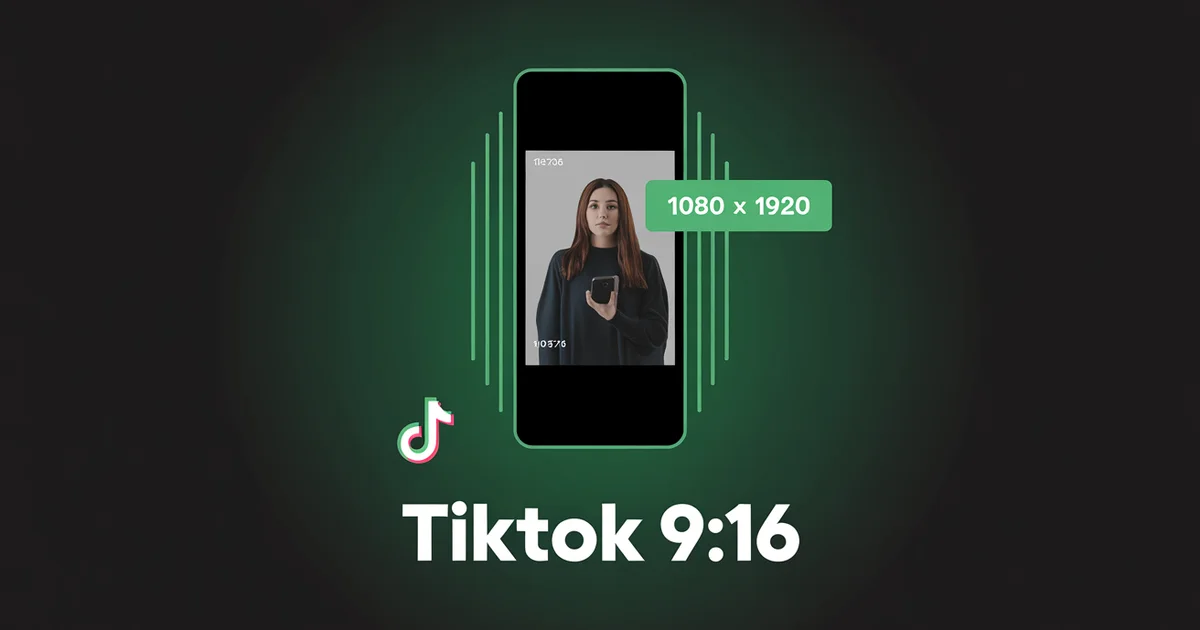
What aspect ratio does TikTok use in 2026?
TikTok uses 9:16 vertical (1080×1920 px) for everything: videos, photo carousels, Stories, and ads. It is the only shape that fills the screen and the one TikTok optimises for. Horizontal 16:9 is accepted for long-form video; square and other ratios get letterboxed or buried.
TikTok has experimented with horizontal video. It has expanded uploads to 60 minutes. It has added photo carousels, Stories, and Spark Ads. None of that changes the answer to the most-asked TikTok question of the year: post 9:16. Everything else (square, landscape, horizontal long-form) gets letterboxed, buried, or both.
This guide covers every TikTok aspect ratio, every video dimension, every safe zone, and every recent change worth knowing.
Shoot once, post to TikTok and 10 other platforms. PostEverywhere schedules native 9:16 video across TikTok, Reels, Shorts, and more, with no manual reformatting. Try the TikTok scheduler →
The TikTok Aspect Ratio Cheat Sheet
| Format | Aspect Ratio | Pixel Dimensions | Recommended |
|---|---|---|---|
| Vertical video | 9:16 | 1080×1920 | ✅ Default |
| Horizontal video | 16:9 | 1920×1080 | Long-form only |
| Square video | 1:1 | 1080×1080 | ❌ Avoid |
| Photo carousel | 9:16 | 1080×1920 | ✅ Default |
| Photo carousel (alt) | 1:1 or 4:5 | 1080×1080 / 1080×1350 | If cross-posting |
| Stories | 9:16 | 1080×1920 | ✅ |
| In-Feed ads | 9:16 | 1080×1920 | ✅ |
| Profile picture | 1:1 | 720×720 upload | Circle display |
| Cover image / thumbnail | 9:16 (crops to 1:1 grid) | 1080×1920 | ✅ |
The 2026 default: shoot vertical 9:16 at 1080×1920. Frame key content inside the centre 960×1386 zone so the interface overlays never cover it.
Why TikTok Insists on 9:16
TikTok was built mobile-first, and the entire experience is designed around full-screen vertical video. Anything that does not fill the screen does two things: it visually signals "not made for TikTok" to viewers (who scroll past faster), and it shrinks the effective content area.
The geometry is easy to check. A 1:1 square placed inside a 9:16 frame fills only 1,080 of the canvas's 1,920 vertical pixels, so it occupies about 56% of the screen and leaves roughly 44% empty. A 16:9 landscape clip fills even less. TikTok does not apply a hidden "wrong ratio" penalty. It reads engagement signals, and letterboxed video reliably earns lower dwell time and fewer shares, which the ranking system treats as weaker content. Video-spec guides from Sprout Social and SocialBee reach the same conclusion.
Practical implication: there is almost no scenario where you should upload non-9:16 video to TikTok organically. Even cross-posted content performs better after it is reformatted to vertical first.
TikTok Video Size and Dimensions (9:16)
This is the default, and the only ratio worth optimising for.
Specs:
- Aspect ratio: 9:16
- Recommended TikTok video size: 1080×1920 px
- Minimum: 540×960 px (720×1280 is a safer practical floor)
- Frame rate: 30 fps recommended, up to 60 fps
- Max file size: 287.6 MB on iOS, 72 MB on Android; larger files upload through TikTok's web uploader
- Max length: 60 minutes (uploaded), 10 minutes (recorded in-app)
TikTok's own video ad specifications confirm 9:16 (at least 540×960) as the recommended vertical format, and the device file-size split is documented in HeyOrca's 2026 TikTok media specs.
TikTok safe zone
On a 1080×1920 canvas, the interface overlays consume meaningful real estate:
| Zone | Pixels to keep clear | What's there |
|---|---|---|
| Top | ~140-200 px | Profile bar, sound label, device notch |
| Bottom | ~250-324 px | Caption bar, sound attribution, CTA button |
| Right edge | ~120-164 px | Like, comment, share, bookmark, gift icons |
| Left | minimal | Username / caption overflow |
Effective safe content zone: roughly 960×1386 px, centred in the 1080×1920 canvas. Keep faces, text, logos, and CTAs inside this TikTok safe zone so they stay visible from iPhone SE through Galaxy S24+.
The most common safe-zone mistake is putting product names, prices, or hooks in the bottom 300 px, which is where TikTok's own caption bar sits. Either move that text up, or use TikTok's native caption sticker (which the algorithm reads for keyword context anyway).
TikTok Horizontal Video (16:9)
Accepted, but not native. Horizontal video plays in a small, letterboxed box on mobile, and the experience is much worse than 9:16.
The exception: TikTok has leaned into long-form, and horizontal video longer than one minute is the one place 16:9 is defensible. If you are posting a 5-to-60-minute educational clip, podcast, or interview, 16:9 is acceptable. For anything under a minute, 9:16 wins every time.
When a viewer opens a landscape long-form video, TikTok prompts them to rotate their phone for true landscape playback. That rotation prompt only makes sense for long content. On short clips it is friction that kills retention.
Practical use case: podcast episodes, interview recordings, and screen recordings, uploaded as 16:9 long-form. Everything else stays 9:16.
TikTok Photo Size and Carousels (Photo Mode)
TikTok Photo Mode is one of the highest-performing organic content types in 2026 and competes with vertical video for reach in many niches.
Specs:
- Aspect ratio: 9:16 recommended (1080×1920 px); 1:1 and 4:5 also supported
- TikTok photo size: 1080×1920 px per image at 9:16
- Slides: up to 35 per carousel (5-10 is the engagement sweet spot)
- File: JPG for photos, PNG for text-heavy graphics; up to 5 MB per image
- Total carousel size: 500 MB max
- Per-image weight: around 100 KB keeps loading fast
Key rules:
- All slides must share one aspect ratio. Mixing ratios forces TikTok to crop the carousel. Pick one shape per post.
- Default to 9:16. Cross-posting a 4:5 carousel from Instagram letterboxes it on TikTok.
- Sound still matters. Audio is part of TikTok's distribution signal even for photo posts, so add a trending sound.
2026 photo-mode updates
Recent changes worth knowing:
- Collage Carousel format: a hero image plus clickable product tiles on the first frame, built for TikTok Shop, confirmed in TikTok For Business product updates.
- Audio boost extended to photo posts, so adding sound measurably improves distribution.
For cross-platform photo carousels, the TikTok carousel maker exports at the right dimensions, and the TikTok image resizer snaps any frame to 9:16.
TikTok Stories
Still active in 2026, despite periodic rumours of deprecation.
Specs:
- Aspect ratio: 9:16
- Pixel dimensions: 1080×1920
- Duration: 24 hours (ephemeral)
2026 additions:
- Desktop and web Stories viewing
- New Flip Stories photo format
- "Secret replies" sticker
- Subscribers-only Stories for creator monetisation
- Stories Archive
Use the same safe zones as regular vertical video. Stories are now a genuine engagement tool rather than a throwaway format: they appear in the inbox feed and their tap-throughs count toward your engagement profile.
TikTok Ad Aspect Ratios
| Ad type | Aspect Ratio | Dimensions | Length |
|---|---|---|---|
| In-Feed Ads | 9:16 primary; 1:1 and 16:9 supported | 1080×1920 (vertical) | 5-60s (9-15s best) |
| Spark Ads | Inherits from boosted post (typically 9:16) | 1080×1920 | Inherited |
| TopView | 9:16 only | 1080×1920 | 5-60s (9-15s recommended) |
| Branded Hashtag Challenge | 9:16 | 1080×1920 | Variable |
The single biggest mistake on TikTok ads is running square or landscape creative repurposed from Meta. Even ads take the dwell-time hit for non-native ratios, so always export ad creative at native 9:16. TikTok's official video ad specifications list 9:16 as the recommended ratio, with in-feed ad files capped at 500 MB.
TikTok-native 9:16 video, scheduled in one click. PostEverywhere keeps your content properly formatted and your best posting times dialled in. See the TikTok scheduler →
TikTok File Sizes, Formats and Upload Limits
Aspect ratio gets you full-screen playback, but resolution, codec, and file size decide whether TikTok's compressor keeps your clip sharp or grinds it into mush. These are the technical specs behind a clean 9:16 upload.
| Spec | Value |
|---|---|
| Recommended resolution | 1080×1920 px |
| Minimum resolution | 720×1280 px |
| Maximum resolution | 4K (downscaled to 1080p on upload) |
| Frame rate | 24, 25, 30, or 60 fps |
| Video formats | MP4, MOV (native); AVI and MPEG also accepted for ads |
| Photo formats | JPG, JPEG, PNG |
| Recommended codec | H.264 |
| Recommended bitrate | 8-12 Mbps |
TikTok accepts 4K uploads but downscales everything to 1080p, so there is no quality benefit to exporting above 1080×1920. Match the target resolution exactly and let the file arrive at 30 fps for standard content, 60 fps for fast motion like dance or sport.
File size by upload method
The file-size ceiling depends entirely on how you upload, and the Android limit catches a lot of creators out.
| Upload method | Max file size | Max duration |
|---|---|---|
| Android app | 72 MB | 60 minutes |
| iOS app | 287.6 MB | 60 minutes |
| Web browser | 500 MB (under 3 min), 2 GB (3-10 min) | 60 minutes |
| TikTok Ads Manager | 500 MB | 60 seconds (ads) |
If an edited video exceeds the 72 MB Android cap, upload from the web browser or desktop instead, where you get up to 500 MB (and up to 2 GB for videos running 3 to 10 minutes).
How to avoid quality loss on upload
TikTok compresses every video during processing. You cannot switch it off, but you can minimise the damage:
- Export at exactly 1080×1920. Uploading a higher resolution forces TikTok to downscale, which stacks an extra round of compression on top.
- Use MP4 with the H.264 codec. This is TikTok's native format. Other codecs get transcoded on upload, introducing more quality loss.
- Target 8-12 Mbps bitrate. Too low looks blocky, too high makes the compressor work harder and often produces worse results than a well-encoded moderate file.
- Do not re-upload a downloaded TikTok. Re-uploading a clip you saved from the app compresses it twice. Keep your original export and upload from that.
- Enable HD uploads. Under Settings > Content & Display > Data Saver, switch on "Upload HD" so TikTok preserves more quality during processing.
Desktop vs Mobile Rendering
This catches a lot of people off guard.
- Mobile (the default experience): 9:16 fills the entire screen edge to edge. 16:9 plays in a small letterboxed box in the centre. 1:1 plays in a square letterboxed area.
- Desktop and web: 9:16 displays pillarboxed, with black bars on the left and right, to preserve the aspect ratio. 16:9 fits desktop natively but looks tiny on mobile.
The takeaway is simple: always optimise for mobile. Desktop is a secondary surface for TikTok. Even though desktop pillarboxes your 9:16, that is still the right choice, because the mobile experience is the one that drives reach.
Profile Picture and Cover Image
Profile picture
- Aspect ratio: 1:1, displayed as a circle
- Display size: 200×200 px
- Recommended upload: 720×720 px for retina sharpness
- Test legibility at around 50×50 px, the comment-feed size
Cover image and thumbnail
- Upload as a full 1080×1920 9:16 frame
- Grid thumbnail crop: 1:1 square. TikTok crops your 9:16 cover to a square thumbnail on your profile grid.
- Critical: place the key visual or text in the centre 1080×1080 region of the 1080×1920 cover so it survives both the 9:16 video preview and the 1:1 grid crop.
This is one of the most overlooked TikTok design rules. Creators build beautiful 9:16 covers with text at the top or bottom, then the profile grid crops it all away and the thumbnail looks blank. A grid previewer shows the crop before you post.
Common TikTok Aspect Ratio Mistakes
After auditing TikTok accounts in agency engagements, these are the recurring mistakes:
Cross-posting Instagram Reels at 4:5. Reels are 9:16, but Instagram lets you post 4:5 to Reels too. Cross-post that 4:5 to TikTok and it letterboxes top and bottom. Always crop to 9:16 first.
Burning captions into the bottom 300 px. TikTok's own caption bar sits there. Use TikTok's native captions or move your text up.
Designing covers without the 1:1 grid crop in mind. Your 9:16 cover gets cropped to a square on the profile. Centre everything important.
Mixing aspect ratios in a photo carousel. TikTok force-crops mixed-ratio carousels. Match all slides.
Uploading 720p when 1080p is available. Native 1080×1920 looks meaningfully sharper than 720×1280 on modern phones.
Posting horizontal video for under a minute. The long-form boost only applies to landscape video over 60 seconds. Anything shorter should be vertical.
Treating the cover image as an afterthought. The cover is your grid thumbnail, the first impression on your profile.
Using "vertical" templates that are not actually 9:16. Some templates ship at 9:18 or 9:20, slightly off-spec. They still display as 9:16 but with subtle compression artefacts. Use exact 1080×1920.
Cross-Posting TikTok Video to Other Platforms
The payoff for shooting native 9:16 is that the same file works almost everywhere. A 1080×1920 TikTok drops straight into Instagram Reels, YouTube Shorts, Facebook Reels, LinkedIn's vertical feed, and Pinterest Video Pins with no resizing.
The one thing to watch is the safe zone. Caption and button positions differ slightly between apps, so design to the strictest common margin: clear the bottom 340 px, the right edge 120 px, and the top 200 px, and one asset clears every platform. Cross-posting then turns four uploads into one. For the full picture of which ratio each network wants, keep the social media aspect ratios cheat sheet handy.
Tools to Get TikTok Aspect Ratios Right
- TikTok image resizer: drop in any frame or graphic and get a 9:16 1080×1920 output.
- TikTok carousel maker: build Photo Mode carousels at the correct 9:16 dimensions.
- AI video generator: outputs TikTok-ready 9:16 video at 1080×1920.
- TikTok scheduler: schedule native 9:16 content and manage your queue.
- Best time to post on TikTok: pair the right format with the right time.
- TikTok hashtag generator: once the ratio is right, hashtag strategy is next.
- Social media image sizes: every platform's dimensions in one reference.
For the cross-platform view, see social media aspect ratios and the Instagram aspect ratio guide.
TikTok is one of the platforms PostEverywhere schedules to. Cross-post one 9:16 video to TikTok, Reels, Shorts, and Facebook Reels in a single upload. Plans start at $9/mo. See pricing →
Frequently Asked Questions
What is the best TikTok aspect ratio in 2026?
9:16 vertical (1080×1920 px). This is the only ratio that fills the entire mobile screen and is favoured by the algorithm. Non-9:16 video correlates with ~35% lower dwell time and ~28% lower share rates per industry analyses.
Does TikTok support horizontal video?
Yes, but with caveats. TikTok accepts 16:9 horizontal video, but on mobile it plays in a small letterboxed box. The algorithm now boosts horizontal video longer than 1 minute as part of TikTok's long-form push. For short content (<60s), always use 9:16. For long-form (1–60 min), 16:9 is acceptable.
What size are TikTok photo carousels?
9:16 vertical (1080×1920 px) is recommended. TikTok also accepts 1:1 and 4:5, but all slides in a carousel must share the same aspect ratio. You can post up to 35 photos in a single carousel.
What is the TikTok safe zone in 2026?
On a 1080×1920 canvas, keep critical content inside the centre 960×1386 px zone. Avoid the bottom ~300 px (caption + CTA bar), top ~150–200 px (profile/sound), and right ~120–165 px (engagement icons).
What aspect ratio does the TikTok algorithm prefer?
9:16 vertical, full-screen. The mechanism isn't a hardcoded multiplier, it's that 9:16 fills the screen, holds attention longer, and generates better dwell/share signals, which the algorithm reads positively. Non-native ratios shrink the effective canvas by up to 44%.
How long can a TikTok video be in 2026?
Up to 60 minutes uploaded, up to 10 minutes when recorded in-app. The sweet spot for engagement remains 9–15 seconds for short-form, with long-form (>1 minute) increasingly viable since TikTok extended its long-form distribution boost.
Does my TikTok cover have to be 9:16?
Yes, uploaded at 1080×1920, but the profile grid crops it to a 1:1 square thumbnail. Place key visuals and text in the centre 1080×1080 region of your 1080×1920 cover so it survives both the in-feed 9:16 preview and the 1:1 grid crop.
What's the TikTok profile picture size?
1:1 square, displayed as a 200×200 circle. Upload at 720×720 for sharpness on high-DPI screens. Test legibility at ~50×50 (the size in comment threads), fine detail disappears at that scale.
Specs in this guide were verified in July 2026 against TikTok's official video ad specifications, TikTok's video-creation support, TikTok For Business product updates, and cross-checked against HeyOrca's 2026 TikTok media specs and Sprout Social's video specs guide. TikTok updates specs frequently, and we refresh this page when it does. For more context, see the social media aspect ratios cheat sheet and the Instagram aspect ratio guide for cross-platform creators.

Founder & CEO of PostEverywhere. Writing about social media strategy, publishing workflows, and analytics that help brands grow faster.