Later and Buffer are two of the most recognizable names in social media scheduling — but they were built with completely different philosophies. Later started life as Latergramme, an Instagram-only visual planner. Everything about it — the grid preview, the drag-and-drop media library, the aesthetic-first design — was built for brands that care deeply about how their feed looks. Buffer went the other way: simplicity above all else. A clean queue, fast scheduling, no bloat. Write your post, pick your time, move on.
Both tools have evolved since then. Both have added AI features, analytics, and multi-platform support. But the underlying DNA hasn't changed, and those philosophical differences still shape what each tool does well — and where each one falls short.
What's new in May 2026: Buffer now bundles AI Assistant free across every plan — including the free tier — with unlimited use on paid plans. Later has tightened its social-set pricing model: Starter is $18.75/month on annual billing (around $25 monthly), Growth is $37.50/month annual, and Scale is $82.50/month annual, with AI credits ranging from 5 to 100 per month. Later still does not support X/Twitter (dropped in 2025).
I've used both tools across real client accounts over the past year. Here's an honest breakdown of how they compare in May 2026, plus a third option if neither one quite fits.
For deeper dives into alternatives for each, see our guides on Later alternatives and Buffer alternatives.
Quick verdict
Choose Later if you're Instagram-focused, care about visual grid planning, and don't need X/Twitter. Later's media library, grid preview, and Linkin.bio are still best-in-class for visual brands.
Choose Buffer if you value simplicity, need X/Twitter support, or want a genuinely free tier. Buffer does fewer things but does them cleanly, and the per-channel pricing stays affordable for small teams.
Choose neither if you need all top platforms (including X and Threads), AI content generation with real depth, and flat pricing that doesn't scale by channel. More on that below.
Later vs Buffer: comparison table
| Feature | Later (May 2026) | Buffer (May 2026) |
|---|---|---|
| Starting price | $18.75/mo annual (~$25 monthly) — 1 social set | Free (3 channels, 10 posts each) |
| Paid plans | $18.75 – $82.50/mo annual (Starter / Growth / Scale) | $5 – $10/channel/mo (Essentials / Team) |
| Post limits | 30/profile/mo on Starter, 180 on Growth, unlimited on Scale | Unlimited on paid plans |
| Pricing model | Per social set (8 profiles per set) | Per channel |
| Yes (feed, Stories, Reels) | Yes (feed, Stories, Reels) | |
| Yes | Yes | |
| Yes | Yes | |
| X/Twitter | No (dropped Aug 2025) | Yes |
| TikTok | Yes | Yes |
| YouTube | Yes | Limited |
| Threads | Yes | Limited |
| Yes | Yes | |
| Snapchat | Yes | No |
| Visual grid preview | Yes (best-in-class) | No |
| Link-in-bio | Yes (Linkin.bio) | Yes (Start Page) |
| AI features | Caption Writer + Ideas (5/50/100 credits per plan) | AI Assistant free on all plans (unlimited on paid) |
| Analytics | Detailed for Instagram | Basic on Free, advanced on paid |
| Free plan | No (14-day trial only) | Yes |
| Bulk scheduling | Yes | CSV upload (Essentials+) |
Pricing: where both tools get expensive differently
Later and Buffer take opposite approaches to pricing — and both approaches have a catch.
Later's pricing (May 2026)
Later starts at $18.75/month on annual billing for its Starter plan (around $25/month if you pay monthly). That gets you one social set — which Later defines as one profile per supported platform (Instagram, Facebook, TikTok, Pinterest, LinkedIn, YouTube, Threads, Snapchat), so up to 8 profiles — 30 scheduled posts per profile per month, and 5 AI credits per month. The Growth plan is $37.50/month annual for 2 social sets (16 profiles), 180 posts per profile, and 50 AI credits. The Scale plan jumps to $82.50/month annual for 6 social sets (48 profiles), unlimited posts, and 100 AI credits.
The catch is in the post caps and AI credits. Thirty posts per profile per month on Starter sounds reasonable until you actually start scheduling Stories, Reels, and grid posts side by side. Five AI credits a month is closer to a demo than a workflow. Most teams who try Starter end up needing to jump to Growth within their first month.
Buffer's pricing (May 2026)
Buffer takes a per-channel approach. The free plan gives you three channels with 10 scheduled posts each — legitimately useful for solo creators testing the waters, and as of 2026 it includes AI Assistant with a weekly suggestion limit. Paid plans start at $5/month per channel on the Essentials tier, which unlocks unlimited scheduling, a landing page, engagement tools, and unlimited AI Assistant use. The Team tier is $10/month per channel and adds approval workflows, unlimited team members, and branded reports.
Buffer's pricing feels cheap at first. Five dollars per channel is nothing. But it scales linearly. Managing five channels is $25/month. Ten channels is $50/month. If you're an agency managing 20 client channels, you're looking at $100–$200/month. The good news in 2026: at least the AI Assistant is included rather than gated behind a credit pool.
The bottom line on pricing
Later is more expensive upfront and gates AI credits aggressively, but its social-set model is efficient if you genuinely manage every platform per brand. Buffer is cheaper to start, has a real free plan, and bundles AI Assistant — but per-channel pricing gets uncomfortable past 10 channels. Neither tool offers the flat, all-inclusive pricing you'll find with tools like PostEverywhere where $29/month covers 10 accounts with no per-channel or per-set fees.
Tired of per-channel pricing? PostEverywhere starts at $9/month for 2 social accounts, with 10 accounts and 100 AI credits on Growth at $29/month, and unlimited scheduled posts on every plan. No post caps, no per-channel fees. Start your 7-day free trial — cancel anytime.
Platform support: the biggest difference
This is where the Later vs Buffer decision gets straightforward for a lot of people.
Later dropped X/Twitter in August 2025 and still hasn't added it back as of May 2026. If your content strategy includes X — and most B2B brands, journalists, tech companies, and thought leaders still rely on it — Later simply doesn't work. You'd need a separate tool for one of the most important platforms for real-time engagement and link sharing.
Buffer still supports X/Twitter. It also supports Facebook, Instagram, LinkedIn, TikTok, Pinterest, YouTube, and Mastodon, and has limited Threads support. For breadth on X, Buffer wins.
Later covers Instagram (its strongest suit), Facebook, LinkedIn, TikTok, Pinterest, YouTube, Threads, and Snapchat — and the social-set model bundles one profile per platform. So if you need Threads or Snapchat, Later actually has the edge there in 2026. But no X/Twitter remains the biggest hole in Later's lineup.
For teams that need all top platforms, including Instagram, Facebook, LinkedIn, X (Twitter), YouTube, TikTok and Threads, neither tool covers everything natively. That's one of the reasons tools with broader cross-posting support have gained traction in the past year.
Visual planning and grid preview
This is Later's territory, and it's still the best at it.
Later's visual planner lets you see exactly how your Instagram grid will look before you publish. You can drag and rearrange photos, preview your feed aesthetic, and plan Stories alongside grid posts. For fashion brands, food photographers, travel influencers, and anyone whose Instagram presence is fundamentally about visual consistency, this feature alone can justify the price — pair it with our social media aspect ratios cheat sheet so the assets you drop into the grid render at the correct ratio.
Later's media library is also strong. You can upload assets, organize them into labels, and store content for future use. The drag-and-drop workflow from library to calendar is smooth and intuitive.
Buffer has no grid preview. Its content calendar is functional — you can see what's scheduled and when — but it's designed around text and timing rather than visual aesthetics. If your Instagram grid strategy is "whatever looks good," Buffer works fine. If you meticulously plan colour palettes six rows deep, Later is the clear winner.
For a more balanced visual calendar that works across all platforms (not just Instagram), take a look at tools with a dedicated social media calendar view.
AI features
Both tools have added AI capabilities, but neither is particularly deep.
Later's AI offers Caption Writer and Ideas (one credit generates either three content ideas or one caption). The problem is credits. Starter caps you at 5 credits/month, Growth at 50, and Scale at 100. On Starter that's roughly one caption a week before you're writing everything manually until the next billing cycle. The AI itself is functional — it can generate decent first drafts — but the credit limits make it feel like a demo rather than a workflow unless you're on Growth or Scale.
Buffer's AI Assistant generates post ideas, rewrites content for different tones, and suggests variations. As of 2026 it's free on every plan — with a limited weekly cap on Free and unlimited use on paid plans. It's integrated into the composer, which makes the workflow smooth. Buffer doesn't gatekeep AI behind a credit pool the way Later does, but the output is fairly basic — good for overcoming writer's block, less useful for generating platform-specific content at scale.
Neither tool comes close to a dedicated AI content generator that can produce full captions optimized for each platform's algorithm, or an AI image generator that creates custom visuals inside your scheduling workflow. If AI-assisted content creation is central to your strategy, both Later and Buffer will leave you reaching for third-party tools.
Link-in-bio
Both Later and Buffer offer link-in-bio tools, but Later's is more mature.
Later's Linkin.bio was one of the first Instagram link-in-bio solutions. It mirrors your Instagram grid as a clickable landing page — each post can link to a product page, blog post, or external URL. For ecommerce brands and content creators who drive traffic through Instagram, Linkin.bio is polished and well-integrated.
Buffer's Start Page is a simpler link-in-bio builder. It creates a clean landing page with customizable links, and it gets the job done. But it's not tied to your Instagram grid the way Later's is, and the customization options are more limited.
If link-in-bio is a critical part of your Instagram monetization strategy, Later wins here. If you just need a basic link page, Buffer's offering is perfectly adequate.
Analytics
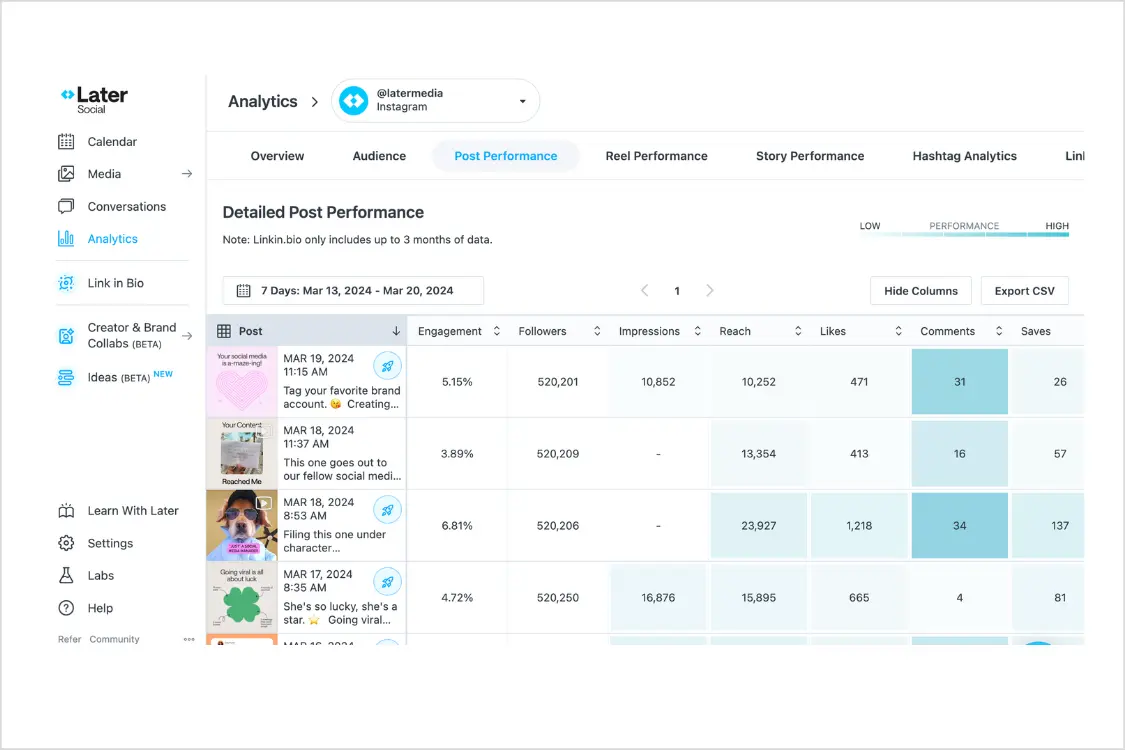
Later's analytics are strongest where you'd expect: Instagram. You get follower demographics, engagement rates, best time to post recommendations, and hashtag performance tracking. The Instagram-specific insights are genuinely useful for optimizing your posting strategy. Analytics for other platforms exist but aren't as developed.
Buffer's analytics are broader but shallower. You'll get engagement metrics across all connected platforms, post performance comparisons, and basic audience growth tracking. The Team and Agency plans include exportable reports. But there's nothing that would replace a dedicated analytics tool for serious reporting needs.
For most small teams and solo creators, either tool provides enough data to make informed scheduling decisions. If you need deep Instagram analytics specifically, Later has the edge. If you want consistent (if basic) metrics across all your platforms, Buffer delivers.
For a more comprehensive overview of social media analytics options, check our best social media scheduling tools roundup.
Ease of use
Buffer wins on simplicity. The interface is clean to the point of being minimalist. You connect your accounts, open the composer, write your post, select channels, set a time, and publish. There's almost no learning curve. Someone who's never used a social media scheduler could be productive with Buffer inside of five minutes.
Later has a slightly steeper learning curve because it offers more features. The media library, visual planner, and grid preview all add power but also add complexity. Once you learn the workflow, it's intuitive — but the first session can feel overwhelming compared to Buffer's "just start posting" approach.
Both tools have solid mobile apps. Buffer's mobile experience is particularly good for quick scheduling on the go. Later's mobile app includes the visual planner, which is impressive but works better on tablet than phone.
Neither tool requires any technical knowledge. Both use clean, modern interfaces. The difference is simply how much you see when you first log in.
Who should choose Later
Later makes the most sense for:
- Instagram-focused brands that care about grid aesthetics and visual consistency
- Ecommerce creators who rely heavily on Linkin.bio to drive product traffic from Instagram
- Visual content creators (photographers, designers, food bloggers) who plan content around how it looks
- Pinterest users who want to manage Instagram and Pinterest from one tool
- Small teams that only manage one or two platforms and don't need X/Twitter
If your social media strategy revolves around Instagram and visual storytelling, Later still does that better than almost any other tool. The grid preview, media library, and visual planner create a workflow that's genuinely built for aesthetic-first content.
The trade-offs: no X/Twitter, no Threads, post caps on the Starter plan, and pricing that climbs quickly if you need more than one social set.
Who should choose Buffer
Buffer makes the most sense for:
- Solo creators and freelancers who want a free or very affordable scheduling tool
- X/Twitter users who need scheduling support for a platform Later abandoned
- Simplicity seekers who want to schedule posts without learning a complex interface
- Small businesses managing fewer than five channels on a tight budget
- Teams that need approvals — Buffer's Team tier includes collaboration workflows
If you don't care about Instagram grid previews and just need a reliable, fast way to schedule posts across multiple platforms, Buffer is hard to beat. The free tier is genuine, the paid plans are affordable, and the interface stays out of your way.
The trade-offs: no visual grid preview, basic analytics, no bulk scheduling, and per-channel pricing that adds up if you manage many accounts.
A third option worth considering
Full disclosure: I'm the founder of PostEverywhere, so take this with the appropriate grain of salt. But I built it specifically because tools like Later and Buffer each solve part of the problem while creating new gaps.
The platform coverage gap. Later dropped X/Twitter. Buffer's Threads support is limited. PostEverywhere connects to all top platforms, including Instagram, Facebook, LinkedIn, X (Twitter), YouTube, TikTok, and Threads — from a single dashboard. You don't need to drop a platform or bolt on a second tool.
The pricing gap. Later charges by social set and caps posts and AI credits. Buffer charges per channel. PostEverywhere uses flat pricing: $29/month for 10 social accounts with unlimited scheduled posts and 100 AI credits. No per-channel or per-set fees, no post caps. Scale is $39/month for 20 accounts and 500 AI credits. All plans include a 7-day free trial — cancel anytime.
The AI gap. Both Later and Buffer bolt on basic AI features with limited credits. PostEverywhere includes a full AI content generator that creates platform-optimized captions, an AI image generator for custom visuals, and enough credits on every plan to actually use them as part of your daily workflow — not just as a demo you try once.
The calendar gap. Later's calendar is Instagram-centric. Buffer's is functional but minimal. PostEverywhere's visual content calendar shows all platforms equally in a drag-and-drop weekly or monthly view, with best time to post suggestions built in.
PostEverywhere also includes a hashtag generator, cross-posting with per-platform optimization, and platform-specific schedulers including a dedicated Instagram scheduler for users coming from Later's Instagram-first workflow.
See how PostEverywhere compares. all top platforms, flat pricing, real AI tools. Start your free 7-day trial — cancel anytime.
PostEverywhere doesn't have a free tier (only a free trial) or a link-in-bio tool. If those are dealbreakers, Buffer or Later may still be your better fit. But for teams that need broad platform coverage, AI-powered content creation, and predictable pricing, it's worth a look.
For a broader comparison across more tools, our best social media scheduling tools roundup covers the full landscape. You might also find our Planoly alternatives guide helpful if you're evaluating visual-first schedulers beyond Later.
Frequently asked questions
Is Later or Buffer better for Instagram?
Later is better for Instagram if you care about visual planning. The grid preview, media library, and Linkin.bio are built specifically for Instagram-first workflows. Buffer supports Instagram scheduling and Reels, but it has no grid preview and the experience is more generic. If Instagram is your primary platform and aesthetics matter, Later wins.
Does Later still support X/Twitter?
No. Later dropped X/Twitter support in August 2025. If you need to schedule posts on X, Buffer supports it, or you can use a tool like PostEverywhere that covers all top platforms, including both X and Threads.
Is Buffer really free?
Yes, Buffer offers a genuine free plan: three channels with 10 scheduled posts per channel per month, plus the AI Assistant with a limited weekly suggestion cap. It's limited but usable for solo creators or anyone testing the tool. Later has no free plan — only paid tiers starting at $18.75/month on annual billing (around $25 monthly) and a 14-day trial.
Which is cheaper: Later or Buffer?
Buffer is cheaper to start, especially with its free tier and $5/channel paid plans, and in 2026 it also bundles AI Assistant free on every plan. But Buffer's per-channel pricing scales linearly, so managing 10+ channels can get expensive. Later's pricing starts higher (~$18.75–$82.50/month annual) but bundles up to 8 profiles per social set, so if you're truly using every supported platform per brand, Later can be more cost-efficient than buying 8 separate Buffer channels.
Can I use Later and Buffer together?
You can, but there's rarely a good reason to. The main scenario would be using Later for Instagram visual planning and Buffer for X/Twitter scheduling (since Later dropped it). But running two schedulers means two dashboards, two billing accounts, and twice the workflow complexity. A single multi-platform tool is almost always more efficient.
Does Buffer have a visual planner like Later?
No. Buffer's calendar shows scheduled posts in a timeline view, but it doesn't offer Instagram grid previews or visual drag-and-drop planning. If visual grid planning is essential to your workflow, Later or a dedicated tool with a visual calendar is a better choice.
Which tool has better AI features?
Neither tool is strong on AI. Later offers caption generation and hashtag suggestions but limits credits heavily on lower plans. Buffer's AI Assistant generates post ideas and tone variations but produces fairly basic output. For serious AI content creation, both tools will leave you needing third-party support or a scheduler with a more robust AI content generator built in.
Is there a tool that combines the best of Later and Buffer?
That's the gap PostEverywhere was built to fill: visual calendar planning across all platforms (not just Instagram), AI content and image generation, X/Twitter and Threads support, and flat pricing without per-channel fees. It won't replace Later's grid preview specifically, but it covers most of what both tools do individually — across more platforms.
Ready to stop choosing between visual planning and simplicity? PostEverywhere gives you both — plus AI content generation, all top platforms, and pricing that starts at $9/month. Try it free for 7 days.
Weighing the bigger suites instead? Buffer vs Hootsuite covers the step up in both price and depth.
Comparing Later against the enterprise end instead? Later vs Hootsuite covers that matchup.

Founder & CEO of PostEverywhere. Writing about social media strategy, publishing workflows, and analytics that help brands grow faster.