How do you see who shared your post on Facebook? Click the share count under your post on desktop, or tap the share number in the mobile app, to open a list of everyone who shared it publicly. Friends-only and private re-shares stay hidden, so the total share count is almost always higher than the visible list.
That is the short answer. The longer answer matters because Meta tightened share privacy across 2024 and 2025, and the gap between the share count and the visible share list is now wider than most creators realise.
If you have ever wondered why your post says "47 shares" but you can only see eight names, this guide explains exactly what is happening, what you can still see, and what tools (including Facebook Page analytics) give you the closest thing to a full picture in 2026.
Edited by Jamie Partridge, Founder
TL;DR
- Public re-shares show up by name. Friends-only and private re-shares are hidden by design.
- Desktop: click the "X shares" link below the post to open the share modal.
- Mobile app: tap the share count, or tap the post and scroll to the share row.
- Pages: same UI for individual posts, plus aggregate share counts inside Meta Business Suite and Page Insights.
- The share count is always honest. The visible list is partial, by privacy design, not a bug.
- You cannot see shares to private groups, Messenger, or DMs. Those are end-to-end private re-shares.
Want share data across every platform in one dashboard? PostEverywhere's analytics tracks shares, reach and engagement across Facebook, Instagram, LinkedIn, X, TikTok and more. Start your 7-day free trial.
How to see who shared your Facebook post on desktop
The desktop path on facebook.com is the most reliable in 2026. Meta has not changed the core flow since the late-2024 redesign of the post engagement bar.
- Go to facebook.com and sign in.
- Find the post on your profile, Page or News Feed.
- Below the post, look for the engagement row showing reactions, comments and shares. The shares value reads as "X shares" (for example, "47 shares").
- Click the share count. A modal titled "Shares" opens.
- The modal lists the public re-shares: each person's name, profile photo, the time they shared, and (if they added one) their commentary above the re-share.
- Click any name to open that person's profile or Page.
If the modal opens but only shows a handful of names while your share count is much higher, that is normal. You are seeing only the public re-shares. The rest are real, but hidden by privacy.
If the share count is not clickable at all, that almost always means zero public re-shares exist. Every share is friends-only or private.
External reference: Meta's Help Center entry on shares and engagement confirms the modal behavior.
How to see who shared your Facebook post on mobile
The mobile flow on the Facebook app (iOS and Android, version 458+ as of April 2026) is similar but the tap target moved in the late-2025 update.
- Open the Facebook app and find your post.
- Tap the post once to open the standalone post view (this step matters: you cannot expand the share list from the feed in 2026).
- Below the post, tap the share count ("X shares").
- A bottom sheet slides up listing public sharers, with their name, photo and time of share.
- Pull down to dismiss.
On older Android builds you may instead see "View shares" inside the three-dot menu. If you have neither option, force-quit and reopen the app, or update from the Play Store. Meta's mobile help article covers the current path.
One quirk: on iOS, the share count sometimes opens the native iOS share sheet instead of the share list. If that happens, dismiss it and tap the number itself rather than the share icon. The number opens the list. The icon opens the share sheet.
Why some shares are hidden (and always will be)
This is the part most articles get wrong. The visible share list is not the full list. It never has been, and Meta has tightened the gap further across the last two years.
Here is what you cannot see, broken out by share type:
- Shares set to Friends. When someone re-shares your post and chooses "Friends" as the audience, only that person's friends can see the re-share. You, the original poster, cannot, unless you happen to also be their friend.
- Shares set to "Only Me" or a custom list. Completely invisible to everyone except the sharer (and the custom list).
- Shares to private or secret Groups. Even if the group has thousands of members, the re-share lives behind the group's privacy wall.
- Shares via Messenger or DM. These are not "shares" in the public sense, but they do tick up the share count when sent through the in-product Share button. They are end-to-end invisible.
- Shares via the "Copy link" option. Counted as 0 in the share metric, because there is no Facebook re-share object created. The link travels via SMS, email or other apps.
Meta's reasoning, stated in its privacy docs, is that re-share visibility should match the audience the sharer chose, not the audience the original poster would prefer. A Friends share belongs to the sharer's friends.
That logic is consistent with the rest of Facebook's privacy model, which is why this is unlikely to ever change.
The takeaway: the share count is honest. The visible list is partial. If you need to know how far your content travelled, look at counts and reach. If you need to know who specifically shared, expect to identify only the public sharers.
Page-specific: shares for Facebook Pages
If you run a Facebook Page (a business, brand or creator account), the per-post share modal works exactly the same way as a personal profile. Click the share count, see the public sharers.
But Pages get an extra layer: aggregate analytics inside Meta Business Suite and the legacy Page Insights.
To find share counts for a Page:
- Go to business.facebook.com.
- Select your Page from the left sidebar.
- Open Insights then Content.
- Filter by date range and post type.
- The "Shares" column shows total share count per post, including the hidden ones.
This is how you get the real share number even when the visible list is short. The aggregate count includes Friends shares, group shares, and Messenger shares. It does not, however, identify the individuals.
Meta's Business Help Center documents the Insights export, which lets you pull share data into a CSV for deeper analysis.
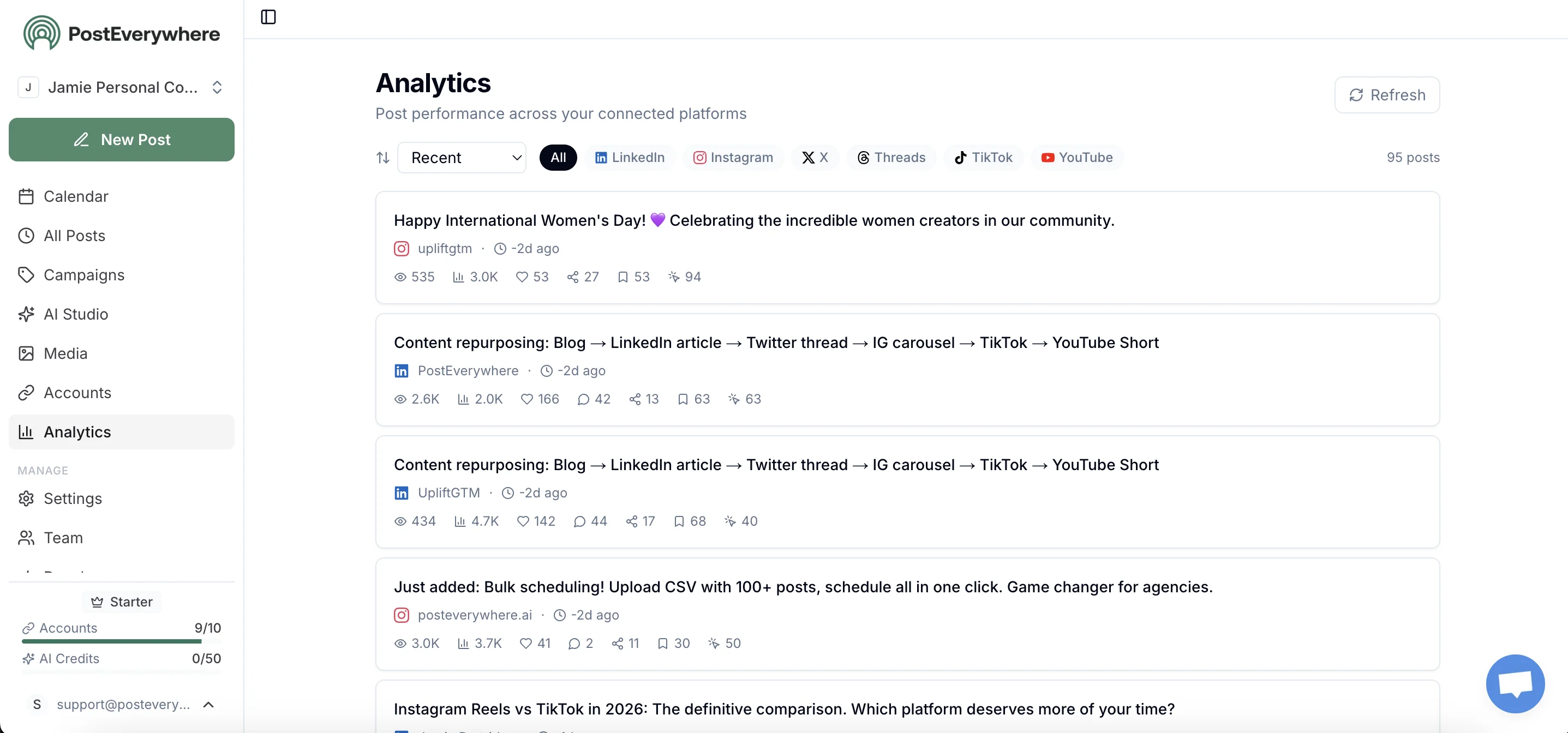
If you manage multiple Pages, exporting from Business Suite once a week becomes painful. This is one of the reasons we built PostEverywhere's cross-platform analytics: one dashboard, every Page, share counts plotted alongside reach and reactions, no per-Page exports.
What does the share count actually mean?
The share count under a Facebook post in 2026 reflects every action that creates a re-share object. That includes:
- Public re-shares to a user's own timeline or to a Page they admin
- Friends-only re-shares
- Re-shares to a Group (any privacy level)
- Re-shares via Messenger (single recipient, group chat, or community)
- Re-shares via the in-product "Send to a friend" flow
It does not include:
- Copying the post link and sharing it externally (SMS, email, Slack, WhatsApp)
- Screenshots
- Embeds on third-party sites
- Bookmarks (these are private and do not count as shares)
If you want to track external sharing more accurately, layer a UTM-tagged link inside the post body. Anyone who shares the post and someone clicks the link, you will see a referral event in your analytics tool, regardless of where the share happened.
This complements (not replaces) Facebook's share count, since the share count counts share actions and UTM tracking counts resulting clicks.
Getting more share visibility via Meta Business Suite
For Pages and creators, Meta Business Suite is the closest you get to a unified share dashboard.
Inside Business Suite:
- Content tab shows shares per post in a sortable table
- Insights > Reach breaks reach into organic vs viral (where viral = reach driven by shares)
- Audience > Posts lets you compare top-shared posts by month or quarter
You still cannot see who shared if their re-share was Friends-only or private. But you can see how many shares each post earned, which lets you reverse-engineer what content drives sharing.
This is also where Facebook's algorithm does most of its weighting. Shares are a higher-value signal than reactions and comments because they imply the user thinks the content is worth their friends' attention.
Tracking which posts drive the most shares, even without identity data, is one of the most useful exercises a Page operator can do.
For a deeper look at which Page metrics actually predict growth, see our Facebook KPIs guide and the Facebook statistics roundup.
How PostEverywhere fits in
PostEverywhere does not give you names of friends-only sharers. Nobody can. Meta does not expose them via API.
What we do give you:
- Share counts unified across every Page you manage, in one analytics view
- Best-time-to-post suggestions based on when your own posts have done best (details)
- Cross-platform share tracking so you can see whether the same content earned more shares on Facebook, LinkedIn or X
- A content calendar so you can plan share-worthy posts in advance rather than reacting to what flopped
- Native cross-posting from one composer to Facebook, Instagram and beyond. The cross-posting playbook covers Meta's native bugs and how to dodge them

If you spend an hour a week pulling share counts out of Business Suite, that hour is the first one PostEverywhere gives back. Start a 7-day free trial and connect a Page in under two minutes.
FAQ
Can I see anonymous shares on Facebook?
No. Facebook does not have an "anonymous share" feature. Every share is attributed to the sharer's account, but the visibility of that attribution depends on the audience the sharer chose. Friends-only re-shares are not anonymous, they are private to the sharer's friends.
Why is my share count higher than the list of names I can see?
Because the share count includes every re-share (public, friends, groups, Messenger), but the visible list only includes public re-shares. This is by design, not a bug. See Meta's share privacy explainer.
How do I see who shared my post in a Facebook Group?
You generally cannot. Re-shares into private or closed groups are hidden behind the group's privacy. If the group is public and indexed, you may occasionally find the re-share via Facebook search, but Meta does not surface group re-shares in the share modal.
Can I see who shared my post via Messenger?
No. Messenger re-shares are end-to-end private. They tick up the share count, but neither the sharer's name nor the recipient is visible to you as the original poster.
Why does Facebook hide some shares?
Privacy. Meta's position is that the audience a sharer chooses (Friends, Only Me, a specific Group) belongs to the sharer, not the original poster. A user sharing your post to their friends is not consenting to be identified to you. The Meta privacy policy covers this.
Can a Facebook Page see more share details than a personal profile?
Slightly. Pages get aggregate share data inside Meta Business Suite and Page Insights, including share counts that include the hidden re-shares. But Pages still cannot see the identities of friends-only or private sharers. The privacy rule applies regardless of who originally posted.
How do I see who shared my Facebook post on iPhone?
Tap the post to open it, then tap the share count number (not the share icon, which opens the iOS share sheet). The share list opens as a bottom sheet.
If you only see the share sheet, you tapped the icon by mistake. Try again on the number.
Is there a Facebook tool that shows hidden sharers?
No legitimate tool exists. Anything claiming to "reveal hidden Facebook shares" is either misleading, scraping public data only, or violating Meta's terms. The Graph API does not return private sharers.
If a tool claims it does, it is not using the official API. For honest cross-platform share analytics, use a tool that respects the API limits, like PostEverywhere.
The honest summary
You can see who shared your Facebook post if they shared it publicly. You cannot see who shared it privately, to friends, to a closed group, or via Messenger. The share count is the truthful number; the visible list is a privacy-filtered subset.
For most creators, the practical move is to stop chasing identities and start tracking the share count itself as a content-quality signal. Posts that earn high share counts (regardless of who shared them) are the posts the Facebook algorithm will distribute hardest. That is the metric that compounds.
If you want share counts unified across every Facebook Page you run, alongside the rest of your social analytics, PostEverywhere does it in one dashboard. Start a 7-day free trial and your first Page connects in under two minutes.
Edited by Jamie Partridge, Founder

Founder & CEO of PostEverywhere. Writing about social media strategy, publishing workflows, and analytics that help brands grow faster.