Threads will quietly hide your Instagram hashtags, refuse your Reel, and chop your caption at 500 characters, all on the same post.
If you've been trying to post to Instagram and Threads at the same time using Meta's built-in toggle, you've been shipping a degraded version of your content to one of the fastest-growing platforms on the internet.
Threads passed 400 million monthly active users in August 2025 (per Adam Mosseri) and overtook X in mobile daily active users in January 2026. The cross-posting plumbing Meta ships hasn't kept up with that growth, and the gap matters more every month.
This is a guide to posting to Instagram and Threads at the same time without the three silent failure modes of the native toggle: hashtag hiding, character-limit truncation, and Reels refusal.
We'll cover what Meta actually supports in April 2026, what Mosseri has confirmed about cross-post behaviour, and the workflow that lets you publish identical-looking content to both platforms without either feed punishing you for it.
Edited by Jamie Partridge, Founder
See also what silently breaks when you post everywhere.
TL;DR
- Instagram → Threads cross-posting is single-image only. Reels, carousels, and Stories don't carry across via the native toggle. TechCrunch documented the limitation when the feature launched and it remains true.
- Threads silently hides Instagram hashtags behind a "Show hashtags" link on cross-posted content, confirmed by Social Media Today, September 2025.
- Caption truncation is unavoidable natively. Instagram allows 2,200 characters; Threads caps at 500. Long captions get cut mid-sentence on the Threads side.
- Threads only allows one Topic Tag per post, a different system from hashtags entirely.
- The clean fix: a cross-platform scheduler talks to each API independently, so a Reel posts to both as a real Reel, captions get written at the right length per platform, and Topic Tags replace hashtags on the Threads side.
Stop sending Threads a degraded copy. PostEverywhere posts to Instagram and Threads simultaneously. Full Reels, native Topic Tags, no truncation. Start your 7-day trial →
Why post to Instagram and Threads at the same time at all?
Of every cross-posting pair available in 2026, Instagram + Threads is the one with the strongest audience-overlap argument and the weakest native tooling.
The case for posting to Instagram and Threads at the same time: Threads is a Meta product that piggybacks on Instagram's social graph. Most accounts on Threads were created by importing an Instagram identity, so your existing IG followers are who Threads is recommending you to.
Mosseri put it bluntly on his own Threads account at the end of 2025 ("authenticity is becoming infinitely reproducible"), meaning the platform that knows you're already a real creator (Instagram) and the one trying to figure that out (Threads) reward consistent, simultaneous presence.
The case against blindly mirroring: Threads' culture is text-first conversational, and Instagram's is visual. A copy-paste of an Instagram caption into Threads reads like an ad in a coffee shop.
Meta's own data shared on the HowSociable 400M milestone coverage flagged that native Threads posts produce "3-to-5x the follower growth" compared with cross-posted ones, a number worth taking seriously even if the methodology is fuzzy.
The compromise: schedule both at the same time, but adapt each. We'll show how to do that in two minutes per post rather than two screens of manual rework.
The four native ways to post to Instagram and Threads at the same time
Meta provides three official paths to post to Instagram and Threads at the same time in April 2026, plus a fourth (Threads-to-IG-Stories) that goes the opposite direction. Each has a specific failure mode.
Method 1: The Instagram "Share to Threads" toggle (single images only)
When you compose a post in Instagram, scroll to the Share to section on the final screen. There's a toggle for Threads. Flip it on, and the post will simultaneously create a Threads post pointing at the IG image.
What works: Single images with short captions. The image embeds cleanly into the Threads feed; tapping it opens the original IG post.
What doesn't:
- Reels do not cross-post via this toggle. TechCrunch confirmed this at the feature's launch and the limitation hasn't been removed. Instagram → Threads remains image-only on the photo composer.
- Hashtags get hidden. Per Social Media Today, 30 September 2025, Threads now buries hashtags behind a "Show hashtags" expander on cross-posted content. Mosseri's stated view is that hashtags "cause more trouble than they're worth," and the cross-post flow is where the platform enforces that.
- Captions are cut at 500 characters. Threads' post character limit is 500 (per Meta's own help docs); Instagram's is 2,200. The Threads version of a long caption ends with an ellipsis mid-thought.
Method 2: Auto-share (every Instagram post mirrors to Threads)
In the same Share-to screen, there's an "Automatically share to Threads" option. Toggling this on means every future single-image post mirrors. You can also reach this setting via Instagram → Settings → Sharing across profiles.
What works: Set-and-forget for image-heavy accounts.
What doesn't: Same three failures as Method 1, applied to every post. Mosseri publicly confirmed in July 2024 that "your posts to Instagram should only go to Threads if you turn on cross-posting", a statement issued because users complained the toggle was being silently auto-enabled.
If you didn't intend to be auto-posting, check this setting.
Method 3: Manual paste-and-edit
The most controlled path: post on Instagram, copy the caption, open the Threads app, paste, trim to 500 characters, replace hashtags with a single Topic Tag, post.
What works: Total control over each platform's version.
What doesn't: Time. For an active creator this is 60-90 seconds per post times 2-5 posts a day. The repetition is exactly what schedulers exist to remove.
Method 4: Threads → Instagram Story (reverse direction)
As of February 2026, Threads added a share-to-IG-Story option in the post share menu. Useful for amplifying a viral Threads post into Story format, but it's one Threads post going into one IG Story, not a cross-platform composer.
The hashtag-vs-Topic-Tag mismatch nobody warns you about
This one trips up almost every account that crosses over from Instagram-first publishing.
Threads doesn't have hashtags in the Instagram sense. It has Topic Tags, with a one-tag-per-post limit. Per Search Engine Land's coverage of the original feature launch, the differences are structural:
- No
#symbol required. A Topic Tag can be plain text. - Spaces and special characters are supported. "Small Business Marketing" is a valid Topic Tag; on Instagram that would have to be
#smallbusinessmarketing. - One tag per post, full stop. Add a second and the post composer rejects it.
When you cross-post an Instagram caption with eight hashtags, Threads does two things: it ranks the post against your single most-relevant tag (often misidentifying which one), and it hides the rest behind an expander so the post doesn't look spammy.
Either way, the hashtag strategy that works on Instagram is actively penalised on Threads.
The fix is to write Instagram's caption normally and replace the hashtag block with one well-chosen Topic Tag for the Threads version. A tool that handles this transformation per platform saves the rewrite step.
How to post to Instagram and Threads at the same time without the truncation
Below is the workflow we use inside PostEverywhere to post to Instagram and Threads at the same time in around 90 seconds with neither version compromised. It assumes you've already connected both accounts via Meta's official APIs (Threads' API became fully available to third-party developers in mid-2025; Meta for Developers' July 2025 announcement covers the supported endpoints).
Step 1: Connect Instagram and Threads as independent accounts
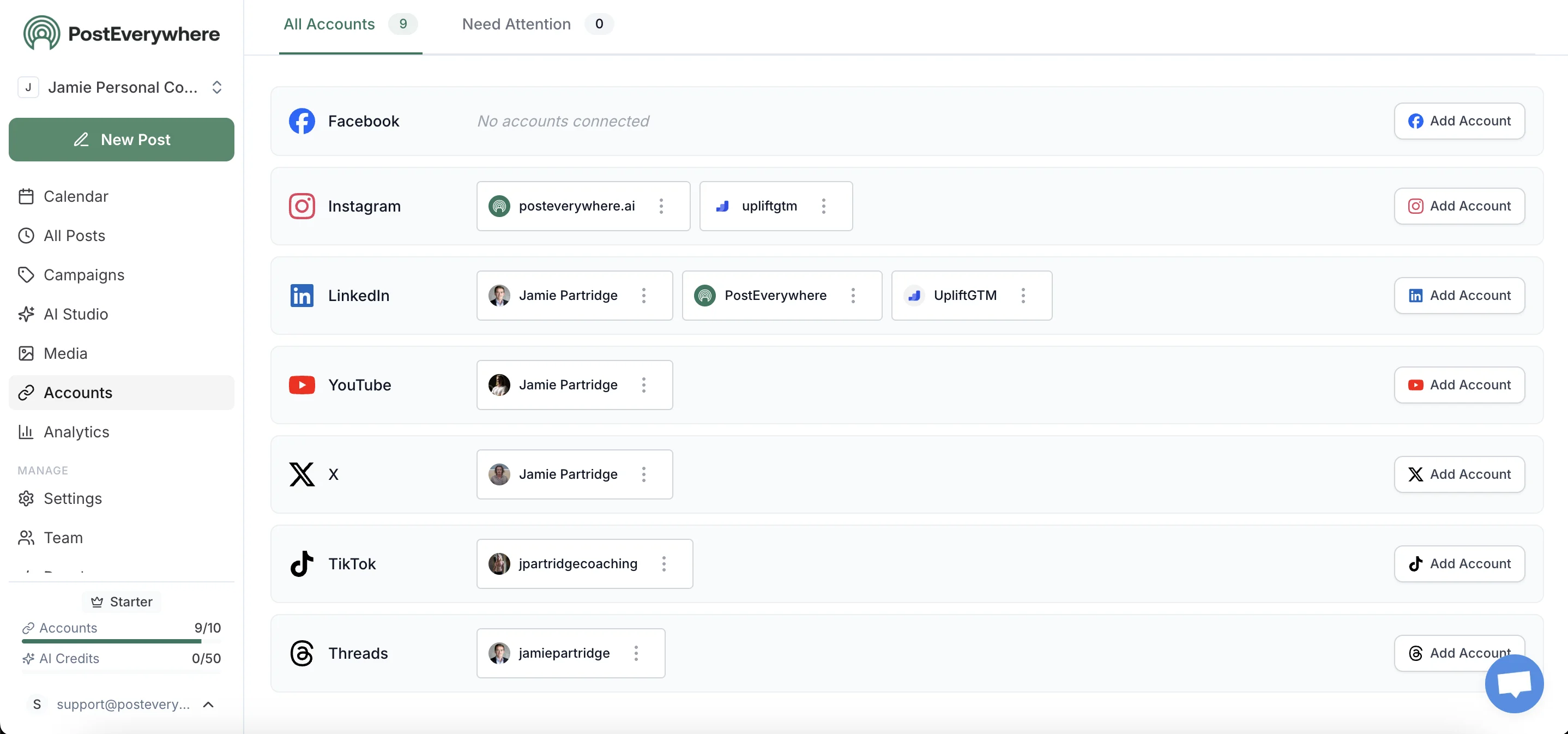
Both connect via Meta's official APIs. Crucially, the multi-account management view treats them as independent, meaning when Threads' API throws an error, Instagram still publishes (and vice versa), unlike the native toggle where one failure can break both.
Step 2: Upload your media once and let the composer adapt
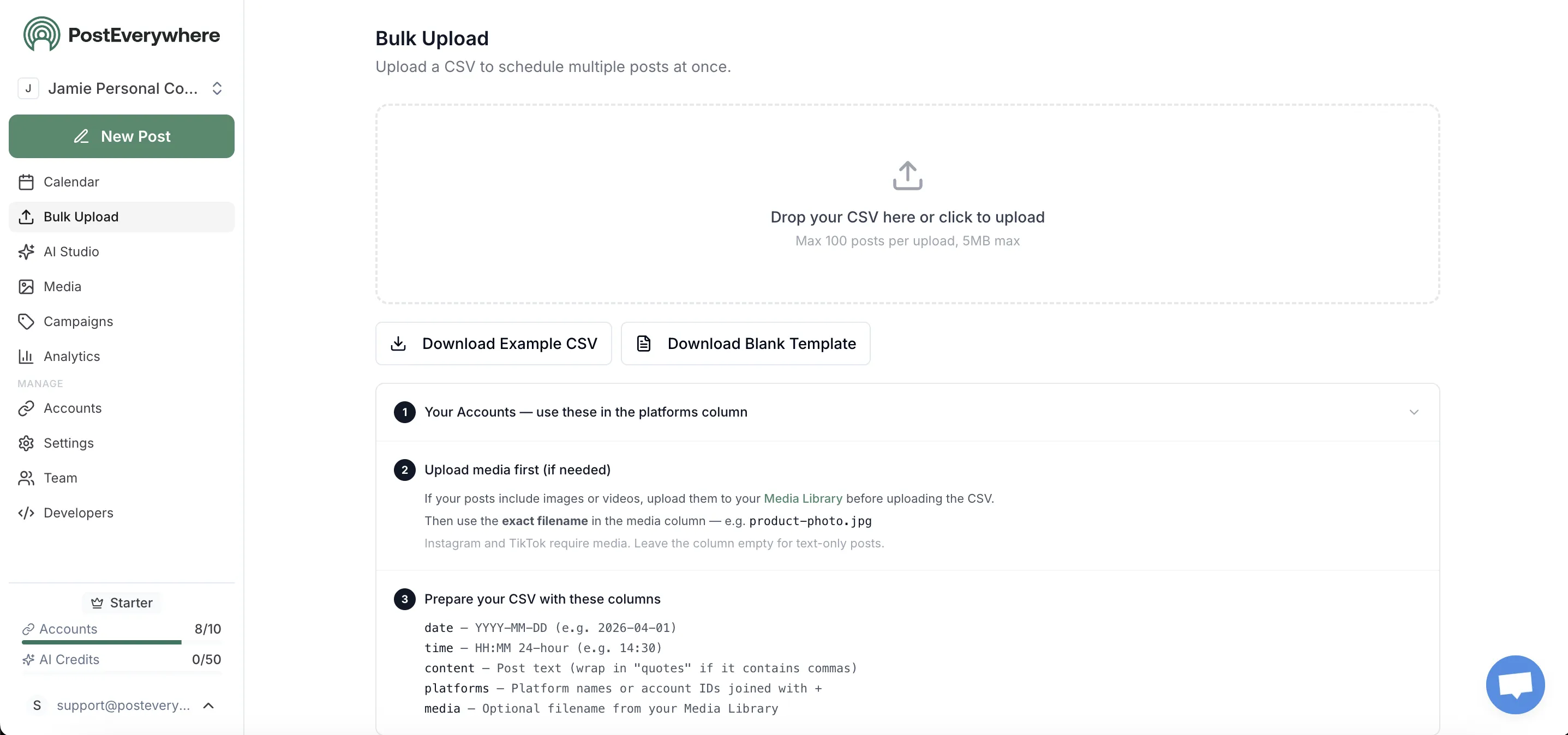
Upload a single 9:16 video and the bulk scheduler recognises it as Reel-eligible for both platforms. Because Threads' API supports video natively up to five minutes, the file goes to both endpoints as real video, not the thumbnail-with-link fallback that the IG-to-Threads native toggle uses for non-image content.
Step 3: Generate per-platform captions without retyping
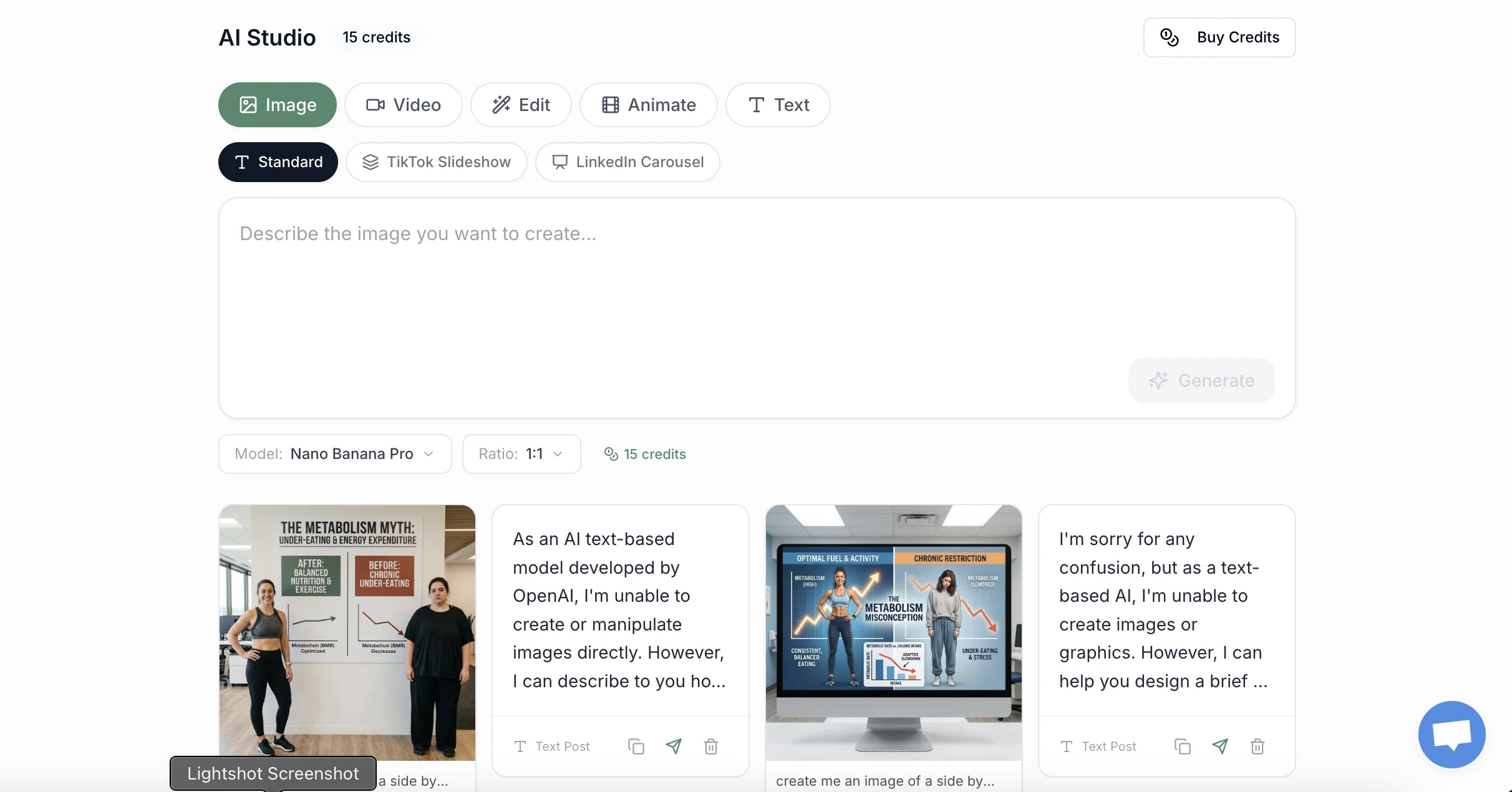
The AI caption generator takes one base post and produces:
- Instagram caption: up to 2,200 characters, hashtag block at the end
- Threads caption: under 500 characters, conversational tone, one Topic Tag
Edit either, then approve. The model knows about the 500-character cap and refuses to generate longer Threads variants.
Step 4: Schedule both at the right times (not the same time)

A common cross-posting mistake is publishing both versions at the literal same minute. Followers who use both platforms then see the same post twice in 30 seconds, which kills the second impression.
The content calendar and best time to post data lets you stagger by 2-4 hours so each version hits the audience at its peak window. See our best time to post on Threads write-up for platform-specific timing.
Step 5: Compare which version did the work
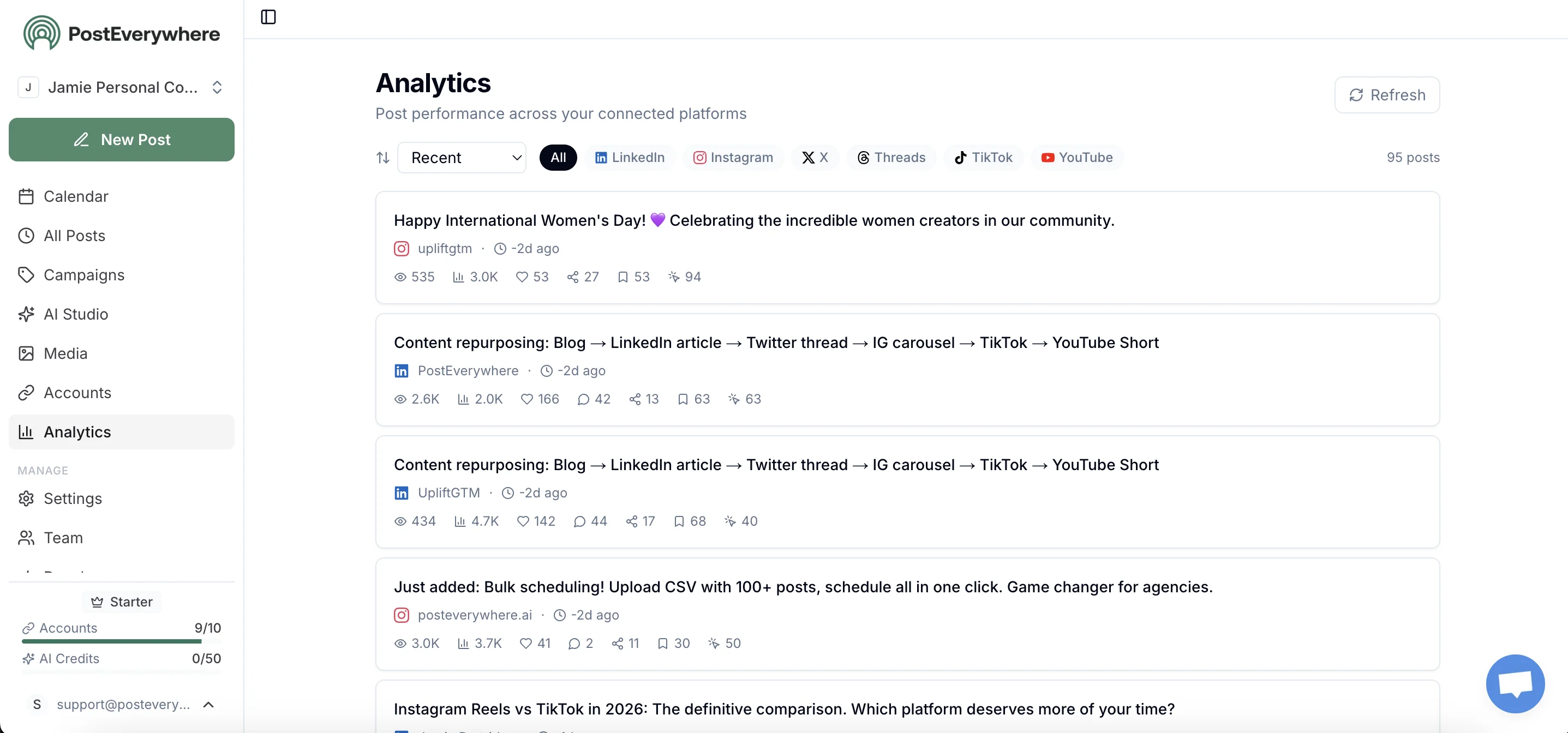
The point of cross-posting is information, not duplication: which platform actually drove engagement on this topic? Per-post analytics surface Instagram saves vs Threads replies separately. For traffic attribution, append UTMs using the free UTM link builder and the source-by-source picture clarifies inside a week.
One post, two platforms, no truncation. PostEverywhere handles Instagram, Threads, and every other top platform from one composer. See pricing →
Three things you should never do when cross-posting Instagram to Threads
Patterns that look efficient but are actively damaging your reach on one or both platforms:
1. Posting identical hashtag-stuffed captions to both. Instagram now allows up to 5 hashtags per post and Threads one topic tag, so a hashtag wall works on neither. Use one Topic Tag for the Threads version and up to five specific hashtags on Instagram.
2. Treating Threads as a Reels mirror. The single-image-only limit on the native cross-post means Reels never mirror over. If you want a Reel to appear on both platforms, you have to post it independently to Threads as a video, which means a proper scheduler that has a video upload endpoint, not the IG share toggle.
3. Same minute, both platforms. Stagger by hours, not seconds. The Threads algorithm has its own engagement-velocity ranking; the first 60 minutes after publish matter more on Threads than on Instagram, so the platforms have different optimal launch windows.
Frequently asked questions
Why are my Instagram hashtags hidden on Threads when I cross-post?
Threads automatically hides cross-posted hashtags behind a "Show hashtags" expander to keep the feed clean. Social Media Today reported this in September 2025, and Mosseri has previously stated hashtags "cause more trouble than they're worth" on Threads.
The fix is to write a separate Threads caption that uses one Topic Tag instead, not a hashtag block.
Can I cross-post a Reel from Instagram to Threads automatically?
No, not via Instagram's native Share-to-Threads toggle. TechCrunch verified at launch that the cross-post flow only handles single-image posts; Reels and carousels don't carry across. To get a Reel to both platforms, post it independently to each.
Easiest with a cross-platform scheduler that uses Threads' video API directly.
Why does my Threads version of an Instagram caption get cut off?
Threads has a 500-character limit per post; Instagram allows 2,200. When the cross-post system encounters a caption longer than 500 characters, it truncates with an ellipsis and posts the cut-off version to Threads. There's no warning before publish.
The fix is to write a shorter Threads-specific version (under 500 characters) using your scheduler's per-platform composer.
Will posting to both Instagram and Threads at the same time hurt my algorithm?
No, but posting identical content at the same minute to the same audience reduces the second impression's value. Mosseri's algorithm guidance focuses on penalising recycled content (TikTok watermarks, copy-pasting from other creators); cross-posting your own original work to your own accounts on different platforms is fine.
Stagger by 2-4 hours and adapt the caption per platform for best results.
Did I accidentally turn on auto-share to Threads?
Possibly. Mosseri publicly addressed this in July 2024: multiple users reported the auto-share toggle being on without their consent. Open Instagram → Settings → Sharing across profiles → Threads, and confirm the auto-share state is what you want.
The setting affects every future post until you change it.
What's the fastest way to post to Instagram and Threads at the same time from a phone?
For single-image posts and short captions, the native Instagram Share-to-Threads toggle works in two taps. For Reels, carousels, longer captions, or if you also publish to other platforms, a mobile scheduler collapses the workflow into one composer.
PostEverywhere supports Instagram, Threads, and every other top platform from desktop and mobile so the same post can hit all of them with per-platform adaptations.
Does the Threads API let third-party tools cross-post like the native toggle?
The Threads API became broadly available to third-party developers in mid-2025 and supports text, images, videos, and now carousels, meaning a scheduler can replicate (and exceed) the native cross-post flow.
The trade-off is that schedulers post natively to each platform's API rather than mirroring through Instagram, which avoids the truncation, hashtag-hiding, and Reel-refusal issues described above.
Related guides
- How to post to Instagram and Facebook at the same time: the IG/FB pair's bugs and fixes
- Best time to post on Threads: platform-specific timing data
- Cross-posting feature overview: product page
- Threads scheduler: Threads-specific scheduling product
- Instagram scheduler: Instagram-specific scheduling product
- Best cross-posting tools: tools, strategy and platform-pair playbooks for posting everywhere at once
Two platforms, one post, zero compromises. PostEverywhere posts to Instagram, Threads, Facebook, TikTok, X, LinkedIn, YouTube, and Pinterest from one composer. Start your 7-day trial →

Founder & CEO of PostEverywhere. Writing about social media strategy, publishing workflows, and analytics that help brands grow faster.